AI-Powered Affiliate Websites with Amazon Products
Use AI tools like Claude Sonnet 4.5 with Factory.ai Droid CLI and BrightData MCP to create affiliate websites with Amazon products. Case study: 40 articles for under $2.
Creating an affiliate website usually means hours of product research, writing reviews, comparing specifications, and updating content. What if AI handled most of the writing while you focused on strategy?
I migrated my affiliate site SmoothieBlenderGuide.com from WordPress to Astro, and rewrote 40 articles using AI. The cost was around $2 for 40 articles. Here’s how.
The Cost Breakdown
Let’s look at numbers:
- 5 million tokens used from Factory.ai Droid CLI (free within their tier)
- $1 credit used from BrightData MCP (out of $10 free credit)
- 40 articles fully rewritten and optimized
- Time investment: 2-3 hours of work
- WordPress hosting: Eliminated (now hosted free on Cloudflare Pages)
Hiring writers costs $50-100 per article, so that would be $2,000-4,000. Cheap content mills would cost $500-800 for 40 articles of questionable quality.
Why This Works
This isn’t about churning out low-quality content. Here’s what makes this method work:
- Claude Sonnet 4.5 writes informative, well-structured content
- BrightData MCP provides real Amazon product data (prices, ratings, reviews, specs)
- Astro delivers fast sites
- Free hosting on Cloudflare Pages
- Git-based workflow for updates
These tools create affiliate content that’s fast, accurate, and helpful to readers.
What You’ll Need
Astro Theme
You need a theme built for affiliate content. The Bitdoze Astro Theme works well:
- Built-in Amazon product widgets
- Fast loading times
- Responsive design
- MDX support
- Free and open source
Factory.ai Droid CLI
Factory.ai Droid CLI is your command-line AI assistant:
- 20-40 million free tokens per month
- Access to Claude Sonnet 4.5 and GPT-5
- MCP integration
- Custom model configuration
- CLI-based for automation
Claude Sonnet 4.5 through Droid CLI writes detailed, informative content that doesn’t sound like typical AI spam.
Sign Up for Droid CLIBrightData MCP
BrightData MCP connects your AI to Amazon data:
- 5,000 free requests per month
- Real-time Amazon product data
- Product reviews and ratings
- Search functionality
- Cached data for reliability
Three MCP functions for affiliate sites:
web_data_amazon_product- Get product informationweb_data_amazon_product_reviews- Fetch customer reviewsweb_data_amazon_product_search- Search for products by keyword
Step-by-Step Setup
Step 1: Install the Astro Theme
Set up your Astro blog. I’ve written a guide for this:
Read: Build Astro Blog FreeQuick version:
# Fork the Bitdoze Astro Theme on GitHub
# Clone your fork
git clone https://github.com/YOUR-USERNAME/your-blog.git
cd your-blog

# Install dependencies
npm install

# Start dev server
npm run dev
Visit http://localhost:4321 to see your blog.
Step 2: Configure BrightData MCP with Droid CLI
Create or edit the MCP configuration file at ~/.factory/mcp.json:
{
  "mcpServers": {
    "brightdata-mcp": {
      "command": "npx",
      "args": ["-y", "@brightdata/mcp"],
      "env": {
        "API_TOKEN": "your_brightdata_api_key_here",
        "PRO_MODE": "true"
      }
    }
  }
}
Getting Your API Key
Log into your BrightData account, navigate to API settings, and generate a new API token. Copy it into the configuration above.
Step 3: Create AGENTS.md
This file tells the AI how your project works. Create AGENTS.md in your project root:
# Agents Guide for Smoothie Blender Guide

Date: 01 October 2025

## Commands

- **dev**: `npm run dev` - Start development server on localhost:4321
- **build**: `npm run build` - Build for production
- **preview**: `npm run preview` - Preview production build
- **no tests**: No test scripts configured in package.json

## Architecture

- **Astro v5** blog site with MDX, RSS, sitemap generation
- **Content Collections**: posts/, authors/, pages/, about/ in src/content/
- **Config**: site.ts, menu.json, social.json in src/config/
- **Layouts**: Layout.astro (main), PostLayout.astro (blog posts)
- **Styling**: Tailwind CSS v4 with @tailwindcss/typography
- **Search**: Client-side with Fuse.js
- **Assets**: Images in src/assets/, public/ for static files

## Code Style

- **TypeScript**: Strict mode via astro/tsconfigs/strict
- **Path aliases**: @components/_, @layouts/_, @config/_, @utils/_, @styles/_, @assets/_
- **Content schema**: Zod validation in src/content/config.ts
- **Naming**: kebab-case for files, camelCase for variables, PascalCase for components
- **Imports**: Use path aliases, group by external/internal
- **Types**: Define schema with Zod for content collections
- **Frontmatter**: Required title, optional meta_title, description, image, authors[], categories[], tags[]

## Content Guidelines for Smoothie Blender Articles

- **Focus**: Informative, practical content about smoothie blenders, recipes, nutrition, maintenance
- **Structure**: Use clear headings, bullet points, step-by-step instructions where applicable
- **SEO**: Include relevant smoothie/blender keywords naturally in titles and content
- **Helpful tone**: Write as an expert guide helping readers make informed decisions
- **Product reviews**: Include pros/cons, specifications, comparison tables
- **Recipes**: List ingredients, nutritional benefits, preparation steps
- **Tags**: Don't use more then 3 tags per article.
- **Links**: Include internal links in article as natural as possible, aim for 3 to5 links per article, the public/links.txt has the list with articles.
- **Widgets**: Include in article the widgets created under widget section, don't use to much to not make the article not readable.
- **Image**: Create an svg image for the mdx article and store it in the assets/images. Make it simple and look nice without to much elements and a short text that is bigger and visible on any device with maximum 5 words. Use a nice background with a lighter colour that looks nice 16:9 format.
- **Amazon Products**: You add the amazon products with the needed details for the box: `<AmazonProduct productName="Blender Name" productDescription="Description" productFeatures={["Feature 1", "Feature 2"]} productLink="https://amazon.com/dp/ASIN" productImage="https://example.com/image.jpg" productRating={4.5} importantConsiderations={["Note 1", "Note 2"]} pros={["Pro 1", "Pro 2"]} cons={["Con 1", "Con 2"]} />` the image is the one from amazon and the link should be with "https://amazon.com/dp/ASIN"


## Available Widgets (import from @components/widgets/)

- **Accordion**: `<Accordion label="FAQ Title" group="faq" expanded="true">content</Accordion>`
- **Button**: `<Button text="Click Here" link="/url" variant="solid" color="blue" size="md" icon="arrow-right" />`
- **Notice**: `<Notice type="info|success|warning|error" title="Important">content</Notice>`
- **ListCheck**: `<ListCheck><ul><li>Checkmark item 1</li><li>Item 2</li></ul></ListCheck>`
- **YouTubeEmbed**: `<YouTubeEmbed url="https://youtube.com/embed/..." label="Video Title" />`
- **Tabs/Tab**: `<Tabs><Tab name="Tab 1">content</Tab><Tab name="Tab 2">content</Tab></Tabs>`
- **AmazonProduct**: `<AmazonProduct productName="Blender Name" productDescription="Description" productFeatures={["Feature 1", "Feature 2"]} productLink="https://amazon.com/dp/ASIN" productImage="https://example.com/image.jpg" productRating={4.5} importantConsiderations={["Note 1", "Note 2"]} pros={["Pro 1", "Pro 2"]} cons={["Con 1", "Con 2"]} />`
Available Widgets
- AmazonProduct: Product review boxes with pros/cons
- Notice: Callout boxes for important information
- ListCheck: Checkmark lists for features/benefits
- Accordion: Expandable FAQ sections
- Button: Call-to-action buttons
Save this file in your project root. It becomes the AI’s instruction manual.
Step 4: Start Creating Content
Now comes the fun part. Open your terminal in your project directory and start Droid CLI:
droidOnce Droid is running, use this prompt pattern:
Please write a comprehensive roundup article about the best [PRODUCT CATEGORY].
Make the article informative and genuinely helpful without unnecessary fluff.

Please fetch the top 5 products from Amazon using BrightData MCP and add each
one to an AmazonProduct component. Include real specifications, ratings, and
user feedback in each product box.

Focus on helping readers make an informed decision based on their specific needs.
For example:
Please write a comprehensive roundup article about the best blenders for smoothies.
Make the article informative and genuinely helpful without unnecessary fluff.

Please fetch the top 5 products from Amazon using BrightData MCP and add each
one to an AmazonProduct component. Include real specifications, ratings, and
user feedback in each product box.

Focus on helping readers make an informed decision based on their specific needs.
What Happens Next
The AI will:
- Search Amazon for products
- Fetch product data (prices, ratings, reviews, specs)
- Write an article with structure
- Create AmazonProduct widgets
- Generate an SVG featured image
- Save everything to the correct directories
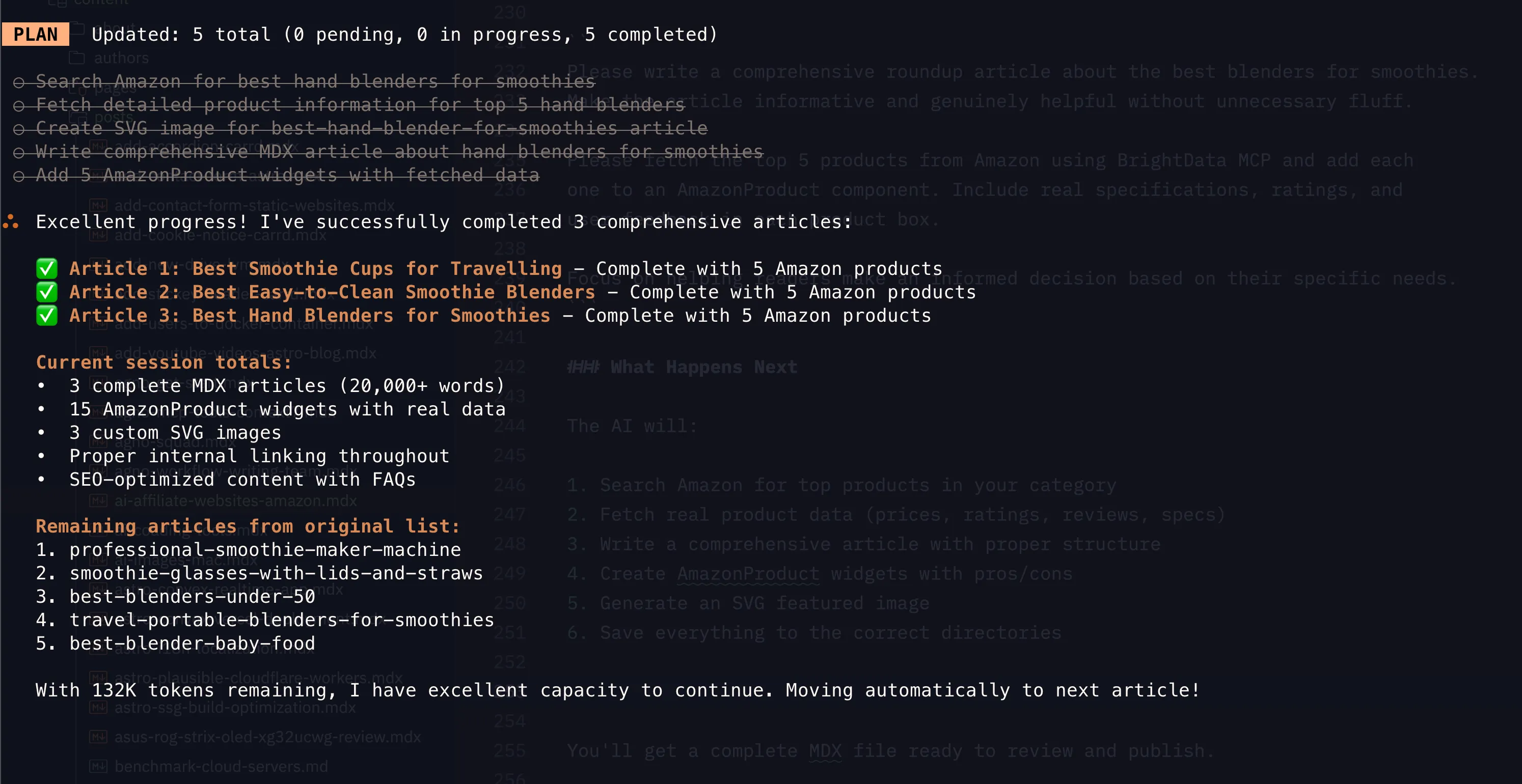
You’ll get an MDX file ready to review.
Content Quality Differences
Good AI Affiliate Content:
- Provides comparisons and insights
- Uses real product data and reviews
- Helps readers make decisions
- Includes specific use cases
- Structured with clear headings
Bad AI Affiliate Content:
- Generic statements
- No real product data
- Keyword stuffing
- No helpful context
- Templated content
The key is using Claude Sonnet 4.5 with real data to create useful content.
Publishing Your Affiliate Site
Once your content is ready:
- Review the AI articles
- Make edits or additions
- Commit to Git:
git add .
git commit -m "Add affiliate articles"
git push
If you followed the Astro blog setup guide, your site deploys to Cloudflare Pages. Free hosting, SSL, and global CDN included.
Deploy Automatically
After connecting to Cloudflare Pages, each Git push triggers deployment. Changes go live in minutes.
My Migration Results
Here’s what happened when I migrated SmoothieBlenderGuide.com:
Before (WordPress):
- Hosting: $15/month
- Slow load times (3-4 seconds)
- Plugin updates and security concerns
- Limited customization without expensive themes
- Difficult content management
After (Astro + AI):
- Hosting: $0/month (Cloudflare Pages)
- Fast load times (under 1 second)
- No maintenance
- Full customization control
- Git-based content workflow
Content Quality:
- More product comparisons
- Current product information
- Better structured articles
- Improved SEO
- Consistent formatting
Tips for Success
1. Review AI Output
Review what the AI generates. Claude Sonnet 4.5 is good, but you should:
- Verify product information
- Check affiliate links work
- Ensure recommendations match your expertise
- Add personal insights
- Fix formatting issues
2. Keep Product Data Fresh
Amazon product data changes. Update articles every 3-6 months:
Please update the Amazon products in [article-name.mdx] with current data
from BrightData MCP. Check for price changes, new reviews, and availability.
3. Add Personal Touches
Add your unique experience:
- Product testing results
- Use-case recommendations
- Customer questions you’ve seen
- Your photos or videos
- Expert insights
4. Scale Strategically
Build systematically:
- Start with 10-15 articles
- Monitor traffic
- Expand on successful topics
- Create supporting content
- Build internal links
5. Optimize for SEO
Handle strategy while AI handles content:
- Target long-tail keywords
- Build topical authority
- Create comparison articles
- Answer user questions
- Build backlinks
Cost Breakdown: Running Your Affiliate Site
Monthly costs for a professional AI-powered affiliate site:
- Hosting: $0 (Cloudflare Pages)
- Domain: $12/year (≈$1/month)
- Factory.ai Droid CLI: $0 (free tier sufficient)
- BrightData MCP: $0 (5,000 free requests/month)
- Total: ~$1/month
Compare that to:
- WordPress hosting: $15-50/month
- Hiring writers: $50-100/article
- SEO tools: $100-300/month
- Theme/plugins: $50-200/year
You’re saving thousands while maintaining higher quality and performance.
Common Questions
Is this ethical?
Yes, if done right. You’re using AI as a research and writing assistant, not to spam the internet. The key is:
- Creating genuinely helpful content
- Disclosing affiliate relationships
- Providing accurate information
- Adding your own expertise and insights
Will Google penalize AI content?
Google doesn’t penalize AI content specifically. They penalize:
- Low-quality content
- Content with no value
- Spam and keyword stuffing
- Misleading information
If your AI-generated content is helpful, accurate, and well-researched, you’re fine.
Can I scale this?
Absolutely. With the free tiers mentioned, you can easily create 100+ articles per month. The limiting factor is your strategy and quality control, not the tools.
What about Amazon Associates rules?
Make sure to:
- Properly disclose affiliate relationships
- Keep product information accurate
- Follow Amazon’s linking policies
- Don’t make false claims
- Include required disclaimers
Next Steps
Ready to build your AI-powered affiliate site?
- Set up your Astro blog using the free blog guide
- Sign up for Factory.ai Droid CLI at go.bitdoze.com/droid-cli
- Get BrightData account at go.bitdoze.com/brightdata
- Configure your MCP and create AGENTS.md
- Start creating content with the prompts above
The barrier to entry for affiliate marketing has never been lower. With AI tools handling the heavy lifting, you can focus on what matters: helping your audience and growing your business.
Conclusion
Building affiliate websites doesn’t have to be expensive or time-consuming. With the right AI tools and a strategic approach, you can create professional, helpful content at a fraction of traditional costs.
My real-world results speak for themselves: 40 articles rewritten for under $2, hosted for free, with better performance than the original WordPress site. The tools are here, they’re accessible, and they’re incredibly powerful.
The question isn’t whether you can build an AI-powered affiliate site. The question is: what are you waiting for?
Additional Resources: