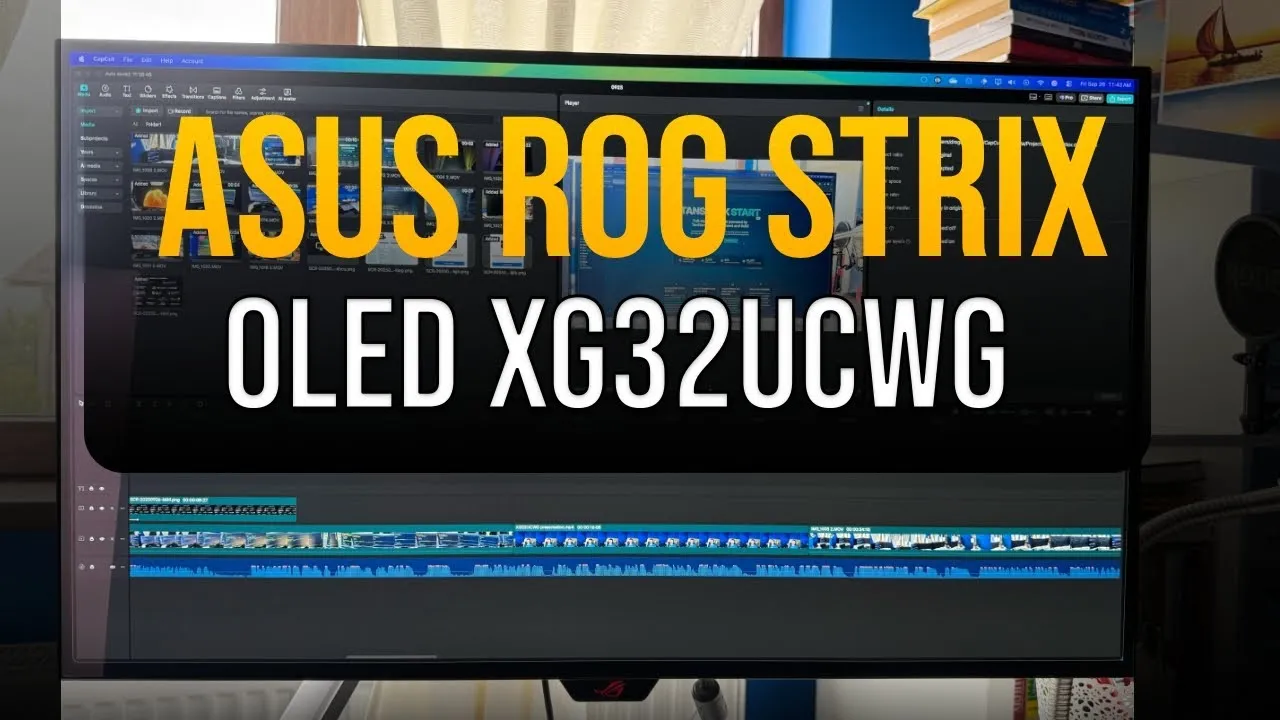
ASUS ROG Strix OLED XG32UCWG Review - OLED Monitor Experience
ASUS ROG Strix OLED XG32UCWG Review - review of this 32-inch 4K WOLED gaming monitor with TrueBlack Glossy technology, productivity focus, and MacBook Pro compatibility.
Rating: ⭐⭐⭐⭐⭐ (4.6/5)
The ASUS ROG Strix OLED XG32UCWG uses WOLED technology with TrueBlack Glossy coating. It’s my first OLED monitor, used for productivity and DevOps work with a MacBook Pro M1. This 32-inch 4K display performed well in most areas, though OLED has some limitations.
Check XG32UCWGASUS ROG Strix OLED XG32UCWG Video Review
The complete list with the Best 32 inch OLED Monitors can be checked to see which are the best.
Design & Build Quality
The XG32UCWG has a modern design that works for professional or gaming setups. The compact stand takes up 45% less desk space than previous-generation XG monitors.
Physical Specifications:
- Screen Size: 32-inch (31.5-inch viewable)
- Resolution: 4K (3840 x 2160) native, FHD dual-mode capability
- Panel Type: WOLED with TrueBlack Glossy coating
- Refresh Rate: 165Hz at 4K, 330Hz at FHD (dual-mode)
- Response Time: 0.03ms (GTG)
- Contrast Ratio: 1,500,000:1
- Color Coverage: 99% DCI-P3, Delta E < 2
Ergonomics & Connectivity:
- Height Adjustment: 0-80mm range
- Tilt: -5° to +20°
- Swivel: -15° to +15°
- VESA Mount: Compatible
- Ports: DisplayPort 1.4 (DSC), HDMI 2.1, USB-C (15W PD)
MacBook Pro Users
The USB-C port provides only 15W power delivery, which is insufficient for charging MacBook Pro models. You’ll need a separate power adapter for your laptop while using the USB-C connection for display output.
Understanding OLED Technologies: WOLED vs QD-OLED
Before looking at performance, it helps to understand the different OLED technologies in ASUS’s monitor lineup.
WOLED (White OLED) Technology
The XG32UCWG uses WOLED technology, which employs white organic light-emitting diodes with color filters to produce the final image. This third-generation WOLED implementation offers:
- True black levels with infinite contrast
- Excellent text clarity with Clear Pixel Edge algorithm
- Latest RGWB subpixel layout + Clear Pixel Edge reduce color fringing on text
- Better longevity compared to first-generation OLEDs
- Lower manufacturing costs than QD-OLED
QD-OLED (Quantum Dot OLED) Technology
For comparison, QD-OLED monitors like the PG32UCDMR use quantum dots for color production:
- Brighter overall output
- More vibrant colors in some scenarios
- Higher peak brightness capabilities
- Premium pricing
ASUS OLED Monitor Comparison
ASUS offers three distinct 32-inch OLED approaches:
-
XG32UCWG (WOLED TrueBlack Glossy)
- Best for: Productivity, text clarity, budget-conscious buyers
- Coating: TrueBlack Glossy for sharp imagery
-
PG32UCDP (WOLED Matte Anti-Glare)
- Best for: Bright environments, reduced reflections
- Coating: Matte anti-glare finish
- Dual-mode: 4K up to 240Hz or FHD up to 480Hz
- USB-C Power Delivery: up to 90W (charges laptops)
-
- Best for: Maximum color vibrancy, premium gaming
- Coating: Semi-glossy finish
Display Coatings: Glossy vs Matte Explained
The display coating affects your viewing experience, and ASUS has different approaches in their OLED lineup.
TrueBlack Glossy (XG32UCWG)
The XG32UCWG’s TrueBlack Glossy coating provides:
- Zero-haze surface for sharp images
- 38% reduction in reflections compared to previous glossy WOLEDs
- Good text clarity for productivity work
- Deep blacks that look good in bright rooms
My Experience: I was concerned about using a glossy display in a bright room with windows, but the TrueBlack Glossy coating worked well. On sunny days with the window in front of my desk, reflections were minimal and didn’t interfere with productivity work.
Matte Anti-Glare (PG32UCDP)
The matte coating offers:
- Reduced reflections in very bright environments
- Slightly softer image quality due to the coating layer
- Better performance under direct lighting
- Preference for some users who prioritize reflection control over sharpness
Semi-Glossy QD-OLED (PG32UCDMR)
The QD-OLED approach provides:
- Balance between sharpness and reflection control
- Good color from quantum dot technology
- Higher brightness options
- Good visual experience
Performance Analysis
Text Clarity and Productivity Performance
After using a Dell UltraSharp IPS monitor, the text clarity on the XG32UCWG is noticeably better. The Clear Pixel Edge algorithm reduces the green and red fringing on WOLED displays, making text readable for long work sessions.
Productivity Strengths:
- Sharp text better than IPS displays
- Comfortable viewing for 8+ hour work sessions
- No eye strain in dark mode applications
- Good scaling on macOS, at non-native resolutions
- Deep blacks improve contrast in code editors and terminals
Gaming Performance
I bought the monitor primarily for productivity, but it also performs well for gaming:
Dual-Mode Capability
The useful feature is the dual-mode functionality:
- 4K @ 165Hz: Good for AAA titles and single-player games
- FHD @ 330Hz: Works well for competitive FPS gaming
- Quick switching: Hotkey toggle between modes
Response Time and Input Lag
- 0.03ms GTG response time reduces ghosting
- Low input lag for competitive gaming
- G-SYNC compatible for tear-free gameplay
- AMD FreeSync Premium Pro support
Color and HDR Performance
- 99% DCI-P3 coverage creates good gaming visuals
- VESA DisplayHDR 400 True Black certification
- True 10-bit color depth for accurate color reproduction
- Infinite contrast ratio for good gaming experiences
Brightness Considerations
The main limitation of WOLED technology is peak brightness. Compared to the Dell IPS monitor in my setup, the XG32UCWG produces noticeably lower brightness levels. While this doesn’t impact usability, users coming from high-brightness IPS displays may need an adjustment period.
Brightness Characteristics:
- Lower peak brightness than IPS alternatives
- Adequate for most environments including moderately bright rooms
- HDR content benefits from true blacks despite lower peak brightness
- Uniform brightness setting helps maintain consistency
Brightness and Reflections
WOLED peak brightness is lower than many IPS or QD‑OLED displays. However, the XG32UCWG’s TrueBlack Glossy coating reduces ambient reflections by about 38% versus prior glossy WOLEDs, so perceived contrast remains excellent even in brighter rooms.
Advanced Features
ASUS OLED Care Pro
The OLED Care Pro suite helps with longevity:
Neo Proximity Sensor
- Automatic detection when user steps away
- Black screen transition to reduce burn-in
- Customizable detection distance
- Quick content return when user returns
Additional Protection Features:
- Pixel cleaning: Automatic recalibration process
- Screen move: Subtle pixel shifting to reduce static burn-in
- Logo brightness adjustment: Automatic detection and dimming of static logos
- Taskbar detection: Dynamic brightness adjustment for Windows taskbar
DisplayWidget Center
The monitor management software provides:
- Mouse-based OSD control that removes physical button navigation
- Firmware update notifications with direct update capability
- Multi-screen management
- Configuration import/export for easy setup sharing
AI Assistant Features
The integrated AI Assistant includes:
- Dynamic Crosshair: Automatic color adjustment for better visibility
- Dynamic Shadow Boost: Enhanced visibility in dark game areas
- AI Visual: Scene detection with optimized settings
Auto KVM Functionality
I don’t use this feature, but the Auto KVM provides:
- Smooth device switching with single keyboard/mouse
- Good for streaming setups
- Multi-device workflow support
MacBook Pro Compatibility
I use a MacBook Pro, and the XG32UCWG works well:
Connection and Display Quality:
- USB-C connectivity works with MacBook Pro M1
- Good scaling at non-native resolutions
- Color accuracy works for professional tasks
- Multiple refresh rate options in macOS settings
- HDR support when enabled in system preferences
Limitations:
- 15W power delivery insufficient for MacBook Pro charging
- Requires separate power adapter for the laptop
- No Thunderbolt 3/4 support (standard USB-C only)
Price and Value Analysis
Current Market Position
Check current price — the XG32UCWG has good value in the 32-inch 4K OLED segment.
Value Proposition:
Strengths:
- Good pricing for WOLED technology
- Dual-mode functionality adds options
- Good feature set with OLED Care Pro
- 3-year warranty
- Good color accuracy
Consider Alternatives If:
- You need maximum brightness (consider QD-OLED options)
- You prefer matte coatings (consider PG32UCDP)
- Budget is primary concern (consider smaller OLED options)
Alternative Recommendations:
WOLED Matte Option - PG32UCDP QD-OLED Premium - PG32UCDMRQuick Notes
- Console Gaming: 9.2/10
- Office: 8.5/10
- Editing: 9.0/10
- Brightness: 7.0/10
- Response Time: 9.8/10
- HDR Picture: 9.0/10
- SDR Picture: 9.9/10
Console Gaming 9.2/10
Fantastic for PS5/Xbox at 4K with True Black and up to 165Hz; motion clarity and contrast are standout.
Ratings Breakdown
Console Gaming: ⭐⭐⭐⭐⭐ (9.2/10)
Good performance for PlayStation 5 and Xbox Series X gaming with 4K@165Hz support and true black levels improving immersion.
Office Work: ⭐⭐⭐⭐⭐ (8.5/10)
Good text clarity and comfortable viewing for long productivity sessions, though brightness limitations affect the score.
Photo/Video Editing: ⭐⭐⭐⭐⭐ (9.0/10)
Good color accuracy with 99% DCI-P3 coverage and Delta E < 2 works for creative tasks.
Brightness: ⭐⭐⭐⭐ (7.0/10)
The main weakness of WOLED technology - adequate for most environments but noticeably dimmer than IPS alternatives.
Response Time: ⭐⭐⭐⭐⭐ (9.8/10)
Good 0.03ms response time reduces ghosting and works for competitive gaming.
HDR Picture Quality: ⭐⭐⭐⭐⭐ (9.0/10)
True blacks and infinite contrast ratio provide excellent HDR experience despite lower peak brightness.
SDR Picture Quality: ⭐⭐⭐⭐⭐ (9.9/10)
Good SDR performance with deep blacks, accurate colors, and sharp text rendering.
Final Verdict
Overall Rating: ⭐⭐⭐⭐⭐ (4.6/5)
The ASUS ROG Strix OLED XG32UCWG brings OLED technology to productivity-focused users while keeping gaming capability. The TrueBlack Glossy coating helps with reflections, and the dual-mode functionality adds options not common in this segment.
Who Should Buy the XG32UCWG:
- Productivity professionals wanting sharp text clarity
- Creative professionals needing accurate color reproduction
- Gamers wanting both 4K detail and high-refresh competitive gaming
- Mac users looking for external display options
- First-time OLED buyers wanting protection features
Who Should Consider Alternatives:
- Bright environment users (consider matte PG32UCDP)
- Maximum brightness seekers (consider QD-OLED PG32UCDMR)
- Budget-conscious buyers (consider smaller OLED options)
- Heavy static content users with burn-in concerns
Recommendation
For productivity-focused users starting with OLED, the XG32UCWG offers a good balance of features, protection, and performance. The TrueBlack Glossy coating helps with reflection concerns while delivering the sharp text clarity and high contrast that makes OLED technology useful.
Long-term Outlook
While newer tandem OLED technology may improve brightness and longevity, the XG32UCWG’s current feature set and ASUS’s OLED Care Pro protection make it a good option for users who want OLED technology now.
Final Recommendation: The ASUS ROG Strix OLED XG32UCWG is a good choice for its intended audience, mixing productivity and gaming features while introducing users to OLED technology.
Get the XG32UCWG on AmazonThis review reflects my first week of real‑world use primarily for productivity with a MacBook Pro M1, supplemented by some gaming and technical checks. I’ll update this post after extended use.