---
title: "Best 32-Inch OLED Monitors 2026: Buying Guide & Comparison"
description: "Guide to 32-inch OLED monitors, comparing budget and premium options with specs, coatings, and connectivity details."
date: 2025-09-29
categories: ["Gadgets"]
tags: ["monitors","oled","gaming","productivity","reviews"]
---
I reviewed the [ASUS ROG Strix OLED XG32UCWG](https://www.bitdoze.com/asus-rog-strix-oled-xg32ucwg-review/) thoroughly, and here's what I learned about choosing a 32-inch OLED monitor. Whether you want an affordable OLED display or something premium for professional work, this guide covers the options worth considering.
The 32-inch OLED market has seen major growth in 2025-2026. There are solid options whether you're budget-conscious or looking for high-end features.
## Quick Comparison
| **Category** | **Best Budget** | **Best Premium** | **Best Productivity** |
|--------------|----------------|------------------|---------------------|
| **Monitor** | MSI MAG 321CUP QD-OLED | ASUS PG32UCDMR QD-OLED | ASUS XG32UCWG WOLED |
| **Price Range** | ~$800-900 | ~$1,200-1,400 | ~$1,000-1,100 |
| **Best For** | Gaming on budget | Premium gaming | Work & gaming |
## OLED Technology Basics
Before looking at specific models, you should know the two main OLED types:
### WOLED (White OLED)
- Uses white organic compounds with color filters
- **Works better for**: Text clarity, productivity work, longevity
- **Characteristics**: Excellent black levels, good text rendering, lower peak brightness
- **Examples**: ASUS XG32UCWG, ASUS PG32UCDP, ASRock PGO32UFS
### QD-OLED (Quantum Dot OLED)
- Uses quantum dots for color production
- **Works better for**: Gaming, HDR content, color accuracy
- **Characteristics**: Higher peak brightness, more vivid colors, costs more
- **Examples**: MSI MAG 321CUP, GIGABYTE MO32U, ASUS PG32UCDMR, Samsung LS32FG810SNXZA
---
## Budget OLED Monitors
### 1. MSI MAG 321CUP QD-OLED

The MSI MAG 321CUP is an affordable entry into QD-OLED technology. You get vibrant colors and deep blacks without paying premium prices.
#### Specifications
| Feature | Details |
|---------|---------|
| **Panel Type** | ✅ QD-OLED (Quantum Dot) |
| **Resolution** | 4K UHD (3840 x 2160) |
| **Refresh Rate** | 165Hz |
| **Response Time** | 0.03ms (GTG) |
| **Coating** | Semi-Glossy |
| **USB Type-C** | ❌ No |
| **HDR** | DisplayHDR True Black 400 |
| **Color Gamut** | 99% DCI-P3 |
| **Connectivity** | 2x HDMI 2.1, 2x DP 1.4 |
| **VESA Mount** | 100x100mm |
#### Key Highlights
- **QD-OLED technology** delivers incredibly vibrant colors
- **165Hz refresh rate** perfect for competitive gaming
- **Excellent color accuracy** with 99% DCI-P3 coverage
- **ClearMR 9000** certification for motion clarity
- **OLED Care 2.0** reduces burn-in risks
The MSI MAG 321CUP has QD-OLED technology at a lower price than most, which makes it a good entry point for OLED gaming without going over budget.
> **Best For**: Gamers who want QD-OLED colors without spending too much, users who don't need USB-C connectivity
---
### 2. GIGABYTE MO32U QD-OLED

GIGABYTE's MO32U brings QD-OLED to the mainstream market. It has decent build quality and useful features.
#### Specifications
| Feature | Details |
|---------|---------|
| **Panel Type** | ✅ QD-OLED (Quantum Dot) |
| **Resolution** | 4K UHD (3840 x 2160) |
| **Refresh Rate** | 165Hz |
| **Response Time** | 0.03ms (GTG) |
| **Coating** | Semi-Glossy |
| **USB Type-C** | ❌ No |
| **HDR** | DisplayHDR True Black 400 |
| **Color Gamut** | 99% DCI-P3 |
| **Connectivity** | 2x HDMI 2.1, 1x DP 1.4 |
| **VESA Mount** | 100x100mm |
#### Key Highlights
- **QD-OLED panel** with good image quality
- **Tactical features** for gaming
- **GIGABYTE OLED Care** with AI-based protection
- **KVM functionality** built-in
- **3-year warranty** including burn-in coverage
> **Best For**: Users who want QD-OLED quality with gaming features and OLED protection
---
### 3. INNOCN 32" 4K OLED Monitor

The INNOCN is an affordable entry into OLED technology.
#### Specifications
| Feature | Details |
|---------|---------|
| **Panel Type** | ✅ WOLED (White OLED) |
| **Resolution** | 4K UHD (3840 x 2160) |
| **Refresh Rate** | 165Hz |
| **Response Time** | 0.03ms (GTG) |
| **Coating** | Glossy |
| **USB Type-C** | ❌ No |
| **HDR** | HDR400 |
| **Color Gamut** | 99% DCI-P3 |
| **Connectivity** | 2x HDMI 2.1, 1x DP 1.4 |
| **VESA Mount** | 100x100mm |
#### Key Highlights
- **Cheapest 32" OLED option**
- **WOLED technology** with decent text clarity
- **165Hz refresh rate** works for most gaming
- **Good value** for the price
- **Decent build quality**
> **Best For**: Budget buyers who want OLED benefits at the lowest price
---
### 4. ASRock PGO32UFS WOLED
ASRock's gaming monitor has dual-mode functionality and a built-in Wi-Fi antenna. These are unusual features at this price.
#### Specifications
| Feature | Details |
|---------|---------|
| **Panel Type** | ✅ WOLED (White OLED) |
| **Resolution** | 4K UHD (3840 x 2160) |
| **Refresh Rate** | 240Hz (4K) / 480Hz (FHD) |
| **Response Time** | 0.03ms (GTG) |
| **Coating** | Anti-Glare |
| **USB Type-C** | ✅ Yes (65W PD) |
| **HDR** | DisplayHDR True Black 400 |
| **Color Gamut** | 99% DCI-P3 |
| **Connectivity** | 2x HDMI 2.1, 2x DP 1.4, USB-C |
| **Special Features** | Integrated Wi-Fi Antenna, KVM |
#### Key Highlights
- **Dual-mode display**: 4K@240Hz or FHD@480Hz
- **65W USB-C PD** charges most laptops
- **Integrated Wi-Fi antenna** (compatible with Wi-Fi 4/5/6/6E/7)
- **KVM switch** functionality
- **Anti-glare coating** for bright environments
This model may not be sold worldwide. Please contact your local dealer for availability in your region.
> **Best For**: Users who want dual-mode flexibility, USB-C charging, and the Wi-Fi antenna feature
---
## Premium OLED Monitors
### 1. ASUS ROG Strix OLED XG32UCWG (WOLED TrueBlack Glossy) ⭐ Top Pick

**My Choice** - This is the monitor I reviewed extensively and use daily for productivity and gaming.
#### Specifications
| Feature | Details |
|---------|---------|
| **Panel Type** | ✅ WOLED (White OLED) |
| **Resolution** | 4K UHD (3840 x 2160) |
| **Refresh Rate** | 165Hz (4K) / 330Hz (FHD) |
| **Response Time** | 0.03ms (GTG) |
| **Coating** | ✨ **TrueBlack Glossy™** |
| **USB Type-C** | ⚠️ Yes (15W PD only) |
| **HDR** | DisplayHDR True Black 400 |
| **Color Gamut** | 99% DCI-P3, Delta E < 2 |
| **Connectivity** | 2x HDMI 2.1, 1x DP 1.4, USB-C |
| **Stand** | Compact (45% smaller) |
#### Key Highlights
- **TrueBlack Glossy coating** - 38% less reflections than standard glossy
- **Exceptional text clarity** with Clear Pixel Edge algorithm
- **Dual-mode**: 4K@165Hz or FHD@330Hz via hotkey
- **OLED Care Pro** with Neo Proximity Sensor
- **Compact stand** saves 45% desk space
- **Factory calibrated** with Delta E < 2
#### Why I Chose This Monitor
I tested this monitor for productivity work with my MacBook Pro M1, and it performed well. The TrueBlack Glossy coating shows sharp text without distracting reflections, even with a window in front of my desk. The 15W USB-C won't charge laptops, but the display quality and productivity features make it my top pick.
**Pros:**
- ✅ Best text clarity among all options
- ✅ Minimal reflections despite glossy coating
- ✅ Perfect for productivity and coding
- ✅ Excellent macOS compatibility
- ✅ Dual-mode flexibility
**Cons:**
- ❌ Only 15W USB-C (won't charge laptops)
- ❌ Lower peak brightness than QD-OLED
- ❌ Premium pricing
After using the XG32UCWG daily for weeks, the TrueBlack Glossy coating and text clarity make it my top choice for mixed use.
> **Read My Full Review**: [ASUS ROG Strix OLED XG32UCWG Detailed Review](https://www.bitdoze.com/asus-rog-strix-oled-xg32ucwg-review/)
---
### 2. ASUS ROG Swift OLED PG32UCDP (WOLED Matte)

This is the matte version of the XG32UCWG, suitable for bright environments with stronger USB-C.
#### Specifications
| Feature | Details |
|---------|---------|
| **Panel Type** | ✅ WOLED (White OLED) |
| **Resolution** | 4K UHD (3840 x 2160) |
| **Refresh Rate** | 240Hz (4K) / 480Hz (FHD) |
| **Response Time** | 0.03ms (GTG) |
| **Coating** | 🎯 **Matte Anti-Glare** |
| **USB Type-C** | ✅ Yes (90W PD) |
| **HDR** | DisplayHDR True Black 400 |
| **Color Gamut** | 99% DCI-P3, Delta E < 2 |
| **Connectivity** | 2x HDMI 2.1, 1x DP 1.4, USB-C |
| **Stand** | Ergonomic adjustable |
#### Key Highlights
- **Matte coating** minimizes reflections in bright rooms
- **90W USB-C PD** charges laptops while working
- **Higher refresh rates**: 4K@240Hz or FHD@480Hz
- **OLED Care Pro** with comprehensive protection
- **AI Assistant** with Dynamic features
- **Uniform brightness** setting available
#### Comparison vs XG32UCWG
- ✅ **Better**: 90W USB-C, higher refresh rates, better for bright rooms
- ❌ **Trade-off**: Slightly softer text due to matte coating
- 💰 **Similar pricing** tier
> **Best For**: Users in bright rooms who need laptop charging and prefer matte displays
---
### 3. ASUS ROG Swift OLED PG32UCDMR (QD-OLED Premium)
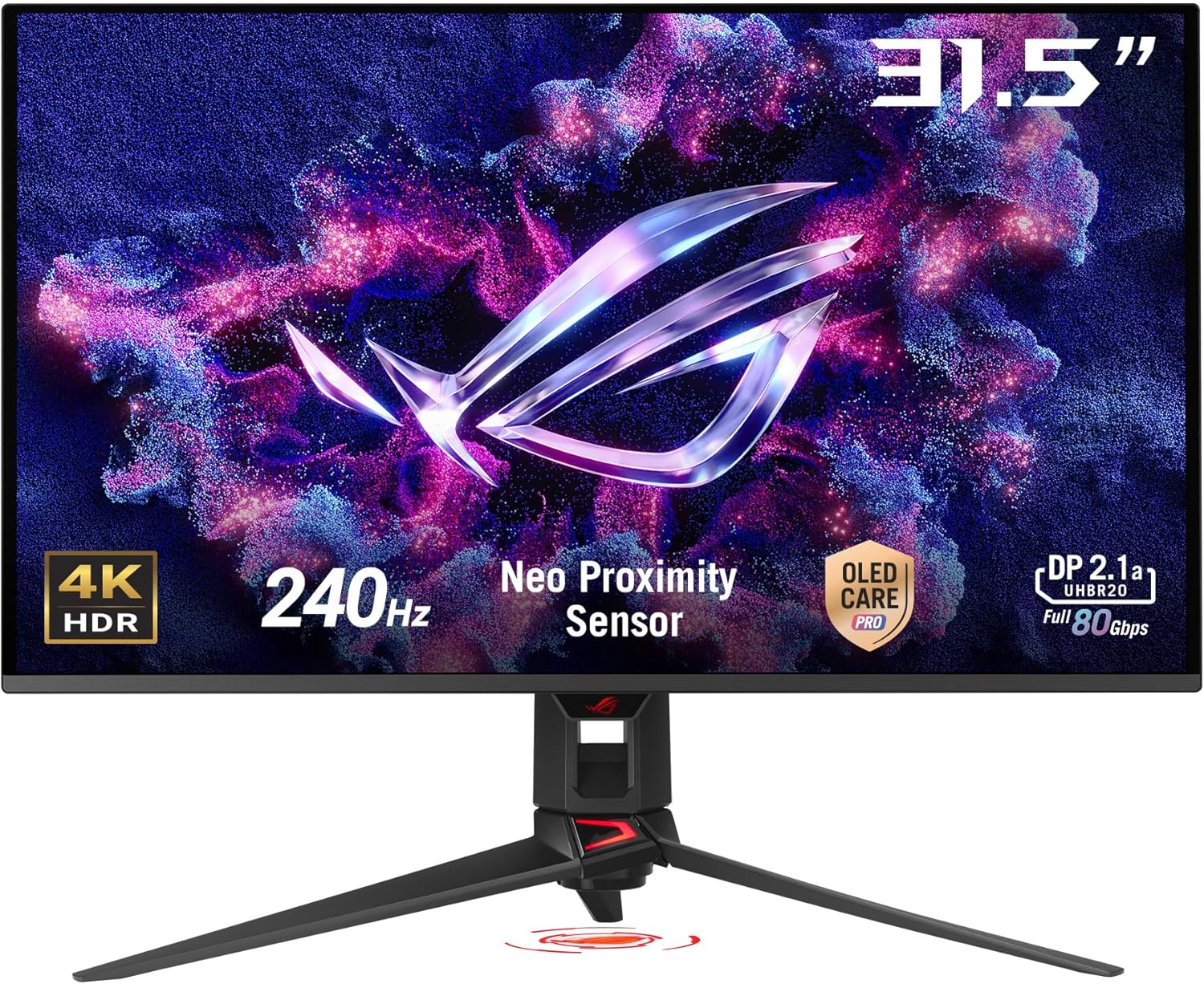
This is a premium option with QD-OLED technology for vivid colors and brightness.
#### Specifications
| Feature | Details |
|---------|---------|
| **Panel Type** | 🌟 **QD-OLED** (Quantum Dot) |
| **Resolution** | 4K UHD (3840 x 2160) |
| **Refresh Rate** | 240Hz |
| **Response Time** | 0.03ms (GTG) |
| **Coating** | Semi-Glossy |
| **USB Type-C** | ✅ Yes (90W PD) |
| **HDR** | DisplayHDR True Black 400 |
| **Color Gamut** | 99% DCI-P3, Delta E < 2 |
| **Connectivity** | 2x HDMI 2.1, 1x DP 1.4, USB-C |
| **Special** | Custom heatsink + graphene |
#### Key Highlights
- **QD-OLED panel** - brightest and most vibrant colors
- **Custom heatsink** with graphene film cooling
- **240Hz at 4K** for premium gaming
- **90W USB-C PD** for laptop charging
- **Premium build quality** throughout
- **Advanced thermal management**
#### QD-OLED Advantages
- 🔆 **Higher peak brightness** than WOLED
- 🎨 **More vibrant colors** in HDR content
- ✨ **Better for bright HDR scenes**
- 💎 **Premium visual experience**
> **Best For**: Users wanting the absolute best image quality and willing to pay premium pricing
---
### 4. Samsung Odyssey OLED G8 (LS32FG810SNXZA)

Samsung's QD-OLED gaming monitor with smart TV features.
#### Specifications
| Feature | Details |
|---------|---------|
| **Panel Type** | ✅ QD-OLED (Quantum Dot) |
| **Resolution** | 4K UHD (3840 x 2160) |
| **Refresh Rate** | 240Hz |
| **Response Time** | 0.03ms (GTG) |
| **Coating** | Semi-Glossy |
| **USB Type-C** | ❌ No |
| **HDR** | HDR True Black 400 |
| **Color Gamut** | 99% DCI-P3 |
| **Connectivity** | 2x HDMI 2.1, 1x DP 1.4 |
| **Special** | Samsung OLED Safeguard+ |
#### Key Highlights
- **QD-OLED technology** with vibrant colors
- **Samsung OLED Safeguard+** protection
- **240Hz at 4K** for premium gaming
- **AMD FreeSync Premium Pro**
- **Samsung ecosystem integration**
#### Unique Features
- **Samsung ecosystem integration**
- **Advanced thermal system**
- **Premium brand recognition**
- **Ergonomic design**
> **Best For**: Samsung ecosystem users wanting QD-OLED without USB-C requirements
---
### 5. LG UltraGear 32GS95UE

LG's WOLED with useful features and high refresh rates.
#### Specifications
| Feature | Details |
|---------|---------|
| **Panel Type** | ✅ WOLED (White OLED) |
| **Resolution** | 4K UHD (3840 x 2160) |
| **Refresh Rate** | 240Hz |
| **Response Time** | 0.03ms (GTG) |
| **Coating** | Semi-Glossy |
| **USB Type-C** | ✅ Yes (90W PD) |
| **HDR** | DisplayHDR True Black 400 |
| **Color Gamut** | 99% DCI-P3 |
| **Connectivity** | 2x HDMI 2.1, 1x DP 1.4, USB-C |
| **Special** | Advanced cooling system |
#### Key Highlights
- **240Hz at 4K** for premium gaming
- **90W USB-C PD** for laptop charging
- **AMD FreeSync Premium Pro**
- **G-SYNC compatible**
- **Comprehensive OLED protection**
#### Unique Features
- **LG's established OLED expertise**
- **Excellent build quality**
- **Strong warranty support**
- **Good price-to-performance ratio**
> **Best For**: Users who want a reliable brand with premium WOLED features
---
## Complete Monitor Specifications Comparison
### **Budget-Friendly Options ($700-$900)**
| **Specification** | [**MSI MAG 321CUP QD-OLED**](#1-msi-mag-321cup-qd-oled) | [**GIGABYTE MO32U QD-OLED**](#2-gigabyte-mo32u-qd-oled) | [**INNOCN 32" 4K OLED**](#3-innocn-32-4k-oled-monitor) | [**ASRock PGO32UFS WOLED**](#4-asrock-pgo32ufs-woled) |
|-------------------|----------------------------|----------------------------|------------------|-------------------|
| **Panel Technology** | ✅ QD-OLED | ✅ QD-OLED | ✅ WOLED | ✅ WOLED |
| **Resolution** | 4K UHD (3840 x 2160) | 4K UHD (3840 x 2160) | 4K UHD (3840 x 2160) | 4K UHD (3840 x 2160) |
| **Refresh Rate** | 165Hz | 165Hz | 165Hz | 240Hz (4K) / 480Hz (FHD) |
| **Response Time** | 0.03ms (GTG) | 0.03ms (GTG) | 0.03ms (GTG) | 0.03ms (GTG) |
| **Display Coating** | Semi-Glossy | Semi-Glossy | Glossy | Anti-Glare |
| **USB-C Port** | ❌ No | ❌ No | ❌ No | ✅ Yes |
| **USB-C Power Delivery** | ❌ No | ❌ No | ❌ No | ✅ 65W PD |
| **Dual Mode** | ❌ Single Mode | ❌ Single Mode | ❌ Single Mode | ✅ 4K@240Hz / FHD@480Hz |
| **HDR Certification** | DisplayHDR True Black 400 | DisplayHDR True Black 400 | HDR400 | DisplayHDR True Black 400 |
| **Color Gamut** | 99% DCI-P3 | 99% DCI-P3 | 99% DCI-P3 | 99% DCI-P3 |
| **Color Accuracy** | Delta E < 2 | Delta E < 2 | Delta E < 3 | Delta E < 2 |
| **VESA Mount** | 100x100mm | 100x100mm | 100x100mm | 100x100mm |
| **Connectivity** | 2x HDMI 2.1, 2x DP 1.4 | 2x HDMI 2.1, 1x DP 1.4 | 2x HDMI 2.1, 1x DP 1.4 | 2x HDMI 2.1, 2x DP 1.4, USB-C |
| **Special Features** | OLED Care 2.0, ClearMR 9000 | KVM, OLED Care, AI Protection | Budget-friendly entry | Wi-Fi Antenna, KVM Switch |
| **Warranty Coverage** | Standard + Burn-in | 3-year + Burn-in | Standard | Standard + Burn-in |
| **Price Range** | ~$800-900 | ~$850-950 | ~$700-800 | ~$900-1000 |
| **Best For** | QD-OLED on budget | Gaming features | Most affordable OLED | Dual-mode + USB-C |
### **Premium Options ($1,000-$1,400)**
| **Specification** | [**ASUS XG32UCWG**](#1-asus-rog-strix-oled-xg32ucwg-woled-trueblack-glossy--top-pick) ⭐ | [**ASUS PG32UCDP**](#2-asus-rog-swift-oled-pg32ucdp-woled-matte) | [**ASUS PG32UCDMR**](#3-asus-rog-swift-oled-pg32ucdmr-qd-oled-premium) | [**Samsung LS32FG810SNXZA**](#4-samsung-odyssey-oled-g8-ls32fg810snxza) | [**LG 32GS95UE**](#5-lg-ultragear-32gs95ue) |
|-------------------|-------------------------|-------------------------|----------------------------|----------------------------|----------------|
| **Panel Technology** | ✅ WOLED | ✅ WOLED | 🌟 **QD-OLED** | ✅ QD-OLED | ✅ WOLED |
| **Resolution** | 4K UHD (3840 x 2160) | 4K UHD (3840 x 2160) | 4K UHD (3840 x 2160) | 4K UHD (3840 x 2160) | 4K UHD (3840 x 2160) |
| **Refresh Rate** | 165Hz (4K) / 330Hz (FHD) | 240Hz (4K) / 480Hz (FHD) | 240Hz | 240Hz | 240Hz |
| **Response Time** | 0.03ms (GTG) | 0.03ms (GTG) | 0.03ms (GTG) | 0.03ms (GTG) | 0.03ms (GTG) |
| **Display Coating** | ✨ **TrueBlack Glossy™** | 🎯 **Matte Anti-Glare** | Semi-Glossy | Semi-Glossy | Semi-Glossy |
| **USB-C Port** | ✅ Yes | ✅ Yes | ✅ Yes | ❌ No | ✅ Yes |
| **USB-C Power Delivery** | ⚠️ 15W (insufficient) | ✅ 90W PD | ✅ 90W PD | ❌ No | ✅ 90W PD |
| **Dual Mode** | ✅ 4K@165Hz / FHD@330Hz | ✅ 4K@240Hz / FHD@480Hz | ❌ Single Mode | ❌ Single Mode | ❌ Single Mode |
| **HDR Certification** | DisplayHDR True Black 400 | DisplayHDR True Black 400 | DisplayHDR True Black 400 | HDR True Black 400 | DisplayHDR True Black 400 |
| **Color Gamut** | 99% DCI-P3 | 99% DCI-P3 | 99% DCI-P3 | 99% DCI-P3 | 99% DCI-P3 |
| **Color Accuracy** | Delta E < 2 | Delta E < 2 | Delta E < 2 | Delta E < 2 | Delta E < 2 |
| **VESA Mount** | 100x100mm | 100x100mm | 100x100mm | 100x100mm | 100x100mm |
| **Connectivity** | 2x HDMI 2.1, 1x DP 1.4, USB-C | 2x HDMI 2.1, 1x DP 1.4, USB-C | 2x HDMI 2.1, 1x DP 1.4, USB-C | 2x HDMI 2.1, 1x DP 1.4 | 2x HDMI 2.1, 1x DP 1.4, USB-C |
| **Special Features** | OLED Care Pro, Compact Stand | AI Assistant, Dynamic Features | Custom Heatsink + Graphene | OLED Safeguard+, Samsung Ecosystem | Advanced Cooling System |
| **Text Clarity** | 🏆 **Excellent** (Clear Pixel Edge) | ✅ **Very Good** (Matte) | ✅ **Good** (QD-OLED) | ✅ **Good** (QD-OLED) | ✅ **Very Good** |
| **Brightness (HDR Peak)** | 450 nits | 450 nits | 🔆 **1000+ nits** | 🔆 **1000+ nits** | 450 nits |
| **Stand Features** | 45% Smaller Footprint | Ergonomic Adjustable | Premium Adjustable | Standard Adjustable | Standard Adjustable |
| **Warranty Coverage** | Standard + Burn-in | Standard + Burn-in | Premium + Burn-in | Standard + Burn-in | Standard + Burn-in |
| **Price Range** | ~$1,000-1,100 | ~$1,100-1,200 | ~$1,200-1,400 | ~$1,300-1,500 | ~$1,200-1,400 |
| **Best For** | 💼 **Productivity + Gaming** | 🎮 **Bright Rooms + Gaming** | 🌟 **Ultimate Premium** | Samsung Ecosystem | Brand Reliability |
### **Quick Decision Matrix**
| **Priority** | **Best Choice** | **Alternative** | **Budget Option** |
|--------------|-----------------|-----------------|-------------------|
| **Text Clarity** | [ASUS XG32UCWG](#1-asus-rog-strix-oled-xg32ucwg-woled-trueblack-glossy--top-pick) (TrueBlack Glossy) | [ASUS PG32UCDP](#2-asus-rog-swift-oled-pg32ucdp-woled-matte) (Matte) | [ASRock PGO32UFS](#4-asrock-pgo32ufs-woled) (Anti-Glare) |
| **Laptop Charging** | [ASUS PG32UCDP](#2-asus-rog-swift-oled-pg32ucdp-woled-matte) (90W) | [LG 32GS95UE](#5-lg-ultragear-32gs95ue) (90W) | [ASRock PGO32UFS](#4-asrock-pgo32ufs-woled) (65W) |
| **Gaming Performance** | [ASUS PG32UCDP](#2-asus-rog-swift-oled-pg32ucdp-woled-matte) (480Hz FHD) | [ASRock PGO32UFS](#4-asrock-pgo32ufs-woled) (480Hz FHD) | [MSI MAG 321CUP](#1-msi-mag-321cup-qd-oled) (165Hz) |
| **Color Vibrancy** | [ASUS PG32UCDMR](#3-asus-rog-swift-oled-pg32ucdmr-qd-oled-premium) (QD-OLED) | [Samsung LS32FG810SNXZA](#4-samsung-odyssey-oled-g8-ls32fg810snxza) (QD-OLED) | [MSI MAG 321CUP](#1-msi-mag-321cup-qd-oled) (QD-OLED) |
| **Budget Value** | [MSI MAG 321CUP](#1-msi-mag-321cup-qd-oled) (~$800) | [INNOCN 32" 4K](#3-innocn-32-4k-oled-monitor) (~$700) | [GIGABYTE MO32U](#2-gigabyte-mo32u-qd-oled) (~$850) |
| **Bright Rooms** | [ASUS PG32UCDP](#2-asus-rog-swift-oled-pg32ucdp-woled-matte) (Matte) | [ASRock PGO32UFS](#4-asrock-pgo32ufs-woled) (Anti-Glare) | [ASUS PG32UCDMR](#3-asus-rog-swift-oled-pg32ucdmr-qd-oled-premium) (Higher Peak Brightness) |
---
## Key Feature Breakdown
### Display Coatings Explained
The coating type affects your viewing experience:
#### **✅ TrueBlack Glossy™ (ASUS XG32UCWG)**
- **Pros**: Sharp text, 38% less reflections than standard glossy
- **Cons**: Still shows some reflections in bright environments
- **Best For**: Controlled lighting, productivity work, sharp text
#### **✅ Matte Anti-Glare (ASUS PG32UCDP, ASRock PGO32UFS)**
- **Pros**: Minimal reflections, great for bright rooms
- **Cons**: Slightly softer image quality
- **Best For**: Bright offices, rooms with windows
#### **✅ Semi-Glossy (Most QD-OLED models)**
- **Pros**: Balance between sharpness and reflection control
- **Cons**: Moderate reflections
- **Best For**: Most gaming setups
**Bright Room**: Choose matte anti-glare coatings (PG32UCDP, PGO32UFS)
**Controlled Lighting**: TrueBlack Glossy™ (XG32UCWG) offers the sharpest image
**Balanced Setup**: Semi-glossy QD-OLED options work well in most environments
### USB-C and Power Delivery
USB-C connectivity differs across models:
| **Power Delivery** | **Models** | **Capability** |
|-------------------|------------|----------------|
| **❌ No USB-C** | MSI MAG 321CUP, GIGABYTE MO32U, Samsung LS32FG810SNXZA | Traditional connections only |
| **⚠️ 15W PD** | ASUS XG32UCWG | Insufficient for laptop charging |
| **✅ 65W PD** | ASRock PGO32UFS | Charges most laptops |
| **✅ 90W PD** | ASUS PG32UCDP, PG32UCDMR, LG 32GS95UE | Charges all laptops including MacBook Pro |
For MacBook Pro charging, you need at least 65W power delivery. The ASUS XG32UCWG's 15W is insufficient for laptop charging, though it works for display output.
---
## Which Monitor Should You Choose?
### For Productivity & Coding 💼
**Winner**: [ASUS ROG Strix OLED XG32UCWG](https://amzn.to/3VBnjCA)
- Best text clarity among all options
- TrueBlack Glossy coating reduces eye strain
- Perfect for extended work sessions
- Excellent macOS compatibility
- Dual-mode for occasional gaming
**Alternative**: [PG32UCDP](https://amzn.to/3Iv6hTM) if you need matte coating + 90W charging
---
### For Competitive Gaming 🎮
**Winner**: [ASRock PGO32UFS](https://pg.asrock.com/Monitors/PGO32UFS/index.asp) or [ASUS PG32UCDP](https://amzn.to/3Iv6hTM)
- 480Hz FHD mode for competitive gaming
- Ultra-fast 0.03ms response time
- Variable refresh rate support
- Advanced OLED protection
**Budget Alternative**: [LG 32GS95UE](https://amzn.to/4nTrcPe) for premium features at better value
---
### For Content Creation 🎨
**Winner**: [ASUS ROG Swift OLED PG32UCDMR](https://amzn.to/4nno4LC)
- QD-OLED technology for maximum color vibrancy
- 99% DCI-P3 coverage with Delta E < 2 accuracy
- Custom cooling system for sustained performance
- 90W USB-C PD for laptop workflows
**Budget Alternative**: [MSI MAG 321CUP](https://amzn.to/4gNJGyj) for QD-OLED on budget
---
### Best Value Overall 💰
**Winner**: [MSI MAG 321CUP QD-OLED](https://amzn.to/4gNJGyj)
- QD-OLED technology at accessible price
- 165Hz gaming performance
- Excellent color accuracy
- OLED Care 2.0 protection
**Runner-up**: [ASUS XG32UCWG](https://amzn.to/3VBnjCA) for productivity focus
---
### For Laptop Users 💻
**Winner**: [ASUS PG32UCDP](https://amzn.to/3Iv6hTM) or [LG 32GS95UE](https://amzn.to/4nTrcPe)
- 90W USB-C PD charges laptops while working
- Clean single-cable setup
- Excellent display quality
- Professional color accuracy
**Budget Option**: [ASRock PGO32UFS](https://pg.asrock.com/Monitors/PGO32UFS/index.asp) with 65W PD
---
### For Mixed Use (Gaming + Work) ⚡
**Winner**: [ASUS ROG Strix OLED XG32UCWG](https://amzn.to/3VBnjCA)
- Good text clarity for productivity
- Dual-mode flexibility (4K@165Hz / FHD@330Hz)
- TrueBlack Glossy coating
- Professional color accuracy
- Good gaming performance
**Read why**: [My detailed XG32UCWG review](https://www.bitdoze.com/asus-rog-strix-oled-xg32ucwg-review/)
---
## Gaming Performance Rankings
### Competitive Gaming Rankings
| **Rank** | **Monitor** | **Competitive Score** | **Key Advantages** |
|----------|-------------|----------------------|------------------|
| **🥇 1st** | ASRock PGO32UFS | 9.8/10 | 480Hz FHD mode, anti-glare |
| **🥈 2nd** | ASUS PG32UCDP | 9.5/10 | 480Hz FHD mode, matte coating |
| **🥉 3rd** | Samsung LS32FG810SNXZA | 9.2/10 | 240Hz QD-OLED, vibrant colors |
| **4th** | ASUS PG32UCDMR | 9.0/10 | 240Hz QD-OLED, premium features |
| **5th** | LG 32GS95UE | 8.8/10 | 240Hz WOLED, good balance |
### Casual Gaming Rankings
| **Rank** | **Monitor** | **Casual Score** | **Key Advantages** |
|----------|-------------|------------------|------------------|
| **🥇 1st** | ASUS PG32UCDMR | 9.6/10 | Best QD-OLED visuals, premium features |
| **🥈 2nd** | Samsung LS32FG810SNXZA | 9.4/10 | Excellent QD-OLED, Samsung ecosystem |
| **🥉 3rd** | MSI MAG 321CUP | 9.2/10 | Great QD-OLED value |
| **4th** | GIGABYTE MO32U | 9.0/10 | Solid QD-OLED performance |
| **5th** | ASUS XG32UCWG | 8.7/10 | Good WOLED gaming, great productivity |
---
## OLED Technology Deep Dive
### WOLED vs QD-OLED: What's the Difference?
#### WOLED (White OLED)
**Used in**: XG32UCWG, PG32UCDP, INNOCN, ASRock, LG
**How it works**: Uses white organic light-emitting diodes with color filters
**Advantages:**
- ✅ Excellent text clarity with Clear Pixel Edge algorithms
- ✅ Better longevity compared to first-generation OLEDs
- ✅ Lower manufacturing costs
- ✅ Less color fringing on text
- ✅ Better for productivity work
**Disadvantages:**
- ❌ Lower peak brightness than QD-OLED
- ❌ Less vibrant in some HDR scenarios
- ❌ Slightly less "wow factor" in media content
#### QD-OLED (Quantum Dot OLED)
**Used in**: MSI MAG 321CUP, GIGABYTE MO32U, PG32UCDMR, Samsung G81SF
**How it works**: Uses quantum dots for color production
**Advantages:**
- ✅ Higher peak brightness capabilities
- ✅ More vibrant colors in HDR content
- ✅ Wider color volume
- ✅ Better HDR performance
- ✅ Impressive visual impact
**Disadvantages:**
- ❌ Higher cost to manufacture
- ❌ More color fringing on text (though improved)
- ❌ Premium pricing
- ❌ May show rainbow effect in bright ambient light
---
## Complete Comparison Table
| Monitor | Panel | Coating | Refresh Rate | USB-C | Power | Best For |
|---------|-------|---------|--------------|-------|-------|----------|
| **MSI MAG 321CUP** | QD-OLED | Semi-Glossy | 165Hz | ❌ | N/A | Budget QD-OLED |
| **GIGABYTE MO32U** | QD-OLED | Semi-Glossy | 165Hz | ❌ | N/A | Gaming features |
| **INNOCN 32"** | WOLED | Glossy | 165Hz | ❌ | N/A | Budget WOLED |
| **ASRock PGO32UFS** | WOLED | Anti-Glare | 240/480Hz | ✅ | 65W | Dual-mode value |
| **XG32UCWG** ⭐ | WOLED | TrueBlack Glossy | 165/330Hz | ⚠️ | 15W | Productivity |
| **PG32UCDP** | WOLED | Matte | 240/480Hz | ✅ | 90W | Bright rooms |
| **PG32UCDMR** | QD-OLED | Semi-Glossy | 240Hz | ✅ | 90W | Premium choice |
| **Samsung G81SF** | QD-OLED | Semi-Glossy | 240Hz | ❌ | N/A | Samsung ecosystem |
| **LG 32GS95UE** | WOLED | Semi-Glossy | 240Hz | ✅ | 90W | Balanced premium |
---
## Step-by-Step Decision Framework
### Step 1: Identify Your Primary Use Case
**Productivity/Office Work (70%+ of time)**
- Text clarity is critical
- Multiple applications open simultaneously
- Long work sessions (6+ hours)
- Static UI elements (taskbars, toolbars)
**Recommended**: [XG32UCWG](https://amzn.to/3VBnjCA) or [PG32UCDP](https://amzn.to/3Iv6hTM)
**Why**: WOLED panels have better text rendering, good burn-in protection for static elements, and factory calibration for accurate colors.
**Gaming (70%+ of time)**
- Fast-paced competitive titles
- Story-driven AAA games
- Console gaming
- High refresh rate priority
**Recommended**: [PG32UCDP](https://amzn.to/3Iv6hTM) or [LG 32GS95UE](https://amzn.to/4nTrcPe)
**Why**: 240Hz+ refresh rates, AMD FreeSync Premium Pro and G-SYNC compatibility work well, and motion clarity is good.
**Content Creation (Video/Photo Editing)**
- Color accuracy critical
- HDR content creation
- Wide color gamut needed
- Vibrancy matters
**Recommended**: [PG32UCDMR](https://amzn.to/4nno4LC) or [MSI MAG 321CUP](https://amzn.to/4gNJGyj)
**Why**: QD-OLED has wider color volume, higher peak brightness for HDR, 99% DCI-P3 coverage, and Delta E < 2 accuracy.
**Mixed Use (Equal Gaming + Work)**
- Need versatility
- Both text clarity and gaming performance matter
- Willing to compromise slightly on each
**Recommended**: [XG32UCWG](https://amzn.to/3VBnjCA) or [ASRock PGO32UFS](https://pg.asrock.com/Monitors/PGO32UFS/index.asp)
**Why**: Dual-mode capability, decent text clarity, solid gaming performance, and balanced features.
### Step 2: Set Your Budget
**Under $1,000** (Budget OLED Experience)
- [MSI MAG 321CUP](https://amzn.to/4gNJGyj) - $800-900
- [GIGABYTE MO32U](https://amzn.to/4gPmrUH) - $850-950
- [INNOCN 32"](https://amzn.to/46N7RbP) - $700-800
**What You Get**: OLED experience with true blacks and vibrant colors. Some trade-offs in build quality, features, or connectivity.
**$1,000 - $1,500** (Mid-range)
- [XG32UCWG](https://amzn.to/3VBnjCA) - $1,000-1,100
- [LG 32GS95UE](https://amzn.to/4nTrcPe) - $1,200-1,400
- [PG32UCDP](https://amzn.to/3Iv6hTM) - $1,100-1,200
**What You Get**: Premium OLED experience, good protection features, better build quality, and advanced features.
**$1,500+** (Premium)
- [PG32UCDMR](https://amzn.to/4nno4LC) - $1,200-1,400
- [Samsung G81SF](https://amzn.to/42UMxjb) - $1,300-1,500
**What You Get**: High-end OLED options, QD-OLED, premium build, and good warranty coverage.
---
## Common Questions
### Will OLED Burn-in Be a Problem?
Modern OLED monitors have good protection:
- **Pixel cleaning cycles** - Automatic recalibration
- **Logo detection and dimming** - Reduces static element brightness
- **Screen savers and pixel shift** - Subtle movement prevents static burn-in
- **Taskbar detection** - Dynamic brightness adjustment
- **3-year warranties** covering burn-in (most brands)
After using OLED for productivity with static elements, I haven't had burn-in issues with OLED Care Pro features enabled. Modern protection makes burn-in less of a concern than early OLED generations.
### Is Glossy Really Usable in Bright Rooms?
Yes. The XG32UCWG's TrueBlack Glossy coating has minimal reflections, even with a window in front of my desk. The 38% reduction in reflections vs standard glossy helps. Matte still works better if you have multiple light sources or bright overhead lighting.
### Do I Really Need USB-C?
**Yes, if you:**
- Use a laptop as primary device
- Want single-cable setup
- Need to charge laptop while working (requires 65W+ models)
**No, if you:**
- Use desktop PC primarily
- Don't mind separate charger
- Want to save money on other features
**My setup**: XG32UCWG with 15W USB-C for display display, separate MagSafe charger. The setup requires one extra cable but has better display quality.
---
## Final Recommendations
### 🏆 Overall Best: ASUS ROG Strix OLED XG32UCWG
Good balance of productivity and gaming, solid text clarity, and OLED protection.
[Read Full Review](https://www.bitdoze.com/asus-rog-strix-oled-xg32ucwg-review/)
### 💰 Best Value: MSI MAG 321CUP QD-OLED
QD-OLED technology at an accessible price point with excellent gaming performance.
### 🎮 Best for Gaming: ASUS PG32UCDP / ASRock PGO32UFS
240Hz/480Hz dual-mode for competitive advantage, excellent motion clarity.
### 💼 Best for Productivity: ASUS XG32UCWG
Exceptional text clarity with TrueBlack Glossy coating, perfect for long work sessions.
### 🌟 Premium Choice: ASUS PG32UCDMR
High image quality with QD-OLED technology and premium features.
---
## Where to Buy - Quick Links
### **Budget Options**
- [MSI MAG 321CUP QD-OLED](https://amzn.to/4gNJGyj) - Best QD-OLED value
- [GIGABYTE MO32U QD-OLED](https://amzn.to/4gPmrUH) - Solid alternative
- [INNOCN 32M2V Monitor](https://amzn.to/46N7RbP) - Budget WOLED option
- [ASRock PGO32UFS](https://pg.asrock.com/Monitors/PGO32UFS/index.asp) - High refresh WOLED
### **Premium Options**
- [ASUS XG32UCWG TrueBlack](https://amzn.to/3VBnjCA) - Best productivity WOLED
- [ASUS PG32UCDP Matte](https://amzn.to/3Iv6hTM) - Best bright room option
- [ASUS PG32UCDMR QD-OLED](https://amzn.to/4nno4LC) - Premium QD-OLED
- [Samsung LS32FG810SNXZA](https://amzn.to/42UMxjb) - Samsung QD-OLED
- [LG 32GS95UE](https://amzn.to/4nTrcPe) - Premium WOLED
OLED monitor prices fluctuate significantly. Check current pricing using the links above, and consider waiting for sales events like Black Friday or Amazon Prime Day for the best deals.
---
## Conclusion
The 32-inch OLED monitor market has good options across price ranges. Whether you want text clarity for productivity (XG32UCWG), vibrant colors for content creation (PG32UCDMR), competitive gaming performance (PG32UCDP), or good value (MSI MAG 321CUP), there's a suitable monitor.
After using the XG32UCWG for productivity, I can say OLED technology has improved the computing experience. The contrast, blacks, and text clarity make it hard to go back to LCD displays.
**Ready to make the jump to OLED?** Use this guide to understand your priorities, match them to the right monitor, and enjoy OLED displays. Any of these monitors should work well.
---
*This guide reflects the market as of January 2026. Monitor specifications and pricing may change. Verify current specifications and pricing before purchase.*