Convex Self-Hosted vs Cloud Free Tier: 2026 Benchmarks
Convex self-hosted vs cloud free tier: real benchmark results from oha load tests comparing response times, throughput, and the CDN impact on performance.

Updated Published 22 min read
Convex self-hosted vs cloud free tier: which one is faster? I load-tested both deployments with oha to get real benchmark numbers instead of marketing claims, and the gap turned out to be bigger than I expected.
I put the same real-time app built with Astro and Convex in front of Convex running on a VPS and running on the managed cloud free tier, then changed one thing at a time: where the CDN sits. Four configurations, 1,000 requests each. Here are the numbers.
Benchmark notes for 2026
Since I ran these tests in November 2025, Convex has open-sourced its backend (get-convex/convex-backend on GitHub), so self-hosting is now a first-party supported path instead of something you had to assemble yourself. The Docker-based deployment I benchmarked works the same way today, and the setup steps plus current image tags are in my guide on how to self-host Convex with Docker Compose or Dokploy.
Updated for 2026
All numbers below come from a single November 2025 test run. The self-hosted architecture hasn’t changed, but the backend version has moved and cloud free tier limits change often, so check Convex’s current pricing page before you commit to either side.
Test setup and methodology
I used oha for the load testing. It’s a Rust-based HTTP load testing tool that shows how each configuration handles concurrent requests, and it treats any URL the same way. You can run the identical test against your own server before you trust it with production traffic; I cover that separately in how to benchmark cloud servers (VPS).
Test parameters
All tests were run with the following parameters:
| Parameter | Value | Description |
|---|---|---|
| Total Requests | 1,000 | Number of HTTP requests to send |
| Concurrent Connections | 500 | Simulated users accessing simultaneously |
| Rate Limit | 50 req/sec | Controlled request rate for consistency |
The command used:
oha -n 1000 -c 500 -q 50 https://target-url/What oha measures
oha reports:
- Success rate: Percentage of requests that returned HTTP 200
- Average response time: Mean time from request to response
- Response time distribution: Percentile breakdown showing consistency
- Throughput: Requests handled per second
- DNS+dialup time: Connection establishment overhead
These metrics show both raw performance and reliability under load.
Test configurations
I tested four configurations:
- Self-Hosted (No CDN): Convex backend running on a VPS, accessed directly
- Self-Hosted (Full CDN): Cloudflare CDN active for both the website and Convex endpoints
- Self-Hosted (Site CDN Only): Cloudflare CDN for the website, direct access to Convex
- Cloud Convex Free Tier: Standard cloud-hosted Convex with Cloudflare on the frontend
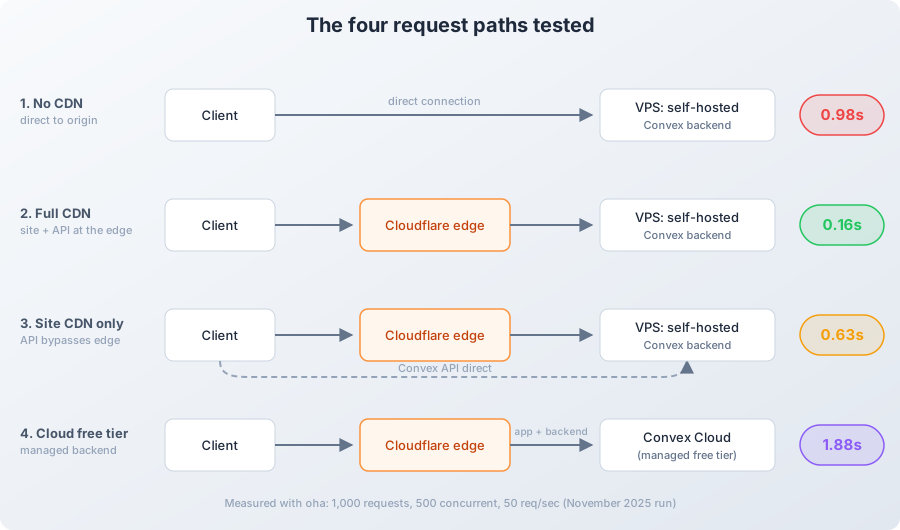
One clarification before the numbers, because it’s the most common misconfiguration: “Full CDN” means the Convex API endpoints are proxied through Cloudflare too, not just the static site. Routing only the website through the edge while the API goes direct gives you roughly the “Site CDN Only” numbers.
Self-Hosting Guide
If you want to deploy your own Convex instance, check out my guide on Self-Host Convex in 2026: Docker Compose & Dokploy Setup Guide. Still picking a deployment tool? I’ve also compared Coolify vs Dokploy vs Kamal 2.
Benchmark results
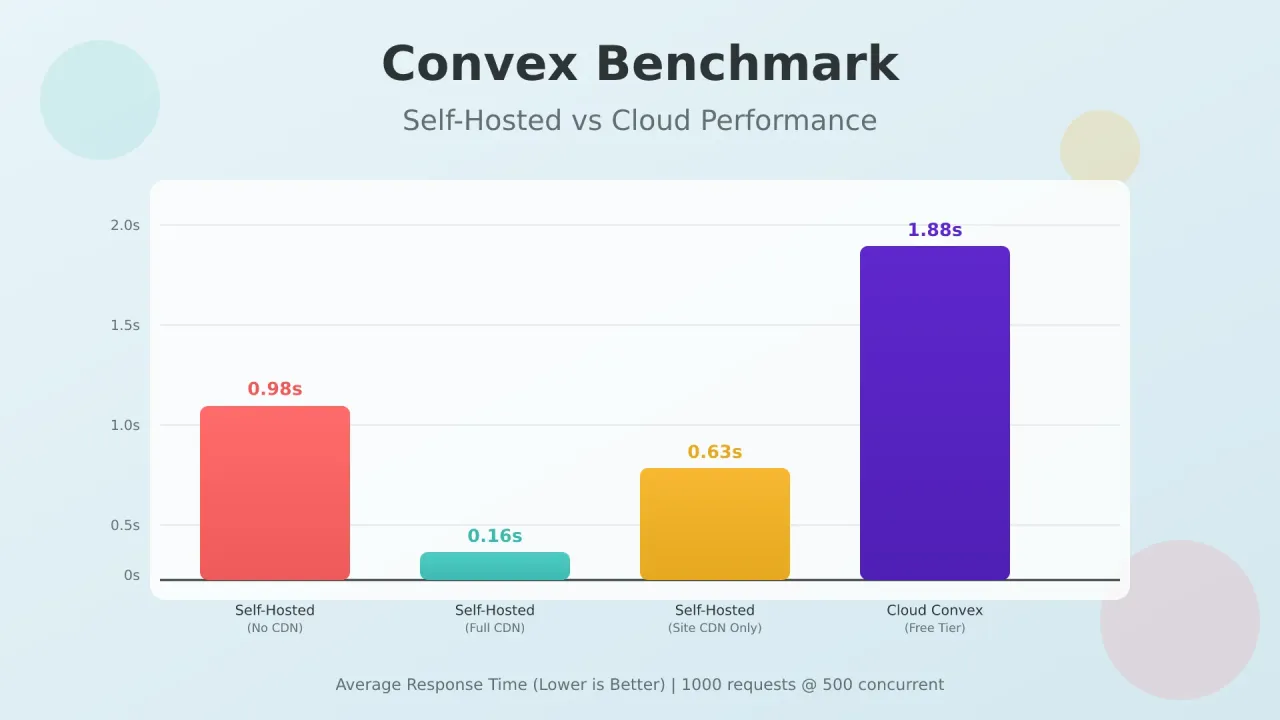
The headline: convex self-hosted performance beat the cloud free tier on every metric, and the biggest single factor was where the CDN sits, not the backend itself.
Visual comparison
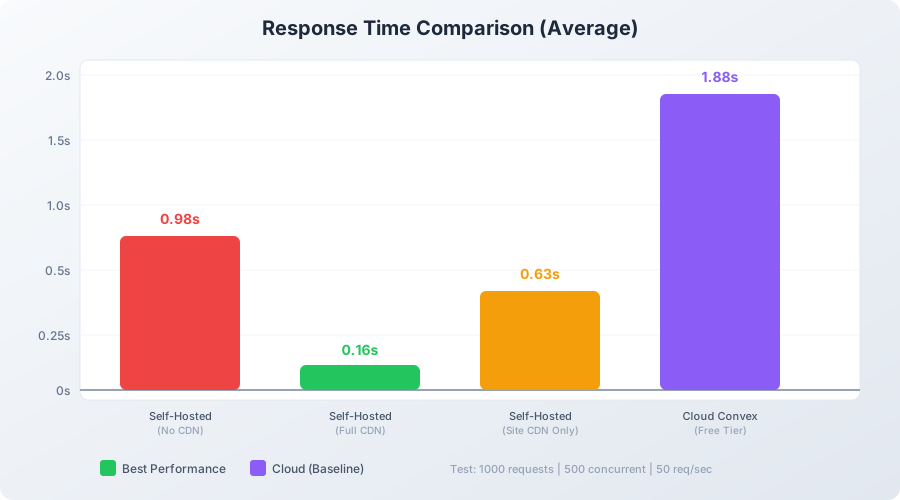
Summary table
Here are the full convex benchmark results from the four runs:
| Configuration | Avg Response | Fastest | Slowest | Req/sec | Success Rate |
|---|---|---|---|---|---|
| Self-Hosted (Full CDN) | 0.16s | 0.08s | 0.37s | 49.65 | 100% |
| Self-Hosted (Site CDN) | 0.63s | 0.17s | 2.57s | 47.74 | 100% |
| Self-Hosted (No CDN) | 0.98s | 0.28s | 2.88s | 47.22 | 100% |
| Cloud Convex | 1.88s | 0.21s | 4.53s | 44.42 | 100% |
All figures come from a single November 2025 test run. Read the caveats section below before quoting them elsewhere.
Detailed results
Self-hosted with no CDN
Direct access to self-hosted Convex, no CDN. Requests hit the VPS origin directly.
# Cloudflare proxy OFF for the Convex host: requests go straight to the VPS
oha -n 1000 -c 500 -q 50 https://sh-convex.bitbuddies.me/
Summary:
  Success rate: 100.00%
  Total:        21.1762 secs
  Slowest:      2.8789 secs
  Fastest:      0.2811 secs
  Average:      0.9796 secs
  Requests/sec: 47.2227

  Total data:   125.04 MiB
  Size/request: 128.05 KiB
  Size/sec:     5.90 MiB

Response time histogram:
  0.281 [1]   |
  0.541 [65]  |■■■■
  0.801 [196] |■■■■■■■■■■■■
  1.060 [507] |■■■■■■■■■■■■■■■■■■■■■■■■■■■■■■■■■
  1.320 [114] |■■■■■■■
  1.580 [43]  |■■
  1.840 [39]  |■■
  2.100 [17]  |■
  2.359 [7]   |
  2.619 [3]   |
  2.879 [8]   |

Response time distribution:
  10.00% in 0.5999 secs
  25.00% in 0.7839 secs
  50.00% in 0.9395 secs
  75.00% in 1.0484 secs
  90.00% in 1.3932 secs
  95.00% in 1.6885 secs
  99.00% in 2.5827 secs
  99.90% in 2.8789 secs
  99.99% in 2.8789 secs

Details (average, fastest, slowest):
  DNS+dialup:   0.1573 secs, 0.1193 secs, 0.2184 secs
  DNS-lookup:   0.0001 secs, 0.0000 secs, 0.0010 secs

Status code distribution:
  [200] 1000 responses
The setup averaged around 1 second per request, with 507 out of 1000 requests finishing between 0.8 and 1.0 seconds. DNS+dialup took about 0.16 seconds on average, which is noticeable overhead. This gives us a baseline for the raw server performance, and the 128 KiB per request is what the origin serves uncompressed.
Self-hosted with full Cloudflare CDN
Same VPS, but Cloudflare proxied both the website and the Convex API endpoints. The host is the same as the run above; what changed was the proxy state, and you can see it in the payload: responses came back compressed from the edge.
# Same VPS, Cloudflare proxy ON for both site and Convex endpoints
oha -n 1000 -c 500 -q 50 https://sh-convex.bitbuddies.me/
Summary:
  Success rate: 100.00%
  Total:        20.1391 secs
  Slowest:      0.3701 secs
  Fastest:      0.0803 secs
  Average:      0.1592 secs
  Requests/sec: 49.6546

  Total data:   14.49 MiB
  Size/request: 14.83 KiB
  Size/sec:     736.54 KiB

Response time histogram:
  0.080 [1]   |
  0.109 [97]  |■■■■■■■■■
  0.138 [219] |■■■■■■■■■■■■■■■■■■■■■
  0.167 [324] |■■■■■■■■■■■■■■■■■■■■■■■■■■■
  0.196 [194] |■■■■■■■■■■■■■■■■■■■
  0.225 [96]  |■■■■■■■■■
  0.254 [44]  |■■■■
  0.283 [15]  |■
  0.312 [6]   |
  0.341 [3]   |
  0.370 [1]   |

Response time distribution:
  10.00% in 0.1096 secs
  25.00% in 0.1302 secs
  50.00% in 0.1541 secs
  75.00% in 0.1812 secs
  90.00% in 0.2119 secs
  95.00% in 0.2340 secs
  99.00% in 0.2845 secs
  99.90% in 0.3701 secs
  99.99% in 0.3701 secs

Details (average, fastest, slowest):
  DNS+dialup:   0.0371 secs, 0.0230 secs, 0.0795 secs
  DNS-lookup:   0.0001 secs, 0.0000 secs, 0.0007 secs

Status code distribution:
  [200] 1000 responses
This setup was fast and consistent. Response times stayed between 0.08 and 0.37 seconds, averaging 0.16s. Throughput hit 49.65 req/sec, and even the 99th percentile stayed under 0.3 seconds. CDN compression cut data transfer from 128 KiB to 14.8 KiB per request.
Self-hosted with site CDN only
Cloudflare proxied the website, while Convex endpoints bypassed the edge and went direct to origin.
# Cloudflare proxy ON for the site only: Convex endpoints go direct to the VPS
oha -n 1000 -c 500 -q 50 https://sh-convex.bitbuddies.me/
Summary:
  Success rate: 100.00%
  Total:        20.9452 secs
  Slowest:      2.5710 secs
  Fastest:      0.1678 secs
  Average:      0.6271 secs
  Requests/sec: 47.7436

  Total data:   17.21 MiB
  Size/request: 17.62 KiB
  Size/sec:     841.16 KiB

Response time histogram:
  0.168 [1]   |
  0.408 [246] |■■■■■■■■■■■■■■■■■■■■■■■■■■
  0.648 [374] |■■■■■■■■■■■■■■■■■■■■■■■■■■■■■■■■■■■■
  0.889 [251] |■■■■■■■■■■■■■■■■■■■■■■■■■■■
  1.129 [81]  |■■■■■■■■
  1.369 [10]  |
  1.610 [14]  |■
  1.850 [10]  |
  2.090 [1]   |
  2.331 [9]   |
  2.571 [3]   |

Response time distribution:
  10.00% in 0.3242 secs
  25.00% in 0.4105 secs
  50.00% in 0.5658 secs
  75.00% in 0.7757 secs
  90.00% in 0.9235 secs
  95.00% in 1.1089 secs
  99.00% in 2.2318 secs
  99.90% in 2.5710 secs
  99.99% in 2.5710 secs

Details (average, fastest, slowest):
  DNS+dialup:   0.0362 secs, 0.0247 secs, 0.0669 secs
  DNS-lookup:   0.0001 secs, 0.0000 secs, 0.0026 secs

Status code distribution:
  [200] 1000 responses
Performance was decent but showed more variance than the full CDN setup. Most requests (374 out of 1000) finished in 0.4-0.6 seconds, but the 99th percentile hit 2.2 seconds. DNS+dialup time improved to 0.04s compared to 0.16s without any CDN, thanks to the site being behind Cloudflare.
Cloud Convex free tier
Cloud-hosted Convex with the application frontend using Cloudflare.
# Cloud-hosted Convex, site behind Cloudflare
oha -n 1000 -c 500 -q 50 https://bitbuddies.me/
Summary:
  Success rate: 100.00%
  Total:        22.5101 secs
  Slowest:      4.5336 secs
  Fastest:      0.2140 secs
  Average:      1.8782 secs
  Requests/sec: 44.4246

  Total data:   17.23 MiB
  Size/request: 17.64 KiB
  Size/sec:     783.66 KiB

Response time histogram:
  0.214 [1]   |
  0.646 [34]  |■■■■■
  1.078 [171] |■■■■■■■■■■■■■■■■■■■■■■■
  1.510 [209] |■■■■■■■■■■■■■■■■■■■■■■■■■■■■
  1.942 [108] |■■■■■■■■■■■■■■■
  2.374 [192] |■■■■■■■■■■■■■■■■■■■■■■■■■■
  2.806 [147] |■■■■■■■■■■■■■■■■■■■■
  3.238 [77]  |■■■■■■■■■■
  3.670 [48]  |■■■■■■■
  4.102 [4]   |
  4.534 [9]   |■

Response time distribution:
  10.00% in 0.8744 secs
  25.00% in 1.1786 secs
  50.00% in 1.8554 secs
  75.00% in 2.4471 secs
  90.00% in 3.0030 secs
  95.00% in 3.3444 secs
  99.00% in 3.8191 secs
  99.90% in 4.5336 secs
  99.99% in 4.5336 secs

Details (average, fastest, slowest):
  DNS+dialup:   0.0399 secs, 0.0244 secs, 0.1982 secs
  DNS-lookup:   0.0001 secs, 0.0000 secs, 0.0141 secs

Status code distribution:
  [200] 1000 responses
This was the slowest setup, averaging 1.88 seconds per request. Response times varied widely from 0.21s to 4.53s, and throughput dropped to 44.42 req/sec. My best hypothesis for the wide spread is geographic distance to Convex’s cloud servers, but that’s a hypothesis: I didn’t measure the routing path, so treat it as unverified.
Analysis and insights
Performance comparison
For convex self-hosted performance against the cloud free tier, every metric points the same way:
| Metric | Winner | Improvement vs Cloud |
|---|---|---|
| Average Response Time | Self-Hosted + Full CDN | 11.75x faster |
| Fastest Response | Self-Hosted + Full CDN | 2.6x faster |
| Consistency (99th percentile) | Self-Hosted + Full CDN | 13.4x better |
| Throughput | Self-Hosted + Full CDN | 12% higher |
Why self-hosted performs better
Several factors explain the result in this benchmark:
- Geographic proximity: You can place the server near your users
- CDN caching: Cloudflare caches static assets and optimizes API responses
- Dedicated resources: No sharing infrastructure with other tenants
- Network path: Shorter hops when the CDN is configured properly
- SSL termination: CDN handles SSL at the edge, reducing backend load
The CDN impact
Pairing Convex with a Cloudflare CDN produced the sharpest single-variable swing in these tests. Same server, same app, only the edge configuration moved:
| Configuration | Avg Response | vs No CDN |
|---|---|---|
| Full CDN (Site + API) | 0.16s | 6.1x faster |
| Site CDN Only | 0.63s | 1.6x faster |
| No CDN | 0.98s | baseline |
CDN Configuration Matters
Simply having a CDN isn’t enough. Most of the performance jump comes from routing Convex API endpoints through the CDN as well, not just the static website assets.
Data transfer comparison
| Configuration | Size/Request | Data/sec |
|---|---|---|
| Self-Hosted (No CDN) | 128 KiB | 5.90 MiB |
| Self-Hosted (Full CDN) | 14.8 KiB | 736 KiB |
| Self-Hosted (Site CDN) | 17.6 KiB | 841 KiB |
| Cloud Convex | 17.6 KiB | 784 KiB |
The CDN configurations compressed the responses: about 88% less data per request than the uncompressed origin. That matters on top of latency: less bandwidth per request means the origin VPS can absorb more traffic before CPU or network become the bottleneck.
Caveats and how to reproduce these tests
Before you take the 12x figure and plan an architecture around it, know what this benchmark does and doesn’t measure:
- Single client location. All runs came from one connection in one region. Your users’ distance to the origin and to the nearest Cloudflare edge will move these numbers.
- HTTP GET against the app’s landing page only. No mutations, no WebSocket subscriptions. Real-time sync is a different traffic pattern and wasn’t benchmarked here.
- A 1,000-request sample at 50 req/sec is enough to compare configurations side by side. It is not a stress test, and nothing here tells you where these setups break.
- The CDN runs were warm-cache. I hit the URL a few times before recording, so these numbers reflect steady state, not cold misses.
- The cloud result includes shared-tenancy variance you can’t control. A different region or a busier day on Convex Cloud would produce different numbers.
If you want to compare your own setups fairly, this is the checklist I’d follow:
- Install oha:
brew install ohaon Mac,cargo install ohaon Linux, orwinget install hatoo.ohaon Windows - Pin the same flags for every run:
oha -n 1000 -c 500 -q 50 https://your-url/ - Warm the CDN cache with a few manual requests first, or your run measures cold misses
- Run from the region your users live in, not from wherever is convenient
- Test both CDN-on and CDN-off so you can see what the edge contributes
- Compare p50 and p99, not just the average. Averages hide tail latency, and tail latency is what users complain about
When to choose each option
Choose self-hosted + full CDN when
- Performance matters for your application
- Your users are concentrated in specific regions
- You want predictable response times
- You’re comfortable operating a server
- Sub-200ms response times are important
Choose cloud Convex free tier when
When I ran the original tests, the free tier covered 1M function calls per month and 1GB of storage. As of September 2026, Convex’s plans page lists the free tier at 1M function calls, 0.5 GB of database storage, and 1 GB of file storage. Check the current page before you plan around those numbers, because they move.
- You’re prototyping or in development
- Traffic stays well inside the free tier limits
- You don’t want to manage infrastructure
- Geographic distribution doesn’t matter
- 1-2 second response times are acceptable
If you stay on the cloud path for the app itself, the edge still matters. The same app deployed the managed way is covered in how to deploy Astro + Convex to Vercel.
Recommendations
Based on these benchmarks:
For production applications
- Self-host Convex with Docker Compose or Dokploy on a VPS near your users
- Use Cloudflare for both the website and the Convex endpoints
- Configure caching rules for your API responses
- Re-run oha after every configuration change so you know what each change bought you
For development/staging
- Cloud Convex free tier works fine
- Use self-hosted for performance testing before production
- Keep development and production configurations similar, or follow the Vercel deployment guide for Astro + Convex if you’d rather keep staging fully managed
Optimal infrastructure setup
| Component | Recommendation |
|---|---|
| VPS Provider | Hetzner Cloud, DigitalOcean, or AWS in your users’ region (data first: Hetzner vs Oracle ARM VPS performance comparison) |
| VPS Specs | 4GB RAM minimum for PostgreSQL |
| CDN | Cloudflare (free tier works well) |
| Database | PostgreSQL for production, SQLite for development |
| SSL | Let the CDN handle SSL termination |
VPS prices jumped across the board in 2026 — if you’re rethinking a rented box, see what changed and when a mini PC wins.
Rough monthly cost, from my own estimates: an $8-20 VPS plus Cloudflare’s free tier lands at about $10-25 all-in. For picking between providers, see DigitalOcean vs Vultr vs Hetzner: which VPS is best.
Conclusion
Self-hosted Convex with a CDN was about 12x faster than the cloud-hosted free tier in these tests. The response time difference is substantial, especially for production applications where users notice latency.
But performance isn’t the only factor. The cloud option handles infrastructure for you, which matters during development or when you don’t have time to manage servers. If sub-second response times aren’t critical, the cloud version works fine.
For production apps where performance matters, setting up self-hosted Convex with a CDN is worth the effort.
Get Started with ConvexRelated resources
- Self-Host Convex in 2026: Docker Compose & Dokploy Setup Guide
- Build a Real-Time App with Astro and Convex
- Deploy Astro + Convex to Vercel: 2026 Production Setup
- Website Performance Testing with oha
- How to Benchmark Cloud Servers (VPS)
- Hetzner Cloud Review 2026
- Configure Dokploy Backups with Cloudflare R2
FAQ
How do I run these benchmarks myself?
The command is the same for any target:
oha -n 1000 -c 500 -q 50 https://your-convex-app-url/Adjust the parameters based on your testing needs:
-n: Total number of requests-c: Concurrent connections-q: Rate limit (requests per second)
For a fair comparison between two setups, follow the reproduce checklist above and change one variable at a time.
Is Cloudflare necessary for good performance?
You don’t strictly need Cloudflare, but a CDN gets you:
- SSL termination at edge locations
- Geographic distribution of content
- DDoS protection
- Compression and optimization
Cloudflare’s free tier is sufficient for most self-hosted Convex deployments. If you want a cheaper alternative, Bunny.net CDN is the one I’d look at first. I cover the tradeoffs in my Bunny.net review (cheaper than Cloudflare). Fastly or Amazon CloudFront would do the same job.
What are the Convex free tier limits?
When I ran the original tests, the free tier included 1M function calls per month and 1GB of storage. As of September 2026, the plans page lists the free tier at 1M function calls, 0.5 GB of database storage, and 1 GB of file storage. Check the current page before relying on any of those numbers, since the terms change.
| Cloud free tier | Self-hosted | |
|---|---|---|
| Monthly cost | $0 | ~$8-20 VPS plus free Cloudflare tier, about $10-25 all-in |
| You manage | Nothing | One VPS (pricing notes in my Hetzner Cloud review) |
| Limits | Free tier caps apply | Your hardware |
Self-hosting becomes cost-effective when you exceed the free tier limits or need the latency numbers from the benchmark above.
Does self-hosting affect real-time sync performance?
The sync mechanism is the same in both deployments. What this benchmark measured is HTTP request/response performance, which affects:
- Initial page loads
- Data fetching
- Function calls
WebSocket-based real-time updates weren’t benchmarked here. I’d expect them to gain from the same geographic proximity, but that’s inference, not measurement.
Is the Convex backend officially open source now?
Yes. Convex open-sourced its backend (get-convex/convex-backend on GitHub), which is why self-hosting now has an official path and why my setup guide exists in its current form. For the latest license and support details, check the repository README and Convex’s docs directly, since that’s where changes show up first.