Sed Insert and Append Text: Examples & macOS Gotchas
Master sed insert and append text commands: line numbers, patterns, multi-line blocks, in-place editing on GNU and BSD sed, and the macOS gotchas to avoid.

41 min read

The sed insert (i) and sed append (a) commands add text before or after any line in a file, targeted by line number or pattern match. One catch: the one-line sed '4i text' syntax that most tutorials show fails on macOS/BSD sed. This guide covers the portable form that works everywhere first, then line numbers, patterns, multi-line blocks, safe in-place editing, and the silent failure modes (empty files, multi-file streams, hard links) that show up in scripts.
GNU sed vs BSD sed (macOS)
Most Linux distributions use GNU sed, macOS ships BSD sed, and Alpine/Docker images ship BusyBox sed. Two differences matter for this article:
- In-place editing: GNU sed uses
sed -i '...' file. BSD sed (macOS) needs a backup suffix argument:sed -i '' '...' file. - One-line insert/append:
sed '4i text'works on GNU sed and BusyBox sed, but BSD/macOS sed requires thei\+ newline form.
If you want one approach that works everywhere, use the i\ + newline syntax and write to a temp file instead of -i (examples below).
Tested with GNU sed 4.9 and BusyBox sed 1.36.1 on Linux. Current GNU sed is 4.10 (released 2026-04-21); Ubuntu 24.04 and Debian 12-era distros still ship 4.9. Nothing in 4.10 changed i, a, or c handling, so every example below applies to both.
What is sed?
sed (Stream Editor) is a command-line utility for filtering and transforming text in Unix-like systems. It processes files line by line without user interaction, which makes it a solid fit for scripts and batch operations. Along with tools like grep, awk, and find, it belongs in your set of essential Linux commands.
Advantages for text insertion and appending:
- Non-interactive: runs to completion once invoked, no prompts
- Precise positioning: insert or append at specific line numbers or pattern matches
- Light on memory: processes one line at a time (one caveat: sed 4.10’s headline fix was
s///gpanicking on lines larger than 2GB, so huge single lines were a real failure mode until recently) - Scriptable: works in pipes, loops, and CI jobs alongside the rest of the Unix toolkit
Other sed guides for text manipulation:
- Delete lines with sed using the
dcommand - Insert or append text with
iandacommands (this guide) - Change text case with sed for standardization
- Sed search and replace with pattern matching
If you want a real GNU sed to practice on instead of whatever is on your laptop, a Hetzner Cloud VPS starts around EUR 4-5/month and gives you the exact Linux environment these examples assume. A budget Hostinger VPS works too.
Which sed are you running?
Before copying any example, check which implementation you are on. The one-line syntax behaves differently across them.
GNU sed (Linux)
sed --version
# sed (GNU sed) 4.9
# or: sed (GNU sed) 4.10- One-line
i text/a text: works (GNU extension) sed -i '...' file: works, no backup suffix neededsed -s: supported (per-file mode for multiple inputs)- This is what the distro examples in this guide assume
BSD sed (macOS)
which sed
# /usr/bin/sed
man sed
# no --version flag on BSD sed- One-line
i text/a text: fails. Use thei\+ newline form - In-place needs an explicit suffix:
sed -i '' '...' file - No
-sflag - This is the implementation the “macOS gotchas” in this guide are about
BusyBox sed (Alpine/Docker)
sed --help 2>&1 | head -1
# BusyBox v1.36.1 sed- One-line
i text/a text: works, like GNU sed -i '...' file: works- Empty file +
$a/1i: silent no-op, same as GNU - Alpine-based images ship BusyBox sed, which is worth knowing when you write sed into a Dockerfile and test it on your Mac first. For the rest of the container toolkit, see the must-know Docker commands.
Quick capability summary:
| Syntax / flag | GNU sed | BusyBox sed | BSD sed (macOS) |
|---|---|---|---|
i text one-liner |
works | works | fails |
i\ + newline (POSIX form) |
works | works | works |
-i without backup suffix |
works | works | fails, use -i '' |
$ = last line of last file |
yes (unless -s) |
yes | yes |
-s (treat each file as a separate stream) is a GNU extension and does not exist in BSD sed. On BusyBox, check sed --help before relying on it.
One portability note for new scripts: -E for extended regex is standardized as of POSIX.1-2024 (Issue 8). Prefer -E over the older GNU -r flag.
Inserting text with sed
Print-only vs in-place editing
By default sed prints the modified output to stdout and leaves the file alone. Always start here:
sed '4i Inserted line' example.txtIf the output looks right, make it permanent using the “Safe in-place editing” section further down. GNU vs BSD differences matter once you add -i, so do not skip that part.
The i command inserts text before a specified line. It is the right tool for adding headers, comments, or configuration entries at specific locations.
Basic insert syntax
There are two forms. The portable one comes from POSIX and works on GNU, BusyBox, and BSD sed:
sed 'LINE_NUMBER i\
TEXT' filename
The one-liner is shorter and is what most blog posts show:
sed 'LINE_NUMBER i TEXT' filenameOne-line i/a syntax is a GNU extension
The one-line i text form is accepted by GNU sed and BusyBox sed, but it is not in the POSIX standard. POSIX.1-2024 still requires the a\ / i\ backslash form. BSD/macOS sed rejects the one-liner. Full story in the next section.
Why your sed ‘1i text’ command fails on macOS
This is the single most common sed complaint from Mac users. You copy a tutorial command like this:
Fails on macOS
sed '4i Inserted line' example.txtOn BSD sed this errors out. The expected wording comes from the FreeBSD sed source, which macOS sed derives from (confirm the exact text on a real Mac):
sed: command i expects \ followed by textNothing is inserted. The same applies to a and c.
Works everywhere
sed '4i\
Inserted line' example.txt
The newline immediately after i\ is the key. GNU sed, BusyBox sed, and BSD sed all accept this form, so a script written this way runs on a Mac, on a Linux box, and inside an Alpine container.
Rule of thumb
If the script must run on macOS, always use i\ + newline. If you only ever run on GNU/Linux (including Alpine/BusyBox), the one-liner is fine and less noisy.
The same rule covers a (append) and c (change/replace line). All three commands live in the same POSIX block and share the syntax quirk.
Insert by line number
Insert before a specific line (GNU/BusyBox one-liner shown first, portable form below it):
sed '4i This is the inserted line.' example.txt

# portable form: works on macOS too
sed '4i\
This is the inserted line.' example.txt
Insert at the beginning of a file:
sed '1i\
Header line goes here' filename
Insert multiple lines (portable style):
sed '4i\
First inserted line\
Second inserted line\
Third inserted line' filename
Notes:
- The newline right after
i\is required for portability between GNU sed and BSD sed - Keep the closing quote at the end of the last inserted line
- Original line numbers shift down after insertion. If you insert before line 4, the old line 4 becomes line 5
Insert by pattern matching
Insert before lines matching a pattern:
sed '/PATTERN/i\
TEXT' filename
Practical examples:
sed '/function main/i\
# Main function starts here' script.py
sed '/^server {/i\
# Nginx server configuration' nginx.conf
sed '/export PATH/i\
# Adding to PATH variable' .bashrc
If you are editing nginx.conf as part of a real server setup, see how to set up Nginx on Linux for the surrounding configuration.
Advanced insert examples
Insert with variables (quote safely):
header="Generated on $(date)"
sed "1i\\
$header" datafile.txt
Why this style: if your variable contains characters sed treats specially (leading dashes, backslashes, etc.), the i\ + newline form behaves more consistently across platforms than the one-liner.
Insert configuration blocks:
sed '/^# Database settings/i \
# Redis configuration\
redis.host=localhost\
redis.port=6379' config.ini
Insert after finding specific content:
sed '/TODO:/i\
# FIXME: Review this section' code.py
Points to remember
- Text is inserted before the specified line or before every line matching a pattern
- Original line numbers shift down after an insertion
- Use
\at the end of each line for multi-line insertions - sed writes to stdout by default. Add
-ionly after you have previewed the output
Appending text with sed
The a command appends text after a specified line. Use it for footers, closing tags, or data that must follow specific content.
Basic append syntax
Portable form (POSIX, works everywhere):
sed 'LINE_NUMBER a\
TEXT' filename
One-liner (GNU + BusyBox only):
sed 'LINE_NUMBER a TEXT' filenameAppend by line number
Append after a specific line:
sed "2a\\
Don't forget to subscribe!" filename
Append at end of file. This is the sed append to end of file case people search for, and $ is the address for it:
sed '$a\
Footer text goes here' filename
$ matches the last line. On multiple files without -i, “last line” means the last line of the last file. See the gotchas section.
Append multiple lines (portable style):
sed '4a\
First appended line\
Second appended line\
Third appended line' filename
Unlike insert, appended lines do not shift the line numbers of existing content.
Append by pattern matching
Append after lines matching a pattern:
sed '/PATTERN/a\
TEXT' filename
Practical examples:
sed '/^}$/a\
# End of function block' script.js
sed '/^server {/a\
    # Server configuration continues' nginx.conf
sed '/export PATH/a\
# PATH modified above' .bashrc
Advanced append examples
Append configuration sections:
sed '/^# Database settings/a \
host=localhost\
port=5432\
database=myapp' config.ini
Append with variables:
timestamp="Last modified: $(date)"
sed "\$a\
$timestamp" datafile.txt
Append after specific markers:
sed '/<!-- INSERT HERE -->/a\
<div>New content</div>' template.html
If you find yourself pasting JSON or YAML blobs through sed quoting, stop and read the “When NOT to use sed” section further down. There are better tools for that job.
Insert vs append vs change
i and a have a third sibling: c (change) replaces the matched line entirely. All three appear in the same POSIX block.
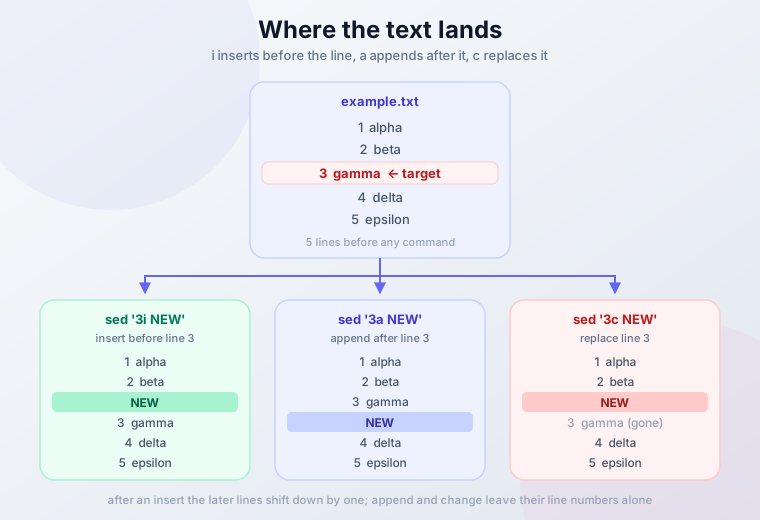
| Command | Position | Example (GNU/BusyBox one-liner) | Notes |
|---|---|---|---|
i |
Before line/pattern | sed '5i text' |
Inserts above; later line numbers shift down |
a |
After line/pattern | sed '5a text' |
Inserts below; existing line numbers stay |
c |
Replaces the line | sed '5c text' |
The matched line is discarded and replaced |
On macOS/BSD sed, write the portable form instead: i\, a\, or c\ followed by a newline and then the text.
Points to remember
- Text is appended after the specified line or pattern
- Use
$ato append at the end of a file - Use
\at line end for multi-line appends - Existing line numbers stay unchanged; new lines land below
Targeting specific positions
sed’s strength is targeting where text should land, using line numbers, ranges, or patterns.
Position-based targeting
Line numbers:
sed '1i\
Header text' filename        # Insert at beginning
sed '5a\
Middle text' filename        # Append after line 5
sed '$a\
Footer text' filename        # Append at end
Line ranges. Note the semantics: a command with a range runs once per line in the range, not once for the whole range:
sed '10,15i\
# Section start' filename    # Inserts before EACH line from 10 to 15
sed '20,$a\
# End section' filename      # Appends after every line from 20 to EOF
If you wanted one insert before line 10 only, address line 10 (10i\), not the range 10,15i. This trips people up regularly.
Pattern-based targeting
Simple patterns:
sed '/TODO/i\
# FIXME: Address this' filename
sed '/^function/a\
# Function definition ends' filename
sed '/^#/a\
# Comment continues' filename
Complex patterns with regular expressions:
sed '/^[0-9]/i\
# Numbered item:' filename              # Before lines starting with digits
sed '/\.log$/a\
# Log entry processed' filename         # After lines ending with .log
sed '/^[[:space:]]*$/i\
# Empty line above' filename            # Before blank lines
Mixed regex work (identifier shapes, email patterns):
sed '/^[A-Z][a-z]*[0-9]\{2,4\}/i\
# Code identifier found' data.txt

sed '/[a-zA-Z0-9._%+-]\+@[a-zA-Z0-9.-]\+\.[a-zA-Z]\{2,\}/a\
# Email processed' contacts.txt
For text manipulation that goes beyond insert/append, like replacing matches or restructuring lines, the sed search and replace guide covers the s command properly.
Practical use cases
Configuration files:
# Add database configuration
sed '/^# Database/a \
host=localhost\
port=5432\
user=admin' config.ini

# Insert security headers
sed '/^server {/a \
    add_header X-Frame-Options SAMEORIGIN;\
    add_header X-Content-Type-Options nosniff;' nginx.conf
Code files:
# Add function documentation
sed '/^def /i\
# Function: Performs calculation' script.py

# Insert debugging statements
sed '/^if /a\
print("Debug: Condition checked")' debug.py
Data processing:
# Add CSV headers
sed '1i\
Name,Age,Email' data.csv

# Insert separators
sed '/^---/i\
# Section divider' document.txt
Advanced targeting techniques
Conditional insertion (block form):
sed '/config_section/{
i\
# Configuration starts here
}' filename
Inside blocks, stick to the i\ + newline form. It behaves the same on GNU sed and BSD sed.
Multiple operations (insert + append around the same match):
sed '/important_line/{
i\
# Important section begins
a\
# Important section ends
}' filename
Using variables for dynamic content:
section_name="Database Configuration"
sed "/^# $section_name/a\\
host=localhost" config.ini
One GNU-specific detail: as a GNU extension, i and a accept two addresses (a range in a single command). POSIX sed accepts only one. Keep scripts to one address if BSD/macOS has to run them.
Safety and testing
Preview changes first (always):
sed '/pattern/i\
NEW TEXT' filename
sed '/pattern/i\
NEW TEXT' filename | head
Show line numbers for context:
nl -ba filename | sed '/pattern/i\
NEW TEXT'
Post-edit verification (diff, grep, line counts) lives in the “Verify your edit” section. Do that after any in-place run.
Safe in-place editing (GNU vs BSD sed)
GNU sed (most Linux):
sed -i.bak '/pattern/i\
NEW TEXT' filename
BSD sed (macOS):
sed -i '.bak' '/pattern/i\
NEW TEXT' filename
Both create filename.bak so you can revert. The suffix is the only difference: GNU takes -i.bak as one word, BSD wants -i '.bak' (and -i '' if you truly want no backup, which I would not).
Portable in-place edit that preserves inode, mode, ownership, and hard links:
tmp="$(mktemp)"
sed '/pattern/i\
NEW TEXT' filename > "$tmp" && cat "$tmp" > filename && rm -f "$tmp"
This writes the result to a temp file, then copies the bytes over the original with cat >. The original file object is never replaced, so hard links and permissions survive. The simpler mv "$tmp" filename version also works, but the renamed file picks up mktemp’s 0600 mode and your ownership. Fine for throwaway files, wrong for anything shared. The inode story is in the gotchas section.
Rollback
With -i.bak or a .bak suffix, mv filename.bak filename reverts the edit completely. Without a backup file, undo means re-running the inverse edit or restoring from your own backup.
Gotchas: empty files, multiple files, and hard links
These are the failure modes that do not show up in most sed tutorials. Each one produces a “but the command ran fine” situation, which is exactly what makes them expensive in scripts.
Empty files: 1i and $a are silent no-ops
On an empty input file, 1i and $a do nothing. sed never starts a cycle, so the queued insert/append text is never printed. Exit code is 0. No warning. Verified on both GNU sed and BusyBox sed.
The GNU manual describes i/a text as queued “at the end of the current cycle, or when the next input line is read”. Empty file means no line, no cycle, no output.
Empty file? sed will do nothing
If you run sed '1i Header' empty.txt and the file stays empty, sed is not broken. This is expected behavior. Use a shell approach instead.
Empty-file-safe alternatives:
# Prepend a header (works on empty files too)
printf 'Header line\n' | cat - file.txt > out && cat out > file.txt && rm out

# Append a footer
echo 'Footer line' >> file.txt
Multiple files: one stream vs -s vs -i
Without -i, passing several files makes sed treat them as one continuous stream. So this:
sed '$a END' f1 f2appends END only after the last line of f2, not after each file. If you expected a footer in every file, you got one footer at the very end and a confusing result.
Your options:
sed -s '$a END' f1 f2       # GNU only: END after each file, on stdout
sed -i '$a END' f1 f2       # works per-file: -i implies -s in GNU sed
The GNU manual states it plainly: the in-place option implies -s. That is why sed -i '1i Header' *.txt puts a header in each file.
BSD sed has no -s, so the portable per-file answer is a loop:
for f in *.txt; do
  sed '$a END' "$f" > "$f.tmp" && cat "$f.tmp" > "$f"
  rm -f "$f.tmp"
done
Inodes, hard links, and permissions
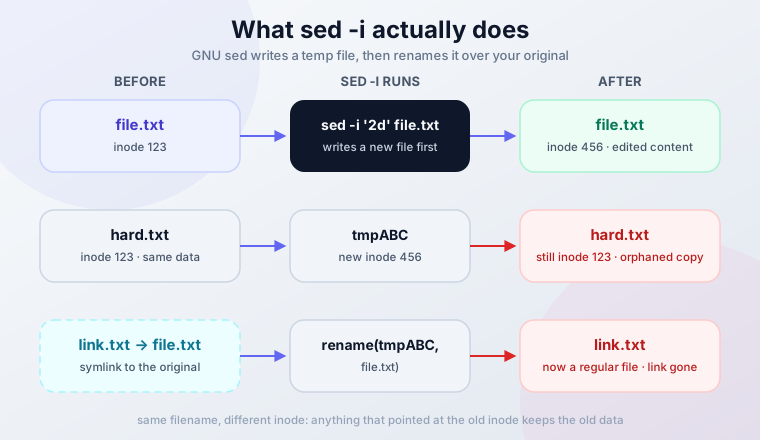
sed -i does not edit your file. It writes a temp file and renames it over the original. The path stays the same; the inode does not.
Consequences:
- Hard links go stale. A hard-linked sibling path keeps pointing at the old inode with the old content. Verified: after
sed -i, the hard link still showed the original text. - Symlinks get replaced. Without
--follow-symlinks, the symlink itself is overwritten with a regular file. - Mode is preserved. A
600file stayed600after-iin testing. Ownership is generally preserved too, but verify on your system if you runsed -iundersudoon files owned by another user. That combination is the one worth checking rather than assuming.
If you need the inode to survive (shared files, hard links, weird permissions), use the cat > recipe from the “Safe in-place editing” section instead of -i.
For symlinked /etc files, GNU sed has --follow-symlinks (only valid with -i). sed 4.10 fixed a TOCTOU symlink race in that flag, which is a good reason to be on a current release.
Trailing newline edge case
If a file’s last line has no trailing newline, sed '$a appended' still works on GNU sed: it adds the newline to the old last line and appends normally. BSD sed is reported to behave differently. Verify before relying on this on macOS.
Where it matters: byte-sensitive files such as generated assets or certain /etc configs where a missing final newline is meaningful. Check with tail -c 1 file | xxd if you are unsure.
Exit codes and idempotent config edits
sed exits 0 whether or not anything matched. Your script cannot use $? to ask “did the insert happen?”. For one-shot provisioning this is fine. For anything that runs twice (cron, config management, re-runnable setup scripts) you need a guard, or the line lands twice:
grep -qxF 'export EDITOR=vim' ~/.bashrc || echo 'export EDITOR=vim' >> ~/.bashrc

grep -q '^PermitRootLogin' /etc/ssh/sshd_config || \
  sed -i '/^#PermitRootLogin/a\
PermitRootLogin no' /etc/ssh/sshd_config
The second example is the standard “uncomment a hardening default exactly once” pattern. If you are editing sshd_config on remote hosts through a jumphost, the SSH ProxyJump setup is worth having first so you do not lock yourself out testing.
One ops note: at fleet scale, do not hand-roll these guards. Ansible’s lineinfile and blockinfile modules exist for exactly this job: idempotency, check mode, and rollback are already solved there. sed is the right tool for a box you are on right now; a config management tool is the right tool for a thousand boxes.
Failure modes quick table
| Symptom | Cause | Fix |
|---|---|---|
| Command ran, exit 0, file unchanged | Empty input file, no sed cycle ran | printf 'Header\n' | cat - file or echo >> file |
| Footer only appeared in the last file | Multiple files = one stream without -s |
Use sed -i (implies -s) or loop per file |
Hard link still shows old content after -i |
Temp file + rename, new inode | Use the cat > in-place recipe |
| Line appears twice after re-running a script | sed exits 0 regardless of matches | grep -q guard before editing |
sed: command i expects \ followed by text |
BSD/macOS sed rejected the one-liner | Use i\ + newline form |
r command produced nothing |
Missing or unreadable file, silently empty | Check the path, then grep -n after |
Verify your edit
Editing config files blind is how you get a service that will not start on the next reboot. Three one-liners catch almost everything.
Post-edit checks
sed -i.bak '/pattern/i\
NEW TEXT' file && diff file.bak file    # review exactly what changed
grep -n 'NEW TEXT' file                 # confirm it landed (and landed once)
wc -l file.bak file                     # line-count sanity
If the diff is wrong, mv file.bak file puts you back. If you need to compare whole trees after a bulk edit, see compare files and folders from the terminal for the recursive version of this.
- Diff reviewed: the only changes are the lines you intended
grep -nfinds exactly one occurrence per target (not zero, not two)- Line count moved by the expected amount
- Service reloaded or config validated if the file feeds one (
nginx -t,sshd -t,systemctl reload ...) - Only then delete the
.bak
Trace execution with sed –debug
GNU sed 4.6 and later has --debug, which prints the compiled program and traces every cycle. It is the fastest way to see why an address did not match:
$ printf 'x\n' | sed --debug '1a hello'
SED PROGRAM:
  1 a\hello
INPUT:   'STDIN' line 1
PATTERN: x
COMMAND: 1 a\hello
END-OF-CYCLE:
x
hello
You get the program as sed parsed it (useful when you suspect a quoting mistake), the line it is on, and the pattern space at each step. sed 4.10 fixed a crash in --debug itself, so keep current if you lean on it.
--debug is GNU-only. It does not exist in BSD/macOS sed or BusyBox sed.
Advanced insert and append techniques
Once the basics are solid, these patterns handle the messier jobs.
Conditional text addition
Insert before lines matching a condition:
# Insert a warning before error lines
sed '/ERROR/i\
*** WARNING: Critical error detected ***' logfile.txt

# Append configuration after specific sections
sed '/^# Network settings/a \
interface=eth0\
dhcp=true' config.txt
Multiple condition matching:
# Insert before lines starting with date patterns
sed '/^[0-9]\{4\}-[0-9]\{2\}-[0-9]\{2\}/i\
Date entry:' dates.txt

# Append after lines containing both keywords
sed '/database.*config/a\
# Database configuration processed' app.conf
Multi-line text blocks
Insert complex configuration blocks:
sed '/^# SSL Configuration/i \
# SSL Certificate Setup\
ssl_certificate /path/to/cert.pem;\
ssl_certificate_key /path/to/key.pem;\
ssl_protocols TLSv1.2 TLSv1.3;' nginx.conf
Append structured data:
sed '/^{$/a \
    "name": "default",\
    "version": "1.0",\
    "active": true' config.json
The earlier sed '$a END' footer is a different job: one line at EOF, not a structured block. For JSON or YAML blocks of any real size, prefer jq or yq. Escaping multi-line structured data through sed quoting gets fragile fast.
Dynamic content insertion
Using variables and command substitution:
# Insert timestamp
current_time=$(date)
sed "1i\
Generated on: $current_time" report.txt

# Append system information
sed "\$a\
System: $(uname -s), User: $(whoami)" logfile.txt
Insert file contents with r
The r command reads another file into the output after the matched line:
# Insert entire file content
sed '/INCLUDE_POINT/r include.txt' main.txt

# Combine with text insertion
sed '/HEADER/{
i\
# Configuration file begins
r config_template.txt
a\
# Configuration file ends
}' main.conf
sed r fails silently
If the filename cannot be read, GNU sed treats it as an empty file with no error indication. A typo’d path produces unchanged output and exit code 0, indistinguishable from success. Always grep -n after using r to confirm the content landed.
POSIX also specifies that the file is read “as of the time the output is written”, not when the r command executes. For sed’s normal single-pass output that rarely matters, but do not assume the content is snapshotted at match time.
Pattern range operations
# Insert text before each line in a range
sed '10,20i\
# Line in middle section' filename

# Append after each line in a pattern-delimited range
sed '/START/,/END/a\
# Block processed' filename
Remember the range semantics from earlier: the command fires for every line in the range, not once at the start of it.
Advanced scripting techniques
Multiple operations in sequence:
sed -e '/function/i\
# Function definition' \
    -e '/function/a\
# Function body starts' \
    -e '/return/i\
# Function ends' \
    -e '/return/a\
# Return statement processed' script.py
Using sed scripts for complex operations. Create modify.sed:
/^# Database/i\
# Database Configuration Section
/^# Database/a\
host=localhost
/^# Database/a\
port=5432
/^# Security/i\
# Security Settings Section
/^# Security/a\
enable_ssl=true
The i\/a\ + newline style is what you want in script files. It avoids the edge cases that vary between sed implementations.
Run it with:
sed -f modify.sed config.ini-f is the right move once a sed program grows past what you can read on one line. Check the script in with the code it modifies.
Practical advanced examples
Log file processing:
now="$(date)"
sed -e '/ERROR/i\
=== ERROR DETECTED ===' \
    -e "/ERROR/a\
Timestamp: $now" \
    -e '/WARN/i\
--- Warning ---' application.log
HTML head injection:
sed -e '1i\
<!DOCTYPE html>' \
    -e '/<head>/a\
<meta charset="UTF-8">' \
    -e '/<head>/a\
<meta name="viewport" content="width=device-width, initial-scale=1.0">' index.html
GNU-only flags worth knowing
Four flags that earn their keep in operator scripts (all GNU sed):
--sandbox: rejects thee,w, andrcommands. Run untrusted sed scripts with it.--follow-symlinks: only with-i; edits through symlinks instead of replacing them. Needed for symlinked/etcfiles. sed 4.10 fixed a TOCTOU race in this flag.-z/--null-data: NUL-delimited mode, pairs withfind -print0pipelines on filenames with spaces.-E: extended regex, now POSIX-standard as of Issue 8 (2024). Prefer it over-rin anything new.
When NOT to use sed
Honest boundaries, from someone who has cleaned up clever sed scripts:
- Appending a line at EOF.
echo 'line' >> fileis simpler, atomic via O_APPEND, and works on empty files.sed '$a'adds nothing there and is harder to read. - Repeated idempotent config edits across machines. A grep-guarded sed one-liner works on one box. On a fleet, Ansible
lineinfile/blockinfilegives you idempotency, dry-run, and diffs for free. - Large or structured blocks (JSON, YAML, HTML fragments).
jq,yq, or a real templating tool beat escaping quotes and backslashes through sed quoting. If the insert is longer than three lines and anything in it is quoted, reconsider.
Conclusion
sed insert (i) and sed append (a) are small commands that do one job well: put text at an exact position. The portable i\ + newline form runs everywhere including macOS, 1i and $a silently no-op on empty files, and sed -i replaces your file behind the scenes. Preview on stdout, keep the .bak, verify with diff.
- Use
i\+ newline for any script that must run on macOS or BSD 1iand$ado nothing on empty files. Usecat -or>>theresed -ireplaces the file (inode changes, hard links go stale)- sed exits 0 whether or not it matched. Guard with
grep -qfor idempotent scripts - Verify with
diff file.bak fileandgrep -nbefore deleting the backup
More sed commands worth knowing:
- Delete lines with sed to remove unwanted content
- Change text case with sed to standardize capitalization
- Sed search and replace for pattern-based substitution
Quick reference guide
Common insert commands
# Insert at specific positions
sed '1i\
Header text' file.txt            # Before first line
sed '5i\
Middle text' file.txt            # Before line 5
sed '/pattern/i\
Before text' file.txt            # Before matching lines

# Multi-line insert (portable)
sed '1i\
Line 1\
Line 2\
Line 3' file.txt

# One-liner: GNU/BusyBox only, fails on macOS
sed '1i Header text' file.txt
Common append commands
# Append at specific positions
sed '5a\
After text' file.txt             # After line 5
sed '$a\
Footer text' file.txt            # After last line
sed '/pattern/a\
After text' file.txt             # After matching lines

# Multi-line append (portable)
sed '$a\
Footer line 1\
Footer line 2\
Footer line 3' file.txt

# Change/replace a line
sed '5c\
Replacement text' file.txt
Frequently asked questions
What's the difference between insert and append (and change)?
Insert (i) adds text before the target line or match. Append (a) adds text after it. Change (c) discards the target line and replaces it with the new text. After an insert, later line numbers shift down; append and change leave them alone.
How do I add multi-line text?
Use the portable backslash form with a newline after the command letter:
sed '1i\
Line 1\
Line 2' file.txt
This works on GNU sed, BusyBox sed, and BSD/macOS sed.
Can I insert variables in the text?
Yes. Use double quotes so the shell expands them, and prefer the i\ + newline form for safety:
sed "1i\\
Current date: $(date)" file.txt
How do I make changes permanent?
Use in-place editing with a backup suffix:
# GNU sed (Linux)
sed -i.bak '1i\
Header' file.txt

# BSD sed (macOS)
sed -i '.bak' '1i\
Header' file.txt
You may see '1i\'$'\n''Header' in older answers. That is bash/zsh ANSI-C quoting, and it does not work in dash or plain sh. See how bash, Zsh, and fish differ for why. If you want to avoid the -i flag differences entirely, use the portable temp-file recipe from “Safe in-place editing”.
What happens to line numbers after insertion?
Insert: line numbers below the insert point shift down by one per inserted line. Append: existing line numbers stay the same, new lines appear below. Change: line count is unchanged unless the replacement is multi-line.
Can I insert/append to multiple files at once?
With -i, yes: sed -i '1i Header' *.txt (GNU/BusyBox form) puts the header in each file, because GNU sed -i implies -s (separate streams per file). Without -i, sed '$a END' f1 f2 treats the files as one stream and appends only after the last file. -s itself is GNU-only. The portable answer is a per-file loop. See the “Multiple files” gotcha above.
Why does sed do nothing on an empty file?
1i and $a are silent no-ops on empty input: sed never runs a cycle, so the queued text is never written. Exit code 0, no error. Prepend with printf 'Header\n' | cat - file.txt and append with echo 'Footer' >> file.txt instead.
How do I know my edit happened? Why did my script insert the line twice?
sed exits 0 whether or not the address matched, so $? tells you nothing about whether text was inserted. Check with grep -n 'NEW TEXT' file. For scripts that run more than once, guard the edit:
grep -q '^PermitRootLogin' /etc/ssh/sshd_config || \
  sed -i '/^#PermitRootLogin/a\
PermitRootLogin no' /etc/ssh/sshd_config
Why didn't sed 'r file' insert anything?
If the filename is missing or unreadable, GNU sed treats it as an empty file without any error indication. The command “succeeds” and inserts nothing. Verify the path exists first, and grep -n the output after.
Why does my hard link still show old content after sed -i?
sed -i writes a temp file and renames it over your path. The inode changes, so hard-linked sibling paths keep pointing at the old, unedited inode. Symlinks get replaced by regular files unless you pass --follow-symlinks. To preserve inodes and hard links, copy the new content over the original instead of renaming: sed ... file > tmp && cat tmp > file.
Does all of this work on macOS and in Alpine Docker images?
The portable i\ + newline form works on macOS (BSD sed), Linux (GNU sed), and Alpine images (BusyBox sed). The one-line i text form works on GNU and BusyBox but fails on macOS. In-place editing syntax differs (-i vs -i ''). Check “Which sed are you running?” at the top for the full comparison.