Zoxide Tutorial: Smarter Terminal Navigation (2026)
Zoxide tutorial: install and set up the smarter cd command for Bash, Zsh, Fish and more. Learn z, zi, and zoxide commands to jump between directories fast.

21 min read

Zoxide replaces cd with a jump command that learns which directories you use. This zoxide tutorial covers v0.10.0 (released 2026-07-04): how to install it, the one zoxide init line for your shell, and the z and zi commands that make terminal navigation faster. It also fixes the commands older tutorials get wrong. The interactive picker is zi, not z -i. Listing is zoxide query -l, not z -l. And zoxide import no longer takes --from. Everything below is written so you can run it tonight and verify each step.
The problem with cd
cd is one of the essential Linux commands you type all day, and it works fine until your directory tree gets deep. Then you start retyping long paths, tab-completing three levels, or keeping a second terminal open just to avoid going back. The command is not the problem. Having to remember and type exact paths is.
A smarter cd alternative exists. It takes about five minutes to set up and costs nothing.
What is Zoxide?

Zoxide is a command-line tool that replaces cd for directory navigation. It’s inspired by tools like z and autojump, written in Rust, MIT licensed, and sitting at roughly 40,000 GitHub stars as of 2026-10-07. It runs on Linux, macOS, Windows, and BSD, and it supports Bash, Zsh, Fish, PowerShell, Nushell (v0.106.0+), Elvish (v0.18.0+), Tcsh, Xonsh, and any POSIX shell (ksh included, via zoxide init posix).
Zoxide is a directory tracker. A shell hook records the directories you visit and assigns each one a “frecency” score, a blend of frequency and recency. The more often and the more recently you visit a directory, the higher it ranks in the database.
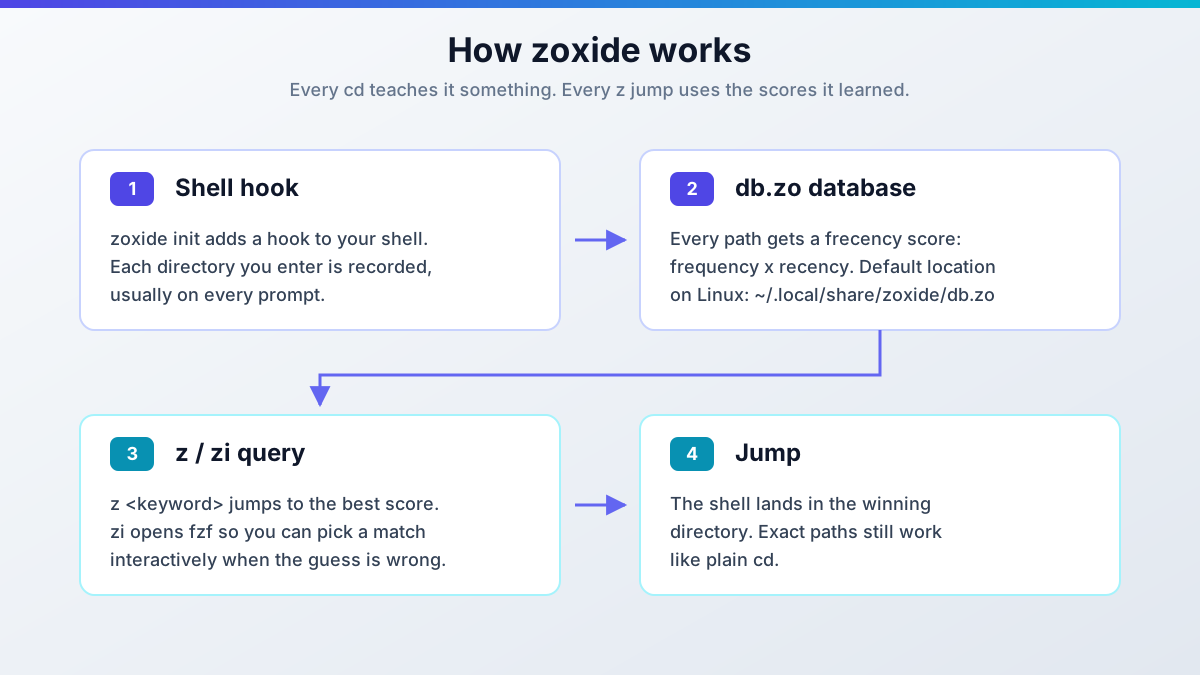
The database is small and local, but it is reusable. File managers such as yazi, lf, nnn, ranger, felix, and superfile read it natively, Neovim users get it through telescope-zoxide and zoxide.vim, and tmux session pickers like tmux-sessionx, sesh, and zesh jump straight to your scored directories. That’s the sign of a tool that stuck: other tools build on its data. It also slots into whatever terminal you already run. See my Ghostty terminal setup guide if your dotfiles are due for a refresh, or Integrating Wezterm, Zoxide, and Tmux for the Perfect Mac Terminal for a full Mac stack.
How Zoxide differs from cd
Unlike cd, zoxide learns from your behavior. It doesn’t need exact path names. It predicts where you want to go from partial inputs and your usage history. Type z proj instead of cd /home/user/code/work/clients/acme/project-api, and if project-api is the directory that matches “proj” most often and most recently, that’s where you land.
Benefits of Zoxide
The advantages are real but small: one short command to any directory, partial keywords instead of full paths, and no mental map of deep trees to maintain.
| What you get | cd Command |
zoxide |
|---|---|---|
| Path input | Exact path | Partial keyword |
| Learns from usage | No | Yes (frecency) |
| Setup | Nothing | One init line |
| Extra data kept | None | Local db.zo |
Zero cost, zero cloud
Zoxide is free, MIT licensed, and fully local. No account, no daemon, no telemetry, no API key. It’s a zero-cost addition to any workstation or VPS. Handy when you live in SSH sessions on a cheap box like Hetzner Cloud (the EUR 4-5/mo class is plenty). The only real cost is the minute it takes to add the init line.
How to install Zoxide
Installing zoxide takes a few minutes end to end: install the binary, add one init line to your shell config, then verify with a test jump.
What you need:
- Linux, macOS, Windows, or BSD. Zoxide ships prebuilt binaries for all of them
- One supported shell: Bash, Zsh, Fish, PowerShell, Nushell (v0.106.0+), Elvish (v0.18.0+), Tcsh, Xonsh, or any POSIX shell
- fzf v0.51.0+ if you want
zi,zoxide edit, and Space-Tab completions (current fzf is v0.74.4, released 2026-09-12) - About 5 minutes, and a new shell session to test in
Install fzf alongside zoxide if you want the interactive picker. On macOS that’s brew install fzf; on Linux, use your distro package or the fzf release binaries. The minimum supported fzf version is v0.51.0.
Skip apt on Debian/Ubuntu
Do not sudo apt install zoxide on Debian or Ubuntu. The official README strikes those distros for a reason: their packages update very slowly. Ubuntu 24.04 (noble) still ships zoxide 0.9.3-1 as of 2026-10-07: no startup doctor, no Tcsh support, no 0.9.8 database-corruption fix, nothing from 0.10.0. Ubuntu 25.10 ships 0.9.7-1, still two minor versions behind. Use the install script below.
Installation instructions
| Operating System | Shell | Installation Command |
|---|---|---|
| macOS | bash/zsh | brew install zoxide |
| Linux (Debian/Ubuntu) | any | curl -sSfL https://raw.githubusercontent.com/ajeetdsouza/zoxide/main/install.sh | sh |
| Linux (Arch) | bash/zsh | sudo pacman -S zoxide |
| Windows | PowerShell | winget install ajeetdsouza.zoxide |
| Any | Any | curl -sSfL https://raw.githubusercontent.com/ajeetdsouza/zoxide/main/install.sh | sh |
On Windows, scoop install zoxide and choco install zoxide still work if you already use those managers. winget is just the first recommendation in the README now. To build from source: cargo install zoxide --locked.
After install, check the version before going further:
zoxide --versionExpect zoxide 0.10.x. If you see 0.9.3 or 0.9.7, you got the distro package. Remove it and rerun the install script.
Add Zoxide to your shell (zoxide init)
The init line must go at the very end of your shell’s rc file. The startup doctor checks hook placement, and putting zoxide last is what makes it see every directory change. Pick your shell:
Bash
Add to the end of ~/.bashrc:
eval "$(zoxide init bash)"Zsh
Add to the end of ~/.zshrc:
eval "$(zoxide init zsh)"Zoxide works out of the box with Oh My Zsh. Just add the init line. If you’re building out a Zsh setup, see the best Oh My Zsh plugins for what else is worth enabling in 2026.
Fish
Add to ~/.config/fish/config.fish:
zoxide init fish | sourceOther shells
PowerShell, end of $profile:
Invoke-Expression (& { (zoxide init powershell | Out-String) })Nushell (minimum v0.106.0 as of zoxide 0.10.0), then source it in your config:
zoxide init nushell | save -f ~/.zoxide.nuTcsh (~/.tcshrc), two lines instead of an eval one-liner:
zoxide init tcsh > ~/.zoxide.tcsh
source ~/.zoxide.tcsh
Xonsh (~/.xonshrc):
execx($(zoxide init xonsh), 'exec', __xonsh__.ctx, filename='zoxide')Any POSIX shell (dash, ksh):
eval "$(zoxide init posix --hook prompt)"That’s the whole configuration. The database starts empty and fills in as you cd around. Expect the first day or two to feel unremarkable. Zoxide has nothing to rank yet. After that the jumps get noticeably better.
Verifying the installation
Open a new shell first (init lines don’t affect the session you added them in), then run this:
zoxide --version        # expect 0.10.x
type z                  # z is a shell function after init, which proves the hook loaded
mkdir -p ~/tmp/demo && cd ~/tmp/demo
cd ~ && z demo          # should land back in ~/tmp/demo
zoxide query -l         # the entry appears, sorted by frecency
pwd                     # confirm you are in ~/tmp/demo
If type z reports “not found”, the init line isn’t being sourced. Check it’s at the end of the right rc file and that you opened a new shell. If z demo prints zoxide: no match found, walk one cd into the directory first so it gets recorded, then retry.
Verified on zoxide 0.10.0
These exact commands were run against the 0.10.0 binary on 2026-10-07. type z returns a shell function, z demo jumps to a freshly visited directory, and zoxide query -l lists it. Zsh users: if completions misbehave after install, rm ~/.zcompdump* and rerun compinit.
Using Zoxide
Once zoxide is installed and configured, the day-to-day surface is small: z, zi, and a handful of zoxide subcommands.
Jumping with z
The primary command is z. It jumps to a directory using only part of the path. If you frequently visit /home/user/projects/my_project:
z my_projectzoxide takes you there, assuming my_project scores highest for that keyword.
It’s smarter than a plain name match. Suppose you have two directories:
/home/user/projects/my_project/home/user/documents/my_project_report
If you’ve been working mostly in the projects directory, z my_project goes there. If you start working more in the report directory, z my_project will usually start favoring it instead, because frecency tracks what you did recently.
One behavior worth knowing: if the query is an exact, cd-able path, the z wrapper just cds there and skips the database entirely. z ~/tmp/demo is a plain cd, not a search.
Interactive selection with zi (fzf)
When you’re not sure which directory you want, or several match, use zi. It opens fzf on the matching directories and jumps to whatever you pick.
zi projThere is no z -i
Older tutorials show z -i for interactive mode. That command does not exist. z -i passes -i to the search as a keyword, so you get zoxide: no match found. The interactive command is zi, a wrapper for zoxide query --interactive. Same story for z -l: use zoxide query -l.
zi needs fzf v0.51.0 or newer. Tune the picker with _ZO_FZF_OPTS. In Fish, Space-Tab completions (new in 0.10.0) display and run the selected command. If you use Fish and want interactive selection built into the shell itself, see Fish Shell autocomplete and suggestions. One caveat: the Warp terminal doesn’t support zoxide’s Space-Tab completions. Warp ships its own completion system.
Zoxide command reference
This is the corrected table. The old z -l / z -i rows you’ll find on other sites are wrong.
| Command | Description |
|---|---|
z <query> |
Jump to the highest-frecency directory matching the query |
zi <query> |
Interactively select a directory with fzf (requires fzf) |
zoxide query -l |
List all matching directories, sorted by frecency |
zoxide query -s |
Print the frecency score alongside each result |
zoxide query --base-dir <path> |
Restrict the search to one directory tree |
zoxide query --exclude <path> |
Exclude a path from the match |
zoxide remove <path> |
Remove a directory from the database |
zoxide remove -i |
Interactively pick entries to remove |
zoxide edit |
Interactive fzf-based database editor (requires fzf) |
zoxide edit is not a score-tweaking CLI flag. It opens fzf on the database so you can prune entries interactively. If fzf isn’t installed, it errors out with zoxide: could not find fzf, is it installed?.
Tips for mastery
- Use
zoxide query -l(notz -l) to see wherezmight take you, sorted by frecency. - Use
zoxide query -swhen you want to see why a directory ranks where it does. - Exclude noisy trees with
_ZO_EXCLUDE_DIRSso they never become jump targets. - Prune stale entries with
zoxide edit(orzoxide remove -iif you prefer picking from a list). - Pair with fzf v0.51.0+ for
ziand Space-Tab completions.
About zoxide doctor
zoxide doctor is not a subcommand. Running it prints error: unrecognized subcommand 'doctor'. The doctor is a shell function that zoxide init defines, and it runs automatically at your first prompt (Bash and Zsh since v0.9.7, POSIX shells since v0.9.8). If your init line isn’t at the end of your rc file, it warns: “Please ensure that zoxide is initialized right at the end of your shell configuration file (usually ~/.bashrc). Disable this message by setting _ZO_DOCTOR=0.” Fix the placement, or take the hint and set _ZO_DOCTOR=0.
Coming from z, Autojump, or Atuin (zoxide import)
If another jump tool already built up a history, don’t throw it away. zoxide import pulls databases from the usual suspects:
zoxide import z          # from z.sh
zoxide import zsh-z      # zsh-z support, new in 0.10.0
zoxide import autojump
zoxide import fasd
zoxide import z.lua
zoxide import atuin      # new in 0.10.0, pulls directories out of atuin shell history
zoxide import z --merge  # merge into the existing db instead of replacing
Database files are auto-detected. Since 0.10.0 the import also respects _ZO_EXCLUDE_DIRS, so excluded trees stay excluded.
Breaking syntax change in 0.10.0
zoxide import now takes a subcommand, not a --from flag. The old zoxide import --from z is gone. If you have old snippets in your dotfiles or bootstrap scripts, update them to zoxide import z before you upgrade.
Configuring Zoxide (environment variables and custom commands)
Everything tunable lives in _ZO_* environment variables and zoxide init flags. Set the variables in the same rc file, above the init line.
| Variable | Default | Effect |
|---|---|---|
_ZO_DATA_DIR |
Linux/BSD: $XDG_DATA_HOME/zoxide or ~/.local/share/zoxide; macOS: ~/Library/Application Support/zoxide; Windows: %LOCALAPPDATA%\zoxide |
Where the database lives |
_ZO_EXCLUDE_DIRS |
$HOME |
Glob list of directories to never rank (:-separated on Linux/macOS) |
_ZO_MAXAGE |
10000 |
Aging cap on database entries |
_ZO_RESOLVE_SYMLINKS |
off | Store canonical paths instead of symlinked ones (works on Windows since 0.10.0) |
_ZO_ECHO |
off | Print the matched directory before jumping |
_ZO_FZF_OPTS |
none | Extra fzf options for zi |
_ZO_DOCTOR |
1 |
Set 0 to silence the startup doctor |
Two of these surprise people. _ZO_EXCLUDE_DIRS defaults to $HOME: home itself is never a jump target, which is intentional (you don’t need a fuzzy tool to get to ~). And on Linux/macOS the exclude list is :-separated, not space-separated.
For the command names themselves, zoxide init takes flags:
--cmd j: rename the commands (j/jiinstead ofz/zi)--cmd cd: replacecdentirely--no-cmd: define your own functions from__zoxide_zand__zoxide_zi--hook pwd(default) /--hook prompt/--hook none: when the database gets updated (on every directory change, once per prompt, or never, with manualzoxide addonly)
Example, a j/ji setup on Bash:
eval "$(zoxide init bash --cmd j)"Zoxide database location and backup
On Linux the database is a single file: ~/.local/share/zoxide/db.zo. It’s tiny. A few entries is a handful of bytes, and even years of use stays in the low KB. There’s no service, no lock file to babysit, nothing to migrate except that one file.
Backup tip
Add db.zo to whatever you already use for dotfiles or backups: a git repo, restic, or an S3 sync job. Copying the file to a new machine carries your frecency history with you, so z works on day one instead of relearning for a week.
Per-OS defaults (override with _ZO_DATA_DIR if you want everything under ~/.config):
| OS | Default location |
|---|---|
| Linux / BSD | ~/.local/share/zoxide/db.zo (or $XDG_DATA_HOME/zoxide) |
| macOS | ~/Library/Application Support/zoxide/db.zo |
| Windows | %LOCALAPPDATA%\zoxide\db.zo |
One version note worth knowing: before v0.9.8 (2025-05-26), zoxide could corrupt its database if the filesystem was 100% full. That’s fixed. It’s also the practical argument against running Ubuntu 24.04’s 0.9.3 package on anything you care about.
Troubleshooting Zoxide
zoxide: no match found means the database is empty (learning phase) or your keyword never matched. Check zoxide query -l to see what’s recorded. Remember that exact paths bypass the database by design, _ZO_EXCLUDE_DIRS defaults to $HOME, and _ZO_MAXAGE (10000) ages old entries out.
zoxide: could not find fzf means zi, zoxide edit, and Space-Tab completions all lack their dependency. Install fzf v0.51.0+ and make sure it’s on your PATH.
A doctor warning at every prompt means your init line isn’t the last thing in your rc file. Move it to the end. If you know what you’re doing and want silence: _ZO_DOCTOR=0.
Zsh completions acting up is usually a stale compdump. rm ~/.zcompdump* then start a new shell (or rerun compinit).
Space-Tab completions in the Warp terminal are unsupported; Warp runs its own completion system. z and zi still work.
Symlinked directories behaving oddly should stop after v0.10.0, which fixed relative-path handling through symlinks. If you want canonical paths in the database, set _ZO_RESOLVE_SYMLINKS=1.
zoxide import --from z failing is expected: the --from flag was removed in 0.10.0. Use zoxide import z.
The Ubuntu package is ancient and there is no nicer way to say it. Remove it and reinstall with the install script.
Rolling back is simple. To drop a bad entry, run zoxide remove <path> or zoxide remove -i. To remove zoxide entirely: delete the init line from your rc file, brew uninstall zoxide (or your platform’s equivalent), and delete the data dir (~/.local/share/zoxide on Linux). Nothing else on the system is touched.
Zoxide and zsh-autocomplete
Pairing zoxide with zsh-autocomplete gives you directory jumping and real-time auto-completion together. zsh-autocomplete is a Zsh plugin that suggests files, directories, and command options as you type, so you memorize less and type less.
zsh-autocomplete is listed as natively supported in zoxide’s own integrations table. No glue code required. zoxide works by default with Oh My Zsh: install it, add the init line at the end of ~/.zshrc, done. For the completion side, follow How to Enable Command Autocomplete in ZSH and you’ll have both working.
Alternatives to Zoxide
zoxide is the default recommendation for a reason, but the alternatives are real and some of them are one-liners away from importing into zoxide later.
z (Jump Around) is the tool that inspired zoxide. It jumps to the most ‘frecent’ directory matching your regexes. Pure shell script, no binary. Maintenance has been quiet for years.
Autojump is an older Python-based jumper using partial names and a self-learning algorithm. It works, but development slowed long ago.
fzf is not a jumper but a fuzzy finder. It solves a different problem (picking from any list), which is why zoxide uses it for zi rather than competing with it.
z.lua is a Lua port focused on speed, with several matching modes. Interesting if you’re already deep in a Lua config stack.
fasd gives quick access to both files and directories, inspired by autojump and v. Largely unmaintained at this point.
zsh-z is a pure-Zsh reimplementation of z, popular with people who want zero dependencies. zoxide can import its database (zoxide import zsh-z).
atuin is a shell history tool, not a jumper, but its data now feeds zoxide directly (zoxide import atuin). Useful if your history already knows where you’ve been.
| Tool | Description | What it does best |
|---|---|---|
| z | Navigate using ‘frecent’ directories with regexes | Regex pattern matching |
| autojump | Jump to frequently visited directories | Self-learning algorithm |
| fzf | Fuzzy finder for files and directories | Customizable search tool |
| z.lua | Fast directory jumping | Speed and flexible matching |
| fasd | Quick access to files and directories | Frequency-based list |
| zsh-z | Pure-Zsh z reimplementation |
Zero dependencies |
| atuin | Shell history with sync | Importable directory data |
My default is zoxide: single static binary, every shell I use is supported, and the database format is useful to other tools. If you refuse to install a binary, zsh-z is the fallback.
FAQ
Is zoxide free?
Yes. zoxide is MIT licensed and completely free. No account, no cloud sync, no telemetry, no paid tier. The database lives in one local file and you can delete it whenever you want.
Can zoxide replace `cd`?
Yes. Run zoxide init --cmd cd and zoxide’s wrapper takes over cd: exact paths behave like normal cd, while partial keywords use the frecency database. See the Configuring section for the flag list.
Does zoxide work with Oh My Zsh and on Windows?
Both yes. Oh My Zsh needs no plugin wiring. Just the eval "$(zoxide init zsh)" line at the end of ~/.zshrc. On Windows, winget install ajeetdsouza.zoxide is the recommended install, and the PowerShell init goes at the end of $profile.
What is `zi`?
zi is zoxide’s interactive command. It runs zoxide query --interactive, which opens fzf on the matching directories so you pick one instead of trusting the top score. It needs fzf v0.51.0+. There is no z -i. That’s a common error in older tutorials.
Conclusion
Zoxide 0.10.0 (released 2026-07-04) makes terminal navigation faster by scoring the directories you use and jumping to them from a partial keyword. The version history is worth knowing when you read other guides: the automatic startup doctor landed in 0.9.7 (2025-02-09), Tcsh support, zoxide add --score, and the database-corruption fix landed in 0.9.8 (2025-05-26), and 0.10.0 added atuin import, $CDPATH handling in z, and RISC-V Linux binaries. It runs on Bash, Zsh, Fish, PowerShell, Nushell (v0.106.0+), Elvish (v0.18.0+), Tcsh, Xonsh, and any POSIX shell.
The setup is three steps: install via the script (or brew/pacman/winget), put the zoxide init line at the very end of your rc file, and verify with type z plus a test jump. Then stop typing long paths.
Zoxide also works with Fish Shell. If you’re interested in trying Fish, check out the best Fish Shell plugins (zoxide is included) or my Fish Shell vs Bash vs Zsh comparison.
Get zoxide on GitHub