Best NAS for Docker & Proxmox Homelabs 2026
The best NAS for Docker containers and Proxmox storage in 2026 — UGREEN DXP4800 Plus, TerraMaster F4-424 Pro, Synology DS925+, plus the DIY mini-PC alternative.

10 min read
This isn’t a generic “best NAS” list — those exist, and PCMag writes them better than I can. This is for homelab people: you want a box that stores files and runs Docker containers, hosts a VM or two, feeds Plex/Jellyfin transcoding, and talks fast to your Proxmox cluster over NFS or iSCSI. That narrows the field to NAS units with real CPUs, enough RAM headroom, and 2.5GbE or better networking.
Affiliate disclosure
Some links on this page are affiliate links. If you buy through them, I earn a small commission at no extra cost to you.
How I picked these
I started with every NAS on Amazon shipping an x86 CPU, 8GB+ RAM (or an upgrade slot), at least one M.2 NVMe bay, and 2.5GbE networking — then cut anything above $1,300 diskless. ARM-only units are out (most VM images and a chunk of container images won’t run), and so are boxes with soldered, non-upgradable RAM under 8GB.
What’s left is a short list. I evaluated each on four things: CPU performance per dollar, RAM ceiling, out-of-box networking speed, and whether the OS lets you run Docker and VMs without hacks. I also weighed the option of skipping a NAS entirely and building a mini PC + DAS — for some homelabs that’s the better call.
Quick picks
| NAS | Price (Sep 21) | CPU | RAM | Bays | Network | Rating | The angle |
|---|---|---|---|---|---|---|---|
| UGREEN DXP2800 | $382.98 | Intel N100 (4C) | 8GB DDR5 | 2 + 2 NVMe | 2.5GbE | 4.5★ (918) | Budget entry — #1 NAS seller on Amazon |
| UGREEN DXP4800 Plus | $657 | Pentium Gold 8505 (5C) | 8GB → 64GB | 4 + 2 NVMe | 10GbE + 2.5GbE | 4.6★ (620) | Best hardware per dollar |
| TerraMaster F4-424 Pro | $730.99 | Core i3-N305 (8C) | 32GB DDR5 | 4 + 2 NVMe | 2x 2.5GbE | 4.2★ (62) | Compute king; flash TrueNAS/Unraid |
| Synology DS925+ | $742.62 | Ryzen V1500B (4C) | 4GB → 32GB | 4 + 2 NVMe | 2x 2.5GbE | 4.2★ (156) | Best software, weakest hardware |
| UGREEN DXP6800 Pro | $1,209.99 | Core i5-1235U (10C) | 8GB + 128GB SSD | 6 + 2 NVMe | 2x 10GbE + 2x TB4 | 4.6★ (89) | Premium — replaces a small server |
| DIY: mini PC + DAS | ~$400 | N150 mini PC + 4-bay DAS | 16–32GB | varies | 2.5GbE | — | Most flexible, most work — see mini PC guide |
All prices are diskless; drives cost extra and often more than the NAS itself.
What actually matters for a Docker/Proxmox NAS
- RAM headroom. Docker containers and a couple of VMs eat RAM faster than CPU. 8GB is the floor; 32GB is comfortable. Non-upgradable RAM (looking at you, soldered models) is a hard stop.
- An NVMe slot for apps. Spinning disks are for bulk storage. Container volumes, databases, and VM disks belong on the M.2 slots every pick here includes.
- 2.5GbE minimum. Containers serving your LAN and Proxmox nodes pulling VM disks over NFS saturate 1GbE instantly. 10GbE future-proofs the link to your main server and the switch everything hangs off.
- x86 CPU. ARM NAS units are cheaper but rule out most VM images and some container images. Every pick below is x86.
- Transcoding. If Jellyfin/Plex lives on the NAS, you want Intel QuickSync — which the Synology’s Ryzen doesn’t have.
1. UGREEN DXP2800 — the $383 entry point

$382.98 (list $439.99, -13%) · 4.5★, 918 reviews · #1 Best Seller in NAS devices
Two bays, Intel N100, 8GB DDR5, a single 2.5GbE port, and two M.2 NVMe slots — which matter more than the bays for this audience: put your container volumes and app databases on NVMe and let the HDDs be pure bulk storage. UGOS supports Docker and VMs, so the whole home-server container stack runs on it.
Where it fits: a first NAS, a Plex/Jellyfin box for a small library, or a dedicated backup target for your Proxmox cluster (a cheap NAS doing one job well is a legitimate architecture). Where it doesn’t: heavy VM duty or anything needing more than ~80TB of raw capacity (two bays × 24TB NAS drives, RAID 1). Two bays also means RAID 1 or nothing — plan your redundancy accordingly.
Check DXP2800 price2. UGREEN NASync DXP4800 Plus — best hardware per dollar
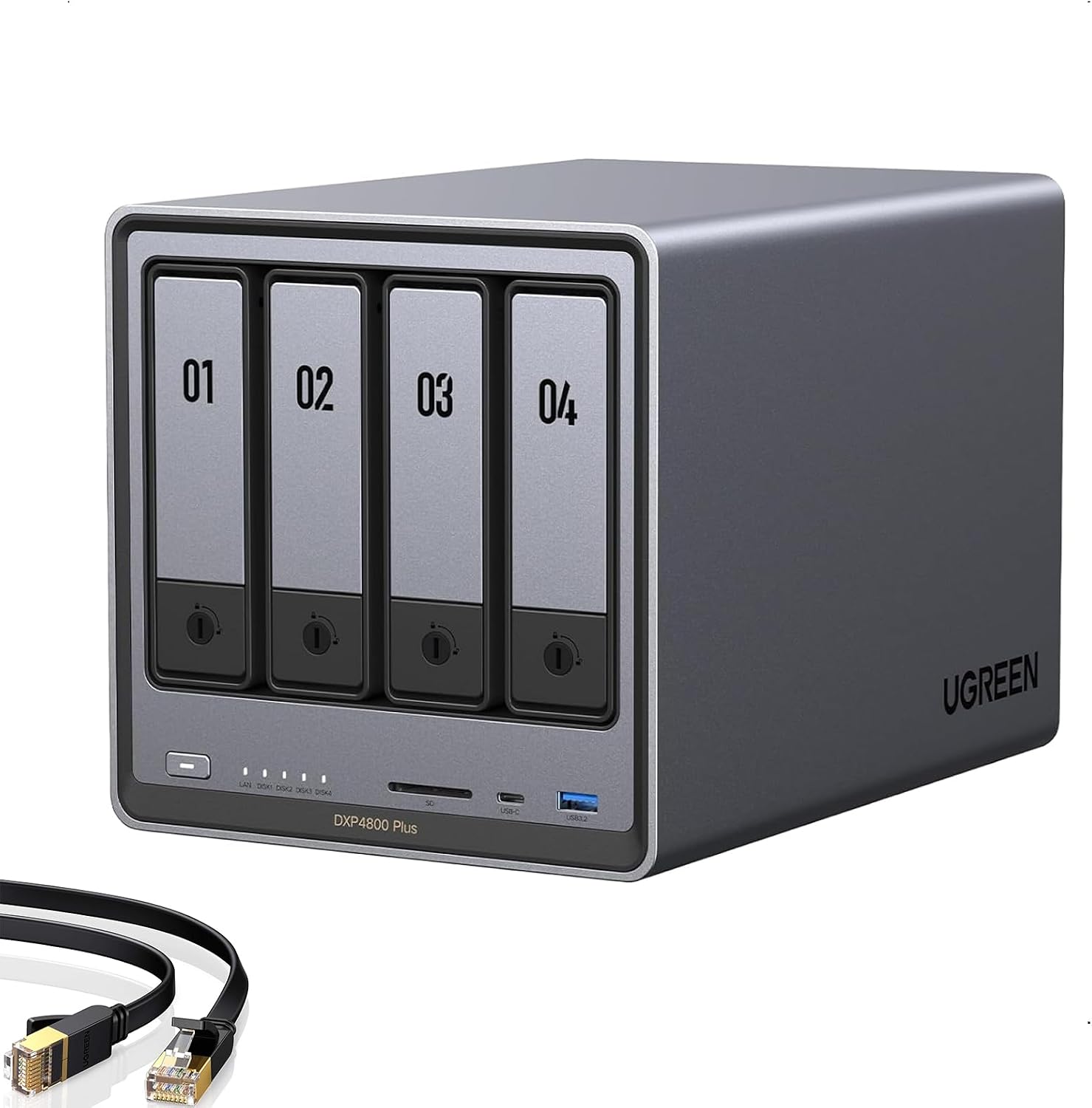
$657 (list $729.99) · 4.6★, 620 reviews · Amazon’s Choice · #4 in NAS Devices
The spec sheet reads like it was designed by r/homelab: Pentium Gold 8505, 10GbE + 2.5GbE onboard, 4 SATA bays + 2 M.2 NVMe slots, DDR5 expandable to 64GB, and hardware transcoding including AV1 decode. Nothing else near $650 ships 10GbE. That’s the gap.
UGOS (UGREEN’s OS) has Docker and VM support built in, and UGREEN officially lets you install TrueNAS, Unraid, or Proxmox instead — no warranty games. The trade-off: UGOS is functional and improving, but it’s younger and rougher than Synology’s DSM. If you plan to run your own OS anyway, that doesn’t matter.
Note: stock was down to one unit at last check; it sells out around deal events.
UGREEN NASync DXP4800 Plus
4-bay NAS with Pentium Gold 8505, 10GbE + 2.5GbE, dual M.2 NVMe slots, and Docker/VM support. The hardware-per-dollar leader for homelab use.
Price & availability at Amazon.com
Key Features
- 10GbE + 2.5GbE networking onboard
- 4x SATA + 2x M.2 NVMe (up to 144TB)
- DDR5 expandable to 64GB
- UGOS supports Docker + VMs; officially allows TrueNAS/Unraid/Proxmox
What we like
- 10GbE at $657 is unmatched
- Hardware transcoding incl. AV1
- x86 with official third-party OS support
Watch out for
- UGOS app ecosystem is thin vs Synology
- Stock fluctuates — was nearly sold out at check
Important Considerations
- •Diskless — budget for drives
- •UGOS software is younger than DSM
Disclosure: This post contains affiliate links. We may earn a commission if you purchase through these links at no additional cost to you.
3. TerraMaster F4-424 Pro — the compute king

$730.99 (list $859.99) · 4.2★, 62 reviews
The i3-N305 gives you 8 cores and 8 threads (the strongest CPU here) plus 32GB of DDR5 out of the box. For Docker-heavy workloads that’s the most capable machine in this list: the RAM you actually need is already installed.
The catch is TOS, TerraMaster’s operating system. It works (Docker support exists) but it’s the weakest software of the three, and TerraMaster had documented security issues in 2022–2023 — deadbolt ransomware targeted TOS vulnerabilities, and patches were slow. The community’s fix is well-worn: buy the hardware, flash TrueNAS SCALE or Unraid, and never boot TOS. If that plan appeals to you, this is your box. If you want a turnkey appliance you’ll never SSH into, look at the Synology or UGREEN instead.
Check F4-424 Pro price4. Synology DS925+ — the software king, with asterisks

$742.62 (list $889.99) · 4.2★, 156 reviews · Amazon’s Choice
DSM is still the best NAS software by a mile: Active Backup, Photos, Drive, Surveillance Station, and a container manager that just works. If the point of the NAS is to be a reliable appliance you’ll forget about for five years, this is the safe pick.
The asterisks are real, though. The Ryzen V1500B is a 4-core chip with no integrated GPU — no hardware transcoding, which rules it out as a Jellyfin box for remote clients. It ships with 4GB of RAM you’ll want to upgrade immediately. And the DS925+ generation restricts storage to Synology’s drive compatibility list, which pushed a chunk of the community toward third-party NAS brands this year. Docker containers run fine in Container Manager; for Proxmox it’s a storage target, not a compute node.
Check DS925+ price5. UGREEN DXP6800 Pro — the small-server replacement

$1,209.99 · 4.6★, 89 reviews · Amazon’s Choice
The premium end of the range, and it earns it: a 10-core/12-thread i5-1235U, two 10GbE ports (aggregable to 20G), two Thunderbolt 4 ports for direct-attach editing, a built-in 128GB SSD for the OS, 6 SATA bays plus 2 M.2 NVMe for up to 208TB, and RAID 0/1/5/6/10. That’s the spec sheet of a small tower server, not an appliance — it can host the whole container stack plus several VMs while serving storage to a Proxmox cluster over 10GbE.
The audience here is narrower: homelabbers consolidating into one “do-everything” box, or small offices. At $1,210 diskless, compare it honestly against a mini PC + DAS build — the mini PC gives you more compute for less money, the 6800 Pro gives you six hot-swap bays, one box, and a 3-year warranty.
UGREEN NASync DXP6800 Pro
6-bay NAS with Core i5-1235U, dual 10GbE + dual Thunderbolt 4, built-in 128GB OS SSD, and Docker/VM support. A small-server replacement for homelabbers who want one box.
Price & availability at Amazon.com
Key Features
- Core i5-1235U (10C/12T), 8GB DDR5 (to 64GB)
- 2x 10GbE + 2x Thunderbolt 4
- 6x SATA + 2x M.2 NVMe (up to 208TB)
- Built-in 128GB SSD for OS
- UGOS with Docker + VM support; third-party OS allowed
What we like
- Dual 10GbE + dual TB4 at this price is rare
- i5-1235U handles VMs and containers simultaneously
- 6 hot-swap bays with RAID 5/6/10 support
Watch out for
- UGOS is still maturing
- At this price, a mini PC + DAS may be more flexible
Important Considerations
- •Diskless — drives sold separately
- •$1,210 puts it in mini-PC-plus-DAS territory — compare before buying
Disclosure: This post contains affiliate links. We may earn a commission if you purchase through these links at no additional cost to you.
Also worth knowing
UGREEN DXP480T Plus (~$999): the all-flash sibling. 4x NVMe bays, no SATA, 10GbE. If your homelab data fits in ~16TB of SSD (and you value silence over raw capacity), it’s a clean option. The lack of SATA bays means no cheap bulk storage, though — every TB costs flash prices.
QNAP TS-464: a year ago this was a contender. The Intel N5095 is showing its age against the N305 and Pentium Gold 8505 in the picks above, QNAP’s software has had its own security troubles, and the price hasn’t dropped to match. I’d skip it this cycle.
The DIY option: mini PC + DAS
Before buying a NAS at all, price the alternative: a cheap mini PC (the $130–250 N150 boxes work fine) running Proxmox or plain Docker, plus a USB or Terramaster-style DAS enclosure for bulk disks.
| Appliance NAS | Mini PC + DAS | |
|---|---|---|
| Setup effort | Hours | A weekend |
| Compute headroom | Limited | Whatever you buy |
| Drive management | Polished (SHR/RAID GUI) | You’re the RAID admin (ZFS/mdadm) |
| Power | ~20–35W | ~10–15W + enclosure |
| Best when | You want a storage appliance | You want one Proxmox cluster anyway |
Honest take: if you already run a Proxmox mini PC or plan to, a NAS appliance is somewhat redundant. Attach storage to the cluster and be done. Buy the NAS when you want storage to be a separate, boring, always-on appliance that survives your cluster experiments.
If I were buying today
- Under $400: The DXP2800. It runs Docker and VMs, the N100 sips power, and you can always add a second NAS later if you outgrow two bays.
- Best overall for homelab: The DXP4800 Plus. 10GbE at $657 is a hardware gap nobody else closes, and the 64GB RAM ceiling means you won’t hit a wall.
- Most compute for the money: The F4-424 Pro — but only if you’re flashing your own OS. The i3-N305 + 32GB out of the box is hard to beat if you never plan to touch TOS.
- Best appliance experience: The DS925+. Accept no transcoding and the drive whitelist, and you get software that genuinely works for five years with minimal attention.
- Money no object, one box: The DXP6800 Pro. i5, dual 10GbE, six bays, TB4. It replaces a small server.
And whichever you buy, put it on a UPS. A CyberPower CP1500PFCLCD is the $240 insurance that keeps a hard power cut from corrupting your array. More on that and the rest of the homelab stack in my Black Friday deals tracker and the Docker containers guide.
FAQ
Can these NAS units run Docker containers directly?
Yes — all three support Docker natively (UGREEN and Synology have container managers in their OS; TerraMaster supports Docker in TOS). For heavier VM workloads, the UGREEN and TerraMaster hardware handles it; the Synology’s 4GB of base RAM needs an upgrade first.
Do I need 10GbE for a homelab NAS?
Not strictly — 2.5GbE saturates HDDs fine (~280MB/s). 10GbE matters when you add NVMe pools, run VM disks over NFS/iSCSI, or have multiple clients hitting the NAS at once. The DXP4800 Plus having it at $657 removes the dilemma.
What's the Synology drive whitelist issue?
The DS925+ generation only supports drives on Synology’s compatibility list, which favors Synology-branded and enterprise drives and excludes many popular WD/Seagate models. It’s the main reason long-time Synology users have been defecting to UGREEN and DIY builds.
NAS or just a big USB drive on my mini PC?
A DAS enclosure on a mini PC is cheaper and simpler for single-server setups. Buy the NAS when you want RAID management, snapshots, and backups handled by software designed for it — or when storage needs to stay up while your compute boxes get experimented on.
How much RAM do I need for Docker on a NAS?
8GB runs a handful of containers. If you’re adding Immich, a Plex instance, a couple of databases, and maybe a Home Assistant VM, 32GB is where it stops being tight — which is why the F4-424 Pro shipping with 32GB matters.