Bunny Storage vs S3 vs Backblaze: Cheapest Cloud Storage in 2026?
Real pricing breakdowns for Bunny Storage, AWS S3, and Backblaze B2. I compare storage costs, egress fees, and hidden charges so you can pick the cheapest…

24 min read

Cloud storage pricing should be simple. You store files, you pay per gigabyte, done. But that’s not how most providers work. AWS S3 has storage classes, request fees, lifecycle policies, and egress charges that need a spreadsheet to calculate. Even “simple” providers bury costs in API call fees or bandwidth surcharges.
I’ve been running sites and services through Bunny.net for a while now (you can read my full Bunny.net review here), and their storage is one of the pieces I find most interesting. But is it actually cheaper than S3 or Backblaze B2? That depends on what you’re storing, how often you access it, and where your users are.
I went through the pricing pages for all three, ran the numbers for common scenarios, and put together this comparison. No affiliate math tricks where I conveniently ignore egress fees to make one option look better.
Try Bunny.net free for 14 days
You can test Bunny Storage yourself with no credit card. Sign up at Bunny.net and get a full 14-day trial with $1 free credit.
The quick comparison
Before we get into details, here’s what you’re looking at:
| Bunny Storage | AWS S3 | Backblaze B2 | |
|---|---|---|---|
| Storage cost | $0.01/GB (single region) | $0.023/GB (Standard) | $0.006/GB |
| Egress cost | Free to Bunny CDN | $0.09/GB (first 10 TB) | Free up to 3x storage |
| API request fees | None | $0.005/1K PUT, $0.0004/1K GET | $0.004/10K downloads |
| Free tier | 14-day trial | 5 GB for 12 months | 10 GB free forever |
| Global replication | Up to 15 regions | Cross-region copy (extra cost) | 2 regions |
| S3 compatible | Yes | Yes (it IS S3) | Yes |
| CDN integration | Built-in (Bunny CDN) | CloudFront (separate config) | Partner CDNs (free egress) |
| Minimum storage duration | None | Varies by class | None |
| Pricing complexity | Low | High | Low |
Backblaze B2 has the cheapest raw storage. Bunny Storage has the simplest pricing and built-in CDN. S3 has the most features but costs the most after you factor in egress and request fees.
Bunny Storage: what you get
Bunny Storage is built into the Bunny.net platform, which means it connects directly to their CDN without extra configuration. Files you store get served through 119+ edge locations automatically.
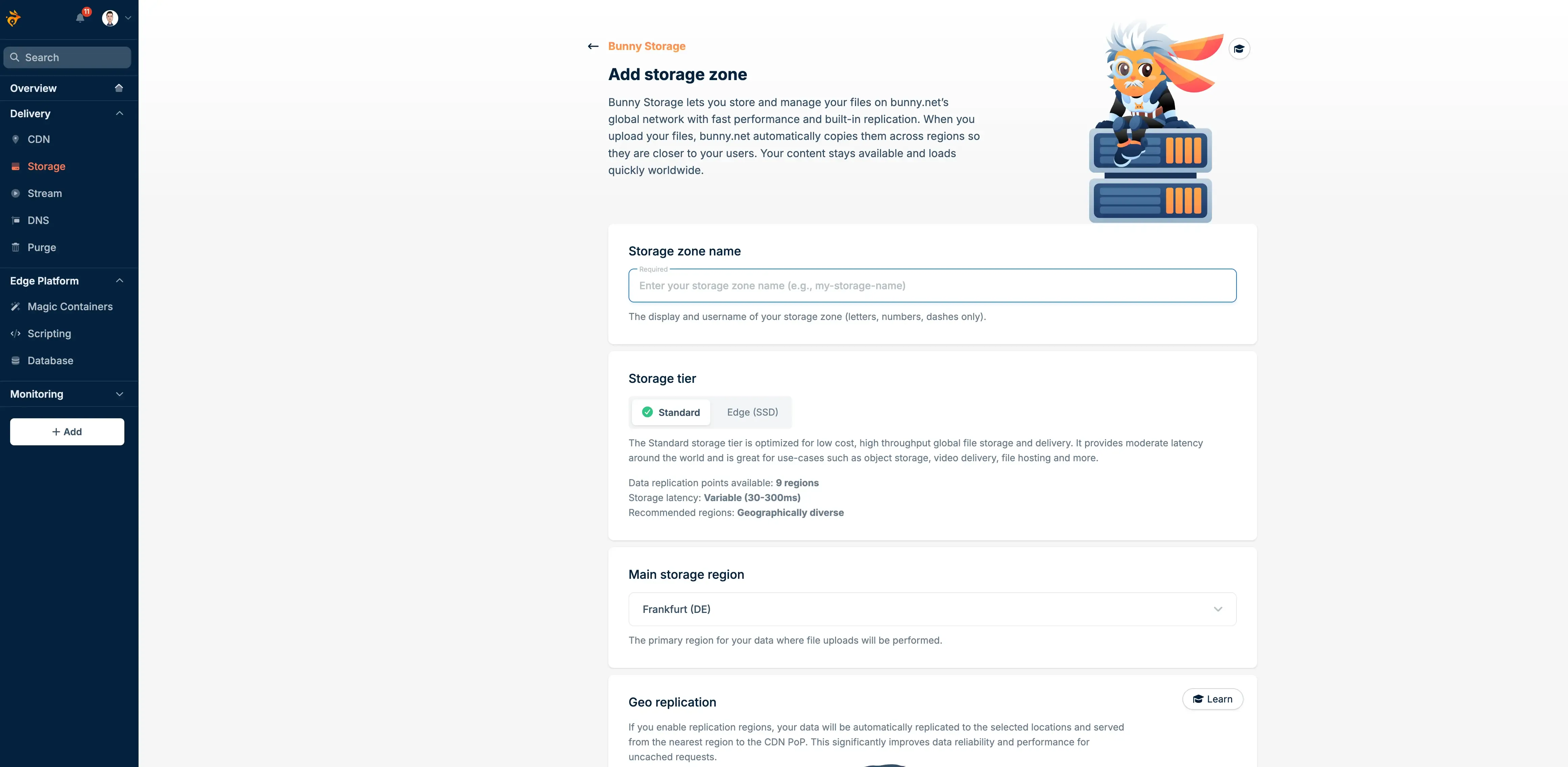
Pricing breakdown
- Single region: $0.01/GB/month
- Two regions: $0.02/GB/month
- Three regions: $0.025/GB/month
- Each additional region: +$0.005/GB/month
- API requests: Free
- Egress to Bunny CDN: Free
- Egress to internet: Billed through CDN pricing ($0.01/GB EU/NA)
The pricing model is flat. You pick how many regions you want your data replicated to, and you pay that rate. No storage classes to pick between, no request fees, no minimum storage durations.
What I like about it
- Zero API call fees (S3 charges for PUT, GET, LIST, everything)
- Free egress to Bunny CDN, no separate transfer costs
- Built-in CDN with 119+ PoPs, no need to configure a separate service
- Global replication across up to 15 regions with a single toggle
- S3-compatible API, so tools like rclone and s3cmd work out of the box
- Simple dashboard, you can browse files through the web UI
Where it falls short
The raw per-GB storage cost ($0.01) is higher than Backblaze ($0.006) and comparable to S3 Standard ($0.023 looks higher, but S3 has cheaper tiers like Glacier at fractions of a penny). If you’re storing terabytes of archive data you rarely access, Bunny Storage isn’t the cheapest bucket to throw files into.
There’s also no lifecycle policy system. S3 lets you automatically transition objects from Standard to Infrequent Access to Glacier after set time periods. Bunny Storage keeps everything hot, always. That’s either a feature or a limitation depending on what you need.
If you’re already using Bunny CDN to serve your sites (like I do), the storage integrates perfectly. I covered the CDN side in depth in my Bunny.net review and the video streaming setup in this guide.
AWS S3: the feature king with complex pricing
S3 is the default choice for most companies. It’s been around since 2006, it’s battle-tested, and it integrates with every AWS service and almost every third-party tool. But the pricing is a maze.
Pricing breakdown
Storage (US East, per GB/month):
- S3 Standard: $0.023 (first 50 TB), $0.022 (next 450 TB), $0.021 (over 500 TB)
- S3 Infrequent Access: $0.0125
- S3 Glacier Instant: $0.004
- S3 Glacier Flexible: $0.0036
- S3 Glacier Deep Archive: $0.00099
Requests:
- PUT/COPY/POST/LIST: $0.005 per 1,000 requests
- GET/SELECT: $0.0004 per 1,000 requests
Data transfer out:
- First 10 TB/month: $0.09/GB
- Next 40 TB: $0.085/GB
- Next 100 TB: $0.07/GB
- Over 150 TB: $0.05/GB
That egress pricing is where S3 gets expensive fast. Store 1 TB and serve it once? You’re paying $0.023 for storage plus $90 for egress. The storage cost is almost a rounding error compared to the bandwidth bill.
When S3 makes sense
S3 wins when you need specific features that nobody else has:
- Lifecycle rules that automatically move cold data to cheaper storage classes
- Object versioning, locking, and compliance retention
- Event triggers through Lambda for processing uploads
- Fine-grained IAM access controls
- Cross-region replication with granular rules
- Integration with hundreds of AWS services
If your infrastructure already lives on AWS, adding S3 is the path of least resistance. The pricing gets better with AWS Data Transfer Out discounts or if you’re using CloudFront (which has its own pricing model that can reduce egress costs).
For everyone else, S3’s complexity is hard to justify. I’ve talked to people who were surprised by their S3 bill because they didn’t realize GET requests cost money, or that listing bucket contents is a billable operation.
Backblaze B2: cheapest raw storage
Backblaze started as a consumer backup company and eventually launched B2, their S3-compatible object storage. Their pitch is simple: dirt-cheap storage with reasonable egress policies.
Pricing breakdown
- Storage: $0.006/GB/month ($6/TB)
- Downloads: Free up to 3x your average monthly storage
- Downloads beyond 3x: $0.01/GB
- CDN partner egress: Free (Cloudflare, Bunny.net, Fastly, Vultr, and others)
- Class B transactions (downloads, metadata): 2,500 free/day, then $0.004/10K
- Class C transactions (uploads, list, delete): 2,500 free/day, then $0.004/1K
- Minimum file size: None
- Minimum storage duration: None
The 3x free egress rule is generous. If you store 1 TB, you can download up to 3 TB per month for free. And if you’re serving files through a partner CDN like Bunny.net or Cloudflare, egress is completely free regardless of volume.
The Backblaze + Bunny combo
One setup I find particularly interesting: store files on Backblaze B2 at $0.006/GB, then serve them through Bunny CDN. Backblaze doesn’t charge egress to partner CDNs, and you get Bunny’s 119+ PoPs for delivery. Total cost per GB stored and served: $0.006 for storage + Bunny CDN delivery fees ($0.01/GB EU/NA for bandwidth used).
This combo undercuts both pure Bunny Storage ($0.01/GB) and S3 + CloudFront by a wide margin for read-heavy workloads.
The trade-off? Two accounts to manage, two dashboards, and some configuration to link them. If you’re setting up Dokploy backups with S3-compatible storage or running a self-hosted file manager like Cloudreve, Backblaze B2 works as a drop-in S3 alternative.
Where B2 falls short
Backblaze only has two data center regions (US West and EU Central). If you need data physically stored in Asia-Pacific or South America, B2 isn’t an option. S3 has 30+ regions and Bunny has 15 storage locations.
The API is S3-compatible but not identical. Some S3 features like object lifecycle policies, versioning, and fine-grained access controls are either limited or missing. For backup and archive workloads this doesn’t matter. For complex application storage, it might.
Real cost comparisons
Numbers on a pricing page are meaningless without context. Here’s what you’d actually pay for three common scenarios:
1 TB static site
Scenario: 1 TB of static assets (images, CSS, JS) served globally, 5 TB egress/month
| Provider | Storage | Egress | Requests (est.) | Total/month |
|---|---|---|---|---|
| Bunny Storage | $10 | $0 (CDN included) | $0 | ~$60 (CDN delivery) |
| S3 + CloudFront | $23 | ~$425 (varies) | ~$5 | ~$453 |
| S3 direct | $23 | $450 | ~$5 | ~$478 |
| Backblaze B2 | $6 | $20 (2 TB over 3x) | ~$2 | ~$28 |
| B2 + Bunny CDN | $6 | $0 (partner) | ~$2 | ~$58 (CDN delivery) |
For serving static assets, Backblaze B2 alone is cheapest if your users can tolerate fetching from two data centers. Add Bunny CDN on top and you get global delivery at a similar price to pure Bunny Storage. S3 is the most expensive option by far, mostly because of egress.
Note: Bunny Storage’s $60 includes CDN delivery for the 5 TB. The B2 + Bunny CDN combo is similar because you pay Bunny’s CDN rates for the actual delivery bandwidth.
10 TB backup archive
Scenario: 10 TB of backups, minimal egress (restore once a quarter, ~500 GB)
| Provider | Storage | Egress | Requests | Total/month |
|---|---|---|---|---|
| Bunny Storage | $100 | ~$5 (occasional) | $0 | ~$105 |
| S3 Standard | $230 | ~$11 (avg) | ~$2 | ~$243 |
| S3 Glacier Instant | $40 | ~$11 + retrieval | ~$2 | ~$55 |
| S3 Glacier Deep | $9.90 | ~$11 + retrieval | ~$2 | ~$25+ |
| Backblaze B2 | $60 | $0 (within 3x) | ~$1 | ~$61 |
For pure archival, S3 Glacier Deep Archive wins on storage cost ($0.00099/GB). But you pay retrieval fees and wait hours for access. Backblaze at $60/month with free egress up to 30 TB is the best no-surprises option. Bunny Storage costs more because it keeps everything hot and replicated.
If you’re setting up WordPress backups or CloudPanel remote backups, B2 is the sweet spot between cheap and accessible.
500 GB video hosting
Scenario: 500 GB of video files, 3 TB delivery/month
| Provider | Storage | Egress | Requests | Total/month |
|---|---|---|---|---|
| Bunny Storage + CDN | $5 | $30 (CDN) | $0 | ~$35 |
| Bunny Stream | $5 | $30 (delivery) | $0 | ~$35 |
| S3 + CloudFront | $11.50 | ~$255 | ~$3 | ~$270 |
| B2 + Bunny CDN | $3 | $30 (CDN) | ~$1 | ~$34 |
For video delivery, the S3 + CloudFront path is painful. The B2 + Bunny CDN combo edges out on pure cost, but if you want transcoding, adaptive bitrate, and a built-in player, Bunny Stream handles all of that without extra setup. I use Bunny Stream for the video courses on bitbuddies.me and it just works.
Performance comparison
Price isn’t everything. If your files take twice as long to deliver, users leave.
| Metric | Bunny Storage | AWS S3 | Backblaze B2 |
|---|---|---|---|
| Global avg. latency | 41ms | 131ms | ~80ms (2 regions) |
| Storage regions | 15 | 30+ | 2 |
| Built-in CDN | Yes (119+ PoPs) | No (need CloudFront) | No (need partner CDN) |
| Avg. CDN latency | 24ms | ~30ms (CloudFront) | Depends on CDN used |
| Upload speed | Fast (edge ingest) | Fast (regional) | Moderate (2 locations) |
Bunny Storage’s 41ms average comes from their multi-region replication. When you replicate to 5+ regions, the nearest copy is usually close to any user worldwide. S3 stores in one region by default (cross-region replication costs extra and needs configuration). Backblaze with just two data centers depends entirely on CDN caching for global performance.
For most web applications, all three are fast enough once you put a CDN in front. The difference shows up for uncached requests or API-heavy workloads where you’re hitting origin storage directly.
Feature comparison
Storage features
| Feature | Bunny | S3 | B2 |
|---|---|---|---|
| S3-compatible API | Yes | Yes | Yes |
| Web file browser | Yes | Yes (console) | Yes |
| Object versioning | No | Yes | Yes (limited) |
| Lifecycle policies | No | Yes (extensive) | Yes (basic) |
| Object lock/retention | No | Yes | Yes |
| Server-side encryption | Yes | Yes (multiple options) | Yes |
| Custom metadata | Yes | Yes | Yes (limited) |
| Multipart uploads | Yes | Yes | Yes |
| Pre-signed URLs | Yes | Yes | Yes |
| Event notifications | No | Yes (Lambda, SNS, SQS) | Yes (webhooks) |
| Access logging | Yes | Yes | Yes |
Developer experience
| Feature | Bunny | S3 | B2 |
|---|---|---|---|
| Official SDKs | Limited | Every language | Python, Java, CLI |
| API documentation | Good | Extensive | Good |
| CLI tool | No (use s3cmd/rclone) | aws-cli | b2-cli |
| Terraform provider | Limited | Full | Community |
| Dashboard UX | Simple, clean | Complex but powerful | Simple |
| Setup time | Minutes | Minutes to hours | Minutes |
| Billing clarity | Very clear | Confusing | Clear |
S3 has features that Bunny Storage and B2 simply don’t offer. If you need object lifecycle transitions, Lambda triggers on upload, or compliance-level retention locks, S3 is still the only real option among these three.
But most people storing website assets, backups, or media files don’t need any of that. They need a bucket, an API key, and predictable pricing.
When to use each
Bunny Storage: best for websites and CDN-delivered content
Pick Bunny Storage when:
- You’re already using or plan to use Bunny CDN
- You want storage and delivery in one bill with no surprises
- You need multi-region replication without managing cross-region sync yourself
- You’re hosting a static site or serving assets that need global delivery
- You want S3 compatibility with simpler pricing
If you’re deploying an Astro site or any static site, Bunny Storage + CDN gives you hosting and delivery without touching a web server.
AWS S3: best for complex applications and the AWS ecosystem
Pick S3 when:
- Your infrastructure already runs on AWS
- You need lifecycle policies to automatically archive old data
- You need event-driven processing (Lambda triggers on upload)
- Compliance requirements demand object lock or retention policies
- You’re storing data that needs to stay in a specific geographic region for legal reasons
- You need the deepest integration ecosystem available
S3 is overkill for simple file hosting, but nothing else matches its feature depth. The cost premium is the price of that flexibility.
Backblaze B2: best for backups and archival storage
Pick Backblaze B2 when:
- Cost per GB stored is your primary concern
- You’re doing backups from WordPress, CloudPanel, or Dokploy
- You want generous free egress (3x storage or unlimited to CDN partners)
- You don’t need more than two storage regions
- You plan to serve files through a CDN like Bunny.net or Cloudflare anyway
The B2 + partner CDN combo is hard to beat on price for read-heavy workloads.
B2 + Bunny CDN: the budget combo
This deserves its own mention. Store on B2 at $0.006/GB, serve through Bunny CDN for free egress from B2 plus fast global delivery. You manage two services instead of one, but the savings add up quickly at scale.
Best for: media sites, file distribution, any workload where you store a lot and serve a lot.
FAQ
Is Bunny Storage S3-compatible?
Yes. You can use any S3-compatible tool (rclone, s3cmd, Cyberduck, backup plugins) with Bunny Storage. The API endpoint and authentication work the same way. Not every S3 feature is supported (no lifecycle policies, no object lock), but standard upload/download/list operations work fine.
Can I use Backblaze B2 with Bunny CDN?
Yes, and it’s a popular combination. Backblaze has a CDN alliance program that includes Bunny.net, so egress from B2 to Bunny CDN is completely free. You set up a Bunny pull zone pointed at your B2 bucket and files get cached and served globally.
Why is S3 egress so expensive?
AWS makes most of its margin on data transfer. They want you to bring data into AWS (free ingress) but charge a premium to get it out. This is a well-documented strategy called “data gravity.” Once your data is in S3, the egress cost creates friction to leave. Other providers like Bunny and Backblaze use free or cheap egress as a competitive advantage.
What about Cloudflare R2?
R2 is another strong option with zero egress fees. I covered a related setup in the Dokploy backups with Cloudflare R2 guide. R2 pricing is $0.015/GB/month for storage, which sits between Bunny ($0.01) and S3 ($0.023). The main advantage is free egress everywhere, not just to a specific CDN. Worth considering if you’re already in the Cloudflare ecosystem.
What's the cheapest option for storing 1 TB?
Just storage with minimal access: Backblaze B2 at $6/month. Storage plus global CDN delivery: Backblaze B2 + Bunny CDN at $6/month plus CDN bandwidth. Storage with simplest setup: Bunny Storage at $10/month with CDN included. S3 Standard at $23/month is the most expensive for simple storage.
Does Bunny Storage work for backups?
It can, but it’s not the cheapest option for pure backup storage. At $0.01/GB, a 5 TB backup costs $50/month vs $30 on B2 or under $5 on S3 Glacier Deep Archive. Bunny Storage makes more sense when you also need fast retrieval and global delivery through their CDN. For cold backups, B2 or Glacier is cheaper.
Can I self-host something instead?
You can run MinIO or SeaweedFS on your own servers for S3-compatible storage with zero per-GB fees. You pay for the hardware and bandwidth instead. If you’re curious about self-hosted file management, check out the Cloudreve Docker setup guide for a Google Drive-like interface that supports S3 backends. The trade-off is maintenance and reliability: cloud storage providers handle replication, backups, and uptime for you.
The verdict
There’s no single cheapest option because it depends on your access patterns:
- Backblaze B2 wins on raw storage cost. At $0.006/GB with generous free egress, it’s the default choice for backups and archives.
- Bunny Storage wins on simplicity and integrated delivery. One platform for storage and CDN with no hidden fees. Best when you need fast global delivery and want one bill.
- AWS S3 wins on features. Lifecycle policies, event triggers, compliance tools, and the deepest ecosystem. You pay for that breadth.
For my own projects, I use Bunny.net because the CDN and storage work together without any glue code or extra accounts. The B2 + Bunny CDN combo is something I’d recommend if cost is your top priority and you don’t mind managing two services.
If you want the full picture on what Bunny.net offers beyond storage, read my Bunny.net review or the Bunny Stream guide if you’re looking at video hosting.
Try Bunny.net Storage Free