How to Add a Testimonial Slider to Your Carrd Website
Learn how to create an auto-rotating testimonial carousel for your Carrd site with navigation dots, arrows, and smooth transitions.

Social proof sells. When potential customers see others vouching for your work, they’re more likely to trust you. But cramming multiple testimonials onto a single-page Carrd site takes up valuable space.
A testimonial slider fixes that. It displays one quote at a time, rotating through your best reviews without overwhelming your layout. Visitors can browse at their own pace or let it autoplay.
Carrd.coSome Carrd Tutorials:
- Add Popup Modal to Carrd
- Add Smooth Scroll to Carrd
- Add Dark Mode Toggle to Carrd
- Add Floating Menu to Carrd
- Add Accordion FAQs to Carrd
- Carrd.co Review
The complete list with Carrd plugins, themes and tutorials you can find on my carrdme.com website.
Why Use a Testimonial Slider
A few reasons this works better than static testimonials:
-
Saves space - Show 5-10 testimonials in the space of one.
-
Keeps content fresh - Visitors who stay on the page see different quotes without scrolling.
-
Draws attention - Movement catches the eye. A rotating slider pulls focus to your social proof.
-
Looks professional - It’s a common pattern on well-designed sites.
-
Works on mobile - Swipe-friendly design for touch devices.
How to Add a Testimonial Slider to Carrd
Step 1: Add an Embed Element
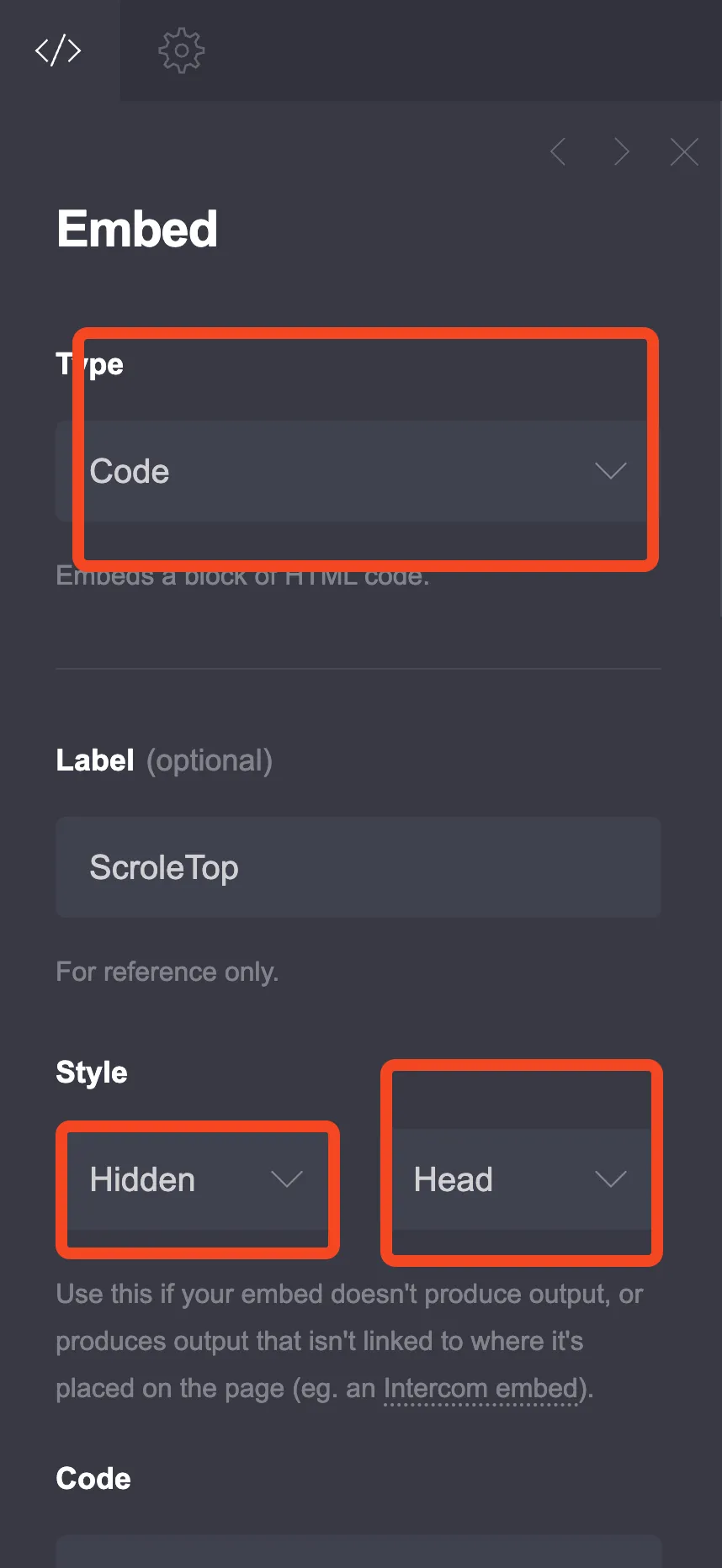
Click the + sign and add an Embed element:
- Type: Code
- Style: Inline (important - this displays the slider on your page)
Step 2: Choose Your Slider Style
I’ve created three different designs. Pick the one that fits your site.
Option 1: Clean Minimal Slider
A simple, elegant design that works with any color scheme.
<style>
  :root {
    --testimonial-bg: #ffffff;
    --testimonial-text: #1f2937;
    --testimonial-secondary: #6b7280;
    --testimonial-accent: #4f46e5;
    --testimonial-quote: #e5e7eb;
    --testimonial-radius: 16px;
    --testimonial-max-width: 700px;
  }

  .testimonial-slider {
    max-width: var(--testimonial-max-width);
    margin: 40px auto;
    position: relative;
    font-family: inherit;
  }

  .testimonial-container {
    overflow: hidden;
    border-radius: var(--testimonial-radius);
    background: var(--testimonial-bg);
    box-shadow: 0 10px 40px rgba(0,0,0,0.1);
  }

  .testimonial-track {
    display: flex;
    transition: transform 0.5s ease;
  }

  .testimonial-slide {
    min-width: 100%;
    padding: 50px 40px;
    box-sizing: border-box;
    text-align: center;
  }

  .testimonial-quote-mark {
    font-size: 80px;
    color: var(--testimonial-quote);
    line-height: 1;
    margin-bottom: -20px;
    font-family: Georgia, serif;
  }

  .testimonial-text {
    font-size: 20px;
    line-height: 1.7;
    color: var(--testimonial-text);
    margin: 0 0 30px 0;
    font-style: italic;
  }

  .testimonial-author {
    display: flex;
    align-items: center;
    justify-content: center;
    gap: 15px;
  }

  .testimonial-avatar {
    width: 60px;
    height: 60px;
    border-radius: 50%;
    object-fit: cover;
    background: var(--testimonial-quote);
  }

  .testimonial-info {
    text-align: left;
  }

  .testimonial-name {
    font-size: 18px;
    font-weight: 600;
    color: var(--testimonial-text);
    margin: 0;
  }

  .testimonial-role {
    font-size: 14px;
    color: var(--testimonial-secondary);
    margin: 4px 0 0 0;
  }

  .testimonial-dots {
    display: flex;
    justify-content: center;
    gap: 10px;
    margin-top: 25px;
  }

  .testimonial-dot {
    width: 12px;
    height: 12px;
    border-radius: 50%;
    background: var(--testimonial-quote);
    border: none;
    cursor: pointer;
    transition: all 0.3s;
    padding: 0;
  }

  .testimonial-dot.active {
    background: var(--testimonial-accent);
    transform: scale(1.2);
  }

  .testimonial-dot:hover {
    background: var(--testimonial-accent);
    opacity: 0.7;
  }

  @media (max-width: 600px) {
    .testimonial-slide {
      padding: 35px 25px;
    }
    .testimonial-text {
      font-size: 17px;
    }
    .testimonial-quote-mark {
      font-size: 60px;
    }
  }
</style>

<div class="testimonial-slider">
  <div class="testimonial-container">
    <div class="testimonial-track" id="testimonialTrack">

      <div class="testimonial-slide">
        <div class="testimonial-quote-mark">"</div>
        <p class="testimonial-text">Working with them was a game-changer for our business. They delivered exactly what we needed, on time and within budget. Highly recommend!</p>
        <div class="testimonial-author">
          <img src="https://i.pravatar.cc/120?img=1" alt="Sarah Johnson" class="testimonial-avatar">
          <div class="testimonial-info">
            <p class="testimonial-name">Sarah Johnson</p>
            <p class="testimonial-role">CEO, TechStart Inc.</p>
          </div>
        </div>
      </div>

      <div class="testimonial-slide">
        <div class="testimonial-quote-mark">"</div>
        <p class="testimonial-text">The attention to detail was impressive. They took the time to understand our needs and created something that exceeded expectations.</p>
        <div class="testimonial-author">
          <img src="https://i.pravatar.cc/120?img=3" alt="Michael Chen" class="testimonial-avatar">
          <div class="testimonial-info">
            <p class="testimonial-name">Michael Chen</p>
            <p class="testimonial-role">Marketing Director, GrowthCo</p>
          </div>
        </div>
      </div>

      <div class="testimonial-slide">
        <div class="testimonial-quote-mark">"</div>
        <p class="testimonial-text">Fast, professional, and great communication throughout the project. This is how freelancing should work. Will definitely hire again.</p>
        <div class="testimonial-author">
          <img src="https://i.pravatar.cc/120?img=5" alt="Emily Rodriguez" class="testimonial-avatar">
          <div class="testimonial-info">
            <p class="testimonial-name">Emily Rodriguez</p>
            <p class="testimonial-role">Founder, DesignLab</p>
          </div>
        </div>
      </div>

    </div>
  </div>

  <div class="testimonial-dots">
    <button class="testimonial-dot active" onclick="goToSlide(0)"></button>
    <button class="testimonial-dot" onclick="goToSlide(1)"></button>
    <button class="testimonial-dot" onclick="goToSlide(2)"></button>
  </div>
</div>

<script>
var testimonialTrack = document.getElementById('testimonialTrack');
var testimonialDots = document.querySelectorAll('.testimonial-dot');
var testimonialSlides = document.querySelectorAll('.testimonial-slide');
var currentSlide = 0;
var slideInterval;

function goToSlide(index) {
  currentSlide = index;
  testimonialTrack.style.transform = 'translateX(-' + (index * 100) + '%)';
  for (var i = 0; i < testimonialDots.length; i++) {
    testimonialDots[i].classList.remove('active');
  }
  testimonialDots[index].classList.add('active');
}

function nextSlide() {
  currentSlide = (currentSlide + 1) % testimonialSlides.length;
  goToSlide(currentSlide);
}

slideInterval = setInterval(nextSlide, 5000);

testimonialTrack.onmouseenter = function() { clearInterval(slideInterval); };
testimonialTrack.onmouseleave = function() { slideInterval = setInterval(nextSlide, 5000); };

var touchStartX = 0;
testimonialTrack.ontouchstart = function(e) {
  touchStartX = e.changedTouches[0].screenX;
  clearInterval(slideInterval);
};
testimonialTrack.ontouchend = function(e) {
  var diff = touchStartX - e.changedTouches[0].screenX;
  if (diff > 50) { currentSlide = (currentSlide + 1) % testimonialSlides.length; goToSlide(currentSlide); }
  else if (diff < -50) { currentSlide = (currentSlide - 1 + testimonialSlides.length) % testimonialSlides.length; goToSlide(currentSlide); }
  slideInterval = setInterval(nextSlide, 5000);
};
</script>
Option 2: Card Slider with Arrows
A more interactive design with navigation arrows for manual control.
<style>
  :root {
    --card-bg: #f8fafc;
    --card-text: #0f172a;
    --card-secondary: #64748b;
    --card-accent: #0ea5e9;
    --card-border: #e2e8f0;
    --card-shadow: rgba(0, 0, 0, 0.08);
  }

  .card-slider {
    max-width: 800px;
    margin: 40px auto;
    position: relative;
    padding: 0 50px;
  }

  .card-slider-container {
    overflow: hidden;
  }

  .card-slider-track {
    display: flex;
    transition: transform 0.4s ease;
  }

  .card-slide {
    min-width: 100%;
    padding: 20px;
    box-sizing: border-box;
  }

  .card-content {
    background: white;
    border-radius: 20px;
    padding: 40px;
    border: 1px solid var(--card-border);
    box-shadow: 0 4px 20px var(--card-shadow);
  }

  .card-stars {
    color: #fbbf24;
    font-size: 20px;
    margin-bottom: 20px;
  }

  .card-text {
    font-size: 18px;
    line-height: 1.8;
    color: var(--card-text);
    margin: 0 0 25px 0;
  }

  .card-divider {
    height: 1px;
    background: var(--card-border);
    margin: 25px 0;
  }

  .card-author {
    display: flex;
    align-items: center;
    gap: 15px;
  }

  .card-avatar {
    width: 55px;
    height: 55px;
    border-radius: 50%;
    object-fit: cover;
  }

  .card-name {
    font-size: 17px;
    font-weight: 600;
    color: var(--card-text);
    margin: 0;
  }

  .card-role {
    font-size: 14px;
    color: var(--card-secondary);
    margin: 3px 0 0 0;
  }

  .card-arrow {
    position: absolute;
    top: 50%;
    transform: translateY(-50%);
    width: 45px;
    height: 45px;
    background: white;
    border: 2px solid var(--card-border);
    border-radius: 50%;
    cursor: pointer;
    display: flex;
    align-items: center;
    justify-content: center;
    font-size: 20px;
    color: var(--card-text);
    transition: all 0.2s;
    z-index: 10;
  }

  .card-arrow:hover {
    background: var(--card-accent);
    border-color: var(--card-accent);
    color: white;
  }

  .card-arrow-left {
    left: 0;
  }

  .card-arrow-right {
    right: 0;
  }

  .card-counter {
    text-align: center;
    margin-top: 20px;
    font-size: 14px;
    color: var(--card-secondary);
  }

  @media (max-width: 600px) {
    .card-slider {
      padding: 0 15px;
    }
    .card-arrow {
      width: 36px;
      height: 36px;
      font-size: 16px;
    }
    .card-arrow-left {
      left: -5px;
    }
    .card-arrow-right {
      right: -5px;
    }
    .card-content {
      padding: 30px 25px;
    }
    .card-text {
      font-size: 16px;
    }
  }
</style>

<div class="card-slider">
  <button class="card-arrow card-arrow-left" id="cardPrev">←</button>
  <button class="card-arrow card-arrow-right" id="cardNext">→</button>

  <div class="card-slider-container">
    <div class="card-slider-track" id="cardTrack">

      <div class="card-slide">
        <div class="card-content">
          <div class="card-stars">★★★★★</div>
          <p class="card-text">"Absolutely fantastic experience from start to finish. The communication was excellent, the work was top-notch, and everything was delivered ahead of schedule. I couldn't be happier with the results."</p>
          <div class="card-divider"></div>
          <div class="card-author">
            <img src="https://i.pravatar.cc/120?img=11" alt="David Park" class="card-avatar">
            <div>
              <p class="card-name">David Park</p>
              <p class="card-role">Product Manager, Innovate Labs</p>
            </div>
          </div>
        </div>
      </div>

      <div class="card-slide">
        <div class="card-content">
          <div class="card-stars">★★★★★</div>
          <p class="card-text">"They transformed our outdated website into something modern and user-friendly. Our conversion rate increased by 40% within the first month. Worth every penny!"</p>
          <div class="card-divider"></div>
          <div class="card-author">
            <img src="https://i.pravatar.cc/120?img=9" alt="Lisa Thompson" class="card-avatar">
            <div>
              <p class="card-name">Lisa Thompson</p>
              <p class="card-role">Owner, Bloom Boutique</p>
            </div>
          </div>
        </div>
      </div>

      <div class="card-slide">
        <div class="card-content">
          <div class="card-stars">★★★★★</div>
          <p class="card-text">"Professional, creative, and incredibly easy to work with. They took our vague ideas and turned them into exactly what we needed. Already planning our next project together."</p>
          <div class="card-divider"></div>
          <div class="card-author">
            <img src="https://i.pravatar.cc/120?img=7" alt="James Wilson" class="card-avatar">
            <div>
              <p class="card-name">James Wilson</p>
              <p class="card-role">Founder, Wilson Consulting</p>
            </div>
          </div>
        </div>
      </div>

    </div>
  </div>

  <div class="card-counter" id="cardCounter">1 / 3</div>
</div>

<script>
  const cardTrack = document.getElementById('cardTrack');
  const cardPrev = document.getElementById('cardPrev');
  const cardNext = document.getElementById('cardNext');
  const cardCounter = document.getElementById('cardCounter');
  const cardSlides = cardTrack.querySelectorAll('.card-slide');
  let cardIndex = 0;

  function updateCardSlider() {
    cardTrack.style.transform = `translateX(-${cardIndex * 100}%)`;
    cardCounter.textContent = `${cardIndex + 1} / ${cardSlides.length}`;
  }

  cardPrev.addEventListener('click', () => {
    cardIndex = (cardIndex - 1 + cardSlides.length) % cardSlides.length;
    updateCardSlider();
  });

  cardNext.addEventListener('click', () => {
    cardIndex = (cardIndex + 1) % cardSlides.length;
    updateCardSlider();
  });

  // Auto-rotate every 6 seconds
  setInterval(() => {
    cardIndex = (cardIndex + 1) % cardSlides.length;
    updateCardSlider();
  }, 6000);
</script>
Option 3: Multi-Testimonial Grid (No Slider)
If you prefer showing all testimonials at once on desktop but scrolling on mobile:
<style>
  :root {
    --grid-bg: #fefce8;
    --grid-card-bg: #ffffff;
    --grid-text: #1c1917;
    --grid-secondary: #78716c;
    --grid-accent: #f59e0b;
  }

  .testimonial-grid {
    display: grid;
    grid-template-columns: repeat(auto-fit, minmax(300px, 1fr));
    gap: 25px;
    max-width: 1000px;
    margin: 40px auto;
    padding: 0 20px;
  }

  .grid-card {
    background: var(--grid-card-bg);
    border-radius: 16px;
    padding: 30px;
    box-shadow: 0 4px 15px rgba(0,0,0,0.05);
    transition: transform 0.2s, box-shadow 0.2s;
  }

  .grid-card:hover {
    transform: translateY(-5px);
    box-shadow: 0 8px 25px rgba(0,0,0,0.1);
  }

  .grid-rating {
    display: flex;
    gap: 3px;
    margin-bottom: 15px;
  }

  .grid-star {
    width: 20px;
    height: 20px;
    fill: var(--grid-accent);
  }

  .grid-text {
    font-size: 15px;
    line-height: 1.7;
    color: var(--grid-text);
    margin: 0 0 20px 0;
  }

  .grid-author {
    display: flex;
    align-items: center;
    gap: 12px;
    padding-top: 15px;
    border-top: 1px solid #f3f4f6;
  }

  .grid-avatar {
    width: 45px;
    height: 45px;
    border-radius: 50%;
    object-fit: cover;
  }

  .grid-name {
    font-size: 15px;
    font-weight: 600;
    color: var(--grid-text);
    margin: 0;
  }

  .grid-role {
    font-size: 13px;
    color: var(--grid-secondary);
    margin: 2px 0 0 0;
  }

  @media (max-width: 600px) {
    .testimonial-grid {
      grid-template-columns: 1fr;
    }
  }
</style>

<div class="testimonial-grid">

  <div class="grid-card">
    <div class="grid-rating">
      <svg class="grid-star" viewBox="0 0 20 20"><path d="M10 15l-5.878 3.09 1.123-6.545L.489 6.91l6.572-.955L10 0l2.939 5.955 6.572.955-4.756 4.635 1.123 6.545z"/></svg>
      <svg class="grid-star" viewBox="0 0 20 20"><path d="M10 15l-5.878 3.09 1.123-6.545L.489 6.91l6.572-.955L10 0l2.939 5.955 6.572.955-4.756 4.635 1.123 6.545z"/></svg>
      <svg class="grid-star" viewBox="0 0 20 20"><path d="M10 15l-5.878 3.09 1.123-6.545L.489 6.91l6.572-.955L10 0l2.939 5.955 6.572.955-4.756 4.635 1.123 6.545z"/></svg>
      <svg class="grid-star" viewBox="0 0 20 20"><path d="M10 15l-5.878 3.09 1.123-6.545L.489 6.91l6.572-.955L10 0l2.939 5.955 6.572.955-4.756 4.635 1.123 6.545z"/></svg>
      <svg class="grid-star" viewBox="0 0 20 20"><path d="M10 15l-5.878 3.09 1.123-6.545L.489 6.91l6.572-.955L10 0l2.939 5.955 6.572.955-4.756 4.635 1.123 6.545z"/></svg>
    </div>
    <p class="grid-text">"Quick turnaround and excellent quality. Exactly what I was looking for. Will definitely work together again!"</p>
    <div class="grid-author">
      <img src="https://i.pravatar.cc/120?img=12" alt="Anna Lee" class="grid-avatar">
      <div>
        <p class="grid-name">Anna Lee</p>
        <p class="grid-role">Freelance Designer</p>
      </div>
    </div>
  </div>

  <div class="grid-card">
    <div class="grid-rating">
      <svg class="grid-star" viewBox="0 0 20 20"><path d="M10 15l-5.878 3.09 1.123-6.545L.489 6.91l6.572-.955L10 0l2.939 5.955 6.572.955-4.756 4.635 1.123 6.545z"/></svg>
      <svg class="grid-star" viewBox="0 0 20 20"><path d="M10 15l-5.878 3.09 1.123-6.545L.489 6.91l6.572-.955L10 0l2.939 5.955 6.572.955-4.756 4.635 1.123 6.545z"/></svg>
      <svg class="grid-star" viewBox="0 0 20 20"><path d="M10 15l-5.878 3.09 1.123-6.545L.489 6.91l6.572-.955L10 0l2.939 5.955 6.572.955-4.756 4.635 1.123 6.545z"/></svg>
      <svg class="grid-star" viewBox="0 0 20 20"><path d="M10 15l-5.878 3.09 1.123-6.545L.489 6.91l6.572-.955L10 0l2.939 5.955 6.572.955-4.756 4.635 1.123 6.545z"/></svg>
      <svg class="grid-star" viewBox="0 0 20 20"><path d="M10 15l-5.878 3.09 1.123-6.545L.489 6.91l6.572-.955L10 0l2.939 5.955 6.572.955-4.756 4.635 1.123 6.545z"/></svg>
    </div>
    <p class="grid-text">"They went above and beyond to make sure everything was perfect. Communication was smooth the entire time."</p>
    <div class="grid-author">
      <img src="https://i.pravatar.cc/120?img=15" alt="Tom Harris" class="grid-avatar">
      <div>
        <p class="grid-name">Tom Harris</p>
        <p class="grid-role">Startup Founder</p>
      </div>
    </div>
  </div>

  <div class="grid-card">
    <div class="grid-rating">
      <svg class="grid-star" viewBox="0 0 20 20"><path d="M10 15l-5.878 3.09 1.123-6.545L.489 6.91l6.572-.955L10 0l2.939 5.955 6.572.955-4.756 4.635 1.123 6.545z"/></svg>
      <svg class="grid-star" viewBox="0 0 20 20"><path d="M10 15l-5.878 3.09 1.123-6.545L.489 6.91l6.572-.955L10 0l2.939 5.955 6.572.955-4.756 4.635 1.123 6.545z"/></svg>
      <svg class="grid-star" viewBox="0 0 20 20"><path d="M10 15l-5.878 3.09 1.123-6.545L.489 6.91l6.572-.955L10 0l2.939 5.955 6.572.955-4.756 4.635 1.123 6.545z"/></svg>
      <svg class="grid-star" viewBox="0 0 20 20"><path d="M10 15l-5.878 3.09 1.123-6.545L.489 6.91l6.572-.955L10 0l2.939 5.955 6.572.955-4.756 4.635 1.123 6.545z"/></svg>
      <svg class="grid-star" viewBox="0 0 20 20"><path d="M10 15l-5.878 3.09 1.123-6.545L.489 6.91l6.572-.955L10 0l2.939 5.955 6.572.955-4.756 4.635 1.123 6.545z"/></svg>
    </div>
    <p class="grid-text">"Responsive and creative. They captured our brand voice perfectly. Our customers love the new design!"</p>
    <div class="grid-author">
      <img src="https://i.pravatar.cc/120?img=20" alt="Rachel Green" class="grid-avatar">
      <div>
        <p class="grid-name">Rachel Green</p>
        <p class="grid-role">Marketing Manager</p>
      </div>
    </div>
  </div>

</div>
Customizing Your Testimonials
Adding Your Own Testimonials
Replace the placeholder content in each slide:
- Text: Change the paragraph content to your actual testimonial
- Name: Update the name to your client’s name
- Role: Change the role/company
- Avatar: Replace the image URL with your client’s photo (or use placeholder services like pravatar.cc)
Adding More Slides
Copy an entire <div class="testimonial-slide">...</div> block and paste it after the last slide. The JavaScript automatically adjusts for any number of slides.
Changing Autoplay Speed
Find the setInterval line and change the number (in milliseconds):
5000= 5 seconds7000= 7 seconds3000= 3 seconds
Disabling Autoplay
Remove or comment out the setInterval code block if you want manual-only navigation.
Tips for Better Testimonials
Use real photos - Stock photos look fake. Ask clients for headshots or use their LinkedIn photos with permission.
Keep quotes short - Long testimonials lose attention. Edit down to the most powerful 2-3 sentences.
Include specifics - “Great work!” is forgettable. “Increased our conversion rate by 40%” is memorable.
Diversify your testimonials - Show different types of clients and different benefits they received.
Try Carrd.coConclusion
A testimonial slider adds social proof without eating up your entire page. Pick the style that matches your design, customize the colors and content, and let your happy clients do the selling for you.
Combine this with a pricing table and contact form for a complete service page.