Convex Self-Hosted vs Cloud Free Tier: Performance Benchmarks
Real-world performance benchmarks comparing Convex self-hosted deployment vs cloud free tier. Test results with oha load testing tool showing response times, throughput, and CDN impact.
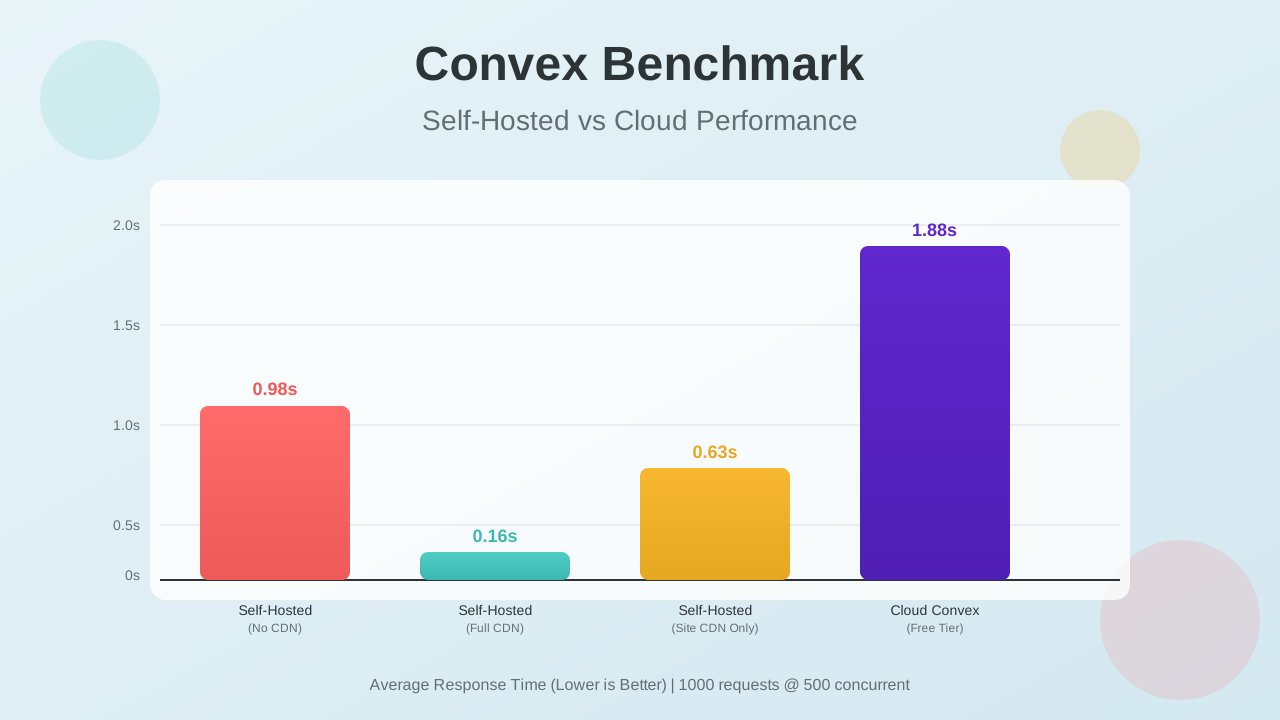
When I started looking at Convex for a real-time backend, I wanted actual performance numbers, not just marketing claims. So I ran load tests on both self-hosted and cloud deployments to see how they stack up in real conditions.
Test Setup and Methodology
I used oha to hit different Convex setups with traffic. It’s a Rust-based HTTP load testing tool that shows how each configuration handles concurrent requests.
Test Parameters
All tests were run with the following parameters:
| Parameter | Value | Description |
|---|---|---|
| Total Requests | 1,000 | Number of HTTP requests to send |
| Concurrent Connections | 500 | Simulated users accessing simultaneously |
| Rate Limit | 50 req/sec | Controlled request rate for consistency |
The command used:
oha -n 1000 -c 500 -q 50 https://target-url/What oha Measures
oha reports:
- Success rate: Percentage of requests that returned HTTP 200
- Average response time: Mean time from request to response
- Response time distribution: Percentile breakdown showing consistency
- Throughput: Requests handled per second
- DNS+dialup time: Connection establishment overhead
These metrics show both raw performance and reliability under load.
Test Configurations
I tested four different configurations:
- Self-Hosted (No CDN): Convex backend running on VPS, accessed directly
- Self-Hosted (Full CDN): CloudFlare CDN active for both website and Convex endpoints
- Self-Hosted (Site CDN Only): CloudFlare CDN for website, direct access to Convex
- Cloud Convex Free Tier: Standard cloud-hosted Convex with CloudFlare on frontend
Self-Hosting Guide
If you want to deploy your own Convex instance, check out my comprehensive guide on How to Self-Host Convex with Dokploy or Docker Compose.
Benchmark Results
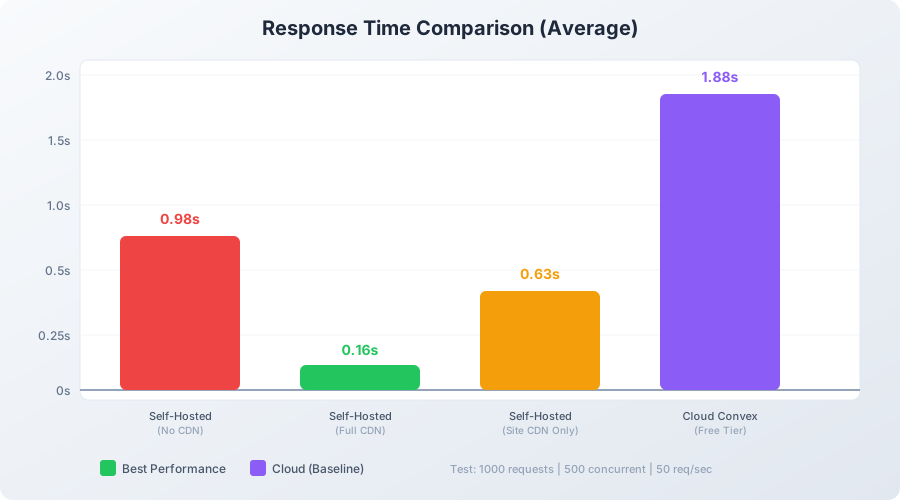
Visual Comparison
Summary Table
| Configuration | Avg Response | Fastest | Slowest | Req/sec | Success Rate |
|---|---|---|---|---|---|
| Self-Hosted (Full CDN) | 0.16s | 0.08s | 0.37s | 49.65 | 100% |
| Self-Hosted (Site CDN) | 0.63s | 0.17s | 2.57s | 47.74 | 100% |
| Self-Hosted (No CDN) | 0.98s | 0.28s | 2.88s | 47.22 | 100% |
| Cloud Convex | 1.88s | 0.21s | 4.53s | 44.42 | 100% |
Detailed Results
Self-Hosted with No CDN
Direct access to self-hosted Convex, no CDN.
oha -n 1000 -c 500 -q 50 https://sh-convex.bitbuddies.me/
Summary:
  Success rate: 100.00%
  Total:        21.1762 secs
  Slowest:      2.8789 secs
  Fastest:      0.2811 secs
  Average:      0.9796 secs
  Requests/sec: 47.2227

  Total data:   125.04 MiB
  Size/request: 128.05 KiB
  Size/sec:     5.90 MiB

Response time histogram:
  0.281 [1]   |
  0.541 [65]  |■■■■
  0.801 [196] |■■■■■■■■■■■■
  1.060 [507] |■■■■■■■■■■■■■■■■■■■■■■■■■■■■■■■■
  1.320 [114] |■■■■■■■
  1.580 [43]  |■■
  1.840 [39]  |■■
  2.100 [17]  |■
  2.359 [7]   |
  2.619 [3]   |
  2.879 [8]   |

Response time distribution:
  10.00% in 0.5999 secs
  25.00% in 0.7839 secs
  50.00% in 0.9395 secs
  75.00% in 1.0484 secs
  90.00% in 1.3932 secs
  95.00% in 1.6885 secs
  99.00% in 2.5827 secs
  99.90% in 2.8789 secs
  99.99% in 2.8789 secs

Details (average, fastest, slowest):
  DNS+dialup:   0.1573 secs, 0.1193 secs, 0.2184 secs
  DNS-lookup:   0.0001 secs, 0.0000 secs, 0.0010 secs

Status code distribution:
  [200] 1000 responses
The setup averaged around 1 second per request, with 507 out of 1000 requests finishing between 0.8 and 1.0 seconds. DNS+dialup took about 0.16 seconds on average, which is noticeable overhead. This gives us a baseline for the raw server performance.
Self-Hosted with Full CloudFlare CDN
CloudFlare CDN active for both the website and Convex API endpoints.
oha -n 1000 -c 500 -q 50 https://sh-convex.bitbuddies.me/
Summary:
  Success rate: 100.00%
  Total:        20.1391 secs
  Slowest:      0.3701 secs
  Fastest:      0.0803 secs
  Average:      0.1592 secs
  Requests/sec: 49.6546

  Total data:   14.49 MiB
  Size/request: 14.83 KiB
  Size/sec:     736.54 KiB

Response time histogram:
  0.080 [1]   |
  0.109 [97]  |■■■■■■■■■
  0.138 [219] |■■■■■■■■■■■■■■■■■■■■■
  0.167 [324] |■■■■■■■■■■■■■■■■■■■■■■■■■■■■■■■■
  0.196 [194] |■■■■■■■■■■■■■■■■■■■
  0.225 [96]  |■■■■■■■■■
  0.254 [44]  |■■■■
  0.283 [15]  |■
  0.312 [6]   |
  0.341 [3]   |
  0.370 [1]   |

Response time distribution:
  10.00% in 0.1096 secs
  25.00% in 0.1302 secs
  50.00% in 0.1541 secs
  75.00% in 0.1812 secs
  90.00% in 0.2119 secs
  95.00% in 0.2340 secs
  99.00% in 0.2845 secs
  99.90% in 0.3701 secs
  99.99% in 0.3701 secs

Details (average, fastest, slowest):
  DNS+dialup:   0.0371 secs, 0.0230 secs, 0.0795 secs
  DNS-lookup:   0.0001 secs, 0.0000 secs, 0.0007 secs

Status code distribution:
  [200] 1000 responses
This setup was fast and consistent. Response times stayed between 0.08 and 0.37 seconds, averaging 0.16s. Throughput hit 49.65 req/sec, and even the 99th percentile stayed under 0.3 seconds. CDN compression cut data transfer from 128 KiB to 14.8 KiB per request.
Self-Hosted with Site CDN Only
CloudFlare CDN for the website, direct access to Convex endpoints.
oha -n 1000 -c 500 -q 50 https://sh-convex.bitbuddies.me/
Summary:
  Success rate: 100.00%
  Total:        20.9452 secs
  Slowest:      2.5710 secs
  Fastest:      0.1678 secs
  Average:      0.6271 secs
  Requests/sec: 47.7436

  Total data:   17.21 MiB
  Size/request: 17.62 KiB
  Size/sec:     841.16 KiB

Response time histogram:
  0.168 [1]   |
  0.408 [246] |■■■■■■■■■■■■■■■■■■■■■
  0.648 [374] |■■■■■■■■■■■■■■■■■■■■■■■■■■■■■■■■
  0.889 [251] |■■■■■■■■■■■■■■■■■■■■■
  1.129 [81]  |■■■■■■
  1.369 [10]  |
  1.610 [14]  |■
  1.850 [10]  |
  2.090 [1]   |
  2.331 [9]   |
  2.571 [3]   |

Response time distribution:
  10.00% in 0.3242 secs
  25.00% in 0.4105 secs
  50.00% in 0.5658 secs
  75.00% in 0.7757 secs
  90.00% in 0.9235 secs
  95.00% in 1.1089 secs
  99.00% in 2.2318 secs
  99.90% in 2.5710 secs
  99.99% in 2.5710 secs

Details (average, fastest, slowest):
  DNS+dialup:   0.0362 secs, 0.0247 secs, 0.0669 secs
  DNS-lookup:   0.0001 secs, 0.0000 secs, 0.0026 secs

Status code distribution:
  [200] 1000 responses
Performance was decent but showed more variance than the full CDN setup. Most requests (374 out of 1000) finished in 0.4-0.6 seconds, but the 99th percentile hit 2.2 seconds. DNS+dialup time improved to 0.04s compared to 0.16s without any CDN, thanks to the site being behind CloudFlare.
Cloud Convex Free Tier
Cloud-hosted Convex with the application frontend using CloudFlare.
oha -n 1000 -c 500 -q 50 https://bitbuddies.me/
Summary:
  Success rate: 100.00%
  Total:        22.5101 secs
  Slowest:      4.5336 secs
  Fastest:      0.2140 secs
  Average:      1.8782 secs
  Requests/sec: 44.4246

  Total data:   17.23 MiB
  Size/request: 17.64 KiB
  Size/sec:     783.66 KiB

Response time histogram:
  0.214 [1]   |
  0.646 [34]  |■■■■■
  1.078 [171] |■■■■■■■■■■■■■■■■■■■■■■■■■■
  1.510 [209] |■■■■■■■■■■■■■■■■■■■■■■■■■■■■■■■■
  1.942 [108] |■■■■■■■■■■■■■■■■
  2.374 [192] |■■■■■■■■■■■■■■■■■■■■■■■■■■■■■
  2.806 [147] |■■■■■■■■■■■■■■■■■■■■■■
  3.238 [77]  |■■■■■■■■■■■
  3.670 [48]  |■■■■■■■
  4.102 [4]   |
  4.534 [9]   |■

Response time distribution:
  10.00% in 0.8744 secs
  25.00% in 1.1786 secs
  50.00% in 1.8554 secs
  75.00% in 2.4471 secs
  90.00% in 3.0030 secs
  95.00% in 3.3444 secs
  99.00% in 3.8191 secs
  99.90% in 4.5336 secs
  99.99% in 4.5336 secs

Details (average, fastest, slowest):
  DNS+dialup:   0.0399 secs, 0.0244 secs, 0.1982 secs
  DNS-lookup:   0.0001 secs, 0.0000 secs, 0.0141 secs

Status code distribution:
  [200] 1000 responses
This was the slowest setup, averaging 1.88 seconds per request. Response times varied widely from 0.21s to 4.53s, and throughput dropped to 44.42 req/sec. The inconsistent performance across buckets likely reflects the geographic distance to Convex’s cloud servers.
Analysis and Insights
Performance Comparison
The benchmarks show clear differences:
| Metric | Winner | Improvement vs Cloud |
|---|---|---|
| Average Response Time | Self-Hosted + Full CDN | 11.75x faster |
| Fastest Response | Self-Hosted + Full CDN | 2.6x faster |
| Consistency (99th percentile) | Self-Hosted + Full CDN | 13.4x better |
| Throughput | Self-Hosted + Full CDN | 12% higher |
Why Self-Hosted Performs Better
Several factors explain why self-hosting performs better:
- Geographic proximity: You can place the server near your users
- CDN caching: CloudFlare caches static assets and optimizes API responses
- Dedicated resources: No sharing infrastructure with other tenants
- Network path: Shorter hops when the CDN is configured properly
- SSL termination: CDN handles SSL at the edge, reducing backend load
The CDN Impact
The data shows how CDN configuration affects performance:
| Configuration | Avg Response | vs No CDN |
|---|---|---|
| Full CDN (Site + API) | 0.16s | 6.1x faster |
| Site CDN Only | 0.63s | 1.6x faster |
| No CDN | 0.98s | baseline |
CDN Configuration Matters
Simply having a CDN isn’t enough. The dramatic performance improvement comes from routing Convex API endpoints through the CDN as well, not just the static website assets.
Data Transfer Comparison
| Configuration | Size/Request | Data/sec |
|---|---|---|
| Self-Hosted (No CDN) | 128 KiB | 5.90 MiB |
| Self-Hosted (Full CDN) | 14.8 KiB | 736 KiB |
| Self-Hosted (Site CDN) | 17.6 KiB | 841 KiB |
| Cloud Convex | 17.6 KiB | 784 KiB |
The CDN configurations show compression benefits, reducing data transfer by ~88% compared to uncompressed responses.
When to Choose Each Option
Choose Self-Hosted + Full CDN When:
- Performance matters for your application
- Your users are concentrated in specific regions
- You want predictable response times
- You’re comfortable managing servers
- Sub-200ms response times are important
Choose Cloud Convex Free Tier When:
- You’re prototyping or in development
- Traffic is low
- You don’t want to manage infrastructure
- Geographic distribution doesn’t matter
- 1-2 second response times are acceptable
Recommendations
Based on these benchmarks:
For Production Applications
- Self-host Convex on a VPS near your users
- Use CloudFlare for both website and Convex endpoints
- Configure caching rules for your API responses
- Monitor performance with oha
For Development/Staging
- Cloud Convex free tier works fine
- Use self-hosted for performance testing before production
- Keep development and production configurations similar
Optimal Infrastructure Setup
| Component | Recommendation |
|---|---|
| VPS Provider | Hetzner, DigitalOcean, or AWS in user’s region |
| VPS Specs | 4GB RAM minimum for PostgreSQL |
| CDN | CloudFlare (free tier works well) |
| Database | PostgreSQL for production, SQLite for development |
| SSL | Let CDN handle SSL termination |
Conclusion
Self-hosted Convex with a CDN is about 12x faster than the cloud-hosted free tier. The response time difference is substantial, especially for production applications where users notice latency.
But performance isn’t the only factor. The cloud option handles infrastructure for you, which matters during development or when you don’t have time to manage servers. If sub-second response times aren’t critical, the cloud version works fine.
For production apps where performance matters, setting up self-hosted Convex with a CDN is worth the effort.
Get Started with ConvexRelated Resources
- How to Self-Host Convex with Dokploy or Docker Compose
- Website Performance Testing with oha
- Dokploy Backups to CloudFlare R2
FAQ
How do I run these benchmarks myself?
Install oha on your system:
- Mac:
brew install oha - Linux:
cargo install oha - Windows:
winget install hatoo.oha
Then run:
oha -n 1000 -c 500 -q 50 https://your-convex-app-url/Adjust the parameters based on your testing needs:
-n: Total number of requests-c: Concurrent connections-q: Rate limit (requests per second)
Will my results be similar?
Results will vary based on:
- Geographic distance between you, CDN edges, and servers
- Server specifications (CPU, RAM, network)
- Database choice (PostgreSQL vs SQLite)
- CDN configuration and caching rules
- Application complexity and data being fetched
Run your own benchmarks to get accurate numbers for your specific setup.
Is CloudFlare necessary for good performance?
While CloudFlare isn’t strictly necessary, a CDN provides significant benefits:
- SSL termination at edge locations
- Geographic distribution of content
- DDoS protection
- Compression and optimization
CloudFlare’s free tier is sufficient for most self-hosted Convex deployments. Alternatives like Fastly, AWS CloudFront, or Bunny.net work equally well.
What about the cost difference?
Cloud Convex Free Tier:
- Free for up to 1M function calls/month
- 1GB storage included
- No infrastructure costs
Self-Hosted Convex:
- VPS: ~$8-20/month (Hetzner, DigitalOcean)
- Domain: ~$1/month
- CloudFlare: Free tier sufficient
- Total: ~$10-25/month
Self-hosting becomes cost-effective when you exceed the free tier limits or need better performance.
Does self-hosting affect real-time sync performance?
Real-time synchronization works identically in both deployments. The benchmark tests measure HTTP request/response performance, which affects:
- Initial page loads
- Data fetching
- Function calls
WebSocket-based real-time updates have different characteristics and weren’t specifically tested here, though they benefit from the same geographic proximity advantages.