How to Install Plausible Analytics With One Click (2026)
Install Plausible Analytics on your VPS with Coolify in one click. Self-hosted, privacy-first, cookie-free analytics. Step-by-step Docker guide (v3.2.1).

26 min read

Plausible Analytics is a privacy-first, open-source alternative to Google Analytics. It sets no cookies, collects no personal data, and the tracking script is under 1 KB. Plausible says it is 54x smaller than Google Analytics and saves each visitor around 135 KB of JavaScript.
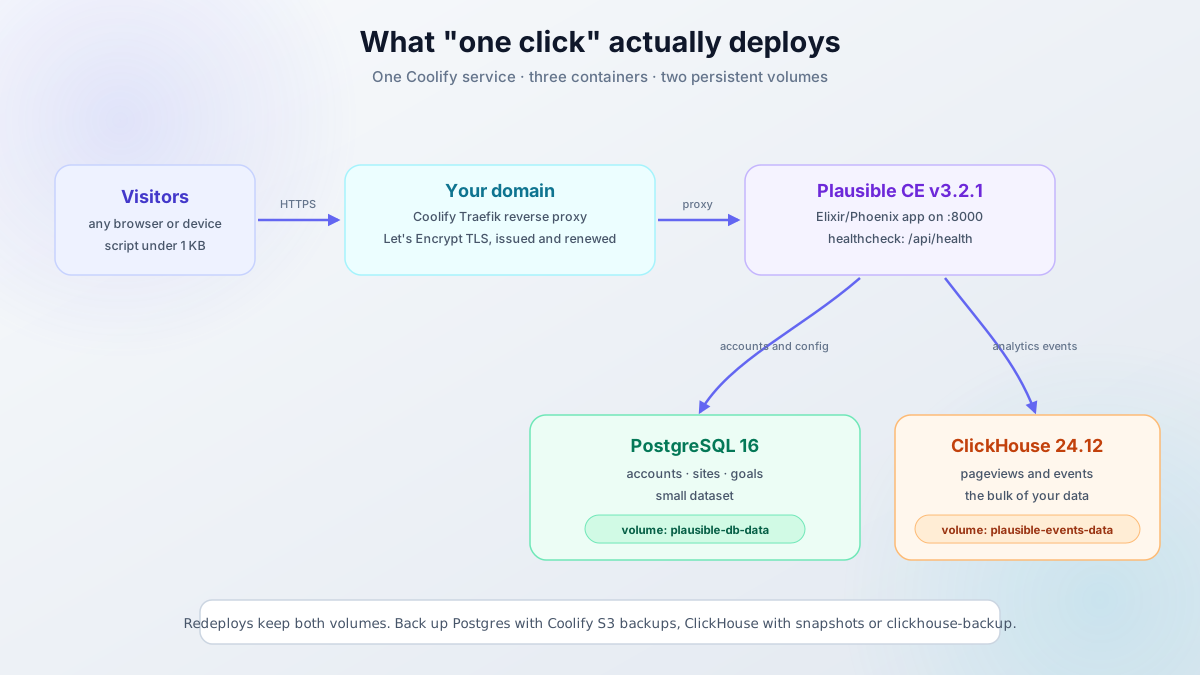
In this guide, you’ll install Plausible Analytics on your own VPS using Coolify, a self-hosted PaaS. One predefined Docker Compose app stands up the whole stack: the analytics app, PostgreSQL for accounts, ClickHouse for events, plus SSL and a reverse proxy.
Plausible CE v3.2.1 (May 2026) is the current release. It is also a security fix worth taking (details in the update section), so pin that tag and not an older one.
What you get with self-hosted Plausible Analytics
- No pageview limits. Plausible Cloud is tiered now: Starter at $9/month for 10k monthly pageviews on one site, Growth at $14/month for 3 sites, Business at $19/month for 10 sites. Self-hosted CE has no limits.
- Full data ownership. Events live on your server in ClickHouse. No third party in the path.
- No consent banner. No cookies, no IP logging, no personal data collection. Under GDPR you are not running a cookie banner for this.
- Tiny script. Under 1 KB versus roughly 135 KB for Google Analytics.
- Three containers. Plausible (Elixir/Phoenix), PostgreSQL 16 for accounts and site config, ClickHouse 24.12 for events.
Cost math
A 4 GB VPS shared with Coolify and a few other services runs on the order of €5-8/month on Hetzner-class hardware. Plausible Cloud costs $9/month for a single site at 10k pageviews and goes up from there. Self-hosting pays for the box by itself once you run more than one site or more than trivial traffic.
What v3.x gives you on top of older releases: teams and permissions, scroll depth and engagement time (v3.0.0), the new configurable tracking script (v3.1.0), and “Limit to segment” on shared links (v3.2.0). Site segmentation itself shipped earlier, in the v2.1 line.
Prerequisites
- A VPS with 2 CPU cores and at least 2 GB RAM. Plausible’s own README recommends “>= 2 GB RAM recommended for running ClickHouse and Plausible without fear of OOMs”. I’d take 4 GB if the box also runs Coolify and other services.
- A CPU that supports SSE4.2 (x86-64) or NEON (ARM). ClickHouse will not run without it.
- A domain or subdomain for the dashboard, like
analytics.yourdomain.com. - Ports 80 and 443 reachable on the server. Port 8000 only matters while you set up Coolify.
- A DNS A record for that hostname pointing at the server IP.
- Coolify installed on the server (Step 2 covers this).
ClickHouse needs SSE4.2 or NEON
Some cheap or old VPS plans run on CPUs without SSE4.2 and the events database crash-loops. If grep -o 'sse4_2' /proc/cpuinfo | head -1 prints nothing on your box, change plans or providers before you deploy.
Video walkthrough
The video shows the older Service-catalog flow in Coolify. Plausible now ships as a predefined Docker Compose app, so use the text steps below as the current path (they match the Coolify v4.3.x templates as of September 2026).
Step 1: Set up a VPS server
You need a VPS to host Plausible. Hetzner is the price-to-performance pick I’d default to; see the Hetzner Cloud review for details. DigitalOcean, Vultr, and Hostinger all work fine too. Numbers here: DigitalOcean vs Vultr vs Hetzner VPS comparison.
VPS prices jumped across the board in 2026. If you’re rethinking a rented box, see what changed and when a mini PC wins.
For Plausible alongside Coolify and a few other services, a 4 GB RAM / 2-core VPS is the right starting point. That class of box runs about €5-8/month on Hetzner.
DigitalOcean $100 Free Vultr $100 Free Hetzner €20 Free Hostinger VPSStep 2: Install Coolify
SSH into your VPS as root and run:
curl -fsSL https://cdn.coollabs.io/coolify/install.sh | sudo bashThe script installs Docker Engine, the dependencies, and Coolify itself (currently the v4.x line, v4.3.23 as of September 2026). Open http://your-server-ip:8000 and create the admin account right away. This is a self-hosted PaaS you fully control; see our Coolify v5 review for what it looks like in daily use.
Verify: curl -I http://your-server-ip:8000 returns 200 or 302 and the dashboard loads. If the page hangs, check ss -tlnp | grep 8000 and docker ps to confirm Coolify started.
For the full setup including SSL and domain configuration, see the Coolify install guide.
Step 3: Point a domain to the server
Add an A record in your DNS pointing the Plausible hostname at the VPS IP. For example, analytics.yourdomain.com → your-server-ip.
If you use Cloudflare, leave the proxy disabled (gray cloud). Coolify’s Traefik reverse proxy handles SSL via Let’s Encrypt automatically.
Verify: dig +short analytics.yourdomain.com returns your server IP before you deploy. If it does not, wait out the TTL and try again. Certificate issuance fails on an unresolvable hostname, and Coolify will just show you a broken proxy target.
Step 4: Deploy Plausible Analytics with Coolify
This is where things changed in 2026. Plausible used to live in Coolify’s service-template catalog. It now ships as a predefined Docker Compose app (updated to v3.2.1 in September 2026), so the click path is different from older tutorials and videos. The template pulls three containers:
- plausible:
ghcr.io/plausible/community-edition:v3.2.1, healthcheck on/api/health - plausible-db:
postgres:16-alpine, healthcheck onpg_isready - plausible-events-db:
clickhouse/clickhouse-server:24.12-alpine, healthcheck on:8123/ping, with a low-resources config inlined
4.1 Create a new Docker Compose resource
Predefined app (recommended)
In Coolify, go to New Resource → Docker Compose → Load from Predefined Apps. Search for “Plausible” (category: Analytics) and select it. Coolify fills in the compose file, the healthchecks, and the environment placeholders the app needs.
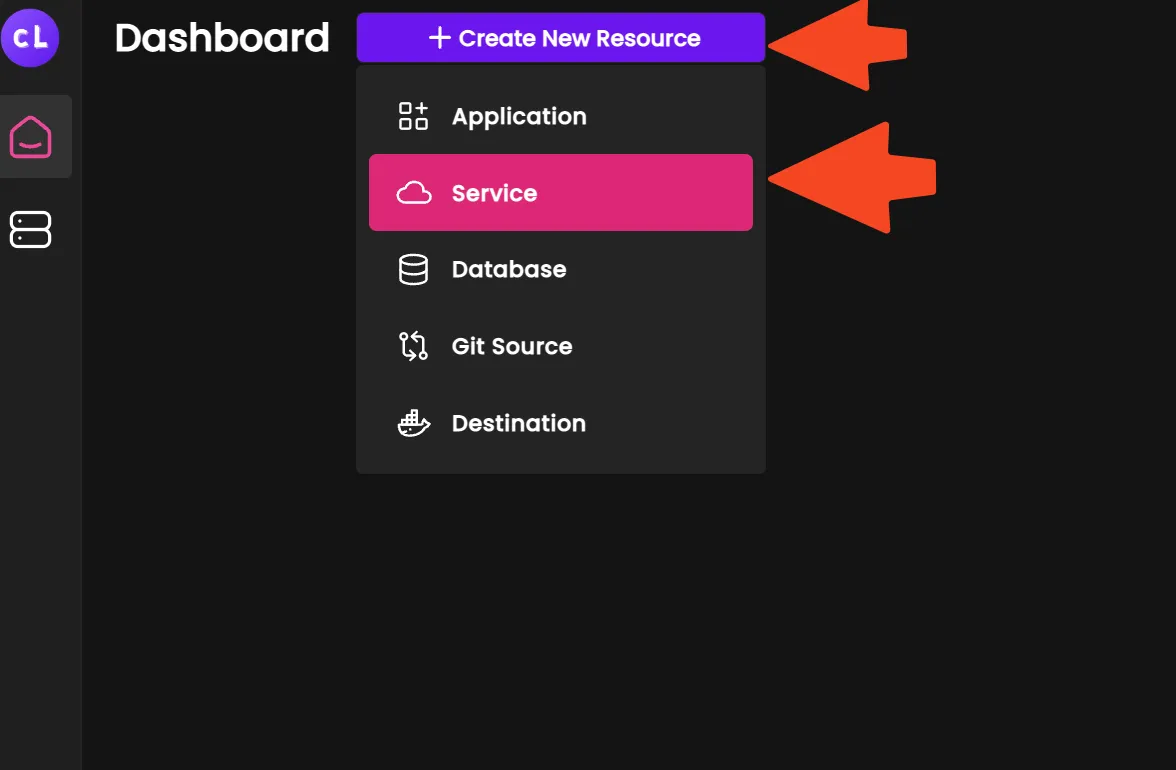
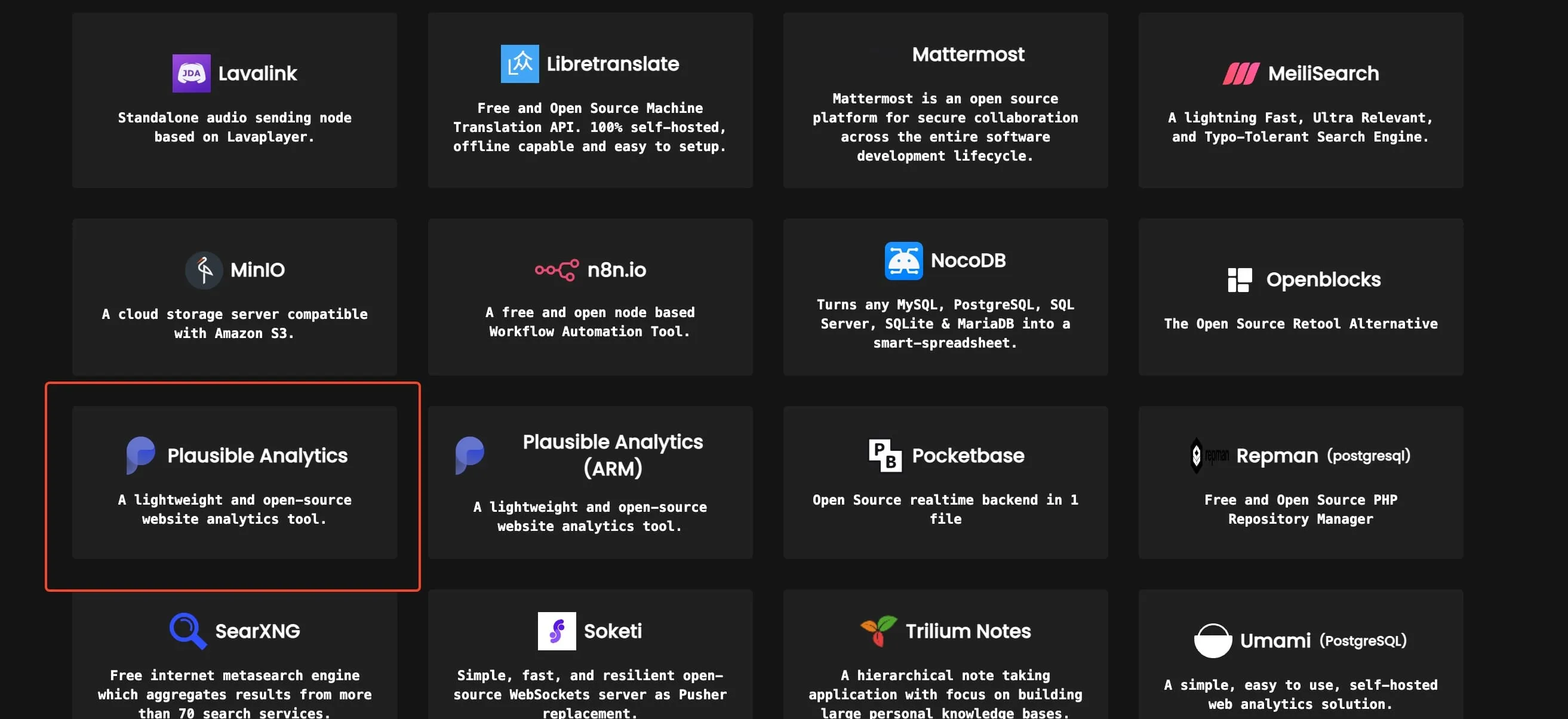
Screenshots predate the move to predefined Docker Compose apps, so some labels differ from the current UI. Follow the text steps above if the two disagree.
Paste the official compose file
This works on any Coolify version and keeps you independent of Coolify’s template list.
- New Resource → Docker Compose (empty).
- Paste the official
compose.ymlfrom the Plausible community-edition repo. - Set at least
BASE_URLandSECRET_KEY_BASEin the environment settings:
BASE_URL=https://analytics.yourdomain.com
SECRET_KEY_BASE=<output of the command below>openssl rand -base64 48If you go this route, update the community-edition files yourself when Plausible releases fixes, not just the app image.
Do not look for Plausible under the old Service catalog. It is no longer listed there in current Coolify versions.
4.2 Configure the service
Set these in the service configuration:
- Name: anything recognizable, like
plausible-analytics - Image tag:
v3.2.1(the template default as of September 2026) - URL (FQDN):
https://analytics.yourdomain.com. This populatesBASE_URLautomatically viaSERVICE_URL_PLAUSIBLE.
Coolify also generates the secrets for you: SECRET_KEY_BASE from SERVICE_BASE64_64_PLAUSIBLE and TOTP_VAULT_KEY from SERVICE_REALBASE64_32_TOTP. You do not need to invent them.
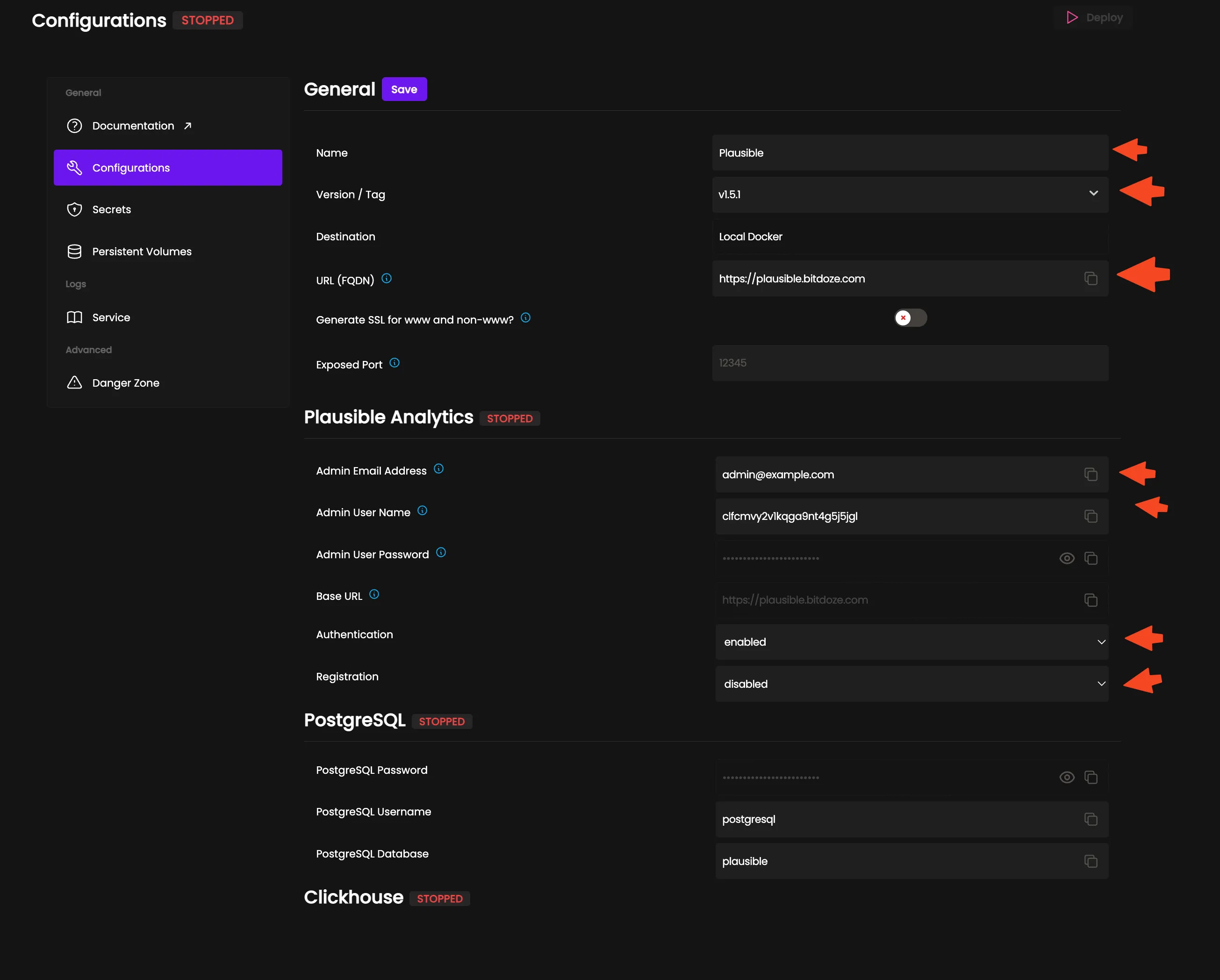
Save the configuration.
4.3 Environment variables
Required:
BASE_URL: your Plausible URL, e.g.https://analytics.yourdomain.com. Set automatically if you filled in the FQDN above.SECRET_KEY_BASE: a 64+ character random string for session encryption. Coolify generates it; if you pasted the compose file yourself, useopenssl rand -base64 48. Plausible CE also reads Docker secrets from/run/secrets/SECRET_KEY_BASE, which overrides the env var; see Docker Compose secrets for wiring those up.
Optional:
TOTP_VAULT_KEY: encrypts two-factor authentication secrets. Plausible derives it fromSECRET_KEY_BASE(PBKDF2) when it is unset, so you only set it if you want it independent. Coolify’s template sets it anyway.
Registration:
DISABLE_REGISTRATION: defaults toinvite_only, so only users you invite can create accounts. After your admin account exists, leave it there. Settrueto lock it down completely.
SMTP (optional, for email reports and password resets):
Emails are not sent by default
Coolify’s template sets MAILER_ADAPTER=Bamboo.LocalAdapter, which writes emails to a local file instead of delivering them. Password resets and scheduled reports will never arrive until you configure SMTP below. Direct outbound mail needs port 25 open plus SPF and DKIM on your domain, and most VPS providers block 25. A relay or transactional SMTP provider is the realistic path.
MAILER_EMAIL=analytics@yourdomain.com
SMTP_HOST_ADDR=smtp.yourdomain.com
SMTP_HOST_PORT=587
SMTP_USER_NAME=analytics@yourdomain.com
SMTP_USER_PWD=your_smtp_password
SMTP_HOST_SSL_ENABLED=true
Without SMTP, Plausible works fine. You just get no email reports and no email-based password resets.
Google Search Console integration (optional):
GOOGLE_CLIENT_ID=your_client_id
GOOGLE_CLIENT_SECRET=your_client_secret
This lets Plausible import search query data from Google Search Console. You configure it in Plausible’s site settings after deployment.
City-level geolocation (optional):
IP_GEOLOCATION_DB=MaxMindCity
MAXMIND_LICENSE_KEY=your_maxmind_license
MAXMIND_EDITION=GeoLite2-City
Without a MaxMind license key you get country-level location at best. The GeoLite2 license is free; sign up at MaxMind and paste the key in.

For the full list of configuration options, see the Plausible CE Configuration wiki. If you are not using Coolify and want Plausible to handle its own certificates, set HTTP_PORT=80 and HTTPS_PORT=443 and it will issue and renew Let’s Encrypt certs itself.
Hit Deploy. The first run takes a few minutes while the images pull and db createdb && db migrate && run runs on boot.
4.4 Verify the deployment
Run these from the server or any machine that can reach the domain:
# 1. health endpoint should return healthy
curl -fsSL https://analytics.yourdomain.com/api/health

# 2. confirm you are running v3.2.1
docker ps --format '{{.Image}}' | grep plausible
# expect: ghcr.io/plausible/community-edition:v3.2.1

# 3. CVE check: /storybook must NOT return 200 on v3.2.1
curl -sSI https://analytics.yourdomain.com/storybook
Then open https://analytics.yourdomain.com in a browser. The registration page should appear. Create your admin account immediately: with DISABLE_REGISTRATION=invite_only, every later user needs an invite from you.
You are live
If the health check returns 200, the image tag is v3.2.1, /storybook is gone, and the registration page loads, the deploy is good. Add your first site next.
Step 5: Add your first site
In the Plausible dashboard, click Add a website and enter your site’s domain. Open Site Installation in the site settings. Plausible generates a unique snippet for that site:
<script defer data-domain="yourdomain.com"
  src="https://analytics.yourdomain.com/js/script.js">
</script>
Add it to the <head> of every page on your website. Custom events and revenue tracking are enabled by default in the new script. Because the script loads from your own domain rather than a third-party server, ad blockers are far less likely to block it than a cloud analytics host.
Adblockers and proxies
First-party hosting cuts down blocking a lot, but it is not immune to aggressive filter lists. If you need the counts to survive those, run the script through a proxy path on your own domain. Plausible documents this in their proxy guide, and there is a full walkthrough here: Plausible Analytics with Cloudflare Workers proxy.
Verify: load your site in a browser, then refresh the Plausible dashboard. A pageview should show up within a minute. For local testing before DNS is live, add captureOnLocalhost: true to the init options below.
Tracking script options
Since the October 2025 script update (shipped in Plausible CE v3.1.0), optional features are toggles and plausible.init() options, not filename extensions. The per-site snippet from Site Installation already has your choices baked in. If you need to set them manually:
<script defer data-domain="yourdomain.com"
  src="https://analytics.yourdomain.com/js/script.js"></script>
<script>
  plausible.init({
    hashBasedRouting: true,
    fileDownloads: {
      fileExtensions: ["pdf", "xlsx", "docx", "zip"]
    },
    captureOnLocalhost: true,
    autoCapturePageviews: true
  })
</script>
The options you will use most:
hashBasedRouting: true: for single-page apps with hash-based routes. Replaces the oldscript.hash.js.fileDownloads: { fileExtensions: [...] }: download tracking. Out of the box it watches common types (pdf, xlsx, docx, txt, csv, zip, 7z, rar, mp4, mp3 and friends); pass your own list to narrow or extend it.customProperties: {...}: attach static properties to every pageview.endpoint: "https://...": send events to a custom endpoint, for example when you proxy the script. Replaces the olddata-apiattribute.autoCapturePageviews: false: fire pageviews manually in an SPA.captureOnLocalhost: true: needed for any testing fromlocalhost.
Form submission tracking is a toggle in Site Installation. Two things the new script dropped: data-exclude/data-include and multi-domain support in a single snippet. Full details in the script update guide.
Legacy script variants
The old extension scripts still work if you already run them: script.hash.js, script.outbound-links.js, script.file-downloads.js, script.tagged-events.js, and combined forms like script.tagged-events.outbound-links.file-downloads.js. Existing sites can stay on them. For new sites, use the per-site snippet above. It is the path Plausible is actively developing.
Data persistence and backups
Plausible stores data in two places:
- PostgreSQL: user accounts, site configuration, goals. Small dataset.
- ClickHouse: analytics events. This is the bulk of your data.
Both run in containers with persistent volumes managed by Coolify. A redeploy keeps your data.
Coolify S3 backups do not cover ClickHouse
Coolify’s scheduled S3 backups target Postgres. ClickHouse, which holds every event, is not included. For a single-node setup the practical options are a weekly VPS snapshot, a stop-and-rsync of the plausible-events-data volume, or clickhouse-backup for native backups. Do not rely on naive file copies of a running ClickHouse data directory.
A simple schedule that works: Coolify S3 backups for Postgres plus weekly VPS snapshots for the events volume. If you ever restore from a snapshot, restore both volumes from the same point in time.
One upgrade note: moving from Plausible v2.x to v3.x required a ClickHouse image bump (the template now uses 24.12). If you are upgrading a very old deployment, snapshot the volumes first.
Updating Plausible
Security: CVE-2026-8467 (CVSS 9.5)
All Plausible CE releases from v3.0.0 through v3.2.0 ship a vulnerable phoenix_storybook dependency. The exposed /storybook endpoint allows unauthenticated remote code execution as the app user (CVE-2026-8467, GHSA-55hg-8qxv-qj4p, CVSS 9.5, published May 2026). v3.2.1 removes the endpoint entirely. If you cannot update right now, block /storybook at the reverse proxy. After any deploy, run the /storybook check from step 4.4. For hardening your Docker host more broadly, see how we secured a Docker server against real-world attacks.
The update flow itself is short: change the image tag in the Coolify service settings (for example from v3.2.0 to v3.2.1) and redeploy. Migrations run on startup via db createdb && db migrate && run.
Verify after updating: rerun the three checks from step 4.4. You want /api/health returning 200, the new image tag in docker ps, and /storybook not returning 200.
One v3.2.0 gotcha if you pasted the official compose file: ClickHouse low-memory settings only became effective in v3.2.0 (they were silently ignored before). Update the community-edition repo files, not just the app image.
Watch the Plausible CE releases for security patches. v3.2.1 is a security-only release; there is no reason to stay behind it.
Troubleshooting common failures
ClickHouse container keeps restarting
The most common cause is a CPU without SSE4.2 (x86-64) or NEON (ARM). ClickHouse will not run on those. Check with grep -o 'sse4_2' /proc/cpuinfo | head -1 on the host. If it prints nothing, move to a newer plan or provider. Second cause: not enough RAM. Check docker stats and dmesg -T | grep -i oom for kill events.
Containers get killed or the dashboard is sluggish
2 GB RAM is the floor, and that is for Plausible alone. With Coolify and anything else on the box, take 4 GB. If docker stats shows memory climbing to the limit or dmesg shows the OOM killer, either upsize the VPS or move your other services elsewhere.
Emails never arrive
Coolify’s template defaults MAILER_ADAPTER to Bamboo.LocalAdapter, which writes emails to a file instead of sending them. Set the MAILER_EMAIL, SMTP_HOST_ADDR, SMTP_HOST_PORT, SMTP_USER_NAME, SMTP_USER_PWD, and SMTP_HOST_SSL_ENABLED variables from step 4.3 and redeploy. Test by triggering a password reset after the change.
curl /api/health fails or the domain serves 502
Almost always DNS or TLS. Run dig +short analytics.yourdomain.com and confirm it returns the server IP. Then give Traefik a couple of minutes to issue the Let’s Encrypt certificate. Also check the Coolify deployment logs for proxy errors. If the hostname is behind a Cloudflare proxy (orange cloud), turn it off for this record.
Upgrading from Plausible v2.x
v3.x required a ClickHouse upgrade, and the template now pins clickhouse/clickhouse-server:24.12-alpine. Snapshot both volumes before you change images. The exact volume migration behavior for old Coolify deployments is not something I would trust without a backup first. If anything goes sideways, restore the snapshot and pin the old images.
/storybook returns 200 on my instance
You are running v3.2.0 or older with a critical unauthenticated RCE exposed (CVE-2026-8467). Update to v3.2.1 now. If you cannot update immediately, block the /storybook path at your reverse proxy and schedule the update. Then rerun the verification commands from step 4.4.
More Coolify tutorials
If Plausible is not the right fit for your stack, you can also install Umami Analytics on Docker.
Conclusion
Self-hosted Plausible on Coolify gets you privacy-first, cookie-free analytics with no pageview limits and no recurring bill. The one-click Docker Compose template handles the hard parts (ClickHouse, PostgreSQL, networking, SSL). You set the domain, deploy, run the health check, and start tracking.
A 4 GB VPS runs about €5-8/month and hosts Coolify plus several other services. Plausible Cloud starts at $9/month for one site at 10k pageviews. The script loads from your own domain, so ad blockers are far less likely to block it than a cloud host, and visitors never see a cookie consent banner. For stubborn filter lists, the proxy option exists.
Install Plausible Analytics once, verify it, and it runs.
DigitalOcean $100 Free Vultr $100 Free Hetzner €20 Free Hostinger VPS