Railpack vs Nixpacks (2026): Which One Should You Use Now?
Nixpacks is now in maintenance mode. Compare Railpack vs Nixpacks in 2026: config, image size, caching, platform support, and how to migrate your builds.

19 min read
After writing deploying a Python uv project with Git and Railpack in Dokploy I went back and ran a proper Railpack vs Nixpacks comparison. The picture changed since I first covered this: Nixpacks, the tool most self-hosted panels still default to, is officially frozen.
Railway’s Nixpacks README now carries a maintenance-mode banner pointing at Railpack. The last Nixpacks release was v1.41.0 on 2025-10-24. Railpack shipped v0.41.0 on 2026-10-13 and still cuts a release every one to two weeks.
Nixpacks is in maintenance mode
The Nixpacks README (checked Oct 2026) states: “Maintenance Mode: This project is currently in maintenance mode and is not under active development. We recommend using Railpack as a replacement.” Last release: v1.41.0, 2025-10-24, which added Node 24. No releases since.
So this is no longer a “which is better” piece. It is a status check plus a decision tree: head-to-head of how the two builders work, platform-by-platform support (Railway, Coolify, Dokploy), a local test walkthrough so you can verify the claims on your own machine, and a migration map for existing Nixpacks setups.
One cost note before we start: image size is not a vanity metric. Smaller base images mean less registry storage and less bandwidth on every deploy pull. The launch numbers, 38% smaller Node base and 77% smaller Python base, are the cost argument. I break that down in the caching section.
What Are Railpack and Nixpacks?
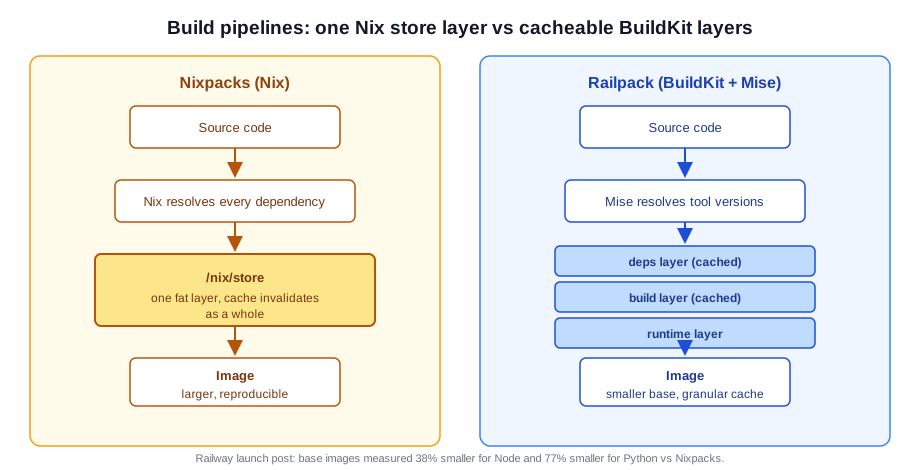
Both tools solve the same problem: turn a Git repo into an OCI image without writing a Dockerfile. They come from the same company, and one is the replacement for the other. The build pipelines below show where they diverge.
Nixpacks: Once Railway’s Default, Now in Maintenance Mode
Nixpacks was introduced by Railway in 2022, written in Rust as an alternative to Cloud Native Buildpacks. It uses the Nix package manager to fetch system and language dependencies, detects your stack from files like package.json or main.py, and produces a reproducible image with zero configuration. Railway’s launch post for Railpack cites 14 million apps built with Nixpacks before the limitations started biting.
That is the history. The current status is what matters in 2026:
- 2025-09-08: maintenance-mode notices added to the README and docs (#1365).
- 2025-10-24: v1.41.0 released, adding Node 24 support. Still the latest release as of 2026-10-14.
- 2025-11-24: maintenance-mode notice reinforced, README recommends Railpack (#1378). Last meaningful commit.
- The repo is not archived, but it is effectively frozen (around 3.5k stars, no release in roughly 12 months).
[Cost/ops] A frozen build tool is an operational risk, not just a stale badge. Your builds keep working only as long as nixpkgs archives and the base images stay compatible. No new language versions are coming, and no security fixes are coming either. Node 24 is the last language update Nixpacks will get.
Railpack: Railway’s Active Build System
Railpack launched on March 4, 2025 (not 2026, as older writeups including my first version of this article claimed) with the post “Why We’re Moving on From Nix”. It is written in Go on top of BuildKit, with Mise handling tool version resolution. It is Railway’s successor to Nixpacks and, as of 2026, Railway’s only documented build system.
The rationale for the switch is worth keeping, because it explains the size and caching differences you still see today. Start with image size: everything Nix installs lands in a single /nix/store layer. Reproducible, but chunky. Then cache invalidation. Railway injects a deployment ID environment variable, which kept busting Nixpacks layer caches. BuildKit layers compose and invalidate far more granularly. Then versioning. Nixpacks versions come from nixpkgs commits, while Railpack resolves exact tool versions through Mise.
Railway’s stated goal is to scale from 1 million to 100 million users, and the build system was one of the bottlenecks.
Current state: v0.41.0 on 2026-10-13, release cadence of one to two weeks since early 2025, around 1.2k stars and active. It is production-proven at Railway scale, but the CLI is still pre-1.0. Treat “stable in production” and “stable API” as different claims.
Third option: if neither builder fits, write your own Dockerfile. Layer ordering and multi-stage builds are the lever, and Docker COPY best practices for layer optimization cover the part most people get wrong. On Coolify and Dokploy a Dockerfile build type sits next to the other two.
Railpack vs Nixpacks: Head-to-Head Comparison
Tech Under the Hood: BuildKit vs Nix
- Nixpacks: Nix bundles every dependency into one fat
/nix/storelayer. Reproducible, yes. Slim or cache-friendly, no. - Railpack: BuildKit compiles a build plan into LLB with separate layers for deps, build, and runtime (see the diagram above). Mise pins exact tool versions.
On efficiency and cache behavior, Railpack wins. On reproducibility of the Nix model, Nixpacks wins, if you can live with the size.
Configuration: Zero-Config Autodetect, railpack.json When You Need It
This is the claim most writeups get wrong, including my earlier version. Railpack does not demand a config file. It autodetects your stack with zero configuration, exactly like Nixpacks. If a railpack.json is found, that configuration is used on top of detection. Railway’s docs are blunt about it: “It works with zero configuration.”
Both tools therefore start from the same place: push a repo, get an image. You add config only to override something.
railpack.json (optional)
{
  "$schema": "https://schema.railpack.com",
  "packages": { "node": "22" },
  "steps": {
    "install": { "commands": ["npm ci"] },
    "build": {
      "inputs": [{ "step": "install" }],
      "commands": ["npm run build"]
    }
  },
  "deploy": { "startCommand": "node dist/index.js" }
}
nixpacks.toml (optional)
[phases.setup]
nixPkgs = ["nodejs_22"]

[phases.install]
cmds = ["npm ci"]

[phases.build]
cmds = ["npm run build"]

[start]
cmd = "node dist/index.js"
The current Railpack schema has root fields provider, buildAptPackages, packages, caches, secrets, and steps. Steps take inputs, commands, secrets, assets, variables, caches, and deployOutputs. If you find older posts showing a flat setup/install/deploy array, that was a very early beta shape and it is gone.
On the Nixpacks side you get the same “override only what you need” story: optional nixpacks.toml, plus NIXPACKS_* environment variables such as NIXPACKS_NODE_VERSION=22.
So “Nixpacks for plug-and-play, Railpack for control” is outdated framing. Both are zero-config. Railpack just gives you a deeper override surface when you need it.
Docker Image Size and Build Caching
Here are the numbers I trust. From Railway’s launch post, measured against Nixpacks base images:
- Node base images: 38% smaller with Railpack.
- Python base images: 77% smaller with Railpack.
I am not restating the “1.3GB vs 450MB” screenshots that float around from the same post. Those came from dive sessions in the writeup, not a reproducible benchmark, and the percentages next to them never matched the math. I have not re-run a local size comparison for this update. If you want your own numbers, build the same app with both tools and compare with docker images and dive.
[Cost/ops] The percentages are the cost story: registry storage and egress scale with image size. On a small VPS pulling images on every deploy, a 38% smaller Node base is bandwidth you do not pay for on each pull.
Caching is where Railpack pulls further ahead:
# push/pull a shared cache from a registry (buildx syntax)
railpack build --cache-from type=registry,ref=ghcr.io/me/cache \
               --cache-to type=registry,ref=ghcr.io/me/cache,mode=max .

# force a clean build
railpack build --no-cache .
Inside railpack.json you can also declare shared vs locked cache mounts for things like node_modules or pip caches.
One caveat if you deploy on Railway: cache hits are not guaranteed. Their builders scale up and down, so a fresh builder may start cold. NO_CACHE=1 disables layer caching entirely. Railway’s own advice for build-time-critical apps is to build the image yourself in a CI pipeline and deploy that image. If your build takes minutes and your budget is tight, that is the honest path.
Version Pinning: Node.js and Python
- Railpack: the Node default is
lts, and only maintained LTS versions are supported. Resolution order isRAILPACK_NODE_VERSION→devEngines.runtime→engines.node→.nvmrc→.node-version→mise.toml/.tool-versions→lts. Python defaults to 3.13.2 and supports 3.10+, resolved fromRAILPACK_PYTHON_VERSION→.python-version/.tool-versions/mise.toml→runtime.txt→Pipfile→ default. Patch-level pins like3.13.2work, because Mise installs exact versions. - Nixpacks: version pins land through
NIXPACKS_NODE_VERSIONand friends, but they resolve against the nixpkgs snapshot the tool ships with. Node 24 arrived in v1.41.0 and nothing has arrived since. You get whatever that frozen snapshot contains.
# Railpack: pin in the environment
RAILPACK_NODE_VERSION=22
RAILPACK_PYTHON_VERSION=3.13.2

# or commit a version file and skip the env vars
echo "22" > .nvmrc
Railpack can pin to the patch release you tested. Nixpacks can only pin to what its frozen snapshot offers.
Language and Framework Coverage
The old “Railpack covers five languages in beta” line is gone. Railpack now has 14 providers: php, golang, java, rust, ruby, elixir, python, deno, dotnet, node (Node, Bun, and frontend tooling), gleam, cpp, staticfile, and shell. First-class framework handling exists for Vite, Astro, Next.js, CRA, Symfony, Laravel, Django, Rails, Phoenix, Nx workspaces, and TanStack Start.
Nixpacks has mature support for Node.js, Python, Go, PHP, and more, but that surface is frozen at v1.41.0. Node 24 is the last language update it will ever get.
Coverage used to favor Nixpacks. In 2026 it favors Railpack, and the gap will keep widening on one side only.
Platform Support in 2026: Railway, Coolify, and Dokploy
This is the section that matters if you run your own stack. The builders do not exist in a vacuum; what you can pick depends on the panel in front of you. For how the panels compare with each other, see the Coolify vs Dokploy vs Kamal 2 comparison. And if you are still sizing hardware: both Coolify and Dokploy run comfortably on an affordable Hetzner Cloud VPS (around €4-7/mo for a cx22/cx32-class box), or a budget Hostinger VPS if you want NVMe storage at the same price class.
Railway: Railpack Only (Nixpacks Removed from Build Docs)
On Railway there is no decision to make. Current build docs document only Railpack. Nixpacks is not offered as a build option. New services have defaulted to Railpack since 2025 (the exact changelog date I could not pin down; check railway.com/changelog if you need it). If you deploy on Railway, you are on Railpack whether you configured anything or not.
Coolify: Both Builders (Railpack Labeled Beta, Git-Source Apps)
Coolify supports both. Nixpacks has mature docs and remains available. Railpack is offered as a build method labeled Beta: it works for Git-source applications only, and you configure the Site type (Dynamic, Static, or SPA) plus a Publish Directory. See Coolify’s Railpack docs for the exact fields.
Practical guidance: Nixpacks still works on Coolify today. Railpack is opt-in. If you are starting a Coolify install, my how to install Coolify as a free self-hosted Heroku alternative guide covers the setup, and the Coolify v5 review has the current state of the platform.
Dokploy: Nixpacks Still the Default, Railpack “(NEW)” with Version Pinning
Dokploy’s default build type is still Nixpacks. Railpack appears as a “(NEW)” build type with something the other platforms do not give you: a Railpack Version pinning field (see the build-type docs). The docs example shows 0.15.1, which is stale. Pin a current release instead, like 0.41.x.
[Cost/ops] Pinning trades “get fixes automatically” for “my builds do not break on a Tuesday”. With Railpack pushing releases every one to two weeks, and breaking minors like v0.37.0 and v0.38.0 landing inside the last few months, I would pin in Dokploy and re-pin deliberately after reading release notes.
Dokploy also exposes the build knobs as environment variables: RAILPACK_BUILD_CMD, RAILPACK_START_CMD, RAILPACK_PACKAGES, RAILPACK_BUILD_APT_PACKAGES, and RAILPACK_DEPLOY_APT_PACKAGES. If Dokploy is not installed yet, follow the Dokploy install guide. For a real app on this stack, I used these build types to deploy TanStack Start on a VPS with Dokploy.
Test Railpack Locally Before You Switch
Do not migrate on faith. You can run the exact plan Railpack will execute on your laptop in a few minutes. If you want to see the same flow end to end against a real app, follow deploying a Python uv project with Git and Railpack in Dokploy once the plan output below looks right.
What you need:
- Docker with BuildKit available (any recent Docker Engine or Desktop)
- A Linux or macOS shell (Windows builds exist but are unsupported)
- A small Node or Python repo to test against
- About 10 minutes
1. Install the CLI:
install script
curl -sSL https://railpack.com/install.sh | shmise
mise use github:railwayapp/railpack@latest2. Inspect the plan before building anything:
railpack build --show-plan .You do not need any config file. The plan shows the detected provider, resolved package versions, and every step Railpack will run.
3. Save the plan for review or CI diffs:
railpack prepare . --out railpack-plan.json4. Start a BuildKit daemon and build:
docker run --rm --privileged -d --name buildkit moby/buildkit
export BUILDKIT_HOST='docker-container://buildkit'
railpack build .
5. For CI, wire a shared cache:
railpack build --cache-from type=registry,ref=ghcr.io/me/cache \
               --cache-to type=registry,ref=ghcr.io/me/cache,mode=max .
[Verify] The --show-plan output lists the packages and steps you expect (wrong provider or missing npm ci means detection did not see what you think). After the build, docker images shows the new image. Run dive <image> if you want to see per-layer sizes.
[Failure modes]
BUILDKIT_HOSTunset or the BuildKit container not running:railpack buildfails immediately. Start the daemon from step 4 first.- Config env vars are not read from your shell environment. Pass them explicitly:
railpack build --env 'RAILPACK_PACKAGES=pipx:httpie jq@latest' .. Since v0.37.1 this also applies toRAILPACK_DISABLE_CACHES. exit 75means a transient failure. Safe to retry in CI rather than fail the pipeline.- Windows: builds exist, support does not. Use WSL2 or a Linux box.
Agent skill for coding agents
Railway ships an official Agent Skill that teaches coding agents the RAILPACK_* variables and config format:
npx skills add railwayapp/railpack --skill railpackIf your agent writes your deployment config, feed it this instead of hoping it knows the schema. See also how an AI assistant can deploy Docker apps from a single message.
How to Migrate from Nixpacks to Railpack
Migration is config work, not data work. You map environment variables, flip the build type, and watch the plan output. Nothing in your database or volumes changes.
Env Var Mapping: NIXPACKS_* to RAILPACK_*
| Nixpacks | Railpack |
|---|---|
NIXPACKS_BUILD_CMD |
RAILPACK_BUILD_CMD |
NIXPACKS_INSTALL_CMD |
RAILPACK_INSTALL_CMD |
NIXPACKS_START_CMD |
RAILPACK_START_CMD |
NIXPACKS_PKGS (Nix packages) |
RAILPACK_PACKAGES (Mise tools, pkg@version) |
NIXPACKS_APT_PKGS |
RAILPACK_BUILD_APT_PACKAGES / RAILPACK_DEPLOY_APT_PACKAGES |
NIXPACKS_NODE_VERSION |
RAILPACK_NODE_VERSION (.nvmrc/engines/devEngines also respected) |
Watch the semantic shift on the PKGS row. NIXPACKS_PKGS lists Nix packages. RAILPACK_PACKAGES lists Mise tools with optional versions, for example python@3.13.2 or pipx:httpie. They are not drop-in equivalents.
[Verify] After switching the vars and the build type, run railpack build --show-plan . and confirm the plan reflects the new values: expected packages listed, install/build commands swapped, start command correct.
Gotchas: Debian 13 Base Images, devEngines Precedence, and Python Source Builds
These are the failure modes that break migrations in practice:
- Debian 13 (Trixie) base images since v0.37.0 (2026-08-18, breaking). Custom apt lists and pinned base images must be Trixie-compatible. GCC 14 treats incompatible pointer types as errors, so native gem and C-extension builds that compiled fine under Nixpacks can fail. Fix: update apt sources to Trixie and fix the pointer warnings in the extension, or pin an older Railpack until you do.
devEnginesprecedence changed in v0.38.0 (2026-08-26, breaking). AdevEnginesfield inpackage.jsonnow beatsengines,.nvmrc, and lockfiles. pnpm installs via Mise, not Corepack. If your Node version suddenly looks wrong, checkdevEnginesfirst.- Python source builds fail by design when no precompiled binary exists for the requested version. That is a feature: silent source compilation is slow and fragile. If you truly need it,
MISE_PYTHON_COMPILE=1opts in. - Playwright browsers are opt-in via
RAILPACK_NODE_PLAYWRIGHT_INSTALL=1orRAILPACK_PYTHON_PLAYWRIGHT_INSTALL=1. If e2e tests fail with missing browsers, that is why. - Java defaults to Temurin builds, and Node downloads are GPG-verified through Mise.
Breaking changes are still landing
Railpack is pre-1.0 and ships breaking changes between minors (v0.37.0 and v0.38.0 were both breaking, eight days apart). Pin the version in Dokploy or your CI, read the release notes, then re-pin deliberately. Do not let a build tool upgrade itself underneath a production deploy.
[Rollback] The migration is reversible while Nixpacks keeps building on your platform. Keep the old NIXPACKS_* variables and config around until the Railpack build has run clean in production, then remove them. On Dokploy and Coolify, flipping the build type back to Nixpacks is the undo. No data migration is involved either way.
Pros and Cons
Nixpacks
Pros:
- Zero-config detection for Node.js, Python, and the usual suspects.
- Battle-tested since 2022, with 14 million apps built on it.
- Nix-level reproducibility if you value that model.
Cons:
- Maintenance mode: no new features, no new language versions, no security fixes.
- Larger images. Railpack base images measure 38% smaller (Node) and 77% smaller (Python).
- Coarse version pinning tied to a frozen nixpkgs snapshot.
- Caching lives inside the single
/nix/storelayer, so you get less to tune.
Railpack
Pros:
- Smaller base images: -38% Node, -77% Python vs Nixpacks
- Zero-config autodetect with a deep
railpack.jsonoverride surface - Patch-level version pinning through Mise
- Real layer caching, with registry cache export/import for CI
- Actively developed, and the only builder Railway documents
Cons:
- Pre-1.0 (v0.41.x). Breaking releases land between minors; pin versions.
- Younger ecosystem. Coolify labels the integration Beta, Dokploy calls it “(NEW)”.
- Some Python builds need
MISE_PYTHON_COMPILE=1when no precompiled binary exists.
Decision Table: Which Should You Choose?
| Need | Nixpacks | Railpack |
|---|---|---|
| Quick start | ✅ Zero-config | ✅ Zero-config autodetect |
| Small images | ❌ Larger bases | ✅ -38% Node / -77% Python |
| Control | ❌ Limited tweaks | ✅ Steps, caches, secrets |
| Version pinning | ⚠️ Frozen snapshot | ✅ Patch-level via Mise |
| Maturity | ⚠️ Frozen since 2025 | ⚠️ Default on Railway since 2025, v0.x CLI |
| Actively developed | ❌ Maintenance mode | ✅ Release every 1-2 weeks |
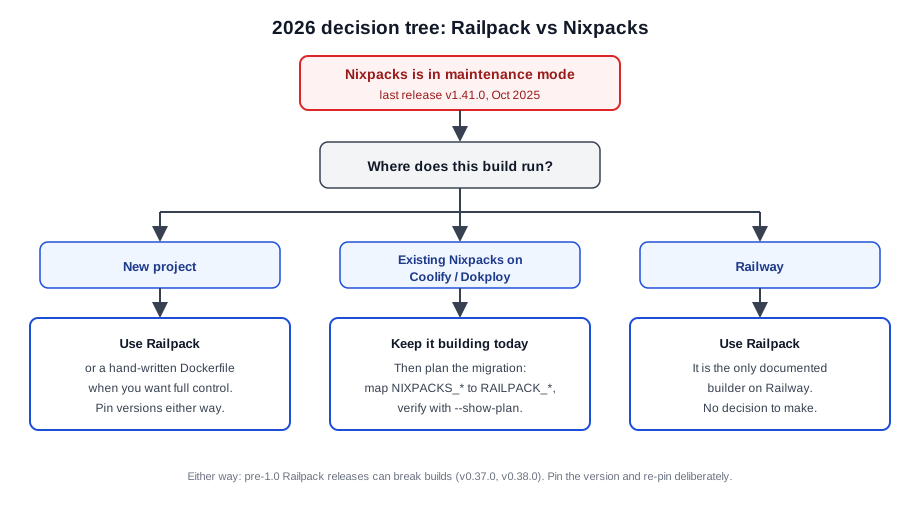
If you are starting a new project, start with Railpack. Drop to a hand-written Dockerfile when you need full control over layers or a custom base. If you have existing Nixpacks on Coolify or Dokploy, it builds today, so nothing is on fire. Use the migration table above, pin versions, and plan the switch on your schedule rather than in an incident. On Railway, the answer is Railpack. There is no second option.
If neither builder fits and you just want containers on a VPS, look at the best self-hosted server panels and the Dockerfile or Docker Compose routes.
FAQ
Is Nixpacks deprecated?
Not archived, but effectively frozen. Maintenance-mode notices landed in September 2025, the README recommends Railpack, and there has been no release since v1.41.0 on 2025-10-24. Treat it as deprecated for planning purposes even though the repo is still public.
Can I still use Nixpacks in 2026?
Yes. It builds fine today on Coolify and Dokploy, and plenty of production apps still run on it. The risk is that nothing gets fixed: no new language versions, no security patches, and builds only keep working while nixpkgs archives and base images stay compatible. Plan the migration instead of waiting for a breakage to plan it for you.
Do I need a railpack.json?
No. Railpack autodetects your stack with zero configuration, the same way Nixpacks does. The file is optional and exists for overrides: pinned packages, custom step commands, caches, secrets, or a custom start command. If Railpack detects your app correctly, do not add one.
Which platforms support Railpack?
Railway, where it is the only documented builder. Coolify, where it is a Beta build method for Git-source apps alongside Nixpacks. Dokploy, where it is a “(NEW)” build type with a version pinning field while Nixpacks remains the default. Coolify and Dokploy both run fine on a small VPS.
How do I migrate NIXPACKS_* environment variables?
Mostly one-to-one renames with RAILPACK_*: BUILD_CMD, INSTALL_CMD, START_CMD, and NODE_VERSION map directly. The exceptions are NIXPACKS_PKGS, which becomes RAILPACK_PACKAGES with Mise pkg@version syntax instead of Nix package names, and NIXPACKS_APT_PKGS, which splits into RAILPACK_BUILD_APT_PACKAGES and RAILPACK_DEPLOY_APT_PACKAGES. Full table in the migration section above. Verify with railpack build --show-plan . after the swap.
Final Verdict
In 2026 the decision is narrower than it used to be, because one of the two options is standing still.
For new projects, use Railpack. It is zero-config when you want that, deep-configurable when you do not, and it produces smaller images with cache behavior you can tune. If you want maximum control over layers and base images, skip both and write a Dockerfile. If neither builder fits your app shape, deploy a Docker Compose app in Dokploy and stop fighting the builder.
If you run existing Nixpacks on Coolify or Dokploy, keep it building today, pin the Railpack version now (not later), map your NIXPACKS_* variables with the table above, and verify with railpack build --show-plan . before flipping anything in production. The rollback is one dropdown.
On Railway you are on Railpack already. Read the release notes before pinning.
The honest caveat: Railpack is pre-1.0 and v0.37.0/v0.38.0 showed that breaking changes still land. Pin versions and re-pin on purpose. Nixpacks is stable in the way a parked car is stable: nothing will change, including the things you wish would change.
Start tonight: railpack build --show-plan . on any repo you care about. It takes thirty seconds and tells you exactly what would happen.