How to Style Countdown Timers in Carrd: Custom Designs
Learn how to create beautiful custom countdown timers for your Carrd website with different styles, animations, and responsive designs.
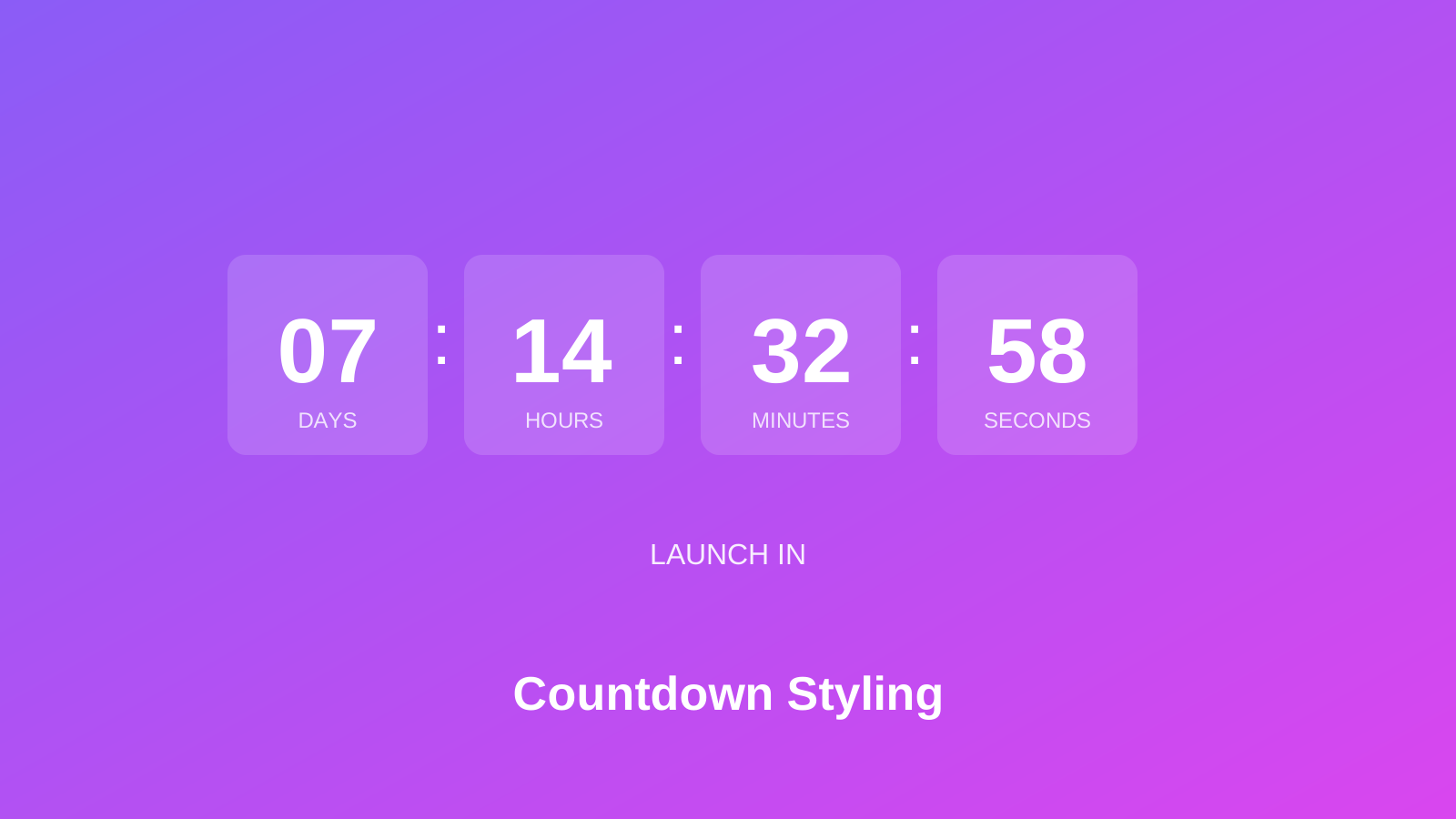
Carrd has a built-in countdown timer, but it looks basic. If you’re launching a product, promoting an event, or running a limited-time offer, you want something that actually creates urgency - not a timer that blends into the background.
Custom countdown timers can match your brand, animate to draw attention, and look professional on any device. Here are several styles you can drop into your Carrd site.
Carrd.coSome Carrd Tutorials:
- Add Popup Modal to Carrd
- Add Smooth Scroll to Carrd
- Add Testimonial Slider to Carrd
- Add Dark Mode Toggle to Carrd
- Add WhatsApp Button to Carrd
- Carrd.co Review
The complete list with Carrd plugins, themes and tutorials you can find on my carrdme.com website.
When to Use Countdown Timers
Countdown timers work well for:
- Product launches - Building anticipation before release
- Sales and promotions - Creating urgency for limited-time offers
- Event registration - Deadline reminders for signups
- Coming soon pages - Showing visitors when to come back
- Webinars and live events - Counting down to start time
The psychology is simple: a ticking clock creates urgency that static text can’t match.
How to Add Custom Countdowns to Carrd
Step 1: Add an Embed Element
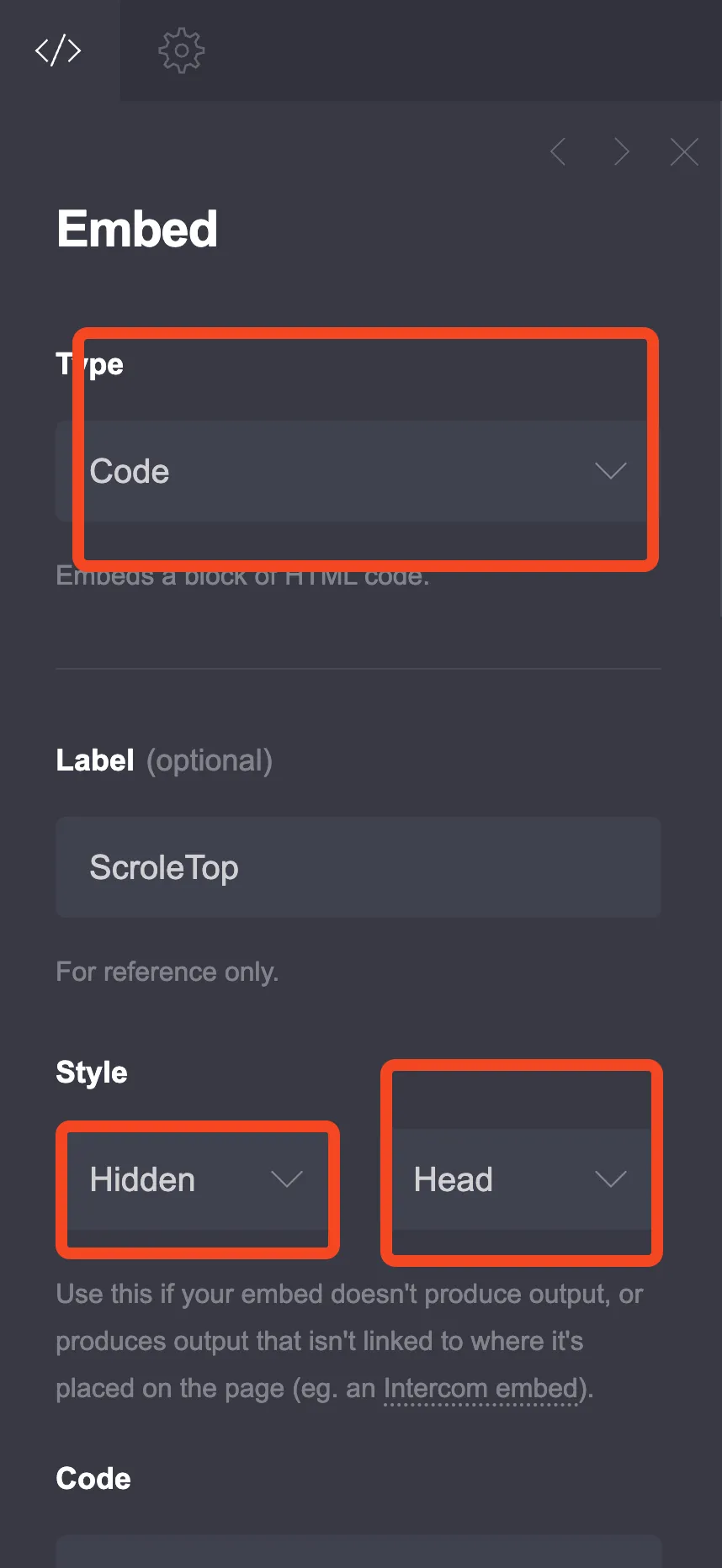
Click the + sign and add an Embed element:
- Type: Code
- Style: Inline / Above
(Use Inline/Above so the countdown displays where you place it, not hidden in the head)
Step 2: Choose Your Style
Pick from the designs below and customize the target date.
Option 1: Modern Card Style
Clean, professional boxes with labels underneath.
<style>
  .countdown-modern {
    display: flex;
    justify-content: center;
    gap: 20px;
    flex-wrap: wrap;
    font-family: -apple-system, BlinkMacSystemFont, 'Segoe UI', Roboto, sans-serif;
    padding: 20px 0;
  }

  .countdown-item {
    background: linear-gradient(135deg, #667eea 0%, #764ba2 100%);
    border-radius: 16px;
    padding: 25px 20px;
    min-width: 100px;
    text-align: center;
    box-shadow: 0 10px 30px rgba(102, 126, 234, 0.3);
    transition: transform 0.3s;
  }

  .countdown-item:hover {
    transform: translateY(-5px);
  }

  .countdown-value {
    font-size: 48px;
    font-weight: 700;
    color: white;
    line-height: 1;
    margin-bottom: 8px;
  }

  .countdown-label {
    font-size: 14px;
    color: rgba(255, 255, 255, 0.8);
    text-transform: uppercase;
    letter-spacing: 2px;
  }

  @media (max-width: 500px) {
    .countdown-item {
      min-width: 70px;
      padding: 18px 15px;
    }
    .countdown-value {
      font-size: 32px;
    }
    .countdown-label {
      font-size: 11px;
    }
  }
</style>

<div class="countdown-modern" id="countdown1">
  <div class="countdown-item">
    <div class="countdown-value" id="days1">00</div>
    <div class="countdown-label">Days</div>
  </div>
  <div class="countdown-item">
    <div class="countdown-value" id="hours1">00</div>
    <div class="countdown-label">Hours</div>
  </div>
  <div class="countdown-item">
    <div class="countdown-value" id="minutes1">00</div>
    <div class="countdown-label">Minutes</div>
  </div>
  <div class="countdown-item">
    <div class="countdown-value" id="seconds1">00</div>
    <div class="countdown-label">Seconds</div>
  </div>
</div>

<script>
var target1 = new Date(2026, 2, 1, 0, 0, 0).getTime();
function tick1() {
  var now = new Date().getTime();
  var dist = target1 - now;
  if (dist < 0) {
    document.getElementById("countdown1").innerHTML = "Event has started!";
    return;
  }
  var d = Math.floor(dist / 86400000);
  var h = Math.floor((dist % 86400000) / 3600000);
  var m = Math.floor((dist % 3600000) / 60000);
  var s = Math.floor((dist % 60000) / 1000);
  document.getElementById("days1").innerHTML = (d < 10 ? "0" : "") + d;
  document.getElementById("hours1").innerHTML = (h < 10 ? "0" : "") + h;
  document.getElementById("minutes1").innerHTML = (m < 10 ? "0" : "") + m;
  document.getElementById("seconds1").innerHTML = (s < 10 ? "0" : "") + s;
}
setTimeout(function() { tick1(); setInterval(tick1, 1000); }, 100);
</script>
To customize: Change new Date(2026, 2, 1, 0, 0, 0) to your target date. Format: new Date(year, month-1, day, hour, minute, second). Note: month is 0-indexed (January = 0, March = 2, etc.)
Option 2: Minimal Dark Style
Sleek dark design with subtle separators.
<style>
  .countdown-dark {
    display: flex;
    justify-content: center;
    align-items: center;
    gap: 10px;
    background: #1a1a2e;
    padding: 30px 40px;
    border-radius: 12px;
    font-family: 'Monaco', 'Consolas', monospace;
    max-width: 600px;
    margin: 20px auto;
  }

  .cd-block {
    text-align: center;
  }

  .cd-number {
    font-size: 56px;
    font-weight: 600;
    color: #eee;
    line-height: 1;
  }

  .cd-text {
    font-size: 12px;
    color: #888;
    text-transform: uppercase;
    margin-top: 10px;
    letter-spacing: 1px;
  }

  .cd-separator {
    font-size: 40px;
    color: #4a4a6a;
    padding: 0 5px;
    margin-top: -20px;
  }

  @media (max-width: 500px) {
    .countdown-dark {
      padding: 20px;
      gap: 8px;
    }
    .cd-number {
      font-size: 36px;
    }
    .cd-separator {
      font-size: 28px;
    }
  }
</style>

<div class="countdown-dark" id="countdown2">
  <div class="cd-block">
    <div class="cd-number" id="days2">00</div>
    <div class="cd-text">Days</div>
  </div>
  <span class="cd-separator">:</span>
  <div class="cd-block">
    <div class="cd-number" id="hours2">00</div>
    <div class="cd-text">Hours</div>
  </div>
  <span class="cd-separator">:</span>
  <div class="cd-block">
    <div class="cd-number" id="minutes2">00</div>
    <div class="cd-text">Mins</div>
  </div>
  <span class="cd-separator">:</span>
  <div class="cd-block">
    <div class="cd-number" id="seconds2">00</div>
    <div class="cd-text">Secs</div>
  </div>
</div>

<script>
(function() {
  var targetDate = new Date(2026, 2, 1, 0, 0, 0).getTime();

  function updateCountdown() {
    var now = new Date().getTime();
    var distance = targetDate - now;

    if (distance < 0) {
      document.getElementById('countdown2').innerHTML = '<p style="color: #eee; font-size: 24px;">Time is up!</p>';
      return;
    }

    var days = Math.floor(distance / (1000 * 60 * 60 * 24));
    var hours = Math.floor((distance % (1000 * 60 * 60 * 24)) / (1000 * 60 * 60));
    var minutes = Math.floor((distance % (1000 * 60 * 60)) / (1000 * 60));
    var seconds = Math.floor((distance % (1000 * 60)) / 1000);

    document.getElementById('days2').innerHTML = (days < 10 ? '0' : '') + days;
    document.getElementById('hours2').innerHTML = (hours < 10 ? '0' : '') + hours;
    document.getElementById('minutes2').innerHTML = (minutes < 10 ? '0' : '') + minutes;
    document.getElementById('seconds2').innerHTML = (seconds < 10 ? '0' : '') + seconds;
  }

  setTimeout(function() {
    updateCountdown();
    setInterval(updateCountdown, 1000);
  }, 100);
})();
</script>
Option 3: Circular Progress Style
Visual progress rings showing time remaining.
<style>
  .countdown-circles {
    display: flex;
    justify-content: center;
    gap: 25px;
    flex-wrap: wrap;
    padding: 20px 0;
    font-family: -apple-system, BlinkMacSystemFont, 'Segoe UI', Roboto, sans-serif;
  }

  .circle-item {
    position: relative;
    width: 100px;
    height: 100px;
  }

  .circle-item svg {
    transform: rotate(-90deg);
  }

  .circle-bg {
    fill: none;
    stroke: #e6e6e6;
    stroke-width: 8;
  }

  .circle-progress {
    fill: none;
    stroke: #10b981;
    stroke-width: 8;
    stroke-linecap: round;
    transition: stroke-dashoffset 0.5s;
  }

  .circle-content {
    position: absolute;
    top: 50%;
    left: 50%;
    transform: translate(-50%, -50%);
    text-align: center;
  }

  .circle-value {
    font-size: 28px;
    font-weight: 700;
    color: #1f2937;
  }

  .circle-label {
    font-size: 11px;
    color: #6b7280;
    text-transform: uppercase;
  }

  @media (max-width: 450px) {
    .circle-item {
      width: 75px;
      height: 75px;
    }
    .circle-value {
      font-size: 22px;
    }
    .circle-label {
      font-size: 9px;
    }
  }
</style>

<div class="countdown-circles" id="countdown3">
  <div class="circle-item">
    <svg width="100" height="100" viewBox="0 0 100 100">
      <circle class="circle-bg" cx="50" cy="50" r="42"/>
      <circle class="circle-progress" id="dayCircle" cx="50" cy="50" r="42" stroke-dasharray="264" stroke-dashoffset="0"/>
    </svg>
    <div class="circle-content">
      <div class="circle-value" id="days3">00</div>
      <div class="circle-label">Days</div>
    </div>
  </div>

  <div class="circle-item">
    <svg width="100" height="100" viewBox="0 0 100 100">
      <circle class="circle-bg" cx="50" cy="50" r="42"/>
      <circle class="circle-progress" id="hourCircle" cx="50" cy="50" r="42" stroke-dasharray="264" stroke-dashoffset="0"/>
    </svg>
    <div class="circle-content">
      <div class="circle-value" id="hours3">00</div>
      <div class="circle-label">Hours</div>
    </div>
  </div>

  <div class="circle-item">
    <svg width="100" height="100" viewBox="0 0 100 100">
      <circle class="circle-bg" cx="50" cy="50" r="42"/>
      <circle class="circle-progress" id="minCircle" cx="50" cy="50" r="42" stroke-dasharray="264" stroke-dashoffset="0"/>
    </svg>
    <div class="circle-content">
      <div class="circle-value" id="minutes3">00</div>
      <div class="circle-label">Mins</div>
    </div>
  </div>

  <div class="circle-item">
    <svg width="100" height="100" viewBox="0 0 100 100">
      <circle class="circle-bg" cx="50" cy="50" r="42"/>
      <circle class="circle-progress" id="secCircle" cx="50" cy="50" r="42" stroke-dasharray="264" stroke-dashoffset="0"/>
    </svg>
    <div class="circle-content">
      <div class="circle-value" id="seconds3">00</div>
      <div class="circle-label">Secs</div>
    </div>
  </div>
</div>

<script>
(function() {
  var targetDate = new Date(2026, 2, 1, 0, 0, 0).getTime();
  var circumference = 264;

  function updateCountdown() {
    var now = new Date().getTime();
    var distance = targetDate - now;

    if (distance < 0) {
      document.getElementById('countdown3').innerHTML = '<p style="font-size: 24px; color: #1f2937;">Event Started!</p>';
      return;
    }

    var days = Math.floor(distance / (1000 * 60 * 60 * 24));
    var hours = Math.floor((distance % (1000 * 60 * 60 * 24)) / (1000 * 60 * 60));
    var minutes = Math.floor((distance % (1000 * 60 * 60)) / (1000 * 60));
    var seconds = Math.floor((distance % (1000 * 60)) / 1000);

    document.getElementById('days3').innerHTML = (days < 10 ? '0' : '') + days;
    document.getElementById('hours3').innerHTML = (hours < 10 ? '0' : '') + hours;
    document.getElementById('minutes3').innerHTML = (minutes < 10 ? '0' : '') + minutes;
    document.getElementById('seconds3').innerHTML = (seconds < 10 ? '0' : '') + seconds;

    document.getElementById('dayCircle').style.strokeDashoffset = circumference - (circumference * Math.min(days, 365) / 365);
    document.getElementById('hourCircle').style.strokeDashoffset = circumference - (circumference * hours / 24);
    document.getElementById('minCircle').style.strokeDashoffset = circumference - (circumference * minutes / 60);
    document.getElementById('secCircle').style.strokeDashoffset = circumference - (circumference * seconds / 60);
  }

  setTimeout(function() {
    updateCountdown();
    setInterval(updateCountdown, 1000);
  }, 100);
})();
</script>
Option 4: Flip Clock Animation
Classic flip-clock style with animated number changes.
<style>
  .countdown-flip {
    display: flex;
    justify-content: center;
    gap: 30px;
    flex-wrap: wrap;
    padding: 20px 0;
    font-family: -apple-system, BlinkMacSystemFont, 'Segoe UI', Roboto, sans-serif;
  }

  .flip-section {
    text-align: center;
  }

  .flip-card-container {
    display: flex;
    gap: 5px;
    margin-bottom: 10px;
  }

  .flip-card {
    position: relative;
    width: 50px;
    height: 70px;
    perspective: 400px;
  }

  .flip-card-inner {
    position: absolute;
    width: 100%;
    height: 100%;
    background: linear-gradient(180deg, #2d2d44 50%, #252538 50%);
    border-radius: 8px;
    display: flex;
    align-items: center;
    justify-content: center;
    font-size: 40px;
    font-weight: 700;
    color: white;
    box-shadow: 0 4px 10px rgba(0,0,0,0.3);
  }

  .flip-card-inner::before {
    content: '';
    position: absolute;
    top: 50%;
    left: 0;
    right: 0;
    height: 1px;
    background: rgba(0,0,0,0.3);
  }

  .flip-label {
    font-size: 13px;
    color: #666;
    text-transform: uppercase;
    letter-spacing: 2px;
  }

  @keyframes flipTop {
    0% { transform: rotateX(0deg); }
    100% { transform: rotateX(-90deg); }
  }

  @keyframes flipBottom {
    0% { transform: rotateX(90deg); }
    100% { transform: rotateX(0deg); }
  }

  .flip-card.flip .flip-card-inner {
    animation: flipAnim 0.6s ease-in-out;
  }

  @keyframes flipAnim {
    0% { transform: rotateX(0deg); }
    50% { transform: rotateX(-10deg); }
    100% { transform: rotateX(0deg); }
  }

  @media (max-width: 500px) {
    .countdown-flip {
      gap: 15px;
    }
    .flip-card {
      width: 38px;
      height: 55px;
    }
    .flip-card-inner {
      font-size: 28px;
    }
    .flip-label {
      font-size: 10px;
    }
  }
</style>

<div class="countdown-flip" id="countdown4">
  <div class="flip-section">
    <div class="flip-card-container">
      <div class="flip-card" id="day1Card"><div class="flip-card-inner">0</div></div>
      <div class="flip-card" id="day2Card"><div class="flip-card-inner">0</div></div>
    </div>
    <div class="flip-label">Days</div>
  </div>

  <div class="flip-section">
    <div class="flip-card-container">
      <div class="flip-card" id="hour1Card"><div class="flip-card-inner">0</div></div>
      <div class="flip-card" id="hour2Card"><div class="flip-card-inner">0</div></div>
    </div>
    <div class="flip-label">Hours</div>
  </div>

  <div class="flip-section">
    <div class="flip-card-container">
      <div class="flip-card" id="min1Card"><div class="flip-card-inner">0</div></div>
      <div class="flip-card" id="min2Card"><div class="flip-card-inner">0</div></div>
    </div>
    <div class="flip-label">Minutes</div>
  </div>

  <div class="flip-section">
    <div class="flip-card-container">
      <div class="flip-card" id="sec1Card"><div class="flip-card-inner">0</div></div>
      <div class="flip-card" id="sec2Card"><div class="flip-card-inner">0</div></div>
    </div>
    <div class="flip-label">Seconds</div>
  </div>
</div>

<script>
(function() {
  var targetDate = new Date(2026, 2, 1, 0, 0, 0).getTime();

  function updateFlipCard(cardId, value) {
    var card = document.getElementById(cardId);
    var inner = card.querySelector('.flip-card-inner');
    if (inner.innerHTML !== value) {
      card.classList.add('flip');
      inner.innerHTML = value;
      setTimeout(function() { card.classList.remove('flip'); }, 600);
    }
  }

  function pad2(num) {
    return (num < 10 ? '0' : '') + num;
  }

  function updateCountdown() {
    var now = new Date().getTime();
    var distance = targetDate - now;

    if (distance < 0) {
      document.getElementById('countdown4').innerHTML = '<p style="font-size: 24px;">Launch Time!</p>';
      return;
    }

    var days = Math.floor(distance / (1000 * 60 * 60 * 24));
    var hours = Math.floor((distance % (1000 * 60 * 60 * 24)) / (1000 * 60 * 60));
    var minutes = Math.floor((distance % (1000 * 60 * 60)) / (1000 * 60));
    var seconds = Math.floor((distance % (1000 * 60)) / 1000);

    var dStr = pad2(days);
    var hStr = pad2(hours);
    var mStr = pad2(minutes);
    var sStr = pad2(seconds);

    updateFlipCard('day1Card', dStr[0]);
    updateFlipCard('day2Card', dStr[1]);
    updateFlipCard('hour1Card', hStr[0]);
    updateFlipCard('hour2Card', hStr[1]);
    updateFlipCard('min1Card', mStr[0]);
    updateFlipCard('min2Card', mStr[1]);
    updateFlipCard('sec1Card', sStr[0]);
    updateFlipCard('sec2Card', sStr[1]);
  }

  setTimeout(function() {
    updateCountdown();
    setInterval(updateCountdown, 1000);
  }, 100);
})();
</script>
Option 5: Simple Inline Text
For situations where you just want text, not boxes.
<style>
  .countdown-text {
    font-family: -apple-system, BlinkMacSystemFont, 'Segoe UI', Roboto, sans-serif;
    font-size: 24px;
    color: #374151;
    text-align: center;
    padding: 20px;
  }

  .countdown-text .highlight {
    color: #dc2626;
    font-weight: 700;
  }

  @media (max-width: 500px) {
    .countdown-text {
      font-size: 18px;
    }
  }
</style>

<div class="countdown-text" id="countdown5">
  Sale ends in <span class="highlight" id="textDays">0</span> days,
  <span class="highlight" id="textHours">0</span> hours,
  <span class="highlight" id="textMins">0</span> minutes
</div>

<script>
(function() {
  var targetDate = new Date(2026, 2, 1, 0, 0, 0).getTime();

  function updateCountdown() {
    var now = new Date().getTime();
    var distance = targetDate - now;

    if (distance < 0) {
      document.getElementById('countdown5').innerHTML = '<span class="highlight">Sale has ended!</span>';
      return;
    }

    var days = Math.floor(distance / (1000 * 60 * 60 * 24));
    var hours = Math.floor((distance % (1000 * 60 * 60 * 24)) / (1000 * 60 * 60));
    var minutes = Math.floor((distance % (1000 * 60 * 60)) / (1000 * 60));

    document.getElementById('textDays').innerHTML = days;
    document.getElementById('textHours').innerHTML = hours;
    document.getElementById('textMins').innerHTML = minutes;
  }

  setTimeout(function() {
    updateCountdown();
    setInterval(updateCountdown, 60000);
  }, 100);
})();
</script>
Setting Your Target Date
All examples use this format:
var targetDate = new Date(2026, 2, 1, 0, 0, 0).getTime();Format: new Date(year, month, day, hour, minute, second)
Important: Month is 0-indexed, so January = 0, February = 1, March = 2, etc.
Examples:
- March 1, 2026 at midnight:
new Date(2026, 2, 1, 0, 0, 0) - December 25, 2026 at 9 AM:
new Date(2026, 11, 25, 9, 0, 0) - July 4, 2026 at 6 PM:
new Date(2026, 6, 4, 18, 0, 0)
Color Customization
Each style uses CSS variables or inline colors you can change:
Gradient backgrounds:
background: linear-gradient(135deg, #667eea 0%, #764ba2 100%);
/* Change the hex colors to match your brand */
Solid colors:
background: #1a1a2e;  /* Dark background */
color: #10b981;       /* Accent color */
Circle colors:
stroke: #10b981;  /* Progress color */
stroke: #e6e6e6;  /* Background circle */
What Happens When Time Runs Out
Each countdown includes fallback text when the timer reaches zero. Customize it in the JavaScript:
if (distance < 0) {
  document.getElementById('countdown1').innerHTML = '<p>Your custom message here!</p>';
  return;
}
You could also redirect to another page:
if (distance < 0) {
  window.location.href = 'https://yoursite.com/launch';
  return;
}Conclusion
A custom countdown timer does more than tell time - it creates anticipation and urgency. Pick the style that matches your brand, set your target date, and let the ticking clock do its work.
Combine this with a popup modal for email capture or a WhatsApp button for instant contact when visitors get excited about your launch.