Carrd Countdown Timer: 5 Custom Designs (Copy-Paste Code)
Add a custom Carrd countdown timer with 5 copy-paste HTML/CSS designs — card, dark, flip clock & circular styles. Pro Standard embed, UTC-safe dates included.

Updated Published 43 min read
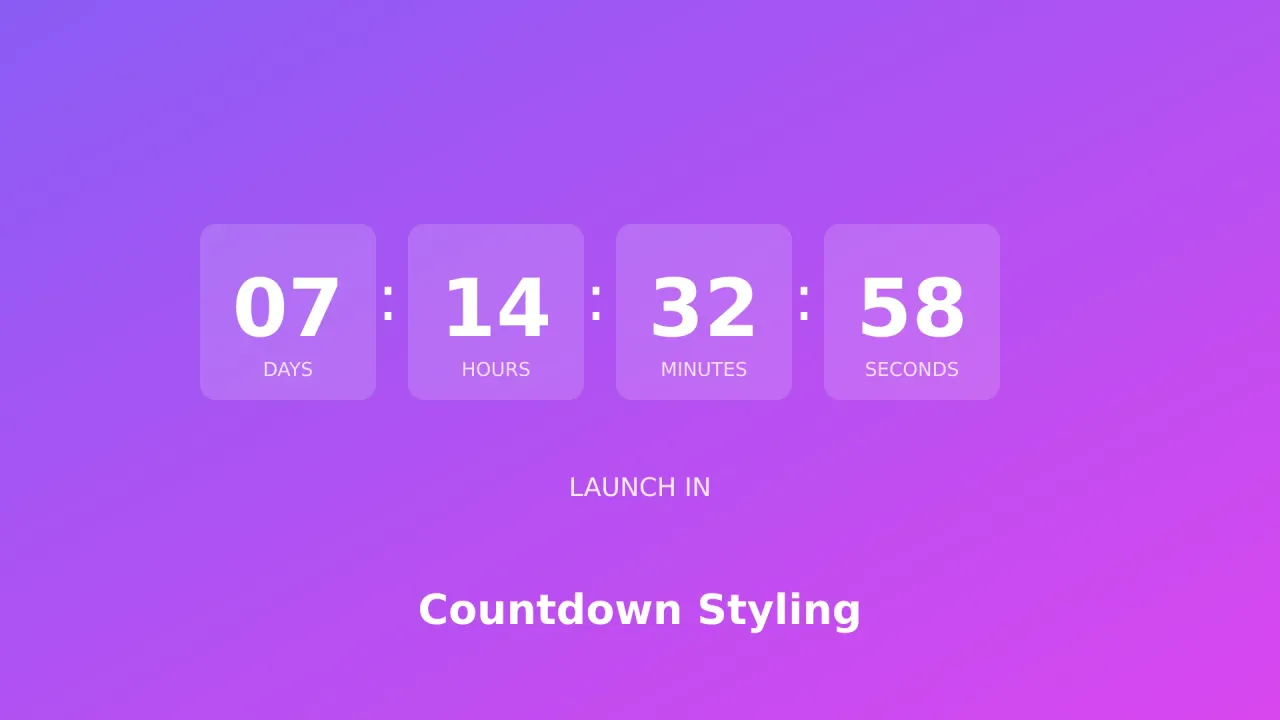
Carrd does ship a built-in Timer element that counts down (or up), but its styling options are limited. If you want a Carrd countdown timer for a launch, a sale, or an event that looks like part of your design, a custom-code Embed element is the way in.
One Embed plus the copy-paste code below gets you a timer that matches your brand and loads zero external scripts. Here are five self-contained designs: a gradient card, a minimal dark strip, circular progress rings, a flip clock, and an inline text version. All plain HTML/CSS/JS, all mobile-friendly.
Heads-up before you scroll: Embeds require Carrd Pro Standard ($19/year). Details in the What You Need section below.
Carrd.coSome Carrd tutorials:
- Add Popup Modal to Carrd
- Add Smooth Scroll to Carrd
- Add Testimonial Slider to Carrd
- Add Dark Mode Toggle to Carrd
- Add WhatsApp Button to Carrd
- Add a Back to Top Button to Carrd
- Add a Floating Menu to Carrd
- Create a Mobile Responsive Navbar in Carrd
- Add a Sticky Header to Carrd
- Add Accordion FAQs to Carrd
- Carrd review (pricing and plans compared)
The complete list of Carrd plugins, themes, and tutorials lives on my carrdme.com site. If you’d rather install than paste code, grab my Carrd tabs plugin or Carrd accordion plugin there.
When to Use a Countdown Timer on Your Carrd Site
Countdown timers earn their place when a real deadline exists:
- Product launches - building anticipation before release
- Sales and promotions - a limited-time offer with a hard end
- Event registration - signup deadlines
- Coming soon pages - telling visitors when to come back
- Webinars and live events - counting down to a start time
A ticking clock creates urgency that static text can’t match. It also creates a hard requirement: for a launch or a sale, the timer has to hit zero at the same instant for every visitor. That detail trips people up, so don’t skip the timezone section below.
What You Need
One prerequisite decides whether anything else in this article works: the Embed element is a paid feature. Here’s how the plans shake out (from carrd.com/pro, September 2026):
| Plan | Price | Sites | Embeds? |
|---|---|---|---|
| Free | $0 | 3 | No |
| Pro Lite | $9/yr | 3 | No |
| Pro Standard | $19/yr | 10 | Yes - plus Forms, Widgets, Analytics, custom domains |
| Pro Plus | $49/yr | 25 | Yes - adds Variables, Redirects, Framing (not needed for countdowns) |
Pro Standard required
Free and Pro Lite accounts can’t add custom code at all, so no countdowns. If you’re on the free plan, the upgrade to Carrd Pro Standard ($19/yr) unlocks everything in this article plus forms, widgets, and custom domains. My Carrd review (pricing and plans compared) breaks down what each tier gets you.
Nothing else to install. Each snippet below is one self-contained HTML/CSS/JS block.
- Carrd account on Pro Standard or higher
- A published (or publishable) Carrd site - a free
yoursite.carrd.cosubdomain works for testing - Your target date and time picked, with a timezone decision (covered below)
- Five minutes
How to Add a Custom Countdown Timer to Carrd
Every design in this article goes through the same element: the Embed. The flow never changes - add the element, set Type to Code, paste a snippet, publish.
Step 1: Add an Embed Element (Type: Code, Style: Inline)
Click the + button in the builder and add an Embed element, then set:
- Type: Code
- Style: Inline
Paste your HTML/CSS/JS into the code field. Inline renders the countdown right where you placed the element in the layout. The other option, Hidden, injects the code into the page’s Head, Body Top, or Body End - right for global scripts like analytics, wrong for a visible countdown. (Older tutorials mention an “Above” style; that option no longer exists.)
To find or re-edit the embed later, use the Elements Panel Carrd added in August 2026: More Actions → Elements… lists every element on the page, which beats hunting through a crowded layout.
Embeds are invisible in the builder
Carrd’s docs say it plainly: the embed element doesn’t output anything in the builder. A blank spot where your countdown should be is normal. Publish the site and it appears. This is the number one false alarm with custom code on Carrd.
Then run the same four-step check every time:
- Publish the site
- Hard-refresh the live page (
Ctrl+Shift+R/Cmd+Shift+R) - Open the DevTools console - it should be clean, no red errors
- Watch the seconds tick for a few beats
Step 2: Choose Your Countdown Style
Pick one of the five designs below and paste it into the embed’s code field. The only edit you have to make is the target date at the top of the script, covered in Setting Your Target Date.
Running two timers on one page?
Each snippet uses its own IDs (countdown1…countdown5), so different styles coexist. Two copies of the same style won’t: duplicate IDs mean only the first timer ticks. Rename every id in the second copy (days1 → days6, countdown1 → countdown6, dayCircle → dayCircle2, day1Card → day1Card2) and the matching getElementById strings in its script, and it works.
Option 1: Modern Card Countdown Timer
Clean gradient cards with the label under each number. The hover lift is subtle and the cards wrap on mobile.
<style>
  .countdown-modern {
    display: flex;
    justify-content: center;
    gap: 20px;
    flex-wrap: wrap;
    font-family: -apple-system, BlinkMacSystemFont, 'Segoe UI', Roboto, sans-serif;
    padding: 20px 0;
  }

  .countdown-item {
    background: linear-gradient(135deg, #667eea 0%, #764ba2 100%);
    border-radius: 16px;
    padding: 25px 20px;
    min-width: 100px;
    text-align: center;
    box-shadow: 0 10px 30px rgba(102, 126, 234, 0.3);
    transition: transform 0.3s;
  }

  .countdown-item:hover {
    transform: translateY(-5px);
  }

  .countdown-value {
    font-size: 48px;
    font-weight: 700;
    color: white;
    line-height: 1;
    margin-bottom: 8px;
  }

  .countdown-label {
    font-size: 14px;
    color: rgba(255, 255, 255, 0.8);
    text-transform: uppercase;
    letter-spacing: 2px;
  }

  @media (max-width: 500px) {
    .countdown-item {
      min-width: 70px;
      padding: 18px 15px;
    }
    .countdown-value {
      font-size: 32px;
    }
    .countdown-label {
      font-size: 11px;
    }
  }

  @media (prefers-reduced-motion: reduce) {
    .countdown-item {
      transition: none;
    }
    .countdown-item:hover {
      transform: none;
    }
  }
</style>

<div class="countdown-modern" id="countdown1" role="timer">
  <div class="countdown-item">
    <div class="countdown-value" id="days1">00</div>
    <div class="countdown-label">Days</div>
  </div>
  <div class="countdown-item">
    <div class="countdown-value" id="hours1">00</div>
    <div class="countdown-label">Hours</div>
  </div>
  <div class="countdown-item">
    <div class="countdown-value" id="minutes1">00</div>
    <div class="countdown-label">Minutes</div>
  </div>
  <div class="countdown-item">
    <div class="countdown-value" id="seconds1">00</div>
    <div class="countdown-label">Seconds</div>
  </div>
</div>

<script>
(function() {
  // March 1, 2027 at 09:00 UTC - Date.UTC months are 0-indexed too (2 = March)
  var targetDate = Date.UTC(2027, 2, 1, 9, 0, 0);

  function updateCountdown() {
    var distance = targetDate - Date.now();

    if (distance < 0) {
      clearInterval(iv);
      document.getElementById('countdown1').innerHTML = '<p style="font-size: 24px; font-weight: 700; color: #667eea;">Event has started!</p>';
      return;
    }

    var days = Math.floor(distance / 86400000);
    var hours = Math.floor((distance % 86400000) / 3600000);
    var minutes = Math.floor((distance % 3600000) / 60000);
    var seconds = Math.floor((distance % 60000) / 1000);

    document.getElementById('days1').innerHTML = (days < 10 ? '0' : '') + days;
    document.getElementById('hours1').innerHTML = (hours < 10 ? '0' : '') + hours;
    document.getElementById('minutes1').innerHTML = (minutes < 10 ? '0' : '') + minutes;
    document.getElementById('seconds1').innerHTML = (seconds < 10 ? '0' : '') + seconds;
  }

  var iv = setInterval(updateCountdown, 1000);
  updateCountdown();
})();
</script>
To customize: change the Date.UTC(2027, 2, 1, 9, 0, 0) line. It’s the one line you edit. Months are 0-indexed (January = 0, March = 2). Publish and watch it tick; if it shows “Event has started!” on load, your target date is in the past.
Option 2: Minimal Dark Countdown Timer
A sleek dark strip with colon separators, for pages that already run a dark palette.
<style>
  .countdown-dark {
    display: flex;
    justify-content: center;
    align-items: center;
    gap: 10px;
    background: #1a1a2e;
    padding: 30px 40px;
    border-radius: 12px;
    font-family: 'Monaco', 'Consolas', monospace;
    max-width: 600px;
    margin: 20px auto;
  }

  .cd-block {
    text-align: center;
  }

  .cd-number {
    font-size: 56px;
    font-weight: 600;
    color: #eee;
    line-height: 1;
  }

  .cd-text {
    font-size: 12px;
    color: #888;
    text-transform: uppercase;
    margin-top: 10px;
    letter-spacing: 1px;
  }

  .cd-separator {
    font-size: 40px;
    color: #4a4a6a;
    padding: 0 5px;
    margin-top: -20px;
  }

  @media (max-width: 500px) {
    .countdown-dark {
      padding: 20px;
      gap: 8px;
    }
    .cd-number {
      font-size: 36px;
    }
    .cd-separator {
      font-size: 28px;
    }
  }
</style>

<div class="countdown-dark" id="countdown2" role="timer">
  <div class="cd-block">
    <div class="cd-number" id="days2">00</div>
    <div class="cd-text">Days</div>
  </div>
  <span class="cd-separator">:</span>
  <div class="cd-block">
    <div class="cd-number" id="hours2">00</div>
    <div class="cd-text">Hours</div>
  </div>
  <span class="cd-separator">:</span>
  <div class="cd-block">
    <div class="cd-number" id="minutes2">00</div>
    <div class="cd-text">Mins</div>
  </div>
  <span class="cd-separator">:</span>
  <div class="cd-block">
    <div class="cd-number" id="seconds2">00</div>
    <div class="cd-text">Secs</div>
  </div>
</div>

<script>
(function() {
  // March 1, 2027 at 09:00 UTC - Date.UTC months are 0-indexed too (2 = March)
  var targetDate = Date.UTC(2027, 2, 1, 9, 0, 0);

  function updateCountdown() {
    var distance = targetDate - Date.now();

    if (distance < 0) {
      clearInterval(iv);
      document.getElementById('countdown2').innerHTML = '<p style="color: #eee; font-size: 24px;">Time is up!</p>';
      return;
    }

    var days = Math.floor(distance / (1000 * 60 * 60 * 24));
    var hours = Math.floor((distance % (1000 * 60 * 60 * 24)) / (1000 * 60 * 60));
    var minutes = Math.floor((distance % (1000 * 60 * 60)) / (1000 * 60));
    var seconds = Math.floor((distance % (1000 * 60)) / 1000);

    document.getElementById('days2').innerHTML = (days < 10 ? '0' : '') + days;
    document.getElementById('hours2').innerHTML = (hours < 10 ? '0' : '') + hours;
    document.getElementById('minutes2').innerHTML = (minutes < 10 ? '0' : '') + minutes;
    document.getElementById('seconds2').innerHTML = (seconds < 10 ? '0' : '') + seconds;
  }

  var iv = setInterval(updateCountdown, 1000);
  updateCountdown();
})();
</script>
A dark countdown sits naturally on a dark-themed section. If you want the whole site to follow the visitor’s preference, pair it with a site-wide dark mode toggle.
To customize: same Date.UTC line as Option 1. Publish, hard-refresh, and check the contrast on a phone screen.
Option 3: Circular Progress Countdown
SVG progress rings that drain as time runs out. Each circle has r=42, so its circumference is 2πr ≈ 264 - that’s where the stroke-dasharray="264" value comes from. Change r and you have to recompute it.
<style>
  .countdown-circles {
    display: flex;
    justify-content: center;
    gap: 25px;
    flex-wrap: wrap;
    padding: 20px 0;
    font-family: -apple-system, BlinkMacSystemFont, 'Segoe UI', Roboto, sans-serif;
  }

  .circle-item {
    position: relative;
    width: 100px;
    height: 100px;
  }

  .circle-item svg {
    transform: rotate(-90deg);
  }

  .circle-bg {
    fill: none;
    stroke: #e6e6e6;
    stroke-width: 8;
  }

  .circle-progress {
    fill: none;
    stroke: #10b981;
    stroke-width: 8;
    stroke-linecap: round;
    transition: stroke-dashoffset 0.5s;
  }

  .circle-content {
    position: absolute;
    top: 50%;
    left: 50%;
    transform: translate(-50%, -50%);
    text-align: center;
  }

  .circle-value {
    font-size: 28px;
    font-weight: 700;
    color: #1f2937;
  }

  .circle-label {
    font-size: 11px;
    color: #6b7280;
    text-transform: uppercase;
  }

  @media (max-width: 450px) {
    .circle-item {
      width: 75px;
      height: 75px;
    }
    .circle-value {
      font-size: 22px;
    }
    .circle-label {
      font-size: 9px;
    }
  }

  @media (prefers-reduced-motion: reduce) {
    .circle-progress {
      transition: none;
    }
  }
</style>

<div class="countdown-circles" id="countdown3" role="timer">
  <!-- Ring math: 2πr ≈ 264 for r=42. Recompute stroke-dasharray if you change r. -->
  <div class="circle-item">
    <svg width="100" height="100" viewBox="0 0 100 100">
      <circle class="circle-bg" cx="50" cy="50" r="42"/>
      <circle class="circle-progress" id="dayCircle" cx="50" cy="50" r="42" stroke-dasharray="264" stroke-dashoffset="0"/>
    </svg>
    <div class="circle-content">
      <div class="circle-value" id="days3">00</div>
      <div class="circle-label">Days</div>
    </div>
  </div>

  <div class="circle-item">
    <svg width="100" height="100" viewBox="0 0 100 100">
      <circle class="circle-bg" cx="50" cy="50" r="42"/>
      <circle class="circle-progress" id="hourCircle" cx="50" cy="50" r="42" stroke-dasharray="264" stroke-dashoffset="0"/>
    </svg>
    <div class="circle-content">
      <div class="circle-value" id="hours3">00</div>
      <div class="circle-label">Hours</div>
    </div>
  </div>

  <div class="circle-item">
    <svg width="100" height="100" viewBox="0 0 100 100">
      <circle class="circle-bg" cx="50" cy="50" r="42"/>
      <circle class="circle-progress" id="minCircle" cx="50" cy="50" r="42" stroke-dasharray="264" stroke-dashoffset="0"/>
    </svg>
    <div class="circle-content">
      <div class="circle-value" id="minutes3">00</div>
      <div class="circle-label">Mins</div>
    </div>
  </div>

  <div class="circle-item">
    <svg width="100" height="100" viewBox="0 0 100 100">
      <circle class="circle-bg" cx="50" cy="50" r="42"/>
      <circle class="circle-progress" id="secCircle" cx="50" cy="50" r="42" stroke-dasharray="264" stroke-dashoffset="0"/>
    </svg>
    <div class="circle-content">
      <div class="circle-value" id="seconds3">00</div>
      <div class="circle-label">Secs</div>
    </div>
  </div>
</div>

<script>
(function() {
  // March 1, 2027 at 09:00 UTC - Date.UTC months are 0-indexed too (2 = March)
  var targetDate = Date.UTC(2027, 2, 1, 9, 0, 0);
  var circumference = 264; // 2πr for r=42

  function updateCountdown() {
    var distance = targetDate - Date.now();

    if (distance < 0) {
      clearInterval(iv);
      document.getElementById('countdown3').innerHTML = '<p style="font-size: 24px; color: #1f2937;">Event Started!</p>';
      return;
    }

    var days = Math.floor(distance / (1000 * 60 * 60 * 24));
    var hours = Math.floor((distance % (1000 * 60 * 60 * 24)) / (1000 * 60 * 60));
    var minutes = Math.floor((distance % (1000 * 60 * 60)) / (1000 * 60));
    var seconds = Math.floor((distance % (1000 * 60)) / 1000);

    document.getElementById('days3').innerHTML = (days < 10 ? '0' : '') + days;
    document.getElementById('hours3').innerHTML = (hours < 10 ? '0' : '') + hours;
    document.getElementById('minutes3').innerHTML = (minutes < 10 ? '0' : '') + minutes;
    document.getElementById('seconds3').innerHTML = (seconds < 10 ? '0' : '') + seconds;

    document.getElementById('dayCircle').style.strokeDashoffset = circumference - (circumference * Math.min(days, 365) / 365);
    document.getElementById('hourCircle').style.strokeDashoffset = circumference - (circumference * hours / 24);
    document.getElementById('minCircle').style.strokeDashoffset = circumference - (circumference * minutes / 60);
    document.getElementById('secCircle').style.strokeDashoffset = circumference - (circumference * seconds / 60);
  }

  var iv = setInterval(updateCountdown, 1000);
  updateCountdown();
})();
</script>
To customize: same Date.UTC line. Publish and check the rings animate, then settle at the right fractions.
Option 4: Flip Clock Countdown Animation
Classic split-flap cards that flip when a digit changes. The heaviest option visually, and the one people remember.
Targets 100+ days out
The days field only has two digit-cards. Past 99 days, pad2(days) returns three characters and dStr[1] shows the wrong digit. The snippet below clamps it with Math.min(days, 99). Need to display real triple digits? Add a third day3Card element and pass dStr[2] to it.
<style>
  .countdown-flip {
    display: flex;
    justify-content: center;
    gap: 30px;
    flex-wrap: wrap;
    padding: 20px 0;
    font-family: -apple-system, BlinkMacSystemFont, 'Segoe UI', Roboto, sans-serif;
  }

  .flip-section {
    text-align: center;
  }

  .flip-card-container {
    display: flex;
    gap: 5px;
    margin-bottom: 10px;
  }

  .flip-card {
    position: relative;
    width: 50px;
    height: 70px;
    perspective: 400px;
  }

  .flip-card-inner {
    position: absolute;
    width: 100%;
    height: 100%;
    background: linear-gradient(180deg, #2d2d44 50%, #252538 50%);
    border-radius: 8px;
    display: flex;
    align-items: center;
    justify-content: center;
    font-size: 40px;
    font-weight: 700;
    color: white;
    box-shadow: 0 4px 10px rgba(0,0,0,0.3);
  }

  .flip-card-inner::before {
    content: '';
    position: absolute;
    top: 50%;
    left: 0;
    right: 0;
    height: 1px;
    background: rgba(0,0,0,0.3);
  }

  .flip-label {
    font-size: 13px;
    color: #666;
    text-transform: uppercase;
    letter-spacing: 2px;
  }

  @keyframes flipAnim {
    0% { transform: rotateX(0deg); }
    50% { transform: rotateX(-10deg); }
    100% { transform: rotateX(0deg); }
  }

  .flip-card.flip .flip-card-inner {
    animation: flipAnim 0.6s ease-in-out;
  }

  @media (max-width: 500px) {
    .countdown-flip {
      gap: 15px;
    }
    .flip-card {
      width: 38px;
      height: 55px;
    }
    .flip-card-inner {
      font-size: 28px;
    }
    .flip-label {
      font-size: 10px;
    }
  }

  @media (prefers-reduced-motion: reduce) {
    .flip-card.flip .flip-card-inner {
      animation: none;
    }
  }
</style>

<div class="countdown-flip" id="countdown4" role="timer">
  <div class="flip-section">
    <div class="flip-card-container">
      <div class="flip-card" id="day1Card"><div class="flip-card-inner">0</div></div>
      <div class="flip-card" id="day2Card"><div class="flip-card-inner">0</div></div>
    </div>
    <div class="flip-label">Days</div>
  </div>

  <div class="flip-section">
    <div class="flip-card-container">
      <div class="flip-card" id="hour1Card"><div class="flip-card-inner">0</div></div>
      <div class="flip-card" id="hour2Card"><div class="flip-card-inner">0</div></div>
    </div>
    <div class="flip-label">Hours</div>
  </div>

  <div class="flip-section">
    <div class="flip-card-container">
      <div class="flip-card" id="min1Card"><div class="flip-card-inner">0</div></div>
      <div class="flip-card" id="min2Card"><div class="flip-card-inner">0</div></div>
    </div>
    <div class="flip-label">Minutes</div>
  </div>

  <div class="flip-section">
    <div class="flip-card-container">
      <div class="flip-card" id="sec1Card"><div class="flip-card-inner">0</div></div>
      <div class="flip-card" id="sec2Card"><div class="flip-card-inner">0</div></div>
    </div>
    <div class="flip-label">Seconds</div>
  </div>
</div>

<script>
(function() {
  // March 1, 2027 at 09:00 UTC - Date.UTC months are 0-indexed too (2 = March)
  var targetDate = Date.UTC(2027, 2, 1, 9, 0, 0);

  function updateFlipCard(cardId, value) {
    var card = document.getElementById(cardId);
    var inner = card.querySelector('.flip-card-inner');
    if (inner.innerHTML !== value) {
      card.classList.add('flip');
      inner.innerHTML = value;
      setTimeout(function() { card.classList.remove('flip'); }, 600);
    }
  }

  function pad2(num) {
    return (num < 10 ? '0' : '') + num;
  }

  function updateCountdown() {
    var distance = targetDate - Date.now();

    if (distance < 0) {
      clearInterval(iv);
      document.getElementById('countdown4').innerHTML = '<p style="font-size: 24px;">Launch Time!</p>';
      return;
    }

    var days = Math.floor(distance / (1000 * 60 * 60 * 24));
    var hours = Math.floor((distance % (1000 * 60 * 60 * 24)) / (1000 * 60 * 60));
    var minutes = Math.floor((distance % (1000 * 60 * 60)) / (1000 * 60));
    var seconds = Math.floor((distance % (1000 * 60)) / 1000);

    var dStr = pad2(Math.min(days, 99)); // two cards only - clamp to avoid 3-digit overflow
    var hStr = pad2(hours);
    var mStr = pad2(minutes);
    var sStr = pad2(seconds);

    updateFlipCard('day1Card', dStr[0]);
    updateFlipCard('day2Card', dStr[1]);
    updateFlipCard('hour1Card', hStr[0]);
    updateFlipCard('hour2Card', hStr[1]);
    updateFlipCard('min1Card', mStr[0]);
    updateFlipCard('min2Card', mStr[1]);
    updateFlipCard('sec1Card', sStr[0]);
    updateFlipCard('sec2Card', sStr[1]);
  }

  var iv = setInterval(updateCountdown, 1000);
  updateCountdown();
})();
</script>
To customize: same Date.UTC line. Publish, then test with a date more than 100 days out and confirm the cards show “99” and flip cleanly.
Option 5: Inline Text Countdown
The lightest option. No boxes, no animation - just a sentence that updates, which makes it easy to place between a headline and a paragraph of copy.
<style>
  .countdown-text {
    font-family: -apple-system, BlinkMacSystemFont, 'Segoe UI', Roboto, sans-serif;
    font-size: 24px;
    color: #374151;
    text-align: center;
    padding: 20px;
  }

  .countdown-text .highlight {
    color: #dc2626;
    font-weight: 700;
  }

  @media (max-width: 500px) {
    .countdown-text {
      font-size: 18px;
    }
  }
</style>

<div class="countdown-text" id="countdown5" role="timer">
  Sale ends in <span class="highlight" id="textDays">0</span> days,
  <span class="highlight" id="textHours">0</span> hours,
  <span class="highlight" id="textMins">0</span> minutes
</div>

<script>
(function() {
  // March 1, 2027 at 09:00 UTC - Date.UTC months are 0-indexed too (2 = March)
  var targetDate = Date.UTC(2027, 2, 1, 9, 0, 0);

  function updateCountdown() {
    var distance = targetDate - Date.now();

    if (distance < 0) {
      clearInterval(iv);
      document.getElementById('countdown5').innerHTML = '<span class="highlight">Sale has ended!</span>';
      return;
    }

    var days = Math.floor(distance / (1000 * 60 * 60 * 24));
    var hours = Math.floor((distance % (1000 * 60 * 60 * 24)) / (1000 * 60 * 60));
    var minutes = Math.floor((distance % (1000 * 60 * 60)) / (1000 * 60));

    document.getElementById('textDays').innerHTML = days;
    document.getElementById('textHours').innerHTML = hours;
    document.getElementById('textMins').innerHTML = minutes;
  }

  // no seconds shown, so a 60-second tick is enough
  var iv = setInterval(updateCountdown, 60000);
  updateCountdown();
})();
</script>
This one ticks once a minute instead of every second, since it doesn’t display seconds. It pairs well with a pricing table when the deadline is the reason to buy now.
To customize: same Date.UTC line. Publish and check the sentence wraps cleanly on mobile.
Setting Your Target Date (Timezone-Safe)
Every snippet sets its deadline on one line:
var targetDate = Date.UTC(2027, 2, 1, 9, 0, 0);This is the line you change. Date.UTC(year, month, day, hour, minute, second) takes the same arguments as new Date(...), and months are still 0-indexed: January = 0, March = 2, December = 11.
Future-dated examples:
- March 1, 2027 at 09:00 UTC:
Date.UTC(2027, 2, 1, 9, 0, 0) - December 25, 2027 at 09:00 UTC:
Date.UTC(2027, 11, 25, 9, 0, 0) - July 4, 2027 at 18:00 UTC:
Date.UTC(2027, 6, 4, 18, 0, 0)
One habit that saves you a republish: while testing, pick a date comfortably in the future. A countdown whose target already passed renders its expiry message on load, which looks broken even though the code is fine. When the real date is set, roll the year instead of leaving an old date in place.
Visitor-Local vs UTC Deadlines
Date.UTC(...) and new Date(y, m, d) look interchangeable but aren’t:
new Date(2027, 2, 1)counts down to midnight in each visitor’s timezone. A visitor in London hits zero five hours before a visitor in New York. For a global deadline (a launch, a sale end, a webinar start), that’s a real bug: some visitors see “Sale has ended!” while others still see hours left.Date.UTC(2027, 2, 1, 9, 0, 0)is one fixed instant. Every visitor’s timer hits zero at the same moment; each browser just renders the remaining time against its own clock.
Rule of thumb: global deadline → Date.UTC. Local event (doors open, in-store promo) → visitor-local new Date(y, m, d) is fine.
Date.UTC
var targetDate = Date.UTC(2027, 2, 1, 9, 0, 0);ISO string
var targetDate = new Date("2027-03-01T09:00:00Z").getTime();Both are the same instant: March 1, 2027 at 09:00 UTC. Pick whichever syntax you’d rather read six months from now.
The month is 0-indexed
In both new Date(y, m, d) and Date.UTC(y, m, d, ...), January is month 0 and December is month 11. It bites everyone once. If your countdown is off by exactly a month, this is why.
Customizing Countdown Colors and Fonts
Each style uses plain CSS colors you can swap to match your brand:
Gradient backgrounds:
background: linear-gradient(135deg, #667eea 0%, #764ba2 100%);
/* Change the hex colors to match your brand */
Solid colors:
background: #1a1a2e;  /* Dark background */
color: #10b981;       /* Accent color */
Circle colors:
stroke: #10b981;  /* Progress color */
stroke: #e6e6e6;  /* Background circle */
The snippets all use system font stacks so they work everywhere with no loading cost. If you want your brand font, Pro Standard and up support Local Fonts - Carrd added six more in August 2026 (Geist Pixel, Smooch Sans, Tangerine, and a few others). Load the font on the site, then override inside the embed’s <style> block:
.countdown-value { font-family: 'Smooch Sans', sans-serif; }Keep it accessible
The animated styles in this article ship with a prefers-reduced-motion guard and every container carries role="timer". If you’re adapting the code for your own variation, keep this block:
@media (prefers-reduced-motion: reduce) {
  .countdown-item:hover { transform: none; }
  .flip-card.flip .flip-card-inner { animation: none; }
  .circle-progress { transition: none; }
}
Skip aria-live on a per-second timer. A live region would announce every tick to screen readers.
The same embed technique covers other injections too - a cookie notice works exactly the same way.
What Happens When the Countdown Ends
Every snippet swaps the timer for a message at zero and stops its own interval, so it doesn’t keep ticking invisibly forever. Two patterns cover most needs:
Show a message
if (distance < 0) {
  clearInterval(iv);
  document.getElementById('countdown1').innerHTML = '<p>We are live!</p>';
  return;
}
Redirect on expiry
if (distance < 0) {
  clearInterval(iv);
  window.location.href = 'https://yoursite.com/launch';
  return;
}
Stop the clock
setInterval keeps firing after expiry unless you clear it. The clearInterval(iv) call in these snippets shuts the timer down the moment the message or redirect runs. Without it, the interval ticks on doing nothing.
Point the redirect at a page on your own custom domain so the URL survives a redesign. Pro Plus ($49/yr) also ships native Redirects and a Framing option under Publish → Settings, but a three-line JavaScript redirect inside the embed is enough for most countdowns.
One security note, in case you’re weighing an iframe-based timer instead: published Carrd sites send content-security-policy: frame-ancestors https://carrd.com and x-frame-options: deny. That only restricts who can iframe your Carrd page. Inline scripts like these snippets run fine, and so do third-party widget scripts.
Custom Embed vs. Third-Party Countdown Widgets
Services like the Elfsight Countdown Timer paste into the same Embed element you just used, and they’re real products with visual editors, count-up mode, and delayed starts. The catch is cost: past the free or badged tier they run roughly $5-6/month, so $60-72/year. Check current pricing before you budget; widget pricing changes often.
| Custom embed (this article) | Third-party widget | |
|---|---|---|
| Yearly cost | $0 extra (Pro Standard is required either way) | ~$60-72/yr on top of Carrd |
| External requests | None | Vendor JS on every pageview |
| No-code editing | No - you edit the snippet | Yes - visual dashboard |
| Vendor badge | None | Free tiers usually add one |
The custom embed wins on cost and page weight. You already need Pro Standard for any embed, so the marginal price of these snippets is zero, and nothing phones home. A widget earns its fee only if you need what code can’t easily give you:
- A visual editor a non-technical client can tweak
- Count-up mode (time since an event, not time until)
- The same timer synced across several sites from one dashboard
One thing that confuses people: Carrd’s own Widget element supports Stripe, Gumroad, Facebook, PayPal, and Typeform. No countdown there. Carrd’s countdown lives in the separate Timer element, and once you outgrow its styling options, the Embed element is where you end up.
Troubleshooting and FAQ
Why is my countdown not showing in the Carrd builder?
Embed elements render nothing in the builder - Carrd’s docs state this directly. Publish the site and hard-refresh the live page. If it’s still blank after publishing, open DevTools and check the console for a script error.
Why does my countdown immediately say 'Event has started!'?
Your target date is in the past. Check the Date.UTC(...) line at the top of the script and roll it forward. Remember the month is 0-indexed: Date.UTC(2027, 2, 1) is March 1, 2027, not February 1.
Why does my countdown hit zero at the wrong time?
You probably used new Date(y, m, d), which counts down to midnight in each visitor’s local timezone. For a deadline that must hit at the same instant worldwide, switch to Date.UTC(y, m, d, h, min, s) or new Date("2027-03-01T09:00:00Z").getTime().
Do I need a paid plan for a Carrd countdown timer?
Yes. The Embed element requires Pro Standard or higher, $19/year minimum. Free and Pro Lite plans can’t add custom code at all, so there’s no free-tier workaround inside Carrd.
Can I add two or more countdowns to one page?
Yes. Different styles coexist because their IDs differ (countdown1 through countdown5). Two copies of the same style collide - rename every ID in the second copy and update the getElementById strings in its script to match.
Why does the flip clock show the wrong days after 100 days?
The days field has two digit-cards, so it can’t display a three-digit number. pad2(150) returns “150” and dStr[1] grabs the middle digit. The snippet clamps it with Math.min(days, 99), or you can add a third card for real triple digits.
Are these countdown snippets accessible?
Mostly, yes. Each container has role="timer", and the animated styles include a prefers-reduced-motion guard that kills the flip and hover effects for users who opt out. Don’t add aria-live to a per-second timer; a live region announcing every tick is worse than announcing nothing.
Conclusion
Carrd’s built-in Timer element covers the basics, but a custom embed is the way to get a countdown that matches your design. Pick a style, change one Date.UTC line, publish, and check it ticks. You’ll spend less than the widget route and ship zero external scripts.
Pair the timer with a popup modal for email capture or a WhatsApp button so visitors can reach you when the clock hits zero. The tutorial list up top has the rest of the Carrd custom-code builds.
Try Carrd.co