How to Add a WhatsApp Chat Button to Your Carrd Website
Learn how to add a floating WhatsApp button to your Carrd site so visitors can message you instantly with pre-filled text.
Contact forms are fine, but some visitors want answers now. A WhatsApp button lets them reach you instantly without leaving your Carrd site or filling out forms.
This works especially well for service businesses, local shops, freelancers, and anyone who can handle direct messages. If you’re already using WhatsApp for business communication, putting a button on your site just makes sense.
Carrd.coSome Carrd Tutorials:
- Add Popup Modal to Carrd
- Add Smooth Scroll to Carrd
- Add Dark Mode Toggle to Carrd
- Add Floating Menu to Carrd
- Add Sidebar Menu to Carrd
- Carrd.co Review
The complete list with Carrd plugins, themes and tutorials you can find on my carrdme.com website.
Why Add a WhatsApp Button
A few reasons this works:
-
Instant connection - Visitors can message you right away instead of waiting for email replies.
-
Higher conversion - People are more likely to reach out when it’s this easy.
-
Mobile-friendly - WhatsApp is already on their phone. One tap and they’re chatting.
-
Pre-filled messages - You can set a default message so visitors don’t have to think about what to write.
-
Global reach - WhatsApp has over 2 billion users. In many countries, it’s the primary communication method.
How to Add a WhatsApp Button to Carrd
Step 1: Get Your WhatsApp Link
WhatsApp has a direct chat link format:
https://wa.me/YOURNUMBERReplace YOURNUMBER with your phone number in international format without any + or spaces. For example:
- US number:
12125551234 - UK number:
447911123456
To add a pre-filled message:
https://wa.me/YOURNUMBER?text=Hi,%20I%20found%20you%20on%20your%20websiteSpaces need to be %20 in URLs.
Step 2: Add an Embed Element
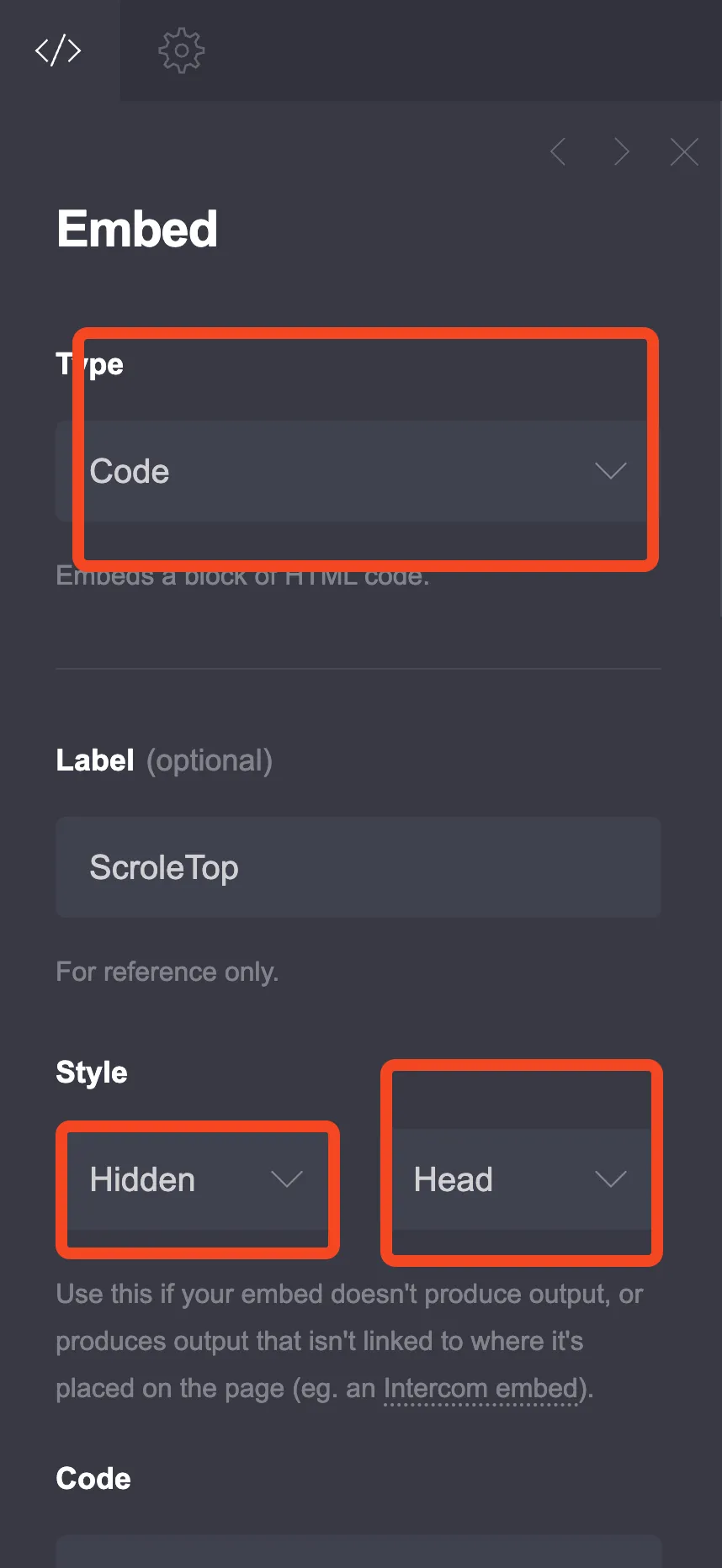
Click the + sign and add an Embed element:
- Type: Code
- Style: Hidden, Head
Step 3: Choose Your Button Style
Pick from the options below.
Option 1: Simple Floating Button
A clean WhatsApp button that floats in the corner.
<style>
  .whatsapp-float {
    position: fixed;
    bottom: 25px;
    right: 25px;
    width: 60px;
    height: 60px;
    background-color: #25D366;
    border-radius: 50%;
    display: flex;
    align-items: center;
    justify-content: center;
    box-shadow: 0 4px 15px rgba(37, 211, 102, 0.4);
    z-index: 9999;
    transition: all 0.3s ease;
    text-decoration: none;
  }

  .whatsapp-float:hover {
    transform: scale(1.1);
    box-shadow: 0 6px 20px rgba(37, 211, 102, 0.5);
  }

  .whatsapp-float svg {
    width: 32px;
    height: 32px;
    fill: white;
  }

  /* Pulse animation */
  .whatsapp-float::before {
    content: '';
    position: absolute;
    width: 100%;
    height: 100%;
    background-color: #25D366;
    border-radius: 50%;
    z-index: -1;
    animation: pulse 2s infinite;
  }

  @keyframes pulse {
    0% {
      transform: scale(1);
      opacity: 0.7;
    }
    70% {
      transform: scale(1.3);
      opacity: 0;
    }
    100% {
      transform: scale(1);
      opacity: 0;
    }
  }

  /* Hide on desktop if you only want mobile */
  /*
  @media (min-width: 769px) {
    .whatsapp-float {
      display: none;
    }
  }
  */
</style>

<a href="https://wa.me/YOURNUMBER?text=Hi,%20I%20found%20you%20on%20your%20website" class="whatsapp-float" target="_blank" rel="noopener" aria-label="Chat on WhatsApp">
  <svg viewBox="0 0 32 32" xmlns="http://www.w3.org/2000/svg">
    <path d="M16.004 0h-.008C7.174 0 0 7.176 0 16c0 3.5 1.128 6.744 3.046 9.378L1.054 32l6.826-2.192A15.915 15.915 0 0016.004 32C24.826 32 32 24.822 32 16S24.826 0 16.004 0zm9.35 22.614c-.396 1.116-1.956 2.042-3.216 2.312-.864.184-1.99.33-5.786-1.244-4.858-2.014-7.984-6.952-8.226-7.274-.232-.322-1.958-2.606-1.958-4.972s1.238-3.528 1.678-4.012c.396-.436 1.036-.636 1.65-.636.198 0 .376.01.536.018.44.02.66.046.95.734.364.864 1.25 3.05 1.36 3.272.11.222.184.482.036.772-.138.3-.208.486-.416.748-.208.262-.438.584-.626.784-.208.24-.424.5-.182.98.242.48 1.076 1.774 2.312 2.874 1.588 1.414 2.926 1.852 3.342 2.058.416.206.658.172.9-.104.252-.286 1.072-1.248 1.358-1.676.276-.428.562-.356.95-.214.39.144 2.476 1.168 2.9 1.38.424.214.706.322.81.498.104.176.104 1.022-.292 2.138z"/>
  </svg>
</a>
Important: Replace YOURNUMBER with your actual phone number (e.g., 12125551234).
Option 2: Button with Text
A button that shows “Chat with us” text on hover.
<style>
  .wa-button {
    position: fixed;
    bottom: 25px;
    right: 25px;
    display: flex;
    align-items: center;
    gap: 12px;
    background: #25D366;
    padding: 15px 20px;
    border-radius: 50px;
    text-decoration: none;
    box-shadow: 0 4px 15px rgba(0,0,0,0.2);
    z-index: 9999;
    transition: all 0.3s ease;
  }

  .wa-button:hover {
    transform: translateY(-3px);
    box-shadow: 0 6px 20px rgba(0,0,0,0.25);
  }

  .wa-button svg {
    width: 28px;
    height: 28px;
    fill: white;
    flex-shrink: 0;
  }

  .wa-button-text {
    color: white;
    font-size: 16px;
    font-weight: 600;
    white-space: nowrap;
  }

  /* Collapse to icon only on mobile */
  @media (max-width: 600px) {
    .wa-button {
      padding: 15px;
      border-radius: 50%;
    }
    .wa-button-text {
      display: none;
    }
  }
</style>

<a href="https://wa.me/YOURNUMBER?text=Hi,%20I'm%20interested%20in%20your%20services" class="wa-button" target="_blank" rel="noopener">
  <svg viewBox="0 0 32 32" xmlns="http://www.w3.org/2000/svg">
    <path d="M16.004 0h-.008C7.174 0 0 7.176 0 16c0 3.5 1.128 6.744 3.046 9.378L1.054 32l6.826-2.192A15.915 15.915 0 0016.004 32C24.826 32 32 24.822 32 16S24.826 0 16.004 0zm9.35 22.614c-.396 1.116-1.956 2.042-3.216 2.312-.864.184-1.99.33-5.786-1.244-4.858-2.014-7.984-6.952-8.226-7.274-.232-.322-1.958-2.606-1.958-4.972s1.238-3.528 1.678-4.012c.396-.436 1.036-.636 1.65-.636.198 0 .376.01.536.018.44.02.66.046.95.734.364.864 1.25 3.05 1.36 3.272.11.222.184.482.036.772-.138.3-.208.486-.416.748-.208.262-.438.584-.626.784-.208.24-.424.5-.182.98.242.48 1.076 1.774 2.312 2.874 1.588 1.414 2.926 1.852 3.342 2.058.416.206.658.172.9-.104.252-.286 1.072-1.248 1.358-1.676.276-.428.562-.356.95-.214.39.144 2.476 1.168 2.9 1.38.424.214.706.322.81.498.104.176.104 1.022-.292 2.138z"/>
  </svg>
  <span class="wa-button-text">Chat with us</span>
</a>
Option 3: Expandable Chat Widget
A button that expands to show a message preview before opening WhatsApp.
<style>
  .wa-widget {
    position: fixed;
    bottom: 25px;
    right: 25px;
    z-index: 9999;
    font-family: -apple-system, BlinkMacSystemFont, 'Segoe UI', Roboto, sans-serif;
  }

  .wa-widget-button {
    width: 60px;
    height: 60px;
    background: #25D366;
    border-radius: 50%;
    border: none;
    cursor: pointer;
    display: flex;
    align-items: center;
    justify-content: center;
    box-shadow: 0 4px 15px rgba(37, 211, 102, 0.4);
    transition: all 0.3s;
  }

  .wa-widget-button:hover {
    transform: scale(1.05);
  }

  .wa-widget-button svg {
    width: 32px;
    height: 32px;
    fill: white;
  }

  .wa-widget-popup {
    position: absolute;
    bottom: 75px;
    right: 0;
    width: 320px;
    background: white;
    border-radius: 16px;
    box-shadow: 0 10px 40px rgba(0,0,0,0.15);
    overflow: hidden;
    transform: scale(0);
    transform-origin: bottom right;
    transition: transform 0.3s ease;
  }

  .wa-widget-popup.active {
    transform: scale(1);
  }

  .wa-widget-header {
    background: #075E54;
    color: white;
    padding: 20px;
  }

  .wa-widget-header h4 {
    margin: 0 0 5px 0;
    font-size: 18px;
  }

  .wa-widget-header p {
    margin: 0;
    font-size: 13px;
    opacity: 0.9;
  }

  .wa-widget-body {
    padding: 20px;
    background: #ECE5DD;
  }

  .wa-widget-message {
    background: white;
    padding: 12px 15px;
    border-radius: 8px;
    border-top-left-radius: 0;
    box-shadow: 0 1px 2px rgba(0,0,0,0.1);
    position: relative;
    margin-bottom: 15px;
  }

  .wa-widget-message::before {
    content: '';
    position: absolute;
    top: 0;
    left: -8px;
    border: 8px solid transparent;
    border-right-color: white;
    border-top-color: white;
  }

  .wa-widget-message p {
    margin: 0;
    font-size: 14px;
    color: #333;
    line-height: 1.5;
  }

  .wa-widget-time {
    font-size: 11px;
    color: #999;
    text-align: right;
    margin-top: 5px;
  }

  .wa-widget-cta {
    display: block;
    width: 100%;
    padding: 15px;
    background: #25D366;
    color: white;
    border: none;
    font-size: 16px;
    font-weight: 600;
    cursor: pointer;
    text-decoration: none;
    text-align: center;
    transition: background 0.2s;
  }

  .wa-widget-cta:hover {
    background: #20bd5a;
  }

  @media (max-width: 400px) {
    .wa-widget-popup {
      width: 280px;
      right: -10px;
    }
  }
</style>

<div class="wa-widget">
  <div class="wa-widget-popup" id="waPopup">
    <div class="wa-widget-header">
      <h4>Need help?</h4>
      <p>Typically replies within minutes</p>
    </div>
    <div class="wa-widget-body">
      <div class="wa-widget-message">
        <p>Hi there! 👋 How can I help you today?</p>
        <div class="wa-widget-time">Just now</div>
      </div>
    </div>
    <a href="https://wa.me/YOURNUMBER?text=Hi,%20I%20have%20a%20question" class="wa-widget-cta" target="_blank" rel="noopener">
      Start Chat
    </a>
  </div>

  <button class="wa-widget-button" id="waButton" aria-label="Open WhatsApp chat">
    <svg viewBox="0 0 32 32" xmlns="http://www.w3.org/2000/svg">
      <path d="M16.004 0h-.008C7.174 0 0 7.176 0 16c0 3.5 1.128 6.744 3.046 9.378L1.054 32l6.826-2.192A15.915 15.915 0 0016.004 32C24.826 32 32 24.822 32 16S24.826 0 16.004 0zm9.35 22.614c-.396 1.116-1.956 2.042-3.216 2.312-.864.184-1.99.33-5.786-1.244-4.858-2.014-7.984-6.952-8.226-7.274-.232-.322-1.958-2.606-1.958-4.972s1.238-3.528 1.678-4.012c.396-.436 1.036-.636 1.65-.636.198 0 .376.01.536.018.44.02.66.046.95.734.364.864 1.25 3.05 1.36 3.272.11.222.184.482.036.772-.138.3-.208.486-.416.748-.208.262-.438.584-.626.784-.208.24-.424.5-.182.98.242.48 1.076 1.774 2.312 2.874 1.588 1.414 2.926 1.852 3.342 2.058.416.206.658.172.9-.104.252-.286 1.072-1.248 1.358-1.676.276-.428.562-.356.95-.214.39.144 2.476 1.168 2.9 1.38.424.214.706.322.81.498.104.176.104 1.022-.292 2.138z"/>
    </svg>
  </button>
</div>

<script>
  const waButton = document.getElementById('waButton');
  const waPopup = document.getElementById('waPopup');

  waButton.addEventListener('click', () => {
    waPopup.classList.toggle('active');
  });

  // Close popup when clicking outside
  document.addEventListener('click', (e) => {
    if (!e.target.closest('.wa-widget')) {
      waPopup.classList.remove('active');
    }
  });
</script>
Option 4: Multi-Chat Button (WhatsApp + Others)
If you want to offer multiple contact options:
<style>
  .chat-buttons {
    position: fixed;
    bottom: 25px;
    right: 25px;
    display: flex;
    flex-direction: column;
    gap: 12px;
    z-index: 9999;
  }

  .chat-btn {
    width: 55px;
    height: 55px;
    border-radius: 50%;
    display: flex;
    align-items: center;
    justify-content: center;
    text-decoration: none;
    box-shadow: 0 4px 12px rgba(0,0,0,0.2);
    transition: all 0.3s;
    transform: scale(0);
    animation: popIn 0.3s ease forwards;
  }

  .chat-btn:nth-child(1) { animation-delay: 0s; }
  .chat-btn:nth-child(2) { animation-delay: 0.1s; }
  .chat-btn:nth-child(3) { animation-delay: 0.2s; }

  @keyframes popIn {
    to {
      transform: scale(1);
    }
  }

  .chat-btn:hover {
    transform: scale(1.1) !important;
  }

  .chat-btn svg {
    width: 28px;
    height: 28px;
    fill: white;
  }

  .chat-btn.whatsapp {
    background: #25D366;
  }

  .chat-btn.telegram {
    background: #0088cc;
  }

  .chat-btn.email {
    background: #ea4335;
  }

  /* Tooltip */
  .chat-btn::before {
    content: attr(data-tooltip);
    position: absolute;
    right: 65px;
    background: #333;
    color: white;
    padding: 8px 12px;
    border-radius: 6px;
    font-size: 13px;
    white-space: nowrap;
    opacity: 0;
    pointer-events: none;
    transition: opacity 0.2s;
  }

  .chat-btn:hover::before {
    opacity: 1;
  }
</style>

<div class="chat-buttons">
  <a href="https://wa.me/YOURNUMBER?text=Hi" class="chat-btn whatsapp" target="_blank" rel="noopener" data-tooltip="WhatsApp">
    <svg viewBox="0 0 32 32"><path d="M16.004 0h-.008C7.174 0 0 7.176 0 16c0 3.5 1.128 6.744 3.046 9.378L1.054 32l6.826-2.192A15.915 15.915 0 0016.004 32C24.826 32 32 24.822 32 16S24.826 0 16.004 0zm9.35 22.614c-.396 1.116-1.956 2.042-3.216 2.312-.864.184-1.99.33-5.786-1.244-4.858-2.014-7.984-6.952-8.226-7.274-.232-.322-1.958-2.606-1.958-4.972s1.238-3.528 1.678-4.012c.396-.436 1.036-.636 1.65-.636.198 0 .376.01.536.018.44.02.66.046.95.734.364.864 1.25 3.05 1.36 3.272.11.222.184.482.036.772-.138.3-.208.486-.416.748-.208.262-.438.584-.626.784-.208.24-.424.5-.182.98.242.48 1.076 1.774 2.312 2.874 1.588 1.414 2.926 1.852 3.342 2.058.416.206.658.172.9-.104.252-.286 1.072-1.248 1.358-1.676.276-.428.562-.356.95-.214.39.144 2.476 1.168 2.9 1.38.424.214.706.322.81.498.104.176.104 1.022-.292 2.138z"/></svg>
  </a>

  <a href="https://t.me/YOURUSERNAME" class="chat-btn telegram" target="_blank" rel="noopener" data-tooltip="Telegram">
    <svg viewBox="0 0 24 24"><path d="M12 0C5.373 0 0 5.373 0 12s5.373 12 12 12 12-5.373 12-12S18.627 0 12 0zm5.562 8.161c-.18 1.897-.962 6.502-1.359 8.627-.168.9-.5 1.201-.82 1.23-.697.064-1.226-.461-1.901-.903-1.056-.693-1.653-1.124-2.678-1.8-1.185-.78-.417-1.21.258-1.91.177-.184 3.247-2.977 3.307-3.23.007-.032.015-.15-.056-.212s-.174-.041-.249-.024c-.106.024-1.793 1.139-5.062 3.345-.479.329-.913.489-1.302.481-.428-.009-1.252-.242-1.865-.442-.751-.244-1.349-.374-1.297-.789.027-.216.325-.437.893-.663 3.498-1.524 5.831-2.529 6.998-3.015 3.333-1.386 4.025-1.627 4.477-1.635.099-.002.321.023.465.141.121.1.154.234.169.334.016.1.035.323.02.498z"/></svg>
  </a>

  <a href="mailto:your@email.com" class="chat-btn email" data-tooltip="Email">
    <svg viewBox="0 0 24 24"><path d="M20 4H4c-1.1 0-2 .9-2 2v12c0 1.1.9 2 2 2h16c1.1 0 2-.9 2-2V6c0-1.1-.9-2-2-2zm0 4l-8 5-8-5V6l8 5 8-5v2z"/></svg>
  </a>
</div>
Customization Options
Change Position
Move the button to a different corner:
/* Bottom left */
bottom: 25px;
left: 25px;
right: auto;

/* Top right */
top: 25px;
right: 25px;
bottom: auto;
Change Size
Adjust the button dimensions:
.whatsapp-float {
  width: 50px;  /* Smaller */
  height: 50px;
}

/* Or larger */
.whatsapp-float {
  width: 70px;
  height: 70px;
}
Disable Pulse Animation
Remove the ::before pseudo-element or set animation: none:
.whatsapp-float::before {
  display: none;
}
Custom Pre-filled Message
Customize what shows up when visitors open the chat:
https://wa.me/12125551234?text=Hi!%20I'm%20interested%20in%20your%20web%20design%20services.%20My%20name%20is%20___Use %20 for spaces and %0A for line breaks.
Mobile vs Desktop
The button works on both, but the experience differs:
- Mobile: Opens the WhatsApp app directly
- Desktop: Opens WhatsApp Web in a new tab
If you want to show the button only on mobile:
@media (min-width: 769px) {
  .whatsapp-float {
    display: none;
  }
}
Business Considerations
Response time matters - If you add a chat button, be prepared to respond quickly. Slow replies make a bad impression.
Set availability hours - Consider mentioning your response hours in the pre-filled message or popup widget.
Use WhatsApp Business - The free WhatsApp Business app offers auto-replies, quick responses, and business profiles.
Try Carrd.coConclusion
A WhatsApp button removes friction between visitors and getting in touch. Pick the style that fits your site, add your phone number, and you’re set. Just make sure you’re ready to handle the messages that come in.
If you want more contact options, combine this with a contact form or popup modal.