How to Add a WhatsApp Chat Button to Carrd (2026 Guide)
Add a WhatsApp chat button to your Carrd site with copy-paste code: floating button, chat widget, and multi-chat options, plus setup steps and troubleshooting.

Updated Published 42 min read
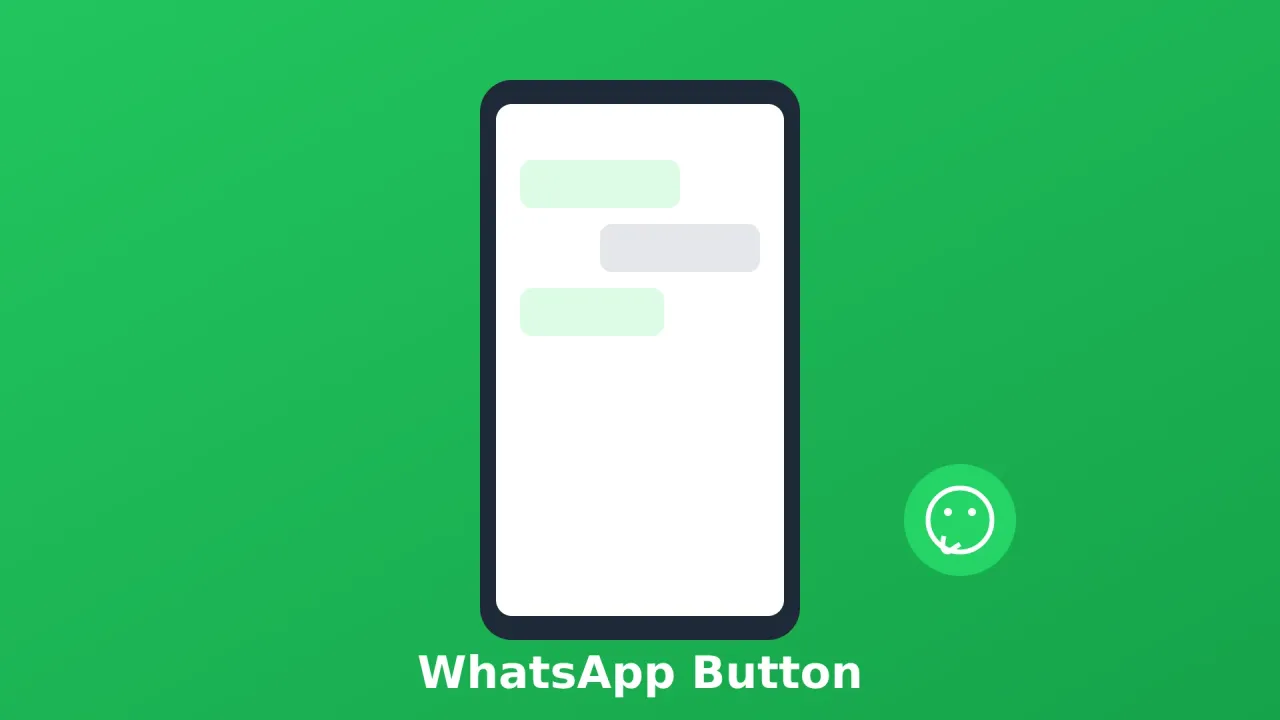
Contact forms are fine, but some visitors want answers now. A WhatsApp chat button on your Carrd site lets them message you instantly, without leaving the page or filling out a form.
This works well for service businesses, local shops, and freelancers who already live in WhatsApp. The floating button and chat widget styles below are plain HTML and CSS with inline SVG, so there are no third-party scripts to load.
One thing up front: every option here lives in a Carrd Embed element, and that needs Carrd Pro Standard or higher ($19/year). The free plan and Pro Lite cannot add custom code. Details below.
Carrd.coSome Carrd Tutorials:
- Add Popup Modal to Carrd
- Add Smooth Scroll to Carrd
- Add Dark Mode Toggle to Carrd
- Add Floating Menu to Carrd
- Add Sidebar Menu to Carrd
- Carrd.co Review
The complete list with Carrd plugins, themes and tutorials you can find on my carrdme.com website.
Why Add a WhatsApp Button to Your Carrd Site
A few reasons this works:
-
Instant connection - Visitors can message you right away instead of waiting for email replies.
-
Higher conversion - People are more likely to reach out when it’s this easy.
-
Mobile-friendly - WhatsApp is already on their phone. One tap and they’re chatting.
-
Pre-filled messages - You can set a default message so visitors don’t have to think about what to write.
-
Global reach - WhatsApp has over 3 billion monthly users (as of 2025). In many countries, it’s the primary way people message a business.
A simple floating button covers most cases. If you want a “WhatsApp chat widget for Carrd” with a message preview before the chat opens, Option 3 below is built for that. Service businesses, local shops, and freelancers tend to get the most out of it.
What You Need Before You Start
This is the short list. The plan requirement is the one that blocks people, so it comes first.
- A Carrd account on Pro Standard or higher ($19/year) - Embeds are not on the free plan or Pro Lite
- Your WhatsApp number in international format (country code, no zeros in front)
- The WhatsApp app on your phone, or WhatsApp Web, so you can test the chat handoff
- Optional: the free WhatsApp Business app if you want greeting messages and a number-hiding short link
You need Carrd Pro Standard or higher
The Embed element used in every option requires Pro Standard ($19/year) or higher. The free plan and Pro Lite ($9/year) cannot add custom code, so a WhatsApp button is not possible on those plans. Pricing verified against carrd.com/pro in September 2026.
| Plan | Price | Sites | What you get |
|---|---|---|---|
| Pro Lite | $9/year | 3 | No Embeds |
| Pro Standard | $19/year | 10 | Embeds, Widgets, Forms, Analytics, Meta Tags |
| Pro Plus | $49/year | 25 | Everything in Standard plus Advanced Settings, Password Protection, Framing |
Pro Standard is the default pick: $19/year works out to about $1.60/month, and it gets you Embeds plus Analytics (useful for the click-tracking snippet later). I would not pay for Pro Plus just for a chat button. For the full plan breakdown, see Carrd Pro plans and pricing.
Get Carrd ProHow to Add a WhatsApp Button to Carrd
Three steps: build your wa.me link, add one Embed element, paste one of the four code styles below. Everything is inline HTML, CSS, and SVG. No widget script, no external font, and (generally) no cookie-consent burden from the code itself.
Step 1: Get Your WhatsApp Chat Link (wa.me)
WhatsApp’s click-to-chat link format is:
https://wa.me/YOURNUMBERReplace YOURNUMBER with your phone number in international format, no +, spaces, or dashes. For example:
- US number:
12125551234 - UK number:
447911123456
To add a pre-filled message:
https://wa.me/YOURNUMBER?text=Hi,%20I%20found%20you%20on%20your%20websiteSpaces need to be %20 in URLs. Use %0A for line breaks.
Phone number format is the #1 failure
No +, spaces, dashes, parentheses, or leading zeros. 12125551234, not +1 (212) 555-1234. WhatsApp rejects anything else with “phone number shared via url is invalid”.
Two more official variants, both documented in WhatsApp’s click to chat help page:
- Numberless pick-a-chat link -
https://wa.me/?text=Hi!%20Quick%20questionopens WhatsApp and lets the visitor choose who to send it to. - WhatsApp Business short link -
https://wa.me/message/YOURSHORTLINKCODEhides your phone number from the page source. I cover this properly in the privacy section below.
wa.me is the only format in the current official docs. Don’t use the old api.whatsapp.com/send?phone= links, they’re no longer documented. Worth re-checking the official click-to-chat page once in a while if WhatsApp changes the format.
Step 2: Add an Embed Element in Carrd
This requires Pro Standard or higher. Click the + sign and add an Embed element:
- Type: Code
- Style: Hidden
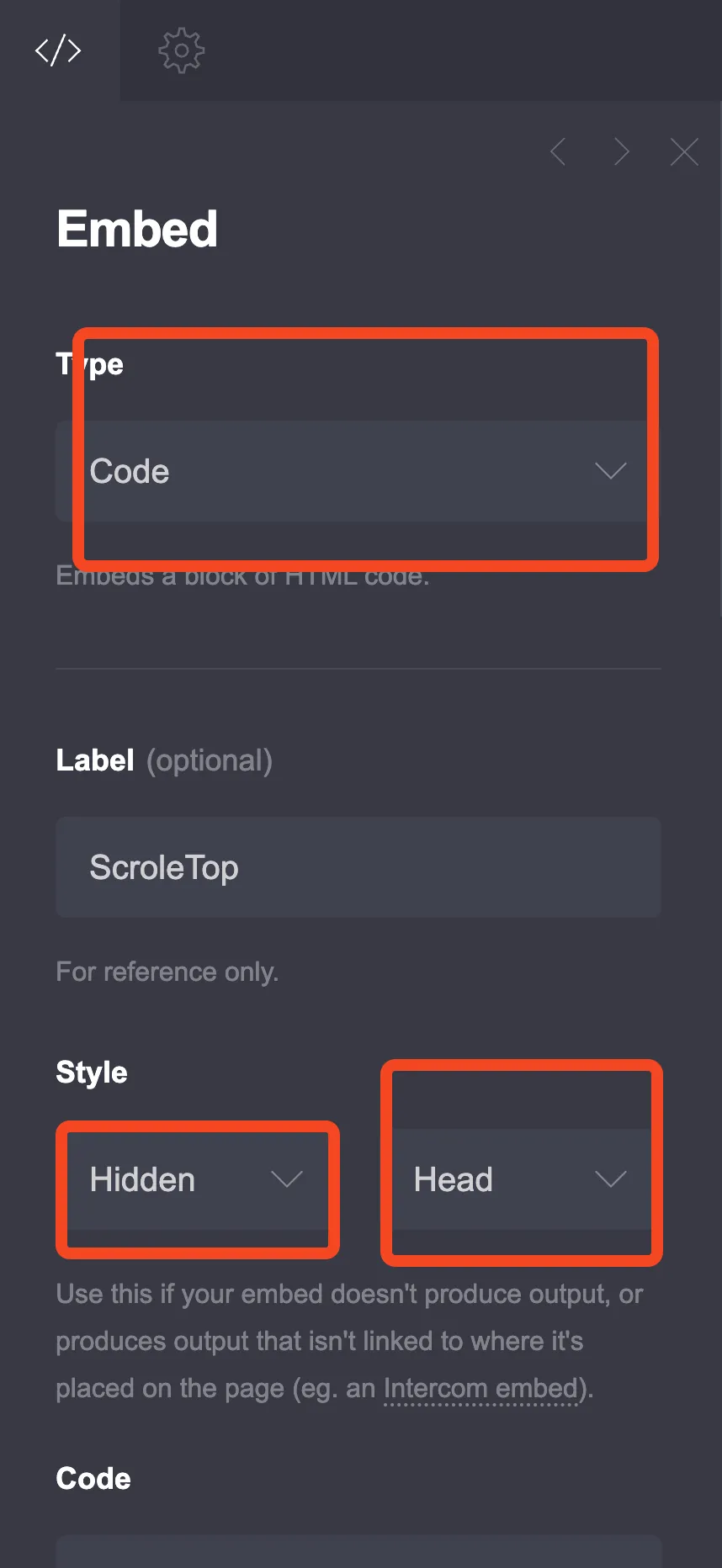
Hidden has three locations in current Carrd: Head, Body Top, and Body End. Rule of thumb:
- Body End - all four options. Each one includes visible markup (an
<a>or<div>), which belongs in the page body, and Option 3’s script queries the DOM, so you want the widget markup parsed first - Head - only for pure
<style>snippets, such as the customization CSS further down if you keep it in a separate embed - Body Top - available, not needed here
If the Elements panel is getting crowded, Carrd shipped an Elements Panel in August 2026 (More Actions → Elements) that makes embedded code easier to find in the builder.
Nothing will show in the builder
The embed element will not output anything in the Carrd builder. This is expected. Publish the site and open the live URL to see the button. If you paste code and “nothing happens”, you have not published yet.
Step 3: Choose Your Button Style
Four copy-paste options below. Pick one, paste it into the Embed’s Code field, replace YOURNUMBER (or the other placeholders), publish.
Option 1: Simple Floating WhatsApp Button
A clean WhatsApp button that floats in the corner. This is my default pick: smallest footprint, one link, nothing to maintain. If it doesn’t appear after publishing, jump to Troubleshooting.
<style>
  .whatsapp-float {
    position: fixed;
    bottom: 25px;
    right: 25px;
    width: 60px;
    height: 60px;
    background-color: #25D366;
    border-radius: 50%;
    display: flex;
    align-items: center;
    justify-content: center;
    box-shadow: 0 4px 15px rgba(37, 211, 102, 0.4);
    z-index: 9999;
    transition: all 0.3s ease;
    text-decoration: none;
  }

  .whatsapp-float:hover {
    transform: scale(1.1);
    box-shadow: 0 6px 20px rgba(37, 211, 102, 0.5);
  }

  .whatsapp-float svg {
    width: 32px;
    height: 32px;
    fill: white;
  }

  /* Pulse animation */
  .whatsapp-float::before {
    content: '';
    position: absolute;
    width: 100%;
    height: 100%;
    background-color: #25D366;
    border-radius: 50%;
    z-index: -1;
    animation: pulse 2s infinite;
  }

  @keyframes pulse {
    0% {
      transform: scale(1);
      opacity: 0.7;
    }
    70% {
      transform: scale(1.3);
      opacity: 0;
    }
    100% {
      transform: scale(1);
      opacity: 0;
    }
  }

  /* Hide on desktop if you only want mobile */
  /*
  @media (min-width: 769px) {
    .whatsapp-float {
      display: none;
    }
  }
  */
</style>

<a href="https://wa.me/YOURNUMBER?text=Hi,%20I%20found%20you%20on%20your%20website" class="whatsapp-float" target="_blank" rel="noopener" aria-label="Chat on WhatsApp">
  <svg viewBox="0 0 32 32" xmlns="http://www.w3.org/2000/svg">
    <path d="M16.004 0h-.008C7.174 0 0 7.176 0 16c0 3.5 1.128 6.744 3.046 9.378L1.054 32l6.826-2.192A15.915 15.915 0 0016.004 32C24.826 32 32 24.822 32 16S24.826 0 16.004 0zm9.35 22.614c-.396 1.116-1.956 2.042-3.216 2.312-.864.184-1.99.33-5.786-1.244-4.858-2.014-7.984-6.952-8.226-7.274-.232-.322-1.958-2.606-1.958-4.972s1.238-3.528 1.678-4.012c.396-.436 1.036-.636 1.65-.636.198 0 .376.01.536.018.44.02.66.046.95.734.364.864 1.25 3.05 1.36 3.272.11.222.184.482.036.772-.138.3-.208.486-.416.748-.208.262-.438.584-.626.784-.208.24-.424.5-.182.98.242.48 1.076 1.774 2.312 2.874 1.588 1.414 2.926 1.852 3.342 2.058.416.206.658.172.9-.104.252-.286 1.072-1.248 1.358-1.676.276-.428.562-.356.95-.214.39.144 2.476 1.168 2.9 1.38.424.214.706.322.81.498.104.176.104 1.022-.292 2.138z"/>
  </svg>
</a>
Important: Replace YOURNUMBER with your actual phone number (e.g., 12125551234).
The aria-label="Chat on WhatsApp" matches WhatsApp’s own accessible-label example in their official HTML snippets. Keep it: the button is icon-only, so screen readers need it.
If you also want a scroll-to-top control, the pattern is nearly identical. See how to add a back-to-top button to Carrd (that tutorial’s embed screenshot is the one used in Step 2).
Option 2: Button with Text
A button that shows “Chat with us” text on hover. It collapses to an icon under 600px.
<style>
  .wa-button {
    position: fixed;
    bottom: 25px;
    right: 25px;
    display: flex;
    align-items: center;
    gap: 12px;
    background: #25D366;
    padding: 15px 20px;
    border-radius: 50px;
    text-decoration: none;
    box-shadow: 0 4px 15px rgba(0,0,0,0.2);
    z-index: 9999;
    transition: all 0.3s ease;
  }

  .wa-button:hover {
    transform: translateY(-3px);
    box-shadow: 0 6px 20px rgba(0,0,0,0.25);
  }

  .wa-button svg {
    width: 28px;
    height: 28px;
    fill: white;
    flex-shrink: 0;
  }

  .wa-button-text {
    color: white;
    font-size: 16px;
    font-weight: 600;
    white-space: nowrap;
  }

  /* Collapse to icon only on mobile */
  @media (max-width: 600px) {
    .wa-button {
      padding: 15px;
      border-radius: 50%;
    }
    .wa-button-text {
      display: none;
    }
  }
</style>

<a href="https://wa.me/YOURNUMBER?text=Hi,%20I'm%20interested%20in%20your%20services" class="wa-button" target="_blank" rel="noopener" aria-label="Chat on WhatsApp">
  <svg viewBox="0 0 32 32" xmlns="http://www.w3.org/2000/svg">
    <path d="M16.004 0h-.008C7.174 0 0 7.176 0 16c0 3.5 1.128 6.744 3.046 9.378L1.054 32l6.826-2.192A15.915 15.915 0 0016.004 32C24.826 32 32 24.822 32 16S24.826 0 16.004 0zm9.35 22.614c-.396 1.116-1.956 2.042-3.216 2.312-.864.184-1.99.33-5.786-1.244-4.858-2.014-7.984-6.952-8.226-7.274-.232-.322-1.958-2.606-1.958-4.972s1.238-3.528 1.678-4.012c.396-.436 1.036-.636 1.65-.636.198 0 .376.01.536.018.44.02.66.046.95.734.364.864 1.25 3.05 1.36 3.272.11.222.184.482.036.772-.138.3-.208.486-.416.748-.208.262-.438.584-.626.784-.208.24-.424.5-.182.98.242.48 1.076 1.774 2.312 2.874 1.588 1.414 2.926 1.852 3.342 2.058.416.206.658.172.9-.104.252-.286 1.072-1.248 1.358-1.676.276-.428.562-.356.95-.214.39.144 2.476 1.168 2.9 1.38.424.214.706.322.81.498.104.176.104 1.022-.292 2.138z"/>
  </svg>
  <span class="wa-button-text">Chat with us</span>
</a>
The aria-label matters even more here: once the text collapses on mobile, the label is the only accessible name left.
Prefer the official button?
WhatsApp publishes branded “Chat on WhatsApp” button assets (green and white, 3 sizes, SVG and PNG downloads) with brand guidelines, plus official HTML examples. They are currently English-only. The custom inline SVG in this tutorial is lighter and lets you change the label. Official assets live on the click to chat help page.
Option 3: Expandable WhatsApp Chat Widget
A button that expands to show a message preview before opening WhatsApp. This is the heaviest option of the four (most markup and CSS), but it sells the conversation better because visitors see a prompt before they commit.
Paste this embed at Body End (see Step 2). The script below waits for the DOM and bails out cleanly if the button or popup is missing, so it works in either location. Body End is still the safer placement since the widget markup is guaranteed to be parsed first.
<style>
  .wa-widget {
    position: fixed;
    bottom: 25px;
    right: 25px;
    z-index: 9999;
    font-family: -apple-system, BlinkMacSystemFont, 'Segoe UI', Roboto, sans-serif;
  }

  .wa-widget-button {
    width: 60px;
    height: 60px;
    background: #25D366;
    border-radius: 50%;
    border: none;
    cursor: pointer;
    display: flex;
    align-items: center;
    justify-content: center;
    box-shadow: 0 4px 15px rgba(37, 211, 102, 0.4);
    transition: all 0.3s;
  }

  .wa-widget-button:hover {
    transform: scale(1.05);
  }

  .wa-widget-button svg {
    width: 32px;
    height: 32px;
    fill: white;
  }

  .wa-widget-popup {
    position: absolute;
    bottom: 75px;
    right: 0;
    width: 320px;
    background: white;
    border-radius: 16px;
    box-shadow: 0 10px 40px rgba(0,0,0,0.15);
    overflow: hidden;
    transform: scale(0);
    transform-origin: bottom right;
    transition: transform 0.3s ease;
  }

  .wa-widget-popup.active {
    transform: scale(1);
  }

  .wa-widget-header {
    background: #075E54;
    color: white;
    padding: 20px;
  }

  .wa-widget-header h4 {
    margin: 0 0 5px 0;
    font-size: 18px;
  }

  .wa-widget-header p {
    margin: 0;
    font-size: 13px;
    opacity: 0.9;
  }

  .wa-widget-body {
    padding: 20px;
    background: #ECE5DD;
  }

  .wa-widget-message {
    background: white;
    padding: 12px 15px;
    border-radius: 8px;
    border-top-left-radius: 0;
    box-shadow: 0 1px 2px rgba(0,0,0,0.1);
    position: relative;
    margin-bottom: 15px;
  }

  .wa-widget-message::before {
    content: '';
    position: absolute;
    top: 0;
    left: -8px;
    border: 8px solid transparent;
    border-right-color: white;
    border-top-color: white;
  }

  .wa-widget-message p {
    margin: 0;
    font-size: 14px;
    color: #333;
    line-height: 1.5;
  }

  .wa-widget-time {
    font-size: 11px;
    color: #999;
    text-align: right;
    margin-top: 5px;
  }

  .wa-widget-cta {
    display: block;
    width: 100%;
    padding: 15px;
    background: #25D366;
    color: white;
    border: none;
    font-size: 16px;
    font-weight: 600;
    cursor: pointer;
    text-decoration: none;
    text-align: center;
    transition: background 0.2s;
  }

  .wa-widget-cta:hover {
    background: #20bd5a;
  }

  @media (max-width: 400px) {
    .wa-widget-popup {
      width: 280px;
      right: -10px;
    }
  }
</style>

<div class="wa-widget">
  <div class="wa-widget-popup" id="waPopup">
    <div class="wa-widget-header">
      <h4>Need help?</h4>
      <p>Typically replies within minutes</p>
    </div>
    <div class="wa-widget-body">
      <div class="wa-widget-message">
        <p>Hi there! 👋 How can I help you today?</p>
        <div class="wa-widget-time">Just now</div>
      </div>
    </div>
    <a href="https://wa.me/YOURNUMBER?text=Hi,%20I%20have%20a%20question" class="wa-widget-cta" target="_blank" rel="noopener">
      Start Chat
    </a>
  </div>

  <button class="wa-widget-button" id="waButton" aria-label="Open WhatsApp chat">
    <svg viewBox="0 0 32 32" xmlns="http://www.w3.org/2000/svg">
      <path d="M16.004 0h-.008C7.174 0 0 7.176 0 16c0 3.5 1.128 6.744 3.046 9.378L1.054 32l6.826-2.192A15.915 15.915 0 0016.004 32C24.826 32 32 24.822 32 16S24.826 0 16.004 0zm9.35 22.614c-.396 1.116-1.956 2.042-3.216 2.312-.864.184-1.99.33-5.786-1.244-4.858-2.014-7.984-6.952-8.226-7.274-.232-.322-1.958-2.606-1.958-4.972s1.238-3.528 1.678-4.012c.396-.436 1.036-.636 1.65-.636.198 0 .376.01.536.018.44.02.66.046.95.734.364.864 1.25 3.05 1.36 3.272.11.222.184.482.036.772-.138.3-.208.486-.416.748-.208.262-.438.584-.626.784-.208.24-.424.5-.182.98.242.48 1.076 1.774 2.312 2.874 1.588 1.414 2.926 1.852 3.342 2.058.416.206.658.172.9-.104.252-.286 1.072-1.248 1.358-1.676.276-.428.562-.356.95-.214.39.144 2.476 1.168 2.9 1.38.424.214.706.322.81.498.104.176.104 1.022-.292 2.138z"/>
    </svg>
  </button>
</div>

<script>
  document.addEventListener('DOMContentLoaded', function () {
    const waButton = document.getElementById('waButton');
    const waPopup = document.getElementById('waPopup');
    if (!waButton || !waPopup) return;
    waButton.addEventListener('click', () => waPopup.classList.toggle('active'));
    document.addEventListener('click', (e) => {
      if (!e.target.closest('.wa-widget')) waPopup.classList.remove('active');
    });
  });
</script>
Edit the header text and the fake preview message to match your reply expectations. If you want the same show/hide pattern for other content, here is how to add a popup modal to Carrd.
Option 4: Multi-Chat Button (WhatsApp + Others)
If you want to offer multiple contact options:
<style>
  .chat-buttons {
    position: fixed;
    bottom: 25px;
    right: 25px;
    display: flex;
    flex-direction: column;
    gap: 12px;
    z-index: 9999;
  }

  .chat-btn {
    width: 55px;
    height: 55px;
    border-radius: 50%;
    display: flex;
    align-items: center;
    justify-content: center;
    text-decoration: none;
    box-shadow: 0 4px 12px rgba(0,0,0,0.2);
    position: relative;
    transition: all 0.3s;
    transform: scale(0);
    animation: popIn 0.3s ease forwards;
  }

  .chat-btn:nth-child(1) { animation-delay: 0s; }
  .chat-btn:nth-child(2) { animation-delay: 0.1s; }
  .chat-btn:nth-child(3) { animation-delay: 0.2s; }

  @keyframes popIn {
    to {
      transform: scale(1);
    }
  }

  .chat-btn:hover {
    transform: scale(1.1) !important;
  }

  .chat-btn svg {
    width: 28px;
    height: 28px;
    fill: white;
  }

  .chat-btn.whatsapp {
    background: #25D366;
  }

  .chat-btn.telegram {
    background: #0088cc;
  }

  .chat-btn.email {
    background: #ea4335;
  }

  /* Tooltip */
  .chat-btn::before {
    content: attr(data-tooltip);
    position: absolute;
    right: 65px;
    background: #333;
    color: white;
    padding: 8px 12px;
    border-radius: 6px;
    font-size: 13px;
    white-space: nowrap;
    opacity: 0;
    pointer-events: none;
    transition: opacity 0.2s;
  }

  .chat-btn:hover::before {
    opacity: 1;
  }
</style>

<div class="chat-buttons">
  <a href="https://wa.me/YOURNUMBER?text=Hi" class="chat-btn whatsapp" target="_blank" rel="noopener" data-tooltip="WhatsApp" aria-label="Chat on WhatsApp">
    <svg viewBox="0 0 32 32"><path d="M16.004 0h-.008C7.174 0 0 7.176 0 16c0 3.5 1.128 6.744 3.046 9.378L1.054 32l6.826-2.192A15.915 15.915 0 0016.004 32C24.826 32 32 24.822 32 16S24.826 0 16.004 0zm9.35 22.614c-.396 1.116-1.956 2.042-3.216 2.312-.864.184-1.99.33-5.786-1.244-4.858-2.014-7.984-6.952-8.226-7.274-.232-.322-1.958-2.606-1.958-4.972s1.238-3.528 1.678-4.012c.396-.436 1.036-.636 1.65-.636.198 0 .376.01.536.018.44.02.66.046.95.734.364.864 1.25 3.05 1.36 3.272.11.222.184.482.036.772-.138.3-.208.486-.416.748-.208.262-.438.584-.626.784-.208.24-.424.5-.182.98.242.48 1.076 1.774 2.312 2.874 1.588 1.414 2.926 1.852 3.342 2.058.416.206.658.172.9-.104.252-.286 1.072-1.248 1.358-1.676.276-.428.562-.356.95-.214.39.144 2.476 1.168 2.9 1.38.424.214.706.322.81.498.104.176.104 1.022-.292 2.138z"/></svg>
  </a>

  <a href="https://t.me/YOURUSERNAME" class="chat-btn telegram" target="_blank" rel="noopener" data-tooltip="Telegram" aria-label="Message on Telegram">
    <svg viewBox="0 0 24 24"><path d="M12 0C5.373 0 0 5.373 0 12s5.373 12 12 12 12-5.373 12-12S18.627 0 12 0zm5.562 8.161c-.18 1.897-.962 6.502-1.359 8.627-.168.9-.5 1.201-.82 1.23-.697.064-1.226-.461-1.901-.903-1.056-.693-1.653-1.124-2.678-1.8-1.185-.78-.417-1.21.258-1.91.177-.184 3.247-2.977 3.307-3.23.007-.032.015-.15-.056-.212s-.174-.041-.249-.024c-.106.024-1.793 1.139-5.062 3.345-.479.329-.913.489-1.302.481-.428-.009-1.252-.242-1.865-.442-.751-.244-1.349-.374-1.297-.789.027-.216.325-.437.893-.663 3.498-1.524 5.831-2.529 6.998-3.015 3.333-1.386 4.025-1.627 4.477-1.635.099-.002.321.023.465.141.121.1.154.234.169.334.016.1.035.323.02.498z"/></svg>
  </a>

  <a href="mailto:your@email.com" class="chat-btn email" data-tooltip="Email" aria-label="Send an email">
    <svg viewBox="0 0 24 24"><path d="M20 4H4c-1.1 0-2 .9-2 2v12c0 1.1.9 2 2 2h16c1.1 0 2-.9 2-2V6c0-1.1-.9-2-2-2zm0 4l-8 5-8-5V6l8 5 8-5v2z"/></svg>
  </a>
</div>
Replace YOURNUMBER, YOURUSERNAME, and your@email.com. Use this when you genuinely offer several channels. One ops note: every channel you add is another inbox you have to watch.
How to Test Your WhatsApp Button After Publishing
Carrd embeds render nothing in the builder, so publishing is the only way to see the button. Run this checklist yourself after every publish.
- Publish the site from the Carrd builder
- Open the live URL in a private or incognito window (bypasses preview quirks and cached CSS)
- Click the button and confirm the wa.me chat opens with the pre-filled text intact
- Test on a real phone: confirm the WhatsApp app opens and the 60px bottom-right button does not cover CTAs or content
- If you use a custom domain, test on the live domain, not the staging URL. See how to connect a custom domain to Carrd
If the click opens WhatsApp but the message text looks broken, your URL encoding is wrong (back to Step 1). If nothing renders at all, the fix is almost always in Troubleshooting below.
Customize Your WhatsApp Button
Small CSS and URL tweaks after the button is live.
Change Position
Move the button to a different corner:
/* Bottom left */
.whatsapp-float {
  bottom: 25px;
  left: 25px;
  right: auto;
}

/* Top right */
.whatsapp-float {
  top: 25px;
  right: 25px;
  bottom: auto;
}
Use one of the two rules, and swap .whatsapp-float for .wa-button, .wa-widget, or .chat-buttons if you picked Option 2, 3, or 4. For Option 3 on the left, also flip the popup with .wa-widget-popup { left: 0; right: auto; transform-origin: bottom left; }.
Whatever corner you pick, make sure it does not sit on top of Carrd’s own floating elements (see the overlap fix in Troubleshooting).
Change Size
Adjust the button dimensions:
.whatsapp-float {
  width: 50px;  /* Smaller */
  height: 50px;
}

/* Or larger */
.whatsapp-float {
  width: 70px;
  height: 70px;
}
Keep at least a 48px touch target on mobile. Below that, taps start to miss.
Disable Pulse Animation
Remove the ::before pseudo-element or set animation: none:
.whatsapp-float::before {
  display: none;
}
Custom Pre-filled Message
Customize what shows up when visitors open the chat:
https://wa.me/12125551234?text=Hi!%20I'm%20interested%20in%20your%20web%20design%20services.%20My%20name%20is%20___Use %20 for spaces and %0A for line breaks.
Two ops tricks worth using: put your reply hours in the message (“I usually reply within 2 hours”) so expectations are set before the first message, and tag the source (“found you on your website”) so you know which channel converts.
Track Clicks (Optional)
Measure it, or you won’t know if the button earns its place. Carrd Pro Standard already includes Analytics (Google Analytics, Plausible, Matomo, and others), so tracking costs you nothing extra on the plan you already need. Add an onclick attribute to the <a> tag:
Plausible
<a href="https://wa.me/YOURNUMBER" onclick="plausible('WhatsApp Click')" ...>Google Analytics
<a href="https://wa.me/YOURNUMBER" onclick="gtag('event','whatsapp_click')" ...>Matomo
<a href="https://wa.me/YOURNUMBER" onclick="_paq.push(['trackEvent','Contact','WhatsApp Click'])" ...>Troubleshooting: WhatsApp Button Not Working in Carrd
Check these in order. The first two solve most cases.
Button doesn’t appear at all
Cause: the Embed Style is not set to Hidden, your plan does not include Embeds (free or Pro Lite), or you saved without republishing.
Fix: set the Embed to Type: Code, Style: Hidden, confirm you are on Pro Standard or higher, publish again, then hard-refresh the live page. If it still collides with another fixed element, the same stacking rules apply to a floating menu on Carrd or a sticky header to Carrd.
“Phone number shared via url is invalid”
Cause: the number in the wa.me href is not in full international format.
Fix: strip +, spaces, dashes, parentheses, and leading zeros. 12125551234, not +1 (212) 555-1234. Check every wa.me href if you pasted the multi-chat option.
Popup widget won’t open (Option 3)
Cause: the script ran before the DOM was ready, or the element IDs don’t match.
Fix: use the DOMContentLoaded-guarded script from Option 3 and move the embed from Head to Body End. Keep the IDs waButton and waPopup as in the snippet. Re-publish.
Button overlaps other floating elements
Cause: two fixed elements fighting for the same corner and z-index.
Fix: lower the WhatsApp z-index (for example 9999 → 999) or move it to another corner (see Change Position). The same collision shows up with floating menus and sticky headers on Carrd.
Privacy Tip: Hide Your Number with a WhatsApp Business Short Link
Your number is public once you publish
A plain wa.me/YOURNUMBER link puts your phone number in the page source. Scrapers pick it up, and you should expect some spam calls and WhatsApp messages. This is not a Carrd problem, it is how the link format works.
Two mitigations:
- Use a dedicated business number instead of your personal one. Cheap SIM, separate WhatsApp account, clean separation.
- Use the WhatsApp Business short link -
https://wa.me/message/YOURSHORTLINKCODE, generated in the business tools of the free WhatsApp Business app (labels vary by version). It does not reveal the number.
Drop-in href swap for any of the four options:
<a href="https://wa.me/message/YOURSHORTLINKCODE" class="whatsapp-float" target="_blank" rel="noopener" aria-label="Chat on WhatsApp">You lose the ?text= pre-filled message with short links, so pick: hidden number or pre-filled message. For most solo operators, the pre-filled message wins and the number is already on the contact page anyway.
On cookie consent: because this code is a plain <a> with inline CSS and SVG and no third-party JavaScript, it generally doesn’t add a cookie or consent burden by itself. That is general guidance, not legal advice. If you run analytics scripts (including the click-tracking snippets above), that is a separate conversation and you may need a cookie notice on your Carrd site.
WhatsApp Button on Mobile vs Desktop
The button works on both, but the experience differs:
- Mobile: Opens the WhatsApp app directly
- Desktop: Opens WhatsApp Web in a new tab
If you want to show the button only on mobile:
@media (min-width: 769px) {
  .whatsapp-float {
    display: none;
  }
}
Option 2 already collapses to an icon under 600px. Whatever style you use, keep the touch target at least 48-60px so thumbs hit it reliably.
Business Tips: Auto-Replies, FAQs & More
Response time matters - If you add a chat button, be prepared to respond quickly. Slow replies make a bad impression.
Set availability hours - Consider mentioning your response hours in the pre-filled message or popup widget.
Use WhatsApp Business - The free WhatsApp Business app offers greeting messages, away messages, business profiles, and catalogs. The away message alone saves you from “seen at 2am” stress.
Deflect repetitive questions before they become chats. An accordion FAQs section on Carrd answers the five questions everyone asks, or use a ready-made Carrd accordion plugin if you don’t want to hand-roll the code. And keep a second channel live so WhatsApp does not become the only inbox: add a contact form to any static website as a fallback.
Try Carrd.coFAQ
Do I need a paid Carrd plan for a WhatsApp button?
Yes. The Embed element that holds the code requires Pro Standard or higher ($19/year). The free plan and Pro Lite ($9/year) do not include Embeds. See Carrd Pro plans and pricing for the full breakdown.
Is the WhatsApp button itself free?
Yes. wa.me click-to-chat links cost nothing and the code in this tutorial is plain HTML and CSS. The only paid piece is the Carrd plan you need for Embeds.
Will this slow down my site?
No. There is no third-party widget script. Each option is one inline <a> tag plus a small CSS block and an inline SVG. The expandable widget (Option 3) adds the most markup, and it is still tiny compared to a hosted chat widget.
Do I need WhatsApp Business?
No. A regular WhatsApp account works fine with wa.me links. The free WhatsApp Business app adds greeting and away messages, a business profile, catalogs, and the number-hiding short link. Worth installing if you chat with customers regularly.
Can I use this on other site builders?
Yes. The four code options are plain HTML and CSS, so they work anywhere that accepts custom code or HTML blocks. Only the Embed setup steps are Carrd-specific.
Conclusion
A WhatsApp button removes friction between visitors and getting in touch. The whole path: Pro Standard, paste code, publish, run the test checklist, then decide whether the Business short link beats pre-filled messages for you. Just make sure you’re ready to handle the messages that come in.
If you want more contact options, combine this with a contact form on any static website or a popup modal.