Shots.so: Free Mockup Generator for Screenshots and Devices
Shots.so is a free mockup generator that turns screenshots into polished device mockups. Full feature breakdown, 2026 pricing, and top alternatives compared.

14 min read
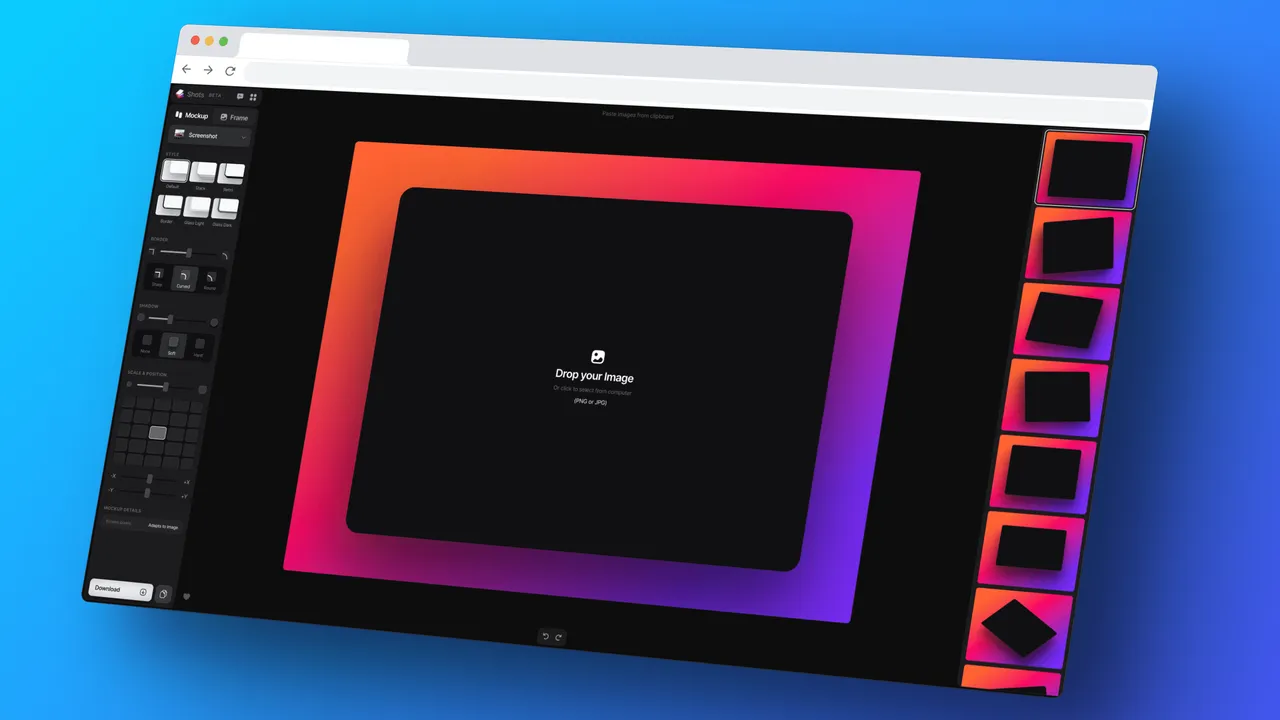
Shots.so is a free mockup generator that turns plain screenshots into polished device mockups. You don’t need Figma or Photoshop. Drop an image in your browser, pick a device frame and a background, export.
It’s been around since 2022 and it is popular with indie hackers and developers who want good-looking visuals without opening a design tool. The free tier covers most casual use: static PNG exports with no watermark. If you want 4K stills, WebP, or video, that’s where the paid plans start.
What Shots.so does
Shots.so takes a screenshot, image, or video and wraps it in a device frame (iPhone, MacBook, browser, iPad, Android phone, Apple Watch) on top of a customizable background. You can drop several items on one canvas, add shadows and VFX, then export the result as a static image or, on paid tiers, as video.
The core loop is short:
- Upload or paste your screenshot (images and video both work)
- Choose a device frame
- Pick a screenshot style
- Choose a background (gradient, solid, image, or AI-generated “magic”)
- Export as PNG (free) or WebP, GIF, and video (paid tiers)
You don’t need an account to start creating. Accept their terms in the welcome dialog and you land straight in the editor. Free static exports come out clean, no watermark burned in.
What’s new since 2023
The original version of this post was a screenshot beautifier. The product has grown since then. What changed:
- Video input works now: drop or paste images and videos, trim clips, and use them for Magic backgrounds (live variants included)
- A templates gallery gives you pre-made layouts to start from instead of a blank canvas
- Multiple items per canvas (June 2024) let you combine several screenshots and shadow overlays in one composition
- Shots for Safari (October 2024) is an extension that captures from the browser straight into Shots
- iOS and Android apps pack the full feature set in a compact form; check the in-app menu for store links
- Custom watermark (paid) puts your own logo or brand on exports
- Shareable links, a Performance Mode toggle for the editor, and faster, higher-quality Pro exports (October 2025)
- The new Free / Plus / Pro plan structure replaced the old Free / Basic / Pro lineup
On the roadmap per the in-app “coming soon” list: Drafts & Folders, a Text tool, and Multiple Clips.
Release timeline (April 2022 to October 2025)
From the in-app changelog:
- Apr 2022: first set of simple mockups for beta testers
- May 2022: browser mockups (Chrome, Safari, light and dark)
- Jan 2023: UI redesign plus more devices
- Apr 2023: custom frame size, higher-quality downloads
- May 2023: Pixel 7 Pro, Nothing Phone (1), iPad lineup, MacBooks, Surface Book
- Sep-Oct 2023: iPhone 15 family
- Jun 2024: multiple screenshot items, shadow overlays, Arc browser frame
- Oct 2024: Safari extension
- Oct 2025: faster, higher-quality Pro exports
Video walkthrough
Watch the flow once before you read the step list below. It moves fast and shows the editor layout as it stands now.
If you embed demo videos like this in your own MDX posts, see my notes on responsive YouTube embeds in Astro.
Features
The panels below follow the order you meet them in the editor, roughly frame first, then style, effects, background, and layout.
Device frames
The device library covers the usual suspects and then some: iPhone (including iPhone 17), Apple Watch (Series 8, Ultra, Watch 10 in 42/46 mm), iPad Pro 12.9, MacBook, iMac, Pixel 7 Pro, Nothing Phone (1), Surface Book, and browser frames for Chrome and Safari in light and dark plus Arc. Pick a device and the screenshot auto-fits the screen area. That is the “device mockup” part handled; an iPhone mockup and a browser mockup take the same number of clicks.
Screenshot styles
How the screenshot looks inside the frame. Default is clean with no effects. Glass Light and Glass Dark add a frosted glass overlay, Liquid Glass is translucent, Inset Light and Inset Dark give the screen a recessed look, Outline draws a wireframe border, Border puts a solid border around the screen, and Shadow drops a shadow on the device.
Two more controls live here that older write-ups skip: corner radius (Sharp, Curved, Round) and shadow controls (None, Spread, Hug, Adaptive, plus opacity). Together they are enough to match most screenshot mockup styles without touching a design tool.
Effects and scenes
Effects cover VFX overlays (noise, VHS, glitch) and 3D shapes you can drop into the composition. Shadow scenes are presets for no shadow, device shadow, or shapes. The custom watermark option puts your logo or brand on the export, and it is a paid feature.
Backgrounds
This is where Shots.so stands out from the pack of mockup tools:
- Solid and gradient colors with full customization
- Glass backgrounds with blur
- Preset collections: By Paper, Cosmic, Mystic, Desktop, Abstract, Earth, Radiant, Texture
- Unsplash integration to search and use stock photos in place
- Magic backgrounds generated by AI from your uploaded media’s colors and style (live variants for video)
- Transparent export with no background, useful for compositing
Magic backgrounds run server-side on the media you uploaded. If you want fully local control over AI-generated art instead, generate AI images locally on your Mac and drop the result in as a custom background.
What leaves your machine
Your screenshot is uploaded to Shots’ backend for processing and export. Fine for marketing shots and public UIs. Think twice before pasting client dashboards, internal admin panels, or anything with secrets on screen.
Layout presets and aspect ratios
Magic Preset suggests layouts automatically. You can also lock an aspect ratio: 16:9, 4:3, 3:2, 1:1, 9:16. Social presets for Instagram, X/Twitter, and Pinterest handle the social media mockup sizes so you are not measuring pixels yourself.
Animated mockups and video export
Motion presets, video zoom, and parallax (60 fps on Pro) turn a static mockup into a short clip. That is useful for Product Hunt galleries, changelog posts, and landing page hero loops. Honest cap summary: Plus gives you 720p video, 10 exports, up to 1 minute each; Pro goes to 2K at 60 fps, unlimited exports, up to 3 minutes each. GIF (30 s cap, transparency supported) and transparent WebM video (1080p at 45 fps, up to 20 s) are Pro-only. Full numbers sit in the export matrix below.
Video export is the main reason most people end up paying. If what you need is a real screen recording with automatic zoom editing rather than mockup animation, use Screen Studio for macOS instead.
Shots.so pricing: Free vs Plus vs Pro (2026)
The “Basic” tier from older posts is gone. The current lineup:
| Plan | Price | What you get |
|---|---|---|
| Free | $0 | PNG exports (1x/2x scale), no watermark, all frames, backgrounds, and styles, limited video |
| Plus | $10/mo or $95/yr | 4K image exports, basic animation at 30 fps, 720p video (10 exports, up to 1 min each) |
| Pro | $15/mo, $125/yr, or $12/wk | 6K images, 2K 60 fps video (unlimited, up to 3 min each), transparent WebM video, WebP, GIF, custom watermark, faster exports |
EU prices are region-localized in Stripe: Plus is €8/mo (€79/yr), Pro is €12/mo. Check what the checkout shows for your account.
Two things worth knowing before you pay list price. First, Shots.so runs promos often. Both the “45% off Pro yearly” and “20% off” banners were live in the app’s pricing data. Wait for one if you can. Second, there is no lock-in to unwind: if the tool stops fitting, stop paying and stay on the free tier. Your PNG exports already sit on disk.
Prices move
Prices verified against the Shots.so app on 2026-09-29 via its live pricing data. Plan names changed in 2025, so older posts referencing “Basic” are stale. Confirm on shots.so before purchasing.
The verdict on value: the free tier is genuinely usable. If you need a free mockup generator for a few tweets or blog images a month, you will not pay anything. Plus is the value pick if you want 4K mockup exports regularly. Pro only pays off if you ship video, WebP, or GIF on a schedule.
Export formats and limits by plan
This is the matrix I would check before spending money:
| What | Free | Plus | Pro |
|---|---|---|---|
| PNG export | Yes (1x/2x) | Yes | Yes |
| Max image resolution | 2x | 4K | 6K Ultra HD (3x quality) |
| WebP export | No | No | Yes (“up to 80% smaller files”) |
| GIF export | No | No | Yes (30 s cap, transparency) |
| Video | Capped or possibly unavailable; check the export panel while logged out | 720p at 30 fps, 10 exports, up to 1 min each | 2K at 60 fps, unlimited, up to 3 min each |
| Transparent video (WebM) | No | No | 1080p at 45 fps, up to 20 s |
| Custom watermark | No | No | Yes |
| Export speed | Standard | Standard | 2.5x faster |
WebP and GIF used to be described loosely as “paid plan” features in older reviews. They are Pro-only now. Same for transparent video and the custom watermark.
When to use Shots.so
Good for:
- Quick hero images for blog posts and documentation, like the posts you get from building a free blog with Astro and Cloudflare
- Social posts showing off a product UI or app screenshot
- Developer portfolios where you want to frame your side projects properly
- Changelog and announcement images
- Landing page visuals when you’re polishing a one-page website on a budget. Shots mockups make strong hero images on the Carrd one-page site builder
- One-off mockups where speed matters more than pixel-perfect control
Not ideal for:
- No batch export for the full set of App Store and Google Play screenshot sizes (still true as of September 2026)
- No 1200x630 OG image preset in the current ratio list
- Team workflows with shared brand assets and review flows
- Anything with confidential data on screen (see the privacy note above)
The old “limited templates” complaint no longer holds: there is a real template gallery now. The specific gaps (App Store sets, OG template) are what remain, and both are worth a quick look in-app before you rule it out. If you need App Store screenshot sets or launch kits, Screenhance and AppLaunchFlow are built for that job. Shots.so is a single-shot beautifier, and it is very good at that job.
Shots.so vs alternatives
| Tool | Free tier | Strengths | Weaknesses |
|---|---|---|---|
| Shots.so | Generous, no watermark | Fast UI, great backgrounds, wide device library | No App Store sets, no OG template |
| Pika.style | Limited free preview, $15/mo | URL screenshot capture, Chrome + VS Code extensions, App Store and Tweet templates | No free static export tier worth using |
| Screenhance | 3 exports/month | App Store sets, animated GIF/WebM, 100+ templates | Launch Pass $6 (7 days, 10 exports), Pro $12/mo or $99/yr, Teams $24/mo |
| Device Shots | Free | Simple, fast | Fewer customization options |
| Mockupviews | 100% free | No signup, no watermark | Newer, smaller feature set |
Prices checked 2026-09-29. Pika.style captures screenshots straight from a URL if you would rather not take them yourself. Screenhance is the launch-kit option.
When to pick which: grab Shots.so for the fastest pretty single mockup, Pika.style when you want capture from a URL plus brand presets, and Screenhance for App Store sets or a full launch kit.
How to use Shots.so (quick start)
Web app
- Go to shots.so. No signup required to start.
- Click the media area or drag and drop your screenshot. Capture one with a fast, free Mac screenshot tool like Shottr first if you have not already
- Select a device frame from the Device section
- Pick a screenshot style (Glass, Inset, Outline, …) from Style
- Choose a background from the Background panel. Try Magic for auto-generated options based on your image
- Adjust layout and zoom if needed
- Click Export top right. PNG at 1x/2x on free, 4K on Plus, plus 6K, WebP, GIF, and video on Pro
The whole process takes under a minute once you know the interface.
Safari extension (Oct 2024)
- Install Shots for Safari from the in-app menu
- Capture the page you are on straight into the Shots editor
- Finish frame, background, and export as in the web app
Use the web app when a feature seems missing from the extension.
Mobile apps (iOS/Android)
- Grab the iOS or Android app (store links in the in-app menu on shots.so)
- Import a screenshot or video from your camera roll
- Edit and export, or push the draft to the web app for the full panel set
Verify your export. Open the downloaded file and check three things: it is a PNG at the scale you picked, nothing (like a watermark) is burned in that you did not ask for, and transparent background exports have an alpha channel. On Linux or macOS:
file mockup.png
# PNG image data, 3840 x 2160, 8-bit/color RGBA
identify mockup.png   # ImageMagick: confirms the alpha channel exists
“Broken” looks like: the expected dimensions missing, an opaque black background where transparency should be, or a watermark on a free-plan export.
Common snags:
- If the export button is greyed out, you hit a plan cap. 4K is Plus-gated, and 6K, WebP, GIF, and full video are Pro-gated. Drop the resolution or the format to stay on free
- If a Magic background will not generate, retry once, then fall back to a preset pack. Magic runs server-side, so it can fail independently of the editor
- If a feature is missing in the Safari extension or mobile app, use the web app. The full panel set lives there
- If large video uploads drag the editor, flip the Performance Mode toggle
That's the whole flow
Done right, the whole thing is under a minute: no signup to start, and no watermark on free static exports.
FAQ
Is Shots.so really free?
Yes, for static mockups. The free tier exports PNG at 1x/2x scale, with every device frame, background, and style available, and no watermark. Video is capped or possibly unavailable on free, so check the export panel while logged out. 4K exports need Plus; WebP, GIF, and full video need Pro.
Does Shots.so add a watermark?
Not on free exports. Watermarks are inverted: adding your own logo or brand watermark is a paid (Pro) feature. Free static exports come out clean.
What export formats does Shots.so support?
PNG on all tiers. WebP export and GIF (30 s cap, transparency) are Pro-only. Video runs from a limited free/Plus tier (720p, 30 fps) up to 2K at 60 fps on Pro, plus transparent WebM at 1080p/45 fps (20 s max) on Pro. See the export formats and limits matrix above.
Can I use Shots.so for App Store screenshots?
Not practically. There is no batch export for the full set of App Store and Google Play sizes. Screenhance or AppLaunchFlow are the right tools for store sets and launch kits.
Does Shots.so work on phones?
Yes. iOS and Android apps exist with the full feature set in a compact form (check the in-app menu on shots.so for store links), plus a Safari extension since October 2024. The web app still has the deepest panel set.
Is my screenshot uploaded anywhere?
Yes. Your media is uploaded to Shots’ backend for processing and export, and Magic backgrounds are generated server-side. Fine for marketing shots and public UIs. Do not paste client dashboards, internal admin panels, or screens with secrets on them.
Conclusion
As a review verdict: Shots.so is the fastest free mockup generator I know of for one-off, good-looking screenshot mockups. The free tier covers casual use with no watermark. Plus at $10/mo is the value pick for regular 4K stills. Pro at $15/mo only pays off if you ship video or WebP on a schedule.
It will not replace a full design workflow, and it will not produce App Store submission sets. For “I need a nice mockup for this tweet or blog post tonight,” it remains hard to beat on speed. Drafts & Folders and a Text tool are on the roadmap, which will close some of the remaining gaps.
One last tip: after export, if you need vector logos or icons to composite over your mockup, convert images to SVG for free first.
Try Shots.so Free