Best Web Scraping Plugins For WordPress
A practical look at the best WordPress web scraping plugins for automating content collection — what each one does, what it costs, and which to pick.

4 min read
Web scraping lets you pull data from websites and automatically publish it to WordPress. News aggregators, price trackers, product comparison sites, and content curators all use it. The tricky part is doing it without breaking rules or getting blocked.
Before you start scraping
Always check the target site’s terms of service and robots.txt. Scraping can violate ToS or copyright law depending on what you collect. If you’re pulling large volumes of data, use a proxy — your server IP will eventually get blocked without one. Bright Data offers pay-as-you-go residential and datacenter proxies that work well for this.
Best WordPress web scraping plugins
1. Scraper – Content Crawler Plugin
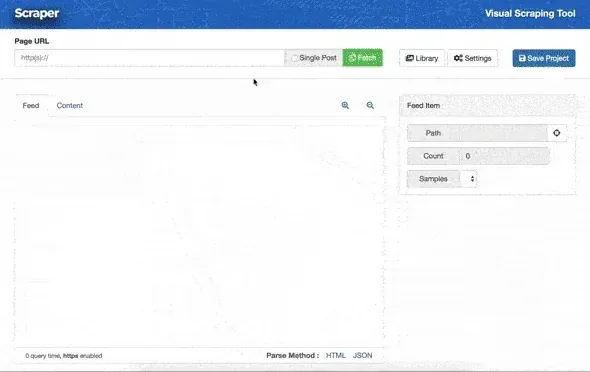
Scraper by wpBots is available on CodeCanyon. It uses XPath and regex to pull content from most sites, handles encoding issues automatically, and can translate content on import.
Key features:
- Scrape any website using XPath or regex selectors
- Automatic featured image extraction
- Duplicate title detection
- Language detection and translation (requires Google Translate API key)
- WooCommerce product creation
- Proxy and cookie support
- Scheduling
Price: $29 (regular license, 6 months support). Doesn’t work well with heavy JavaScript-rendered sites. Amazon and AliExpress have blocked its servers.
2. WP Content Crawler
WP Content Crawler has a visual inspector built into the WordPress admin that helps you find CSS selectors without leaving your site. It crawls post lists, follows pagination, and handles automatic recrawling to keep content fresh. The plugin has been updated with ChatGPT integration for rewriting, summarizing, and transforming scraped content before publishing.
Key features:
- Visual CSS selector inspector
- Automatic URL discovery and background crawling
- Scheduled recrawl for content updates
- ChatGPT integration for content transformation and rewriting
- DeepL, Google Cloud, and other translation services
- Duplicate URL/title/content detection
- WooCommerce product support
- Social media embed conversion for 70+ domains
Price: $29 (regular license, 6 months support). Can’t fetch JavaScript-generated content. Requires PHP 8.1+.
3. Crawlomatic
Crawlomatic runs JavaScript using a headless browser approach, which means it can scrape sites that the other plugins can’t touch. Good for dynamic, JS-heavy sites. Supports CSS selectors, XPath, and regex for content parsing.
Price: $49. Takes more configuration than the others but handles difficult sites.
4. WordPress Automatic Plugin
WordPress Automatic by ValvePress does more than scrape pages. It imports from YouTube, Twitter, Instagram, Reddit, Amazon, eBay, AliExpress, RSS feeds, and more. It also has OpenAI integration for generating SEO descriptions and rewriting content.
Key features:
- RSS feed import with full content
- Social media import (Facebook, Twitter, Instagram, Pinterest, Reddit)
- Amazon/eBay/AliExpress product import for WooCommerce
- OpenAI GPT integration for content generation and meta descriptions
- Google Translate / DeepL / Yandex translation
- Auto-hyperlinking for affiliate links
- Image caching to your server
Price: $39. Can be resource-intensive depending on how many sources you configure.
5. Octolooks Scrapes
Scrapes by Octolooks offers three modes: single-page scraping, serial scraping (follows pagination through a full site), and RSS feed aggregation. The visual selector means you don’t need to write CSS selectors by hand.
Price: $25. Works on shared hosting with minimal resource requirements.
6. WP Scraper (free)

WP Scraper is the free option. It’s mainly designed for migrating content from non-WordPress sites into WordPress — paste a URL and it pulls the page content, images, title, and tags directly into a new post or page.
It’s not a full automation tool, but if you need to import pages one by one without writing any code, it does the job.
Quick comparison
| Plugin | Price | JS Support | AI/GPT | Visual Selector | WooCommerce | Best For |
|---|---|---|---|---|---|---|
| Scraper | $29 | No | No | No (XPath/regex) | Yes | Simple scraping with translation |
| WP Content Crawler | $29 | No | Yes (ChatGPT) | Yes | Yes | Recurring content updates |
| Crawlomatic | $49 | Yes | No | No | Yes | JS-heavy dynamic sites |
| WordPress Automatic | $39 | No | Yes (OpenAI) | No | Yes | Multi-source aggregation |
| Octolooks Scrapes | $25 | No | No | Yes | No | Budget scraping, shared hosting |
| WP Scraper | Free | No | No | No | No | One-off page migration |
Which one to pick
If you need to automate content from social media and RSS at scale, WordPress Automatic is the most flexible. For standard site scraping with a visual interface, WP Content Crawler or Scraper both work well — WP Content Crawler has the edge now thanks to its ChatGPT integration for rewriting content before publishing. If the target site is heavy on JavaScript, Crawlomatic is the only option here that handles it. Just need to migrate a few pages manually? WP Scraper is free and gets it done.
Regardless of which plugin you choose, pair it with a proxy service if you’re scraping at any real volume. And always check the target site’s terms of service — scraping copyrighted content without permission can create legal problems regardless of which tool you use.