How To Create a Sticky Block in Gutenberg
Make any Gutenberg block sticky with the free Sticky Block plugin. Works for buttons, images, call-to-action boxes, and more.

2 min read
Sticky elements stay visible as the user scrolls, which is useful for affiliate buttons, call-to-action boxes, or any element you want to keep in view.
WordPress 6.2+ added native sticky positioning for Group blocks when using a block theme and the Site Editor. That works for headers and top-level layout elements. But if you want to make individual blocks sticky inside post content (a button, an image, a sidebar widget), you still need a plugin. The free Sticky Block plugin handles this cleanly with minimal performance impact.
Steps
1. Install Sticky Block
Go to Plugins → Add New, search for “Sticky Block”, install and activate.
2. Add the Sticky Block wrapper
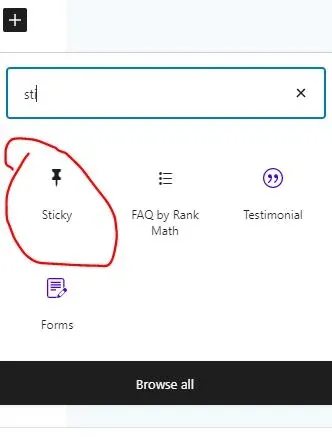
In the Gutenberg editor, add a Sticky Block. Drop any other block inside it — a button, an image, a group — and it will scroll with the user down the page.
3. Configure sticky options
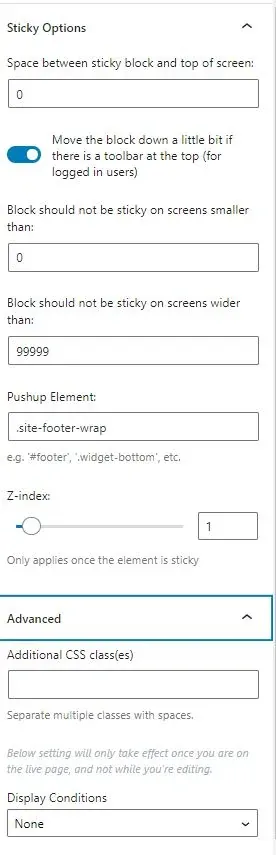
The settings let you:
- Set spacing between the sticky element and the viewport edge
- Choose which screen sizes to activate stickiness on (mobile, desktop, or both)
- Set a push-up element (another element that pushes the sticky out of the way)
- Apply display conditions (show only on mobile, or only on certain operating systems)
That’s it. Any block you nest inside the Sticky Block wrapper becomes sticky. No CSS needed.
WordPress 6.2+ native sticky option (block themes only)
If you’re using a block theme (like Twenty Twenty-Four or any FSE theme), WordPress now has built-in sticky positioning. Here’s how it works:
- Open the Site Editor (Appearance → Editor)
- Select or add a Group block where you want sticky behavior (typically a header)
- In the block settings sidebar, go to Position and select Sticky
- The Group block will now stay fixed at the top of the viewport when the user scrolls
This native approach works for site-wide elements like headers and navigation bars. It does not work inside individual post content, and it requires a block theme. If you need sticky elements inside posts or pages, or you’re using a classic theme, the Sticky Block plugin is still the way to go.
Other plugin alternatives
Besides the Sticky Block plugin, a few other options exist:
- Otter Blocks has a “Transform to Sticky” feature that works on any block. The free version covers basic sticky positioning; the pro version adds float mode and collision behavior settings.
- Custom CSS approach: If you’re comfortable adding CSS, you can use
position: sticky; top: 1rem;on any block via the Additional CSS Class field + your theme’s custom CSS. No plugin needed, but you lose the visual configuration.
For most people, the Sticky Block plugin is the simplest path. It has over 6,000 active installs and is tested up to WordPress 6.8.