How to Install Langflow with Docker Compose (2026 Guide)
Install Langflow with Docker Compose and PostgreSQL, add SSL over a Cloudflare Tunnel, and harden your self-hosted AI workflow builder against 2026 CVEs.

24 min read
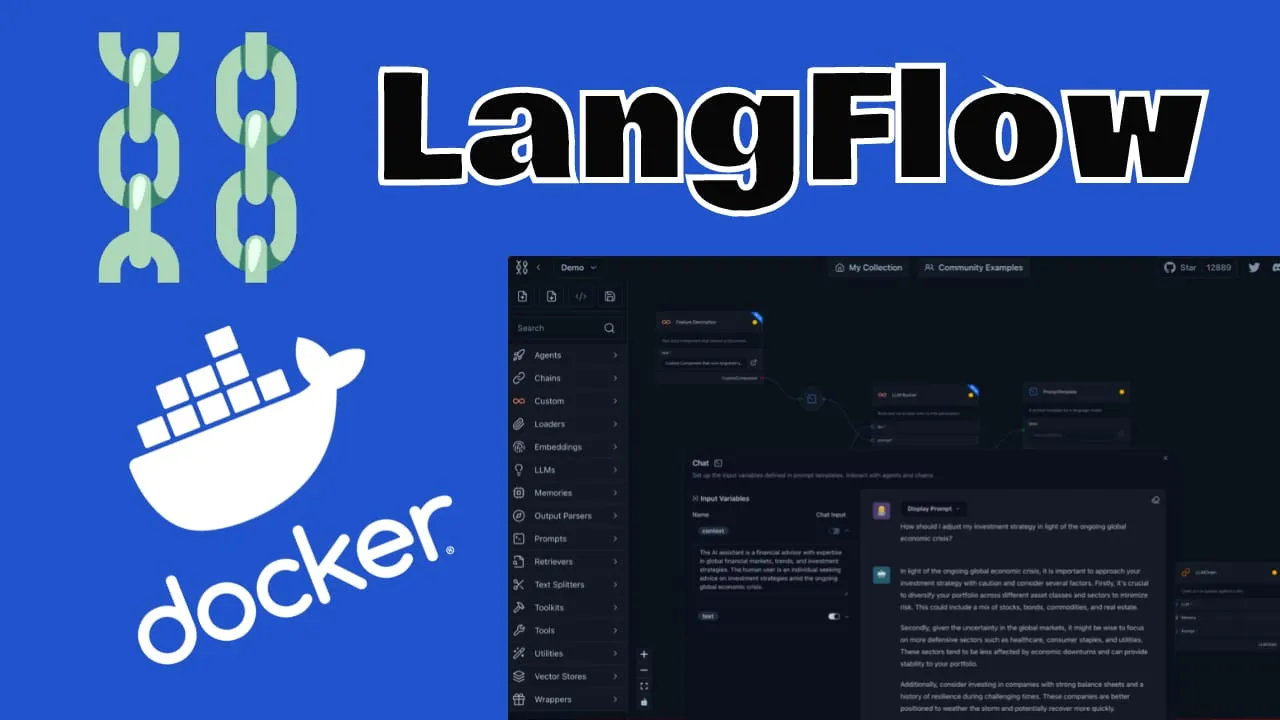
Langflow is an open-source visual builder for AI agents and workflows. It is at version 1.12.5 (released 2026-10-06), with 1.13.x in development, around 155k GitHub stars, and an MIT license. Every flow you build can run as an API or as an MCP server, and the component library covers all major LLMs, vector databases, and a growing set of AI tools.
This guide covers how to install Langflow with Docker Compose and PostgreSQL, expose it over a Cloudflare Tunnel with SSL in front, and harden the deployment against the 2026 CVEs. That last part matters. Langflow executes code by design, and a public instance running an old latest image is a remote code execution target. Pin the version, put an access layer in front, and keep the image bumped.
What is Langflow?
Langflow is a drag-and-drop IDE for AI pipelines. You wire components together on a canvas, and every component is a Python class you can open and edit in the browser. Beyond the builder, the project ships a playground for testing flows, multi-agent orchestration, and a deploy story: any flow can run as a REST API or as an MCP server (see what is MCP (Model Context Protocol) if that term is new). For observability, Langflow exports traces to LangSmith or LangFuse via OTLP; you can self-host Langfuse as a LangSmith alternative and keep the data on your own box. There is also Langflow Desktop for Windows and macOS, and pip installs support Python 3.10 to 3.14.
The 1.12.x line has been about hardening and structure: RBAC foundations, unified Knowledge Bases on common vector DB backends, OTLP telemetry export, and (as of 1.12.5) built-in code execution restricted to administrators.
Langflow executes code
The Langflow UI is an IDE and a code-execution platform. Components can run arbitrary Python with access to the backend process, filesystem, and network. Treat a public deployment like a public shell until you read the security section below. The project’s own docs say multi-tenant isolation is an infrastructure problem, not something the app solves for you.
Langflow vs Flowise in 2026
Both projects aim to make AI workflow building visual, and both have matured. As of 2026-10-10, Langflow 1.12.5 sits at 155,451 GitHub stars; Flowise 3.1.4 (released 2026-07-29) has 55,495. Stars are not everything, but the gap tracks where each project invests.
Pick Langflow if...
- You want Python-level access to every component and are happy editing source in the browser
- You need built-in Knowledge Bases and MCP server mode for flows
- You plan to run multiple LLM providers and tools in one project
- You care about OTLP telemetry export and the RBAC work on the roadmap
Pick Flowise if...
- You want a more streamlined UI and a gentler learning curve
- Your flows are mostly chatbots and document QA
- You want something working tonight with less configuration
- You do not need Python-level component editing
Which one fits depends on the project. Both are worth an evening of clicking. Full setup notes for the other side: How to Install FlowiseAI with Docker Compose. If you want the wider automation picture, you can also self-host n8n for workflow automation; n8n handles general workflow automation while Langflow stays focused on AI flows.
If you are interested to see some free cool open source self hosted apps you can check toolhunt.net self hosted section.
Install Langflow with Docker Compose
The steps below give you a pinned Langflow 1.12.5 with PostgreSQL, persistent named volumes, and a non-root runtime. The video walks the same flow:
Note: the video was recorded on the 1.x UI. The steps are the same, the interface has changed.
Watch the box
If you want to monitor server resources like CPU, memory, and disk space while Langflow runs, see How To Monitor Server and Docker Resources.
1. Prerequisites
Before you start, make sure the following already exist:
- A VPS or home server with at least 2 GB of RAM. The Langflow image is roughly 800 MB compressed on amd64, so 1 GB is tight in practice. Treat 2 GB as the working floor, not a benchmark.
- Docker Engine and Docker Compose v2. Check with
docker –versionanddocker compose version; the second command should print a v2.x version. - A compose manager such as Dockge: Dockge - Portainer Alternative for Docker Management.
- Either a Cloudflare account with a domain and a Tunnel already configured on the server, or a reverse proxy in front (Setup CloudPanel As Reverse Proxy with Docker and Dockge).
- Outbound access only. With a tunnel you publish no inbound ports. The only listener is
127.0.0.1:5060mapped to 7860 in the container, bound to loopback, and cloudflared dials out to it.
For the VPS itself, I use Hetzner boxes for this kind of workload (Hetzner Cloud) and Hostinger when I want a different provider or region. If you would rather not rent, a Mini PC as Home Server like the ASUS mini PC is enough for a single-user Langflow instance.
VPS prices jumped across the board in 2026. If you’re rethinking a rented box, see what changed and when a mini PC wins.
You can also use Traefik as a reverse proxy for your apps. I have created a full tutorial with Dockge install also to manage your containers on: How to Use Traefik as A Reverse Proxy in Docker
2. The Docker Compose file
services:
  langflow-db:
    image: postgres:16-trixie   # pinned base; don't swap in -alpine under an existing volume
    container_name: Langflow-DB
    hostname: langflow-db
    healthcheck:
      test: ["CMD-SHELL", "pg_isready -U ${POSTGRES_USER} -d ${POSTGRES_DB}"]
      interval: 5s
      timeout: 5s
      retries: 5
    volumes:
      - langflow-db:/var/lib/postgresql/data
    environment:
      POSTGRES_DB: ${POSTGRES_DB}
      POSTGRES_USER: ${POSTGRES_USER}
      POSTGRES_PASSWORD: ${POSTGRES_PASSWORD}
    restart: on-failure:5

  langflow:
    image: langflowai/langflow:1.12.5   # pin; bump deliberately. (:latest + pull_policy: always = auto)
    container_name: Langflow
    # no user: root; image runs as uid 1000 and /app/langflow is pre-chowned
    ports:
      # bind to loopback only; cloudflared on this host dials 127.0.0.1:5060.
      # "5060:7860" without the prefix publishes 0.0.0.0 and bypasses Cloudflare Access.
      - "127.0.0.1:5060:7860"
    healthcheck:
      test: timeout 10s bash -c ':> /dev/tcp/127.0.0.1/7860' || exit 1
      interval: 10s
      timeout: 5s
      retries: 3
      start_period: 90s
    restart: on-failure:5
    depends_on:
      langflow-db:
        condition: service_healthy
    environment:
      LANGFLOW_DATABASE_URL: postgresql://${POSTGRES_USER}:${POSTGRES_PASSWORD}@langflow-db:5432/${POSTGRES_DB}
      LANGFLOW_CONFIG_DIR: /app/langflow
      LANGFLOW_AUTO_LOGIN: "False"
      LANGFLOW_SUPERUSER_PASSWORD: ${LANGFLOW_SUPERUSER_PASSWORD:?set it in .env}
    volumes:
      - langflow-data:/app/langflow

volumes:
  langflow-db:
  langflow-data:
Two services, same layout as before: langflow-db runs PostgreSQL, langflow runs the app. What changed versus the 2024 version of this file, and why:
postgres:16-trixiereplacespostgres:16-alpine. The official example pins trixie on purpose: it avoids glibc collation-version mismatch warnings on existing volumes (langflow issue #9608). Alpine uses musl, so pointing a debian-based Postgres image at a volume created by the alpine image is not a safe in-place operation.
Coming from the 2024 version of this guide?
Do not point postgres:16-trixie at a volume created by postgres:16-alpine. Dump and restore first. The migration steps are in Upgrading Langflow without losing data.
-
Named volumes (
langflow-db,langflow-data) replace bind mounts. Upgrades then only replace the container image and the volumes reattach. If you migrate from bind mounts,chown -R 1000:0the data directory first (see the failure modes below). -
LANGFLOW_CONFIG_DIRis now/app/langflow. This directory holds logs, file storage, monitor data and secret keys. The image pre-creates it and chowns it to uid 1000. The old/var/lib/langflowpath still works but is no longer the documented location. -
The image is pinned at
langflowai/langflow:1.12.5. Pinning gives you controlled upgrades on your schedule. If you prefer auto-updates, uselangflowai/langflow:latestwithpull_policy: always, at the cost of surprise changes. -
There is no
user: root. Current images run as uid 1000 (gid 0)./app/langflowis pre-chowned, so the named volume works without extra permission games. -
depends_on: condition: service_healthyis set. The Langflow container waits for the Postgres healthcheck instead of racing it and crash-looping on a missing database. -
The password uses required-variable syntax.
${LANGFLOW_SUPERUSER_PASSWORD:?set it in .env}makesdocker compose upfail fast if the variable is missing, instead of starting with an empty password. TheLANGFLOW_SUPERUSERusername variable still exists, but official examples only set the password; leave the default unless you need a specific username.
Compose v2 precedence
Literal values in a compose environment: block beat shell-exported variables and the .env file. If you hardcode a value in the compose file, no .env edit will override it. Keep secrets in .env and use variable references in the compose file.
The official reference file lives in the langflow docker_example.
Common failure modes at this step:
- Port 5060 already allocated. Change the host side of the mapping to something free (for example
127.0.0.1:5061:7860) or find the squatter withdocker psandss -lntp | grep 5060. - Compose project name collisions. Two stacks deployed from the same project name will reuse networks and volumes. Pin one with
docker compose -p langflow up -d. - Permission denied on the data directory. Old bind mounts (
./langflow) owned by root versus the image’s uid 1000. Runchown -R 1000:0 ./langflowor switch to the namedlangflow-datavolume.
3. The Langflow .env file
Create a .env file in the same directory as the compose file:
POSTGRES_USER='user'
POSTGRES_PASSWORD='use-a-long-random-password'
POSTGRES_DB='langflow'
LANGFLOW_SUPERUSER_PASSWORD='use-a-long-random-password'
Generate the passwords instead of inventing them:
openssl rand -base64 24LANGFLOW_SUPERUSER_PASSWORD is the only required Langflow variable here: compose refuses to start without it thanks to the :? syntax. That password is what you will type into the UI login.
Do not ship example passwords
Never deploy with the placeholder values from this or any other tutorial. And keep LANGFLOW_AUTO_LOGIN set to False on any hostname reachable from the internet (current images default to false; do not flip it). Auto-login means anyone who finds the URL is inside your code-execution platform.
A plain .env is fine for a single-operator VPS with filesystem permissions locked down. If several people need access to the deployment config, look at Docker Compose secrets and safer alternatives to plain .env files for proper secret handling.
4. Deploy the stack
With the compose file and .env in place, from the same directory:
docker compose up -dFollow the first boot while it runs database migrations:
docker compose logs -f langflowFirst start can take a minute or two. The healthcheck allows a 90 second start period for exactly that reason. When the log settles and docker compose ps shows both services up with no restart counter climbing, verify properly.
5. Verify the deployment
Do not assume the containers are happy because up -d returned. Check:
docker compose psshows bothLangflowandLangflow-DBrunning (and healthy, once the checks pass).curl -I http://localhost:5060/from the VPS returns an HTTP response from Langflow before you involve any tunnel or proxy.- You can log into the UI at
http://localhost:5060with theLANGFLOW_SUPERUSER_PASSWORDvalue from.env. - The version string in the UI settings reads 1.12.5 if you pinned the image as shown.
- A trivial flow opens and runs once, which proves the app can write to Postgres.
On footprint: the Langflow image is about 800 MB compressed (amd64), plus Postgres and whatever the flows load into memory. Comfortable on a 2 GB VPS, tight on 1 GB. That is practitioner guidance, not a benchmark.
If the healthcheck syntax bothers you, the image ships curl, so curl -f http://localhost:7860/health || exit 1 is a valid alternative to the bash /dev/tcp check above. The UBI10 base also includes bash.
Port is already allocated
Something else is bound to 5060 on the host. Change the host side of the port mapping (for example 127.0.0.1:5061:7860) or identify the squatter with docker ps and ss -lntp | grep 5060, then stop it.
The Langflow container keeps restarting
Read docker compose logs langflow. Usual causes: a typo or bad credentials in LANGFLOW_DATABASE_URL, Postgres not up yet (the condition: service_healthy in the compose file should prevent this), or the OOM killer on a small VPS. Check docker compose logs langflow | grep -i killed and dmesg | tail.
Permission denied on the data directory
You are probably migrating an old bind mount (./langflow) owned by root. The image runs as uid 1000. Run chown -R 1000:0 ./langflow, or move to the named langflow-data volume.
I cannot log in / forgot the superuser password
The password is whatever LANGFLOW_SUPERUSER_PASSWORD was when the database was first initialized. Changing the variable later does not retro-reset an existing database user. Reset it inside Postgres, or re-create the volumes if the install is still disposable.
Choosing a Langflow Docker image
Since 1.12.x, Langflow publishes three image profiles (see the official image profile docs):
base
langflowai/langflow:base-1.12.5
Minimal image with the built-in LFX components only and no provider packages. Smallest surface, smallest feature set.
default
langflowai/langflow:1.12.5
The tag this guide uses. Ships curated standalone lfx-* packages, roughly equivalent to uv pip install langflow. Covers most flows out of the box.
extended
langflowai/langflow-all:1.12.5
Adds langflow[bundles] with the non-PyTorch providers and extras such as Confluent. Bigger image, more components available.
Default profile, pinned
This guide uses the default profile pinned to 1.12.5. Only switch to langflowai/langflow-all if a flow needs a provider the default image omits: a flow referencing a missing component fails to load.
All three profiles run as non-root uid 1000, have LANGFLOW_AUTO_LOGIN=false baked in, ship no PyTorch, and are mirrored on GHCR (ghcr.io/langflow-ai/langflow[:all]). The old core-* tags are gone; there is no langflow-core image in 1.12.x.
On pinning versus latest: pin 1.12.5 if the deployment has data you care about (my default), and use latest plus pull_policy: always only for throwaway experiments. Each image is around 801 MB amd64 / 725 MB arm64, so run docker image prune -f after each bump to reclaim the old layers.
Add SSL over a Cloudflare Tunnel
Cloudflare Tunnels connect the app to the internet without public IP addresses or open inbound ports. The mechanics are simple: cloudflared runs on your server and dials out to Cloudflare’s edge. That outbound connection is the tunnel between your origin and the edge. Requests to your domain come down the tunnel to the origin, and responses go back the same way.
No port forwarding, no firewall holes for inbound traffic. TLS terminates at Cloudflare.
Browser --HTTPS--> Cloudflare Edge  (TLS terminates here)
                        |
                        |  outbound only: cloudflared dials out
                        v
                  cloudflared daemon
                        |
                        |  http://127.0.0.1:5060
                        v
              Langflow container :7860  (uid 1000)
                        |
                        |  postgresql://langflow-db:5432
                        v
                 Postgres  (named volume langflow-db)
No inbound ports: cloudflared dials out; TLS terminates at Cloudflare.
If you do not want Cloudflare in the path, there is a self-hosted alternative to Cloudflare Tunnels (Pangolin). The reverse proxy route also works: Setup CloudPanel As Reverse Proxy with Docker and Dockge or How to Use Traefik as A Reverse Proxy in Docker. For another app exposed with the same tunnel pattern, see Cloudreve with Docker and Cloudflare Tunnels.
Point a hostname at Langflow
In the Cloudflare Zero Trust dashboard, open Access -> Tunnels, pick the tunnel you created for the server, and add a public hostname:
- Set the subdomain and domain, for example
langflow.yourdomain.com. - Set the service to
http://127.0.0.1:5060, orhttp://langflow:5060if cloudflared shares a Docker network with the container. - Save. Cloudflare creates the DNS record for you.
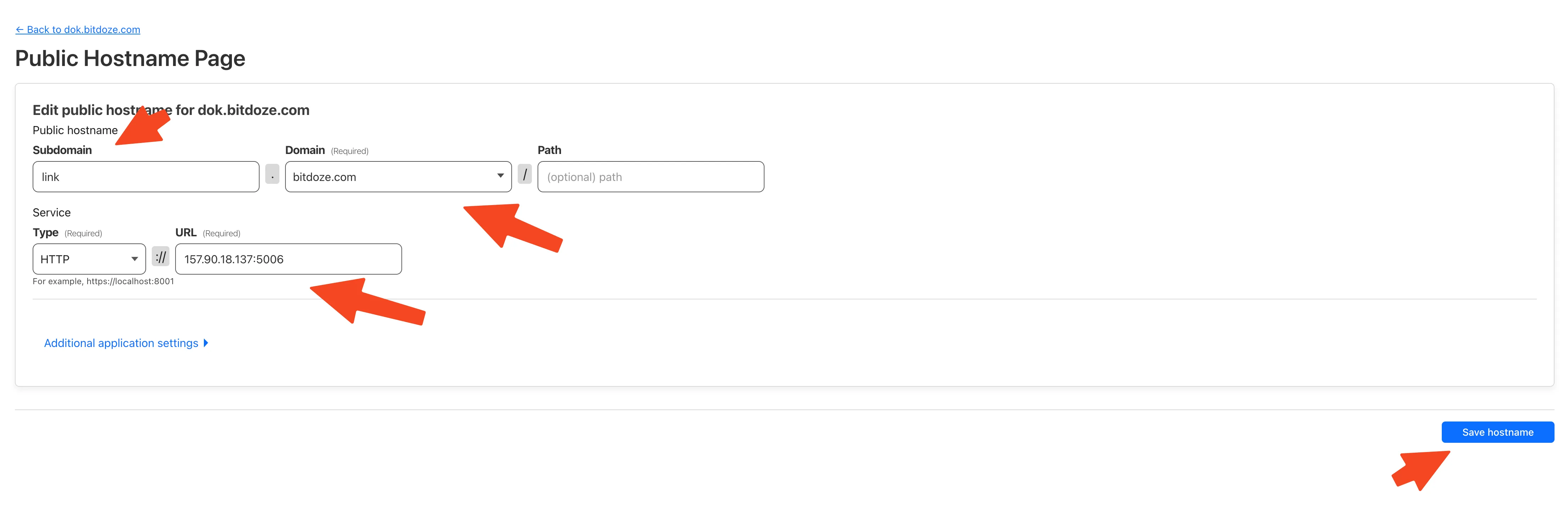
Verify from outside: curl -I https://langflow.yourdomain.com should return a response with server: cloudflare, and a browser on that URL should show a valid certificate plus the Langflow login page:
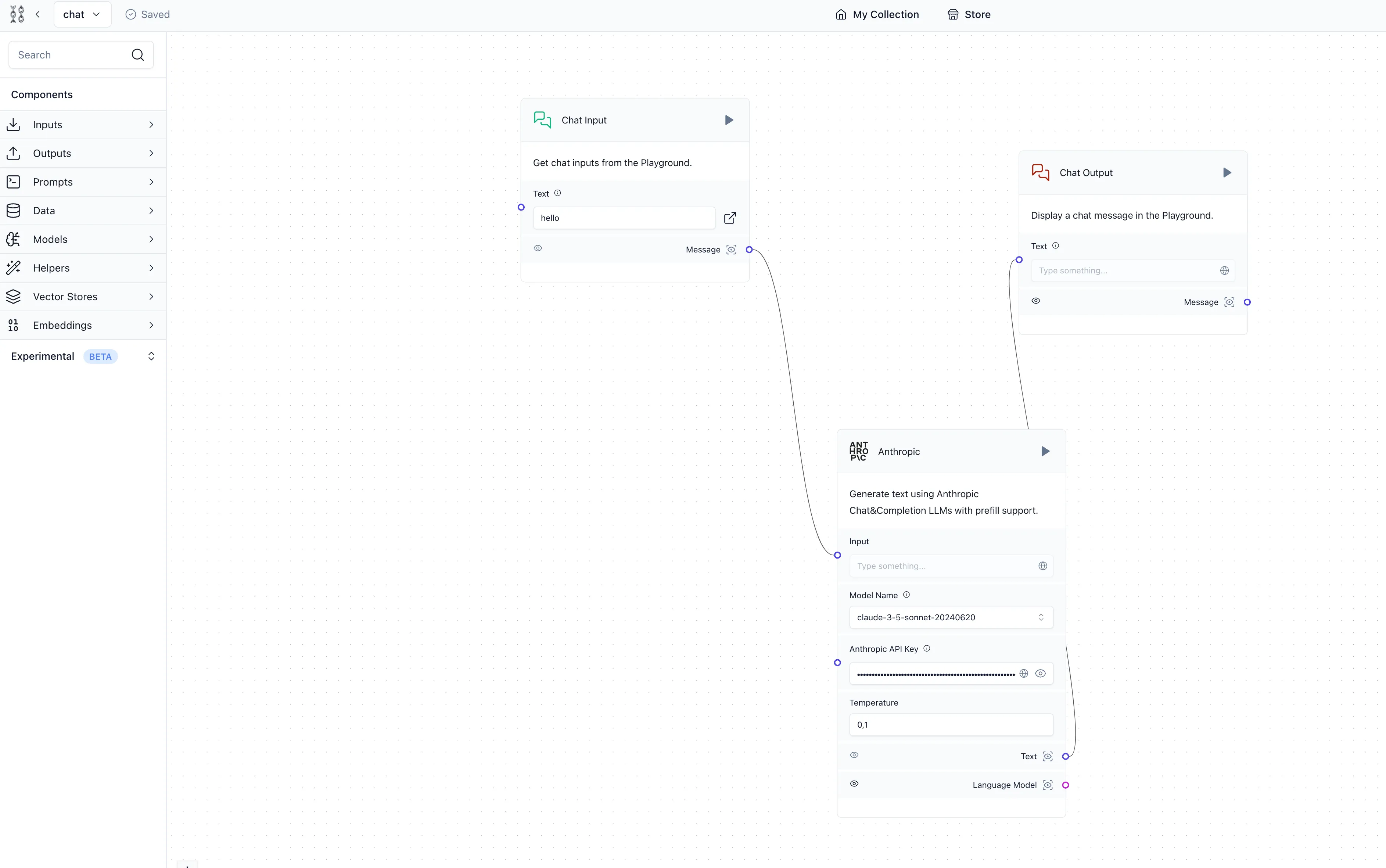
Failure modes in one line each: a 502 or 503 from the tunnel means the service URL or port is wrong; a hostname that does not resolve means the DNS record was not created; “Bad Gateway” means the container is not listening on 7860. And if the app answers at http://your-server-ip:5060 from your laptop, the port is published on 0.0.0.0, which puts Langflow on the internet without Access in the path. Keep the 127.0.0.1: prefix from the compose file and confirm with ss -lntp | grep 5060 that the listener is on 127.0.0.1.
Put Cloudflare Access in front of Langflow
A tunnel hides your origin IP but still publishes the application to the internet. Add Cloudflare Access in front of it:
- In Zero Trust, open Access -> Applications and add a self-hosted application for
langflow.yourdomain.com. - Set a policy. Email OTP is the simplest; an IdP (Google, GitHub, Okta) works if you already have one.
- Test it: hitting the hostname should now ask for the one-time PIN (or IdP login) before Langflow’s own login page appears.
Layer Access and Langflow login on top of each other, not one instead of the other. Cloudflare’s dashboard labels drift over time, so if a button name above does not match what you see, follow the current Cloudflare Access docs for self-hosted applications.
Why this step is not optional
Langflow had multiple critical RCE CVEs in 2026, including unauthenticated RCE (CVE-2026-33017). A tunnel hides the origin but still publishes the app. Put Access in front before you invite anyone else to the URL.
Secure your self-hosted Langflow
Read this before you share the URL
Self-hosting Langflow on an internet-exposed 2024-era latest image means running a vulnerable code-execution platform. Upgrade to 1.12.5 or newer before anything else.
Langflow’s own docs are blunt about the model: the UI is an IDE and code-execution platform. The code editor runs arbitrary Python with access to the host process, filesystem, and network. Multi-tenant isolation is not an application feature; it is infrastructure’s job.
2026 made the risk concrete. GitHub security advisories for the project include:
- CVE-2026-33017 (critical, 2026-03-16): unauthenticated RCE via the public flow build endpoint.
- CVE-2026-33873 (critical, 2026-03-24): authenticated code execution in agentic assistant validation.
- CVE-2026-55255 (critical, 2026-06-19): IDOR in
/api/v1/responsesgiving cross-user flow access. - GHSA-jxw3-mjmx-3pqm (critical, 2026-08-12): weak Fernet key generated via
random.seed(). - CVE-2026-105740 (critical, 2026-09-10): authenticated RCE through the MCP stdio transport.
- Highs and mediums on top: CVE-2026-33760 (Monitor API IDOR), CVE-2026-105699 (cross-project file disclosure), CVE-2026-42867 (path traversal in the KB API), GHSA-j8f7-x8jm-wmm4 (SSRF in URL components).
The project patches quickly (1.12.1 through 1.12.5 landed in five weeks), which is good news only if you pull the updates.
Hardening checklist:
- Pin the image and bump it at least monthly. Treat it like a kernel update.
- Put Cloudflare Access in front of the tunnel hostname, on top of Langflow’s own login.
- Keep
LANGFLOW_AUTO_LOGINatFalse. NeverTrueon a public hostname. - Optionally set
LANGFLOW_ALLOW_CUSTOM_COMPONENTS=falseto block custom components and the built-in code editor (beta; the docs warn it should not be your only safeguard), orLANGFLOW_CUSTOM_COMPONENT_ADMIN_ONLY=trueto make custom components superuser-only. - Run a host firewall (UFW) with Docker-aware rules, keep least privilege, and leave Postgres unpublished (the compose file already does this). See how I secured my Docker server after the BSI security report.
# optional: block custom components / code editor (beta, not a complete safeguard)
LANGFLOW_ALLOW_CUSTOM_COMPONENTS=false
# optional: custom components become superuser-only
LANGFLOW_CUSTOM_COMPONENT_ADMIN_ONLY=true
Should I expose Langflow directly with just a port and TLS?
No. A raw published port with TLS is the widest possible exposure for a code-execution IDE. Use a tunnel or a reverse proxy, put Cloudflare Access (or an equivalent auth proxy) in front, and keep Langflow’s own login enabled as the second layer.
Does blocking custom components make Langflow safe?
It reduces the attack surface; it does not make it safe. The docs mark the flag as beta and say it should not be your only safeguard. Version currency, network isolation, and an auth layer in front do the heavy lifting.
Upgrading Langflow without losing data
Data lives on the volumes; the image is replaceable. The official upgrade flow is deliberately boring:
# edit the image tag in docker-compose.yml, e.g. 1.12.5 -> 1.12.6
docker compose pull
docker compose up -d
docker compose ps          # both healthy
docker image prune -f      # optional, reclaim ~800 MB per old image
Volumes reattach. The database and your flows survive.
Rollback is the same in reverse: re-pin the previous image tag and run docker compose up -d. Volumes are untouched by an image change, so an upgrade you regret is one tag edit away from undone.
Three warnings the release notes will not save you from:
- Alpine to trixie Postgres. If you followed the 2024 version of this guide, your volume was created by
postgres:16-alpine. Do not pointpostgres:16-trixieat it. Dump and restore instead:
docker compose exec langflow-db pg_dump -U user langflow > langflow-backup.sql
# switch image to postgres:16-trixie + a fresh named volume, then:
docker compose up -d langflow-db
cat langflow-backup.sql | docker compose exec -T langflow-db psql -U user -d langflow
The musl to glibc jump on top of the collation issues the official repo pinned trixie to avoid (issue #9608) is not something to gamble a database on.
-
LANGFLOW_CONFIG_DIRpath change (/var/lib/langflowto/app/langflow). This directory holds logs, uploads, monitor data and secret keys. Copy the contents before you switch paths. If the keys regenerate, the worst case is re-authenticating and re-entering stored credentials; flows live in Postgres and survive regardless. -
Compose v2 precedence. Literal values in
environment:beat.env. If values are hardcoded in the compose file, editing.envwill not override them.
Upgrade-day verify:
docker compose ps
docker compose logs langflow | head
docker compose exec langflow-db psql -U user -d langflow -c 'SELECT count(*) FROM flow;'
Plus a version check in the UI and one test run of a real flow before you call it done.
Can I switch bind mounts to named volumes?
Yes, but copy the data. Stop the stack, copy ./langflow contents into the langflow-data volume (or re-point the mount), chown -R 1000:0 the contents, start again, and confirm flows load before deleting the old directory.
What happens to my flows if the config dir path changes?
Flows live in the database and survive. Uploads, logs and secret keys live in the config directory: copy that folder’s contents to the new path before starting the new stack.
Do not skip the dump
The alpine-to-trixie sequence assumes a clean dump and restore. Test the restore into a scratch Postgres container before you delete anything. A dump you have never restored is not a backup.
Backups and monitoring
Two things matter here: the database (flows, users, chat history) and the config directory (uploads, logs, secret keys). Schedule the dump:
docker compose exec langflow-db pg_dump -U user langflow > backup-$(date +%F).sql- Run
pg_dumpon a cron job or systemd timer and keep the output off the box. - Include the
langflow-datavolume (or the./langflowbind mount) in the backup set. - Push both offsite; S3-compatible storage is fine and costs pennies at this size. Self-hosted backup automation with Restic covers the scheduling side.
- Test a restore into a scratch container once in a while.
Test restores
Run the pg_dump restore into a scratch Postgres container once so you know the file opens and imports cleanly.
For monitoring, watch CPU, memory, disk and the containers themselves (How to Monitor Server & Docker Resources). Langflow 1.12.x can also export OTLP telemetry to any backend if you want traces alongside metrics.
On scaling: the default is a single worker with an in-memory build queue, which is the right size for one person or a small team. If you need more, the official multi-worker docs cover LANGFLOW_WORKERS plus a Redis queue (LANGFLOW_JOB_QUEUE_TYPE=redis, LANGFLOW_REDIS_QUEUE_URL, queue on Redis DB 1). Out of scope for this setup; do not start there.
Budget a monthly image bump as part of the routine. Langflow cut 1.12.0 to 1.12.5 in five weeks, and some of those releases were security fixes.
Wrapping up
You now have Langflow 1.12.5 running on Docker Compose with PostgreSQL, SSL over a Cloudflare Tunnel with an Access layer in front, and a hardening baseline appropriate for a code-execution platform that is reachable from the internet. Next steps: build a real flow, try deploying it as an API or MCP server, and put the image bump on a calendar so CVE disclosures turn into a five-minute chore instead of an incident.
Install FlowiseAI for comparisonIf you want to explore more Docker containers for your home server, check out our guide on Best 125+ Docker Containers for Home Server. Langflow also sits next to n8n, Dify, and the rest of the agent stack in top AI GitHub repos.