Langfuse Docker Install: Self-Hosted LangSmith Alternative
Install Langfuse with Docker Compose on your own server. Self-hosted LangSmith alternative: v4 images, .env secrets, Cloudflare Tunnel, upgrades & backups.

32 min read
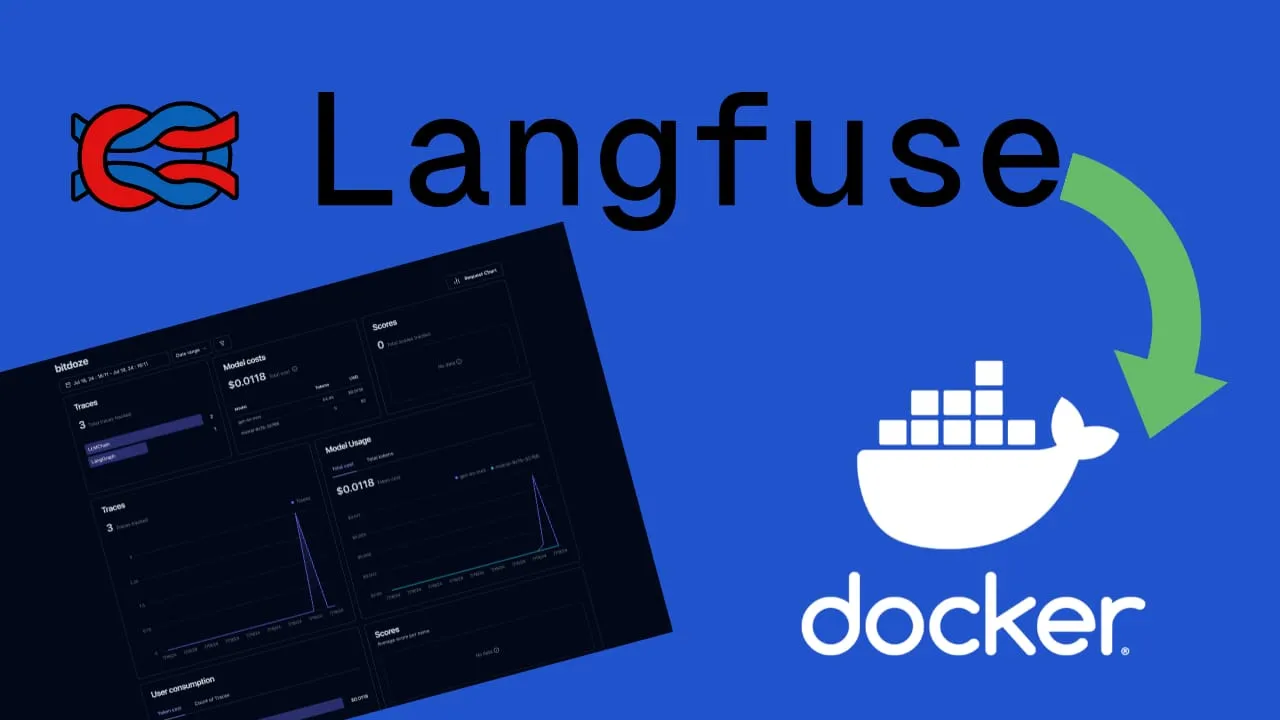
This guide installs Langfuse v4 with Docker Compose on your own server: a self-hosted LangSmith alternative that keeps LLM traces, costs, and evals on hardware you control. Langfuse is an open-source LLM engineering platform with observability, analytics, prompt management, evaluations, and dataset experiments in one stack. It sits at 35.6k GitHub stars (checked 2026-10-10), and the team has joined ClickHouse, which matters because ClickHouse is the analytics engine under the hood.
The version question first, because it decides everything else: Langfuse v4.0.0 shipped on 2026-07-29 and v4.56.0 landed on 2026-10-09. Langfuse v3 receives security patches only until the end of January 2027. Fresh installs should never start on v3 now. If you already run v3, the upgrade section below walks the migration; the infrastructure does not change.
v3 is end-of-life (security patches only)
Langfuse v3 receives security patches only until the end of January 2027. Fresh installs should use v4 images. Existing v3 installs should plan the upgrade before that date, see Upgrading an existing Langfuse v3 install to v4.
Features:
- Observability covers instrumenting your application and ingesting traces so you can see how your LLM calls behave, with full-text search across inputs, outputs, and metadata.
- Analytics tracks cost, latency, and quality through dashboards and data exports.
- Prompt management versions and deploys prompts from inside Langfuse.
- Evaluations score completions with model-based evals, user feedback, and manual scoring.
- Experimentation runs datasets against your app before you ship, and compares runs.
- Integrations work with LangChain, LlamaIndex, LiteLLM, and other popular LLM frameworks. If you want a single gateway in front of your providers, you can install LiteLLM with Docker Compose and route LLM calls through LiteLLM, tracing them in Langfuse.
What’s new in Langfuse v4 (and why fresh installs should skip v3)
v4 is mostly an engine swap, not a product rewrite. The biggest change is the ClickHouse data model: events land in events_full (immutable, wide rows) with a query-optimized events_core projection on top. Traces are now root spans inside the same table (span ID t-<trace_id>), and the UI main surface is a single Observations view, opened filtered to Is Root Observation = true. If you have screenshots or muscle memory from v3’s traces table, expect a different first screen.
What that data model unlocks for self-hosters (these were Langfuse Cloud features first):
- Full-text search across inputs, outputs, and metadata, plus a filter search bar.
- Monitors and alerts on trace metrics.
- Observations API v2 and Metrics API v2 for cleaner data exports.
- In-app agent moved out of the enterprise edition into public beta.
- Better self-hosting ergonomics in the official compose: headless initialization via
LANGFUSE_INIT_*,LANGFUSE_AI_*for the in-app assistant and eval models,LANGFUSE_MCP_*for the MCP server,LANGFUSE_S3_BATCH_EXPORT_*, andREDIS_TLS_*.
What's new in v4
- New ClickHouse model (
events_full+events_core), traces as root observations - Full-text search, filter search bar, monitors and alerts
- Observations API v2 and Metrics API v2
- In-app agent in public beta
- Headless init, MCP server, batch export env blocks in the official compose
- SDK direct-write path (Python SDK >= 4.7.0, JS/TS SDK >= 5.4.0)
What stayed the same
- The same six services:
langfuse-web,langfuse-worker, PostgreSQL, ClickHouse, Redis, S3/MinIO - The required env vars:
NEXTAUTH_URL,NEXTAUTH_SECRET,SALT,ENCRYPTION_KEY,DATABASE_URL,CLICKHOUSE_*,REDIS_* - The Docker Compose flow: one compose file, one
.env,docker compose up -d AUTH_DISABLE_SIGNUP, telemetry opt-out, health endpoints- Only minimum versions changed (ClickHouse >= 25.12, PostgreSQL 15+, Redis 7+)
On the performance numbers
The official upgrade guide claims dashboard load times for large projects improve “10x or more”; the marketing banner says up to 165x. We have not benchmarked these numbers, they come from Langfuse’s own materials checked 2026-10-10. Your mileage depends on hardware and trace volume.
Why skip v3 entirely? It is in maintenance mode with a hard support end date, and v4 runs on the identical infrastructure. The upgrade guide’s own FAQ answers “Do I need new infrastructure components?” with “No.” Same web and worker containers, same PostgreSQL, ClickHouse, Redis, and S3. Starting on v3 today means doing the migration later for no benefit. If you are on v3 already, read the upgrade section and the official v3 → v4 upgrade guide. Release history lives on GitHub releases.
Step-by-step guide to installing Langfuse with Docker Compose
The walkthrough below covers the full Langfuse Docker install: compose file, secrets, verification, HTTPS, and backups. If you prefer video:
Video recorded on v3
The embedded walkthrough was recorded on the v3 UI, so screenshots differ from what you will see on v4. The compose and .env steps are the same; only the image tags and the observations view changed. The article below reflects v4 (checked 2026-10-10).
If you want to watch CPU, memory, and disk while this stack runs, set up how to monitor server and Docker resources first. Langfuse is one of the heavier compose stacks you will self-host, and it will tell you when the box is too small.
1. Prerequisites and VPS sizing for Langfuse v4
Before you start, have these in place:
- A VPS or home server. I use Hetzner or Hostinger for VPS boxes; for a home server, a mini PC like the ASUS DC510 works fine. See the best home server mini PCs if you are still choosing hardware.
- Docker Engine with the Compose v2 plugin (
docker compose versionmust work). If you want a UI for the stack, use Dockge, a Docker Compose manager for self-hosting. - A domain or subdomain pointed at the server (for example
langfuse.yourdomain.com). - A reverse-proxy path: CloudPanel as reverse proxy with Docker and Dockge, how to use Traefik as a reverse proxy in Docker, or Cloudflare Tunnels (covered in step 5).
- Host ports free:
5061(web UI) and, if you want host-side health checks,3030(worker). Check withss -tlnp | grep -E ‘5061|3030’. - At least 50 GB of free disk. ClickHouse and MinIO grow with trace volume, and the v3 to v4 backfill wants headroom.
Sizing: the official example is 4 cores / 16 GiB RAM / 100 GiB disk
Langfuse’s own Docker Compose example uses a 4-core, 16 GiB RAM, 100 GiB disk VM (a t3.xlarge in AWS terms, roughly a Hetzner CPX41-class box, on the order of €15-25/month). Production container guidance is at least 2 CPU and 4 GB RAM per container. An 8 GB box may work for hobby volume, but it is below the official example and we have not tested it. The Node.js heap defaults to 1.7 GiB, so the .env below sets NODE_OPTIONS=–max-old-space-size=4096. Watch memory after deploy with how to monitor server and Docker resources.
VPS prices jumped across the board in 2026. If you are rethinking a rented box, see what changed and when a mini PC wins.
2. Langfuse Docker Compose file (v4 images)
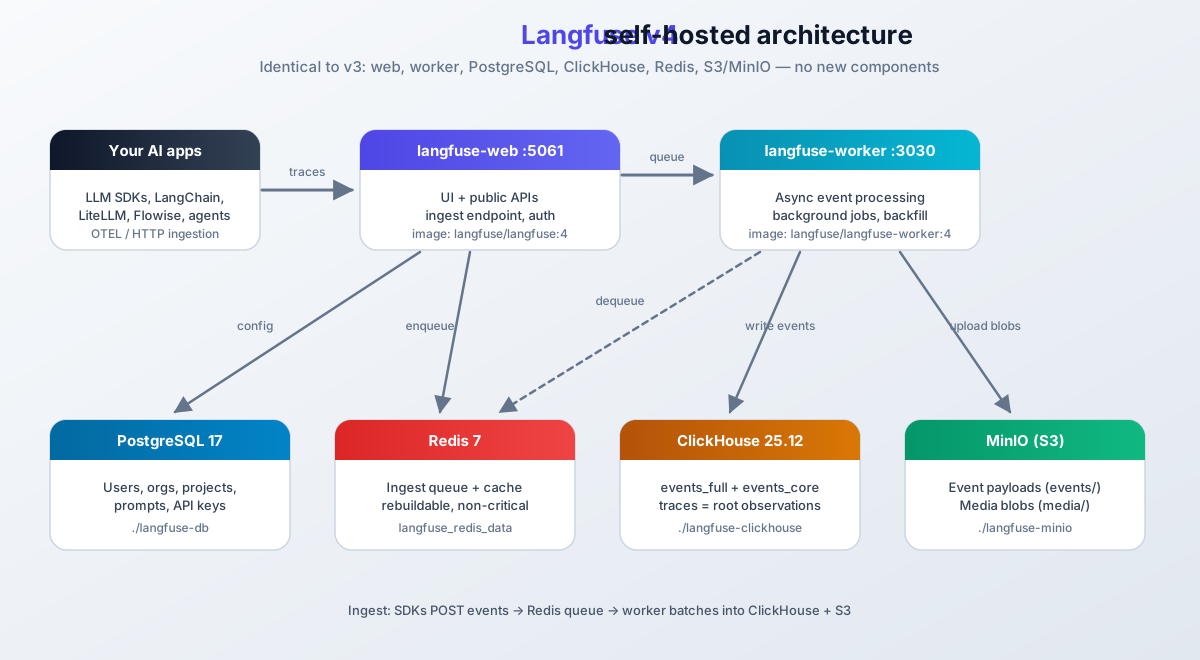
The v4 stack is six services, same shape as v3:
- langfuse-worker processes trace events from the queue, writes them to ClickHouse, and runs background jobs including the historic backfill.
- langfuse-web serves the UI and public APIs on host port 5061. This is the container your reverse proxy points at.
- postgres is the transactional database (PostgreSQL 17) for users, orgs, projects, prompts, and API keys.
- clickhouse is the OLAP store for events and analytics. This is where the v4 data model (
events_full+events_core) lives. - minio is S3-compatible blob storage for event payloads (
events/) and multi-modal media (media/). - redis holds the ingest queue and cache. Losing it costs you queued events, not your database.
Create a directory for the stack and drop in this compose file:
mkdir -p /opt/langfuse && cd /opt/langfuseservices:
langfuse-worker:
image: langfuse/langfuse-worker:4
restart: always
depends_on:
postgres:
condition: service_healthy
minio:
condition: service_healthy
redis:
condition: service_healthy
clickhouse:
condition: service_healthy
ports:
- 127.0.0.1:3030:3030 # worker health endpoint (new vs the old v3 file)
environment:
DATABASE_URL: postgresql://${POSTGRES_USER}:${POSTGRES_PASSWORD}@postgres:5432/${POSTGRES_DB}
NEXTAUTH_URL: https://langfuse.yourdomain.com
SALT: ${SALT}
ENCRYPTION_KEY: ${ENCRYPTION_KEY}
NODE_OPTIONS: --max-old-space-size=4096
TELEMETRY_ENABLED: false
CLICKHOUSE_MIGRATION_URL: clickhouse://clickhouse:9000
CLICKHOUSE_URL: http://clickhouse:8123
CLICKHOUSE_USER: ${CLICKHOUSE_USER}
CLICKHOUSE_PASSWORD: ${CLICKHOUSE_PASSWORD}
LANGFUSE_S3_EVENT_UPLOAD_BUCKET: langfuse
LANGFUSE_S3_EVENT_UPLOAD_REGION: auto
LANGFUSE_S3_EVENT_UPLOAD_ACCESS_KEY_ID: ${MINIO_ROOT_USER}
LANGFUSE_S3_EVENT_UPLOAD_SECRET_ACCESS_KEY: ${MINIO_ROOT_PASSWORD}
LANGFUSE_S3_EVENT_UPLOAD_ENDPOINT: http://minio:9000
LANGFUSE_S3_EVENT_UPLOAD_FORCE_PATH_STYLE: true
LANGFUSE_S3_EVENT_UPLOAD_PREFIX: events/
LANGFUSE_S3_MEDIA_UPLOAD_BUCKET: langfuse
LANGFUSE_S3_MEDIA_UPLOAD_REGION: auto
LANGFUSE_S3_MEDIA_UPLOAD_ACCESS_KEY_ID: ${MINIO_ROOT_USER}
LANGFUSE_S3_MEDIA_UPLOAD_SECRET_ACCESS_KEY: ${MINIO_ROOT_PASSWORD}
LANGFUSE_S3_MEDIA_UPLOAD_ENDPOINT: http://minio:9000
LANGFUSE_S3_MEDIA_UPLOAD_FORCE_PATH_STYLE: true
LANGFUSE_S3_MEDIA_UPLOAD_PREFIX: media/
REDIS_HOST: redis
REDIS_PORT: 6379
REDIS_AUTH: ${REDIS_PASSWORD}
langfuse-web:
image: langfuse/langfuse:4
restart: always
depends_on:
postgres:
condition: service_healthy
minio:
condition: service_healthy
redis:
condition: service_healthy
clickhouse:
condition: service_healthy
ports:
- 5061:3000
environment:
DATABASE_URL: postgresql://${POSTGRES_USER}:${POSTGRES_PASSWORD}@postgres:5432/${POSTGRES_DB}
NEXTAUTH_URL: https://langfuse.yourdomain.com
NEXTAUTH_SECRET: ${NEXTAUTH_SECRET}
SALT: ${SALT}
ENCRYPTION_KEY: ${ENCRYPTION_KEY}
NODE_OPTIONS: --max-old-space-size=4096
TELEMETRY_ENABLED: false
CLICKHOUSE_MIGRATION_URL: clickhouse://clickhouse:9000
CLICKHOUSE_URL: http://clickhouse:8123
CLICKHOUSE_USER: ${CLICKHOUSE_USER}
CLICKHOUSE_PASSWORD: ${CLICKHOUSE_PASSWORD}
LANGFUSE_S3_EVENT_UPLOAD_BUCKET: langfuse
LANGFUSE_S3_EVENT_UPLOAD_REGION: auto
LANGFUSE_S3_EVENT_UPLOAD_ACCESS_KEY_ID: ${MINIO_ROOT_USER}
LANGFUSE_S3_EVENT_UPLOAD_SECRET_ACCESS_KEY: ${MINIO_ROOT_PASSWORD}
LANGFUSE_S3_EVENT_UPLOAD_ENDPOINT: http://minio:9000
LANGFUSE_S3_EVENT_UPLOAD_FORCE_PATH_STYLE: true
LANGFUSE_S3_EVENT_UPLOAD_PREFIX: events/
LANGFUSE_S3_MEDIA_UPLOAD_BUCKET: langfuse
LANGFUSE_S3_MEDIA_UPLOAD_REGION: auto
LANGFUSE_S3_MEDIA_UPLOAD_ACCESS_KEY_ID: ${MINIO_ROOT_USER}
LANGFUSE_S3_MEDIA_UPLOAD_SECRET_ACCESS_KEY: ${MINIO_ROOT_PASSWORD}
LANGFUSE_S3_MEDIA_UPLOAD_ENDPOINT: http://minio:9000
LANGFUSE_S3_MEDIA_UPLOAD_FORCE_PATH_STYLE: true
LANGFUSE_S3_MEDIA_UPLOAD_PREFIX: media/
REDIS_HOST: redis
REDIS_PORT: 6379
REDIS_AUTH: ${REDIS_PASSWORD}
AUTH_DISABLE_SIGNUP: ${AUTH_DISABLE_SIGNUP}
postgres:
image: postgres:17-alpine
restart: always
healthcheck:
test: ["CMD-SHELL", "pg_isready -U ${POSTGRES_USER} -d ${POSTGRES_DB}"]
interval: 5s
timeout: 5s
retries: 5
start_period: 10s
volumes:
- ./langfuse-db:/var/lib/postgresql/data:rw
environment:
POSTGRES_DB: ${POSTGRES_DB}
POSTGRES_USER: ${POSTGRES_USER}
POSTGRES_PASSWORD: ${POSTGRES_PASSWORD}
clickhouse:
image: clickhouse/clickhouse-server:25.12 # pinned: v4 minimum is 25.12, 26.4 recommended
restart: always
user: "101:101"
ports:
- 127.0.0.1:8123:8123 # localhost only
- 127.0.0.1:9000:9000
environment:
CLICKHOUSE_DB: default
CLICKHOUSE_USER: ${CLICKHOUSE_USER}
CLICKHOUSE_PASSWORD: ${CLICKHOUSE_PASSWORD}
volumes:
- ./langfuse-clickhouse:/var/lib/clickhouse
- ./langfuse-clickhouse-logs:/var/log/clickhouse-server
healthcheck:
test: wget --no-verbose --tries=1 --spider http://localhost:8123/ping || exit 1
interval: 5s
timeout: 5s
retries: 10
start_period: 30s
minio:
image: cgr.dev/chainguard/minio
restart: always
entrypoint: sh
command: -c 'mkdir -p /data/langfuse && minio server --address ":9000" --console-address ":9001" /data'
environment:
MINIO_ROOT_USER: ${MINIO_ROOT_USER}
MINIO_ROOT_PASSWORD: ${MINIO_ROOT_PASSWORD}
ports:
- 127.0.0.1:9090:9000 # localhost only
- 127.0.0.1:9091:9001 # MinIO console, localhost only
volumes:
- ./langfuse-minio:/data
healthcheck:
test: ["CMD", "mc", "ready", "local"]
interval: 1s
timeout: 5s
retries: 5
start_period: 10s
redis:
image: redis:7
restart: always
command: >
--requirepass ${REDIS_PASSWORD}
--maxmemory-policy noeviction
ports:
- 127.0.0.1:6379:6379 # localhost only, for debugging
volumes:
- langfuse_redis_data:/data
healthcheck:
test: ["CMD", "redis-cli", "ping"]
interval: 3s
timeout: 10s
retries: 10
start_period: 5s
volumes:
langfuse_redis_data:What changed vs the old (v3) file
- Image tags:
langfuse/langfuse:3andlangfuse/langfuse-worker:3become:4. - ClickHouse is now pinned to
clickhouse/clickhouse-server:25.12(it was floating onlatest, which is exactly the kind of drift that breaks a stack months later). - Worker publishes
127.0.0.1:3030so you can hit its health endpoint. - Redis gets a persistent named volume; ClickHouse, MinIO, and Redis ports are bound to localhost instead of the world.
- MinIO credentials use the official names
MINIO_ROOT_USER/MINIO_ROOT_PASSWORD. NODE_OPTIONSraised to 4 GiB to match the container guidance.
A note on registries, since the official compose pulls from docker.langfuse.com:
Docker Hub images
The file above uses langfuse/langfuse:4 and langfuse/langfuse-worker:4 from Docker Hub. Simpler to read, works fine.
Official registry
The official compose pulls docker.langfuse.com/langfuse/langfuse:4. That host is a mirror of Docker Hub (it 307-redirects to registry-1.docker.io), so the images are identical. Use this if your organization allowlists Langfuse’s registry.
Notes on the file:
- Environment variables (
${VARIABLE_NAME}) keep secrets and hostnames out of the YAML. Next section generates them. - All backing services have healthchecks with
start_period, and the Langfuse containers wait for healthy dependencies before starting. - Bind mounts (
./langfuse-db,./langfuse-clickhouse,./langfuse-minio) keep data on the host filesystem. I prefer bind mounts here over named volumes: they are trivial to tar up in the backups section and trivial to inspect when something breaks. - Telemetry is disabled. Langfuse’s compose default is now
true, so keep this line if you do not want phone-home stats. - S3 prefixes
events/andmedia/are set explicitly; the server has the same defaults, so this is documentation more than configuration. - For reproducible deployments, pin the exact patch version (for example
langfuse/langfuse:4.56.0, current as of 2026-10-10). The:4tag tracks the current minor and gets patched roughly daily. Watch GitHub releases either way.
The full reference for every variable lives in the official self-hosting configuration docs. The upstream file to diff against is the official Langfuse docker-compose.yml.
3. The .env file: secrets and optional LANGFUSE_INIT variables
Create .env next to the compose file:
POSTGRES_USER='langfuse'
POSTGRES_PASSWORD='change-me-strong'
POSTGRES_DB='langfuse'
NEXTAUTH_SECRET=
SALT=
ENCRYPTION_KEY=
CLICKHOUSE_USER=clickhouse
CLICKHOUSE_PASSWORD=change-me-strong
MINIO_ROOT_USER=minio
MINIO_ROOT_PASSWORD=change-me-strong
REDIS_PASSWORD=change-me-strong
AUTH_DISABLE_SIGNUP=false
Generate the three secrets and paste them in. They must not be guessable, and ENCRYPTION_KEY has a fixed format:
openssl rand -base64 32→NEXTAUTH_SECRETopenssl rand -base64 32→SALTopenssl rand -hex 32→ENCRYPTION_KEY(exactly 64 hex characters)
openssl rand -base64 32
openssl rand -base64 32
openssl rand -hex 32
Then lock the file down:
chmod 600 .envTreat .env like a production secret
Never commit this file to version control and never paste it into a chat. ENCRYPTION_KEY protects sensitive connection credentials: if you lose it, encrypted values in the database cannot be decrypted. Back .env up together with the data volumes (see the backups section) or the backups are only half a restore path.
Optional headless initialization: if you would rather not click through the first-run signup, Langfuse can pre-create the org, project, API keys, and first user from env vars on boot. Add these to .env:
# Optional: headless initialization (skip the UI first-run flow)
# LANGFUSE_INIT_ORG_NAME=My Org
# LANGFUSE_INIT_PROJECT_NAME=default
# LANGFUSE_INIT_PROJECT_PUBLIC_KEY=pk-lf-...
# LANGFUSE_INIT_PROJECT_SECRET_KEY=sk-lf-...
# LANGFUSE_INIT_USER_EMAIL=you@yourdomain.com
# LANGFUSE_INIT_USER_PASSWORD=change-me-strong
Leave them commented out and the first user gets created from the sign-up page instead. Either path is fine; headless init is better when you automate deployments and want an API key printed to logs rather than clicked together. Details in the headless initialization docs.
4. Deploying the stack and verifying it’s healthy
Start everything from the directory with the compose file:
docker compose up -dThat pulls images, creates containers, and starts them detached. Check they exist:
docker compose psAll six services should report running, and the four backing services should turn healthy within about a minute.
First boot takes 2-3 minutes
Migrations run on startup. The web container prints Ready when it finishes. Do not restart mid-migration, and do not panic if the UI is blank for the first couple of minutes.
Watch the web container until it is ready:
docker compose logs -f langfuse-webThe success signal is a Ready log line. Then hit the health endpoints:
# web: expect {"success":true}
curl -s http://localhost:5061/api/public/health | jq

# web with DB check: expect {"success":true}
curl -s "http://localhost:5061/api/public/health?failIfDatabaseUnavailable=true" | jq

# readiness: expect 200
curl -s -o /dev/null -w '%{http_code}\n' http://localhost:5061/api/public/ready

# worker: expect {"success":true}
curl -s http://localhost:3030/api/health | jq
docker compose ps: six services running, backing services healthydocker compose logs langfuse-web:Readyline present/api/public/healthreturns{"success":true}curl localhost:3030/api/healthreturns{"success":true}- UI loads at
http://your-server-ip:5061(before the tunnel is up)
The official endpoint reference is the health and readiness endpoints doc. Two failure modes show up here most often: a dependency stuck unhealthy (almost always bad credentials in .env, check docker compose logs postgres or clickhouse), and host port 5061 already taken (ss -tlnp | grep 5061, then change the host port in the compose file). More of these in the troubleshooting section.
5. HTTPS with Cloudflare Tunnels
Cloudflare Tunnels connect your app to the internet without opening inbound ports on the server. The cloudflared daemon dials out to Cloudflare’s network and holds a persistent tunnel to your origin. Requests to your domain come down that tunnel to your server, and responses go back up it. No port forwarding, no firewall holes.
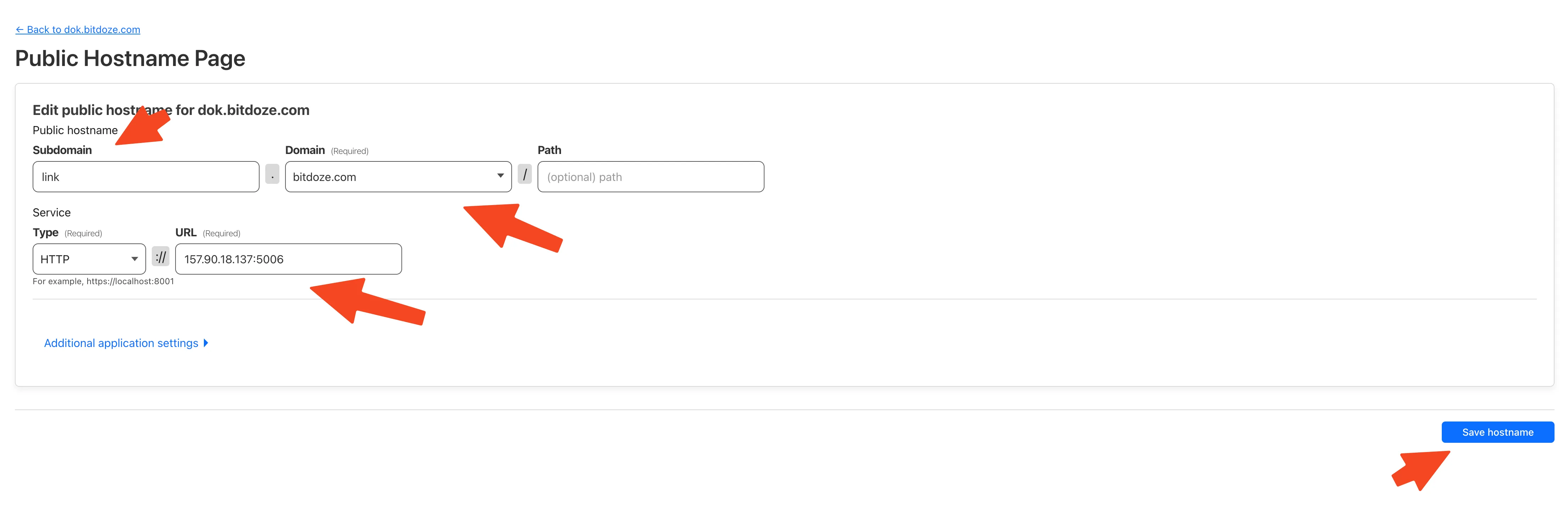
In the Cloudflare Zero Trust dashboard, go to Access - Tunnels, pick your tunnel, and add a hostname that maps your subdomain to the service and port (http://langfuse-web:3000 if the tunnel runs in the same Docker network, or http://localhost:5061 if it runs on the host).
Verify from your workstation:
curl -I https://langfuse.yourdomain.comYou should get a 302 or 200 pointing at the Langfuse login page, not a Cloudflare error. If you see a 502, the tunnel cannot reach the origin port.
NEXTAUTH_URL must match the public URL
Whatever you set in NEXTAUTH_URL must be exactly the URL users type in the browser, including https. A mismatch is the classic cause of login redirect loops after tunnel setup.
Alternatively, you can use Setup CloudPanel as Reverse Proxy with Docker and Dockge or How to Use Traefik as A Reverse Proxy in Docker.
6. First login: create your admin account (or init headlessly)
No default admin account
Langfuse ships without any login. The first account created through the sign-up page becomes the admin. If signups are already disabled and you have no account, you will be locked out, so create the admin before flipping AUTH_DISABLE_SIGNUP.
Create admin in the UI (default)
- Open
https://langfuse.yourdomain.com. - Use the sign-up option on the login page. The first user becomes the admin.
- Create a project, then open project settings and generate an API key (public + secret key pair).
- Point your app’s SDK at the instance and start sending traces.
Headless init via LANGFUSE_INIT_*
- Set the
LANGFUSE_INIT_*variables in.envbefore first boot (previous section). docker compose up -dcreates org, project, API keys, and the first user.- Log in with
LANGFUSE_INIT_USER_EMAIL/LANGFUSE_INIT_USER_PASSWORD. - Rotate the generated secret key if you generated one outside Langfuse.
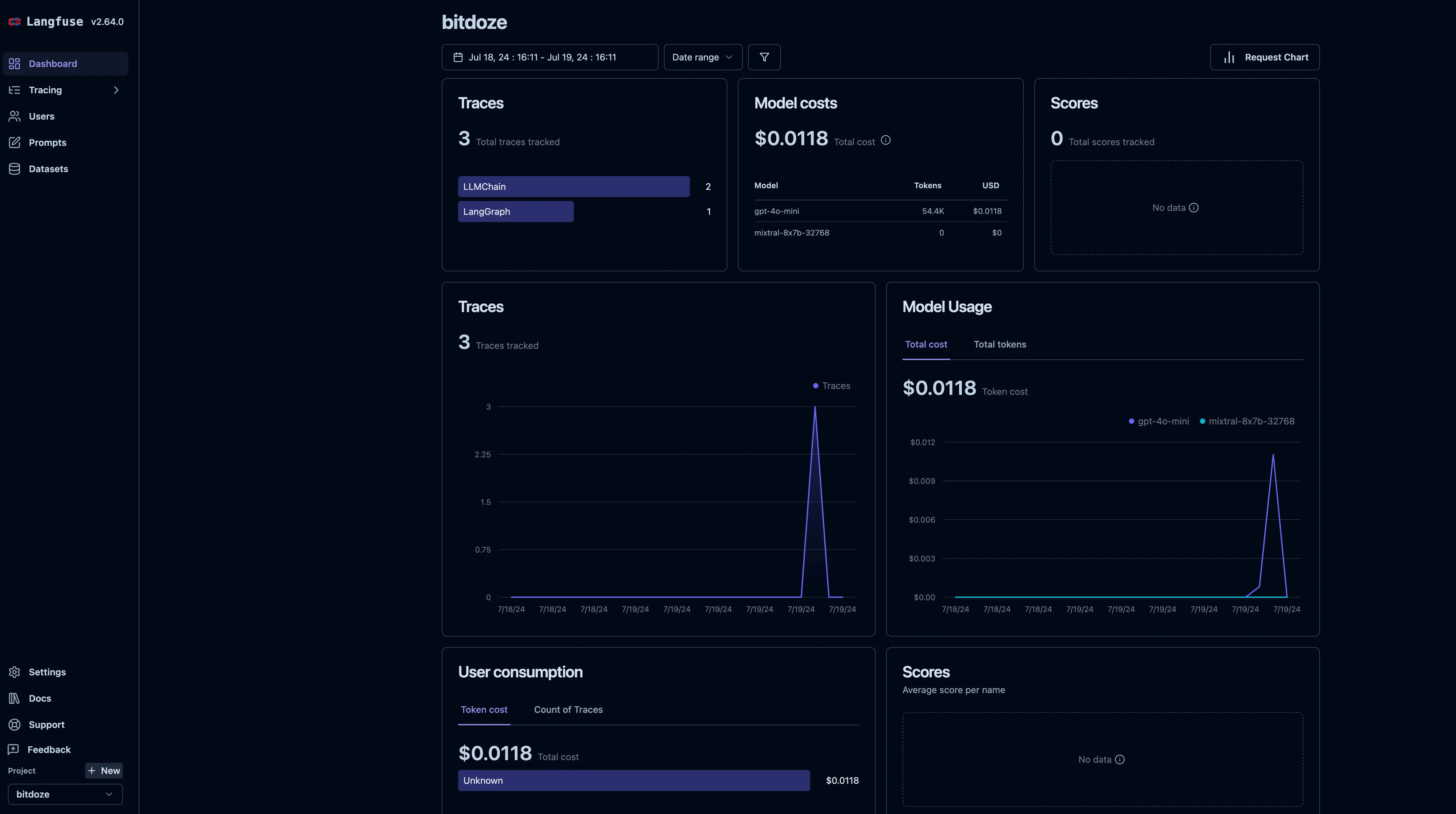
Once logged in, the deploy loop is closed: project created, API key generated, ready to trace. In v4 the main screen is the Observations view filtered to root observations, not the old v3 traces table, so older screenshots may look unfamiliar.
You can integrate this with your AI apps next. The embedded video demos the Flowise integration; for the other half of that stack see how to install FlowiseAI with Docker Compose.
Upgrading an existing Langfuse v3 install to v4
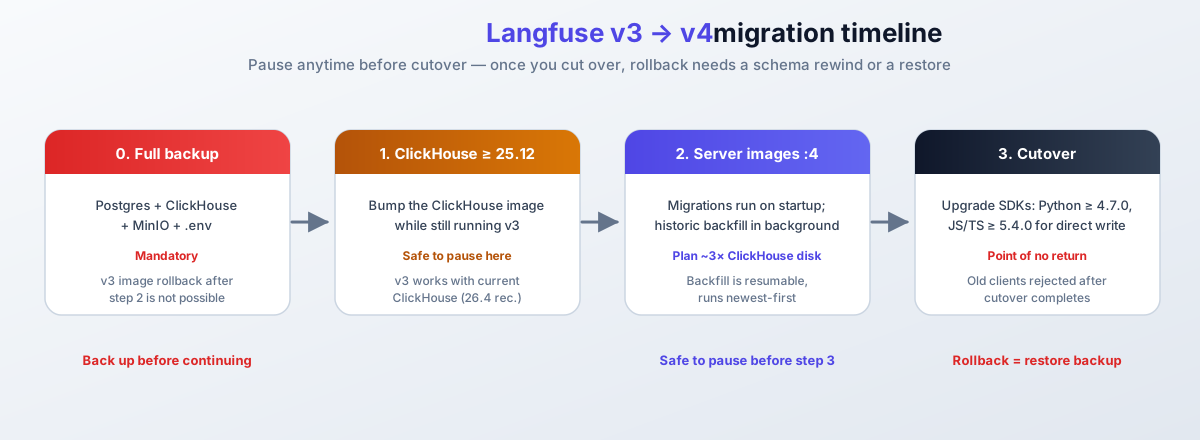
If you followed the old version of this guide, the upgrade is three steps and you can pause between them. It is not a fresh install: your data stays in the same bind mounts. Full detail lives in the official v3 → v4 upgrade guide; this is the operator summary.
Back up before you upgrade
v4 migrations are not reversible by swapping images back to :3. After the schema migrates, a plain v3 image swap fails with no migration found for version 46. Take a full backup (Postgres + ClickHouse + MinIO + .env) before you touch the images. See backing up your Langfuse Docker volumes.
Step 1: upgrade ClickHouse first, while still on v3. v4 needs ClickHouse >= 25.12 (26.4 recommended) for lightweight updates, the JSON type, and full-text search. Current v3 releases are compatible with current ClickHouse, so bump the image on the running v3 stack:
clickhouse:
image: clickhouse/clickhouse-server:25.12docker compose up -d clickhouse
docker compose ps # clickhouse must go healthy before you continueStep 2: bump the server images to v4. Change langfuse/langfuse:3 and langfuse/langfuse-worker:3 to :4, then:
docker compose pull
docker compose up -d
Schema migrations run automatically on startup. Historic data is backfilled in the background, newest-first. The backfill is resumable, but it needs scratch space.
Disk headroom for the backfill
The historic backfill uses a scratch table and needs on the order of 3x your current ClickHouse disk usage until it is cleaned up. If the disk is tight, add space first: add a new drive to Ubuntu LVM and mount it permanently.
Write behavior during migration is controlled by env vars you can set on both containers:
| Variable | Values | Default | What it controls |
|---|---|---|---|
LANGFUSE_MIGRATION_V4_WRITE_MODE |
legacy, dual, events_only |
events_only |
Which pipelines accept writes. In dual mode, data from old SDKs appears with roughly 15 minutes of delay (staging pipeline). |
LANGFUSE_MIGRATION_V4_NATIVE_OTEL_BEHAVIOUR |
see upgrade guide | - | Native OTEL ingestion behavior during migration. |
LANGFUSE_MIGRATION_V4_ALLOW_PREVIEW_OPT_IN |
see upgrade guide | - | Opt-in for preview ingestion paths. |
LANGFUSE_BACKGROUND_MIGRATION_V4_ENABLE_HISTORIC_BACKFILL |
true, false |
true |
Background backfill of historic data into the new model. |
LANGFUSE_BACKGROUND_MIGRATION_V4_DROP_PID_TID_SORTING_TABLES |
true, false |
see upgrade guide | Cleanup of old sorting tables after backfill. |
If a dual-write period is running, check the worker propagation probe (expects the 127.0.0.1:3030 port publish from the compose file above):
curl -s "http://localhost:3030/api/health?failIfEventPropagationStuck=true" | jqA 503 means event propagation has been stuck for more than 15 minutes. Fix that before cutover.
Step 3: cutover, the point of no return. Upgrade your SDKs first: direct-write needs Python SDK >= 4.7.0 and JS/TS SDK >= 5.4.0. Python v2 and JS/TS v3 clients are rejected once you are on the new write path. Then move evaluators to observation-level scoring, switch exports to the “Enriched observations” source, and run on defaults. From here, a v3 rollback is a schema rewind (migrate ... goto 37 from the v4 web image at /app/packages/shared) or a restore from your backup. Prefer the backup.
The infrastructure itself did not change: same web and worker containers, same PostgreSQL, ClickHouse, Redis, and S3. Only the minimum versions moved (ClickHouse 25.12, PostgreSQL 15, Redis 7.0). One honest caveat: this summary follows the official guide, but an in-place ClickHouse upgrade over bind-mounted data deserves a run on staging before you do it on anything you care about.
Troubleshooting: common Langfuse Docker install failures
A dependency container is stuck unhealthy
When docker compose ps shows postgres, clickhouse, minio, or redis as unhealthy, the Langfuse containers never start (they are gated on service_healthy). This is almost always bad credentials in .env, or a volume directory with the wrong ownership (ClickHouse runs as uid 101).
Check docker compose logs postgres (or clickhouse, minio, redis) and read the auth error. For ClickHouse bind mounts: sudo chown -R 101:101 ./langfuse-clickhouse ./langfuse-clickhouse-logs. Then docker compose up -d to retry.
Port 5061 or 3030 is already in use
docker compose up -d fails with Bind for 0.0.0.0:5061 failed: port is already allocated when another container or host service owns the port.
Find the offender with ss -tlnp | grep -E ‘5061|3030’, then either stop it or remap the host port (for example 5062:3000). Keep NEXTAUTH_URL pointed at whatever users browse to.
The web container never prints Ready
Minutes pass and docker compose logs -f langfuse-web shows migrations or errors instead of Ready. Either migrations are still running (give it 2-3 minutes), ClickHouse is older than 25.12 (if you upgraded from v3 without bumping ClickHouse first), or the web container cannot reach one of the backing services.
Check the log tail for the actual error. Confirm ClickHouse answers: curl -s http://localhost:8123/ping should print Ok.. Confirm DATABASE_URL host is postgres (the compose service name), not localhost.
OOM kills or the Node process runs out of heap
Containers restart with exit code 137, or the web UI dies under load. The box is too small (16 GiB is the official example) or the Node heap default of 1.7 GiB is too low for your trace volume.
The compose file above sets NODE_OPTIONS=–max-old-space-size=4096; raise it along with container memory limits if you have the RAM. Watch usage with how to monitor server and Docker resources. If the box is at 8 GB, expect trouble above hobby volume and consider resizing.
The worker queue is wedged
Traces do not appear in the UI, but the API accepts them. The worker stopped consuming from Redis (often after a Redis restart or OOM event).
curl -s “http://localhost:3030/api/health?failIfQueueConsumptionStuck=true” | jq returns 503 if no job has been processed for over 60 minutes. docker compose restart langfuse-worker, then verify new traces land. Queued events from the outage window may be lost, depending on when Redis last persisted.
Login loops back to the sign-up page or redirects wrongly
After the tunnel or reverse proxy is up, logging in bounces you between the login page and an error. The cause is NEXTAUTH_URL not matching the public URL exactly (scheme, host, trailing slash).
Set NEXTAUTH_URL=https://langfuse.yourdomain.com to exactly what users type, then docker compose up -d (an env change is enough; no pull needed).
Securing your self-hosted Langfuse instance
By default, anyone who finds the URL can sign up and create an account. After you create the admin account, flip the flag in .env:
AUTH_DISABLE_SIGNUP=trueApply the change:
docker compose up -dSignups off also blocks invites
AUTH_DISABLE_SIGNUP=true blocks any new account creation, including users who have an open project invite. Turn it off temporarily to onboard teammates, then back on. You do not need docker compose pull for an env change; up -d recreates the containers with the new value.
More hardening knobs from the official hardening docs:
AUTH_EMAIL_VERIFICATION_REQUIRED=trueif you have SMTP configured.AUTH_SESSION_MAX_AGEcontrols session lifetime (default 43200 minutes, 30 days). Lower it on shared machines.AUTH_DOMAINS_WITH_SSO_ENFORCEMENTandAUTH_DISABLE_USERNAME_PASSWORD=trueif you run SSO and want password login gone entirely.- Self-hosted Langfuse rejects private or loopback targets for user-configured LLM connections and webhooks by default (SSRF defense). There are
*_WHITELISTED_*overrides if you intentionally point at an internal model server.
- Disable signups after the first admin exists
- Strong unique values in
.env, file mode600, never committed - Telemetry off if the server has restricted egress
- Session max age lowered to match your threat model
- Email verification on if SMTP is available
- Internal service ports bound to
127.0.0.1(as in the compose file above)
On the whole server level, not just Langfuse: how I secured my Docker server (BSI hardening guide) covers the firewall and Docker-specific holes that matter here.
Cost boundary worth knowing: the core is MIT-licensed and free forever, but SSO/SAML, RBAC, SCIM, and audit logs live in the enterprise edition and require a paid license key. Everything in this guide runs without one.
Backing up your Langfuse Docker volumes
Self-hosting means the data is yours to lose. The stack writes to three bind mounts and one named volume:
| Path | Holds | Backup method | Criticality |
|---|---|---|---|
./langfuse-db |
PostgreSQL: users, orgs, projects, prompts, API keys | pg_dump on a cron |
Critical |
./langfuse-clickhouse (+ -logs) |
Traces, events, analytics | Volume snapshot or clickhouse-backup |
Critical |
./langfuse-minio |
Event payloads and media blobs | Tar or rclone to S3-compatible storage | High |
langfuse_redis_data |
Queue and cache | Skip; rebuildable | Low |
.env |
All secrets including ENCRYPTION_KEY |
Encrypted offsite copy | Critical |
ClickHouse backups are your job when self-hosting. The official backup guidance says the same: volume snapshots or clickhouse-backup, your choice. A minimal cron-able script:
#!/usr/bin/env bash
set -euo pipefail
cd /opt/langfuse
set -a; source ./.env; set +a   # export POSTGRES_USER / POSTGRES_DB for pg_dump
STAMP=$(date +%F)
DEST="/backup/langfuse/$STAMP"
mkdir -p "$DEST"

# Postgres logical dump
docker compose exec -T postgres pg_dump -U "$POSTGRES_USER" "$POSTGRES_DB" | gzip > "$DEST/postgres.sql.gz"

# ClickHouse: cold copy of the data dir (stop-free, consistent enough for most self-hosters;
# use clickhouse-backup for stricter consistency)
sudo tar -czf "$DEST/clickhouse.tar.gz" ./langfuse-clickhouse

# MinIO blobs
sudo tar -czf "$DEST/minio.tar.gz" ./langfuse-minio

# Secrets: without these, the volume backups are half a restore
cp .env "$DEST/env.copy"

# Offsite sync (rclone, restic, rsync over SSH, whatever you already trust)
# rclone sync "$DEST" remote:langfuse-backups/"$STAMP"
Backups include .env
Without ENCRYPTION_KEY and the database password, dumps of the volumes cannot be decrypted or loaded. Store .env with the backups, encrypted at rest, in a different failure domain than the VPS.
.envincluded and stored encrypted offsite- Postgres
pg_dumpon a daily cron - ClickHouse snapshot or
clickhouse-backupweekly, and before every upgrade - MinIO volume synced to S3-compatible storage
- Restore drill on a scratch machine at least once a quarter
Verify the backup, not just the backup job. Restore the three data dirs plus .env into a clean compose directory on another box, run docker compose up -d, and check that your projects and traces appear. A backup you have never restored is a hypothesis. For the offsite side of this, see configure Dokploy backups with Cloudflare R2 (S3-compatible).
Self-hosted Langfuse vs LangSmith: 2026 pricing
The “LangSmith alternative” part of the title is mostly a cost and data-control argument. Numbers as of 2026-10-10:
| Self-hosted Langfuse | Langfuse Cloud | LangSmith | |
|---|---|---|---|
| Entry tier | Free (MIT core) | Hobby: free | Developer: $0 |
| Paid tiers | License key for EE add-ons only | Core $29/mo, Pro $199/mo, Enterprise $2499/mo | Plus $39/seat/mo, Enterprise custom |
| Usage model | Unlimited, your hardware | Hobby 50k units/mo; Core 100k included, $8/100k over | Dev 5k base traces/mo; Plus 10k base traces |
| Retention | Whatever your disk holds | Hobby 30 days, Core 90 days, Pro 3 years | Plan dependent |
| Self-hosted option | Yes, that is this guide | No | Enterprise only |
| Best for | Data control, volume, and no per-seat billing | Low ops, fast start | LangChain shops already paying per seat |
Pricing checked 2026-10-10
Verified against langfuse.com/pricing and langchain.com/pricing on 2026-10-10. Pricing pages change; re-check if you are reading this more than a month later.
The cost math for self-hosting is the VPS plus your time. On a Hetzner CPX41-class box (order of magnitude €15-25/month) you get unlimited traces and unlimited users, and the tradeoff is that you own upgrades and backups. Once a team needs SSO/SAML, RBAC, SCIM, or audit logs, those are enterprise-edition features that need a paid license key on top. The core platform in this guide stays free either way.
Conclusion
Self-hosting Langfuse with Docker Compose gives you full control over your data and runs the same infrastructure that powers Langfuse Cloud. Performance depends on your hardware, the official example starts at 4 cores and 16 GiB, and the health endpoints tell you quickly when something is off.
The recap for operators: deploy the six-service v4 stack, verify with /api/public/health and the worker probe, back up the volumes plus .env before you need them, and decide between the floating :4 tag and a pinned langfuse/langfuse:4.56.0 (current 2026-10-10) depending on whether you want automatic patches or reproducible deploys. If you are still on v3, upgrade before the end of January 2027.
One more angle if you use coding agents: the Langfuse organization ships observability plugins that trace Claude Code, Codex, Cursor, OpenCode, and Pi sessions into Langfuse, plus an MCP server (the LANGFUSE_MCP_* env block) that exposes prompt management to agents. It is early days, but tracing agent sessions into the same place as your app traces is useful once you debug multi-step agent runs.
If you want to explore more Docker containers for your home server, including other AI tools, check out the best 125+ Docker containers for home server. Langfuse is also listed with LiteLLM, OmniRoute, and the agent stack in top AI GitHub repos.
Official Langfuse Docs See the v3 to v4 upgrade guide