Easypanel Review: A Modern Hosting Panel for Your VPS (2026)
Easypanel review: pricing, install, and features of self-hosted PaaS for deploying apps and databases on your VPS, plus how it compares to Coolify and Dokku.

19 min read
Easypanel.io is a self-hosted server control panel that turns a VPS into a self-hosted PaaS. It runs on Docker under the hood, but you get a clean web UI to deploy applications, manage databases, and issue SSL certificates without living in the terminal. This Easypanel review is updated for version 2.36 (September 2026), the new CLI and MCP server, and 2026 pricing.
If you have used Heroku, Netlify, or Vercel, the workflow feels familiar: connect your code, and Easypanel builds and deploys it. The difference is that you own the infrastructure and pay only for the VPS, plus an optional panel license.
Other guides you might find useful:
- How to Deploy Astro on Your VPS with EasyPanel
- How To Monitor Server and Docker Resources
- Best self-hosted server panels for a wider comparison
What’s new in Easypanel (2026)
Easypanel shipped four releases between July and September 2026 (2.33.0 through 2.36.0). They added the pieces that matter if you run more than one server:
- Easypanel CLI for managing servers from the terminal (2.33.0, July 2026)
- MCP server and a documented public API (2.33.0)
- Prometheus metrics and Loki log search (2.29.0, April 2026)
- Scheduled backups for apps, volumes, and databases
- PostgreSQL 18 is now the default Postgres version (2.34.0)
- Traefik updated to 3.7.13 (2.35.0)
- 750+ templates, with OpenSEO added in 2.36.0
Numbers on this page
Easypanel claims 66,000+ active servers and 750+ open-source service templates on its homepage. Those are vendor figures, checked on 2026-10-03, not independent measurements.
Pricing changed in 2026 as well. The short version: the old flat prices are now the annual-billing rates, and month-to-month costs more. Details in the pricing section.
Easypanel CLI: manage servers from the terminal
The CLI shipped in 2.33.0. It installs on your laptop (macOS, Linux, or Windows) and talks to one or more Easypanel servers through per-user API keys. Commands mirror the version of the server you are connected to, so behavior matches what the UI does.
Install it with the official script:
macOS / Linux
curl -fsSL https://get.easypanel.io/cli | shWindows
irm https://get.easypanel.io/cli.ps1 | iexThen generate an API key in the panel (Settings > Server > Users > Generate API Key) and register the server:
easypanel server add production https://panel.example.comVerify: easypanel --help (or ep --help) prints the command list, and easypanel server list shows the server you just added. If auth fails, the key was copied with whitespace or belongs to a different user.
Easypanel MCP: manage your panel from an AI agent
This is the part I would not have expected from a hosting panel two years ago. Easypanel exposes a remote MCP endpoint, so clients like Claude Code, Codex, or Cursor can inspect and manage your projects and services with your user permissions.
The endpoint lives on your own panel:
https://YOUR_SERVER_DOMAIN/api/mcp            # Authorization: Bearer <API key>
https://YOUR_SERVER_DOMAIN/api/mcp/<API_KEY>  # for URL-only clients
The transport is Streamable HTTP. Newer clients use the first form with a bearer token; older or URL-only clients can embed the key in the path. The new public API behind this is documented and intended to stay stable, unlike the old internal API, which still works but may change without notice.
API keys are full credentials
An MCP or CLI API key inherits that user’s permissions. Treat it like a password: one key per client, revoke it from the same screen when you stop using it.
If you want to see how far this can go, I describe how I deploy Docker apps with a single AI message using the same idea: give the agent a scoped API and a clear deploy verb.
What is Easypanel? A self-hosted PaaS for your VPS
Easypanel sits on top of Docker Swarm and Traefik. It handles:
- Application deployment from GitHub repos, Docker images, Dockerfiles, or source archives
- Database management for PostgreSQL (18 by default), MySQL, MariaDB, MongoDB, and Redis
- Automatic SSL via Let’s Encrypt with auto-renewal
- Zero-downtime deployments using Docker Swarm’s rolling update strategy
- Web terminal for running commands inside containers without SSH
- Template library with 750+ one-click installers
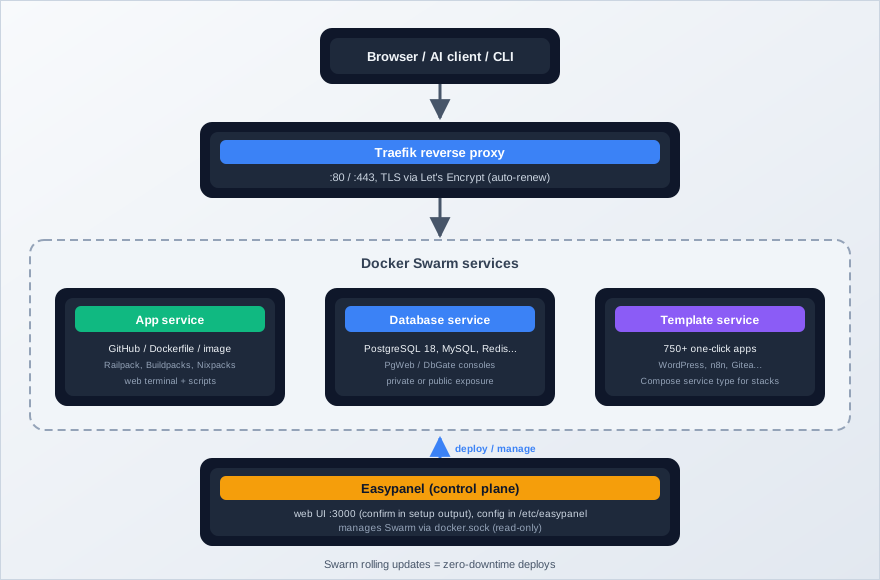
On the build side, Easypanel auto-detects your app’s language and builds an image without forcing you to write a Dockerfile. There are four builders now, and the docs recommend Railpack for new apps:
| Builder | When to use | Notes |
|---|---|---|
| Railpack | Recommended for new apps without a Dockerfile | Modern auto-detection via BuildKit |
| Dockerfile | You have a Dockerfile in the Build Path | Auto-selected when the file is present |
| Cloud Native Buildpacks | You want buildpack-style builds | Configurable builder image, build env, project.toml |
| Nixpacks | No build settings saved yet | Legacy fallback |
If you use monorepos, point the Build Path at the right subdirectory so the builder sees the correct project. Two more service types cover the gaps: a Box service (module-based runtime with Node.js, PHP, Python, Ruby, NGINX, and a browser IDE) for people who do not want a Dockerfile at all, and a Compose service for multi-container stacks.
One correction to older write-ups on the internet: templates are not “pre-configured Docker Compose stacks.” Templates deploy as native Easypanel services (App, Postgres, Redis, Compose, and so on), and there is a separate dedicated Compose service type for people who want to bring their own stack.
Easypanel pricing (2026)
Licensing is per server. The current pricing page shows monthly and annual rates (annual prices are the effective monthly cost when billed yearly):
| Plan | Monthly | Annual (effective) | Projects | Key features |
|---|---|---|---|---|
| Free | $0 | $0 | Up to 3 | Unlimited services, unlimited deployments, basic monitoring |
| Hobby | $14.9/mo | $10.9/mo | Unlimited | Advanced monitoring, notifications, database backups, custom service domain |
| Growth | $23.9/mo | $16.9/mo | Unlimited | Multiple users, access control |
| Business | $37.9/mo | $29.9/mo | Unlimited | Cluster support (alpha), white-labeling, priority support |
Annual billing cuts the price
Paying yearly drops Hobby from $14.9 to $10.9/mo per server. That is about 27% off, effectively 3 months free.
The free plan works for personal projects: three projects with unlimited services per project covers most side-project and homelab setups. You pay when you want backups, advanced monitoring, or team features. Note that database backups are a Hobby feature. If your data matters and you stay on Free, you are signing up to write your own backup routine (more on that below).
All paid plans come with a 30-day money-back guarantee (email support@easypanel.io). Payments run through LemonSqueezy.
Real monthly cost for a small box: a Hetzner CX22-class VPS at around €4-6/mo plus $0-37.9 for the license. Free tier plus one cheap VPS is the cheapest complete path.
What you can deploy
Databases
Easypanel treats databases as first-class services. You can spin up any of these with a few clicks:
- PostgreSQL: version 18 is the default as of 2.34.0. The service ships with PgWeb and DbGate browser admin tools
- MySQL / MariaDB: the standard choice for WordPress, Laravel, and most PHP apps
- MongoDB: document store for flexible schemas
- Redis: in-memory cache and message broker
There is also a dedicated WordPress service type if you want the CMS without assembling the stack yourself.
Each database can stay private (reachable only from services on the same server) or be exposed publicly. Keep it private unless you have a reason not to. And back up databases off the server: the built-in database backup scheduling needs the Hobby plan, so Free-plan users should script pg_dump/mysqldump to object storage themselves.
Templates
The template library has grown a lot. Easypanel claims 750+ open-source services as of October 2026 (2.31.0 alone added 121 templates and updated 400). Popular options:
- WordPress: full CMS with themes and plugins
- Plausible: privacy-focused web analytics
- n8n: workflow automation. See self-host n8n for workflow automation for a full setup
- Listmonk: self-hosted newsletter manager
- Grafana: metrics visualization and dashboards
- Uptime Kuma: uptime monitoring with notifications. I cover it in how to install Uptime Kuma
- Gitea: lightweight Git hosting
- Ghost: publishing platform for newsletters and blogs
OpenSEO was the notable addition in 2.36.0. You can customize environment variables, volumes, and ports after any template deploys.
Applications
For custom code, you connect a GitHub repository and Easypanel handles the rest. Public repos need no token. Private repos use a GitHub personal access token configured on the server (Settings > GitHub). Every push to the connected branch fires the deploy webhook.
Sources are flexible: Git repository, Docker image, Dockerfile, or a source upload (zip, tar, 7z, rar supported since 2.32.0). The builder auto-detects the language with Railpack, or picks the Dockerfile builder if a Dockerfile exists in the Build Path. Easypanel injects a GIT_SHA environment variable during repo builds, which is handy for cache busting and version banners.
App Scripts (2.27.0) let you define named commands per app and run them from a “Scripts” tab, which is how I handle one-off migrations and seed jobs without SSH.
One gotcha worth burning into memory: saving settings does not deploy them. Press Deploy.
For a framework-specific walkthrough, see How to Deploy Astro on Your VPS with EasyPanel.
How to install Easypanel on a VPS
Here is how to get Easypanel running on a fresh VPS and deploy something real.
The walkthrough above is from 2023. The install flow is still the same one-liner, but the UI has evolved since then.
Requirements
Official requirements: a fresh Ubuntu server with at least 2 GB of RAM, and ports 80 and 443 must be available. The install script refuses to run as non-root, and it will not run on macOS or inside a container.
- Fresh Ubuntu 22.04 or 24.04 LTS (my recommendation; any recent Ubuntu works)
- 2 GB RAM minimum, more if you will build on the box
- Root or sudo access
- A domain you control, with DNS access
- Ports 80 and 443 free on the host
- A VPS from a provider you trust
Installer preflight
The installer aborts if ports 80 or 443 are already in use. Stop nginx, Apache, or Caddy before you run it.
For the VPS itself, Hetzner is what I use for most of my own stuff: good performance, low price, reliable networking. Hostinger is also fine, and it is one of the providers on Easypanel’s official one-click marketplace list (along with DigitalOcean, AWS, Vultr, Linode, Kamatera, Cloudzy, LetsCloud, and Bluehost), so you can get a preinstalled box instead of running the script.
Hetzner €20 free credit Hostinger VPSIf you are comparing providers first, see DigitalOcean vs Vultr vs Hetzner.
VPS prices jumped across the board in 2026. If you are rethinking a rented box, see what changed and when a mini PC wins.
Cost sanity check: a Hetzner CX22-class machine is around €4-6/mo. On the Free plan you can run a small production setup for under $15/mo total.
Step 1: Update the server
apt update && apt -y upgrade
reboot
Verify: after the reboot, uptime shows the box is back, and lsb_release -a confirms the Ubuntu release you expect.
Step 2: Add swap (if needed)
Some providers, Hetzner included, do not add swap by default. Adjust the size to your RAM:
sudo fallocate -l 2G /swapfile
sudo chmod 600 /swapfile
sudo mkswap /swapfile
sudo swapon /swapfile
echo '/swapfile none swap sw 0 0' | sudo tee -a /etc/fstab
Verify: free -h shows swap, and swapon --show lists /swapfile. If fallocate fails, use dd if=/dev/zero of=/swapfile bs=1M count=2048 instead.
Step 3: Install Easypanel
One command:
curl -sSL https://get.easypanel.io | shThe script installs Docker CE from Docker’s official apt repo when needed, initializes Docker Swarm, runs the Easypanel setup container with /etc/easypanel and the Docker socket mounted, and deploys Traefik as the reverse proxy. Expect 2-5 minutes.
When it finishes, you get the access URL:
Easypanel was installed successfully on your server!

    http://YOUR_SERVER_IP:3000
Port 3000 is what the setup output prints; the docs do not pin it down, so trust whatever your install output says and adjust the firewall rule to match.
Verify: docker ps should show the panel, the proxy, and the error pages service:
docker ps
# CONTAINER ID   IMAGE                  NAMES
# a1b2c3d4e5f6   easypanel/error-pages  error-pages
# b2c3d4e5f6a7   easypanel/easypanel    easypanel
# c3d4e5f6a7b8   traefik                traefik
Then curl -I http://localhost:3000 should return a response from the panel. If the containers are missing, re-run the installer and read the output from the top.
Step 4: Configure the panel
Point a domain at the server. Create an A record in your DNS provider pointing to your server’s IP. A subdomain like panel.yourdomain.com works well.
Set the domain in Easypanel. Open the panel at http://YOUR_SERVER_IP:3000, create your admin account, then go to Settings > General and enter your domain.
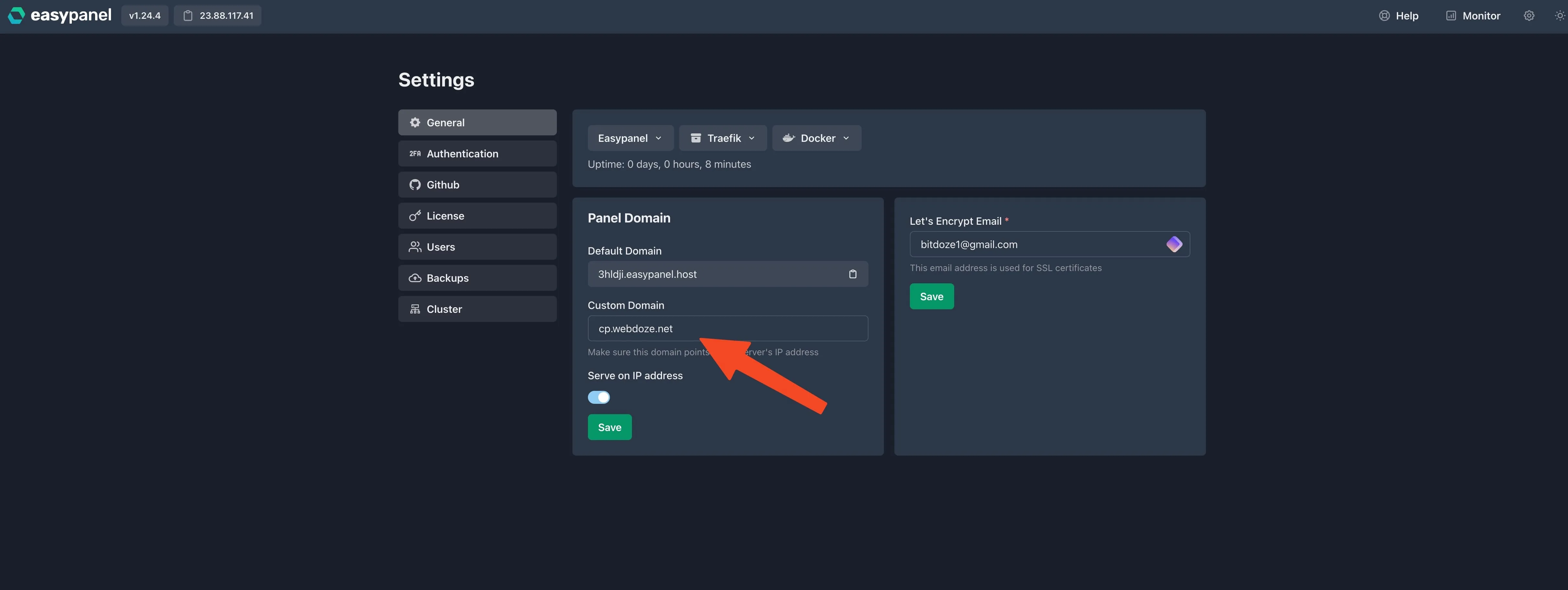
Enable 2FA. Go to Settings > Authentication and set up two-factor authentication with an authenticator app.
The panel owns your server
Easypanel can start, stop, and delete anything on the host. Enable 2FA before you expose the panel publicly, and treat the admin account like a root login. For more host hardening, see how I secured my Docker server.
Connect GitHub. If you are deploying private repos, go to Settings > GitHub and add a personal access token.
Once the domain is set, Traefik issues a Let’s Encrypt certificate and renews it automatically.
Verify: dig panel.yourdomain.com returns your server IP, and curl -I https://panel.yourdomain.com shows a valid Let’s Encrypt certificate.
Step 5: Deploy your first project
Click Create Project, then add a service. For a GitHub app:
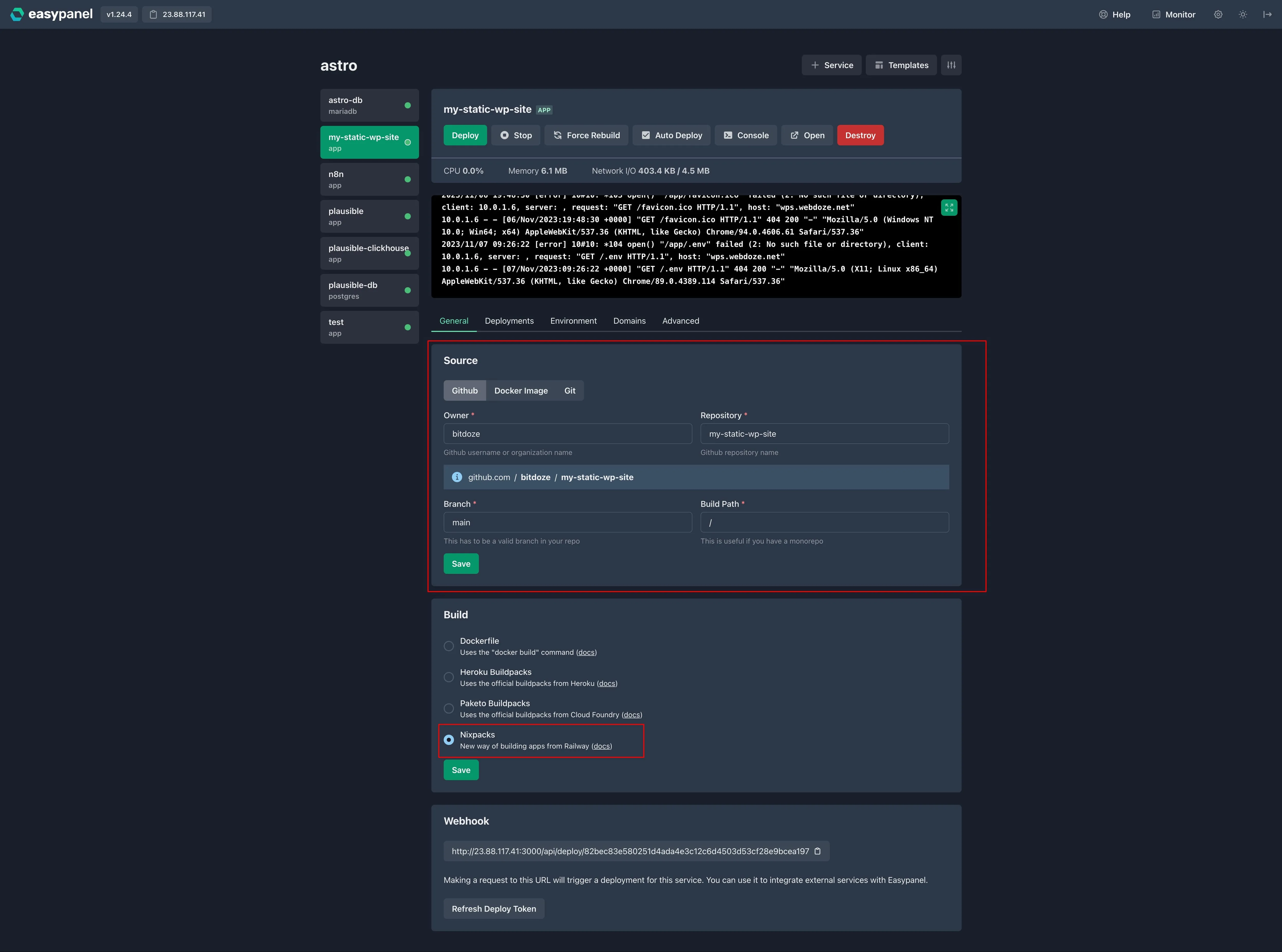
- Select App as the service type
- Connect your GitHub repository
- Choose a build method: Railpack (recommended), or Dockerfile if the repo has one
- Add your domain under the Domains tab
- Deploy
The free plan allows 3 projects, but each project can hold multiple services (app + database + cache, for example).
For more detail on deploying a specific framework, see How to Deploy Astro on Your VPS with EasyPanel.
Verify: the deploy finishes green in the UI, build logs end with a success line, and curl -I https://app.yourdomain.com returns 200. If it fails, check the three usual suspects: missing environment variables, wrong runtime version, or an out-of-memory build (add swap, or offload builds to a remote Docker builder as covered below).
Day-2 operations
Install night is the easy part. Here is what running Easypanel looks like.
Updates. The panel shows an update banner when a new release lands; one click applies it. If you prefer the terminal or the UI is unreachable:
docker image pull easypanel/easypanel && docker service update easypanel --forceThe docs also cover a canary channel (RELEASE_TAG=canary) and pinning a specific version if you would rather not auto-move.
Backups. Easypanel can schedule backups for apps, volumes, and databases. Destinations: Amazon S3 and S3-compatible stores (Cloudflare R2 has a preset since 2.32.0, plus DigitalOcean Spaces, Backblaze B2, Wasabi), Google Drive, Dropbox, FTP/SFTP, and local disk. One-click restore is advertised.
Do not trust a backup you have not restored. My minimum routine: trigger a backup manually, confirm the object exists in the bucket, then restore it into a scratch project. For WordPress, back up the database and the uploads volume; one without the other is not a restore.
Database backups need the Hobby plan ($10.9-14.9/mo depending on billing) plus a few cents of object storage. On the Free plan your volumes live on the box only, so script your own off-server copies.
Monitoring. Since 2.29.0, Easypanel has Prometheus-powered metrics (CPU, memory, disk, network, per service and system-wide) and Loki-powered log search with levels, live streaming, and retention config. Enable it in Settings > Monitoring. Advanced monitoring is part of the Hobby upsell. I still pair the panel with external checks: server monitoring with Beszel and Uptime Kuma gives you a second opinion from outside Easypanel’s own stack.
Maintenance extras worth knowing: the admin password reset command in the docs (you will need it eventually), custom Traefik config and Traefik dashboard guides, wildcard domain setup, notifications (Hobby plan), GPU support via the NVIDIA Container Toolkit, cron jobs, and the remote Docker builder for small servers where local builds thrash swap.
Restart Traefik after updating past 2.35.0
The Traefik 3.7.13 update lands with the panel, but Traefik itself must be restarted to pick it up. If you skip that, you stay on the old proxy version.
Production checklist:
- Backups going off-server, plus one restore test on record
- 2FA enabled on every panel user
- External uptime monitoring pointing at public URLs
- Docker log rotation configured (see troubleshooting)
- Panel updates applied monthly, Traefik restarted after proxy updates
- Firewall rules reviewed (see the Docker/UFW gotcha below)
Verify after any update: docker service ps easypanel shows the task running and healthy.
Easypanel vs Coolify, Dokku, and Portainer
| Feature | Easypanel | Coolify | Portainer | Dokku |
|---|---|---|---|---|
| Type | PaaS panel | PaaS panel | Container manager | PaaS (CLI) |
| UI | Web-based | Web-based | Web-based | CLI only |
| GitHub auto-deploy | Yes | Yes | No (manual) | Via plugins |
| Database management | Built-in | Built-in | No | Via plugins |
| SSL certificates | Automatic | Automatic | Manual | Via plugins |
| Templates | 750+ | 280+ (vendor claim) | Community | Limited |
| Multi-server | Business (alpha) | Yes | Yes | No |
| Free plan | 3 projects | Unlimited | 5 nodes | Fully free |
| License | Closed-source | Open-source | Source-available (CE) | MIT |
| Docker knowledge needed | Minimal | Minimal | Moderate | Moderate |
Star counts as of 2026-10-03, since these move daily: Coolify around 62.5k on GitHub, Dokku around 32.2k.
Easypanel’s strength is the cleanest Heroku-like experience on a single VPS. You pay for that with per-server pricing and a closed-source panel (the public easypanel-io repos host templates and samples, not the panel itself). Coolify is the pick when free and open-source is non-negotiable: it has more features at zero cost, including multi-server. My take in more depth is in our Coolify v5 review, and if you are choosing between the self-hosted PaaS options broadly, Coolify vs Dokploy vs Kamal 2 walks through the decision.
Portainer is a container manager, not a PaaS: great for direct Docker control, wrong tool if you want push-to-deploy. Dokku is excellent if you live in the terminal and do not want a web UI at all.
Troubleshooting
Panel not accessible after install. Check that the panel port (3000 by default; confirm in your setup output) is open in your server’s firewall. If you are using Cloudflare, set the DNS record to “DNS only” (grey cloud) during setup.
Install aborts, or ports 80/443 already in use. The new preflight refuses to continue. Stop nginx, Apache, or Caddy, or move the conflicting service. Related trap: Docker publishes container ports past UFW, so the firewall can “look fine” while traffic still arrives. Here is how Docker bypasses UFW and how to fix it.
App builds failing. Open the build logs in the UI. Usual causes: missing environment variables, wrong runtime version, or insufficient memory. Adding swap helps on small boxes. On servers where builds constantly OOM, offload them to a remote Docker builder (Easypanel has a guide). Easypanel injects GIT_SHA during repo builds, so cache-busting tricks can use that variable.
SSL certificate not provisioning
Make sure the DNS A record is fully propagated before setting the domain in Easypanel. Let’s Encrypt uses HTTP-01 validation and must reach your server on port 80. If the domain is proxied through Cloudflare, switch it to DNS only until the cert is issued.
Settings saved but nothing changed
Saving settings is not deploying. Press the Deploy button for the service. This is a documented gotcha in the app service docs and usually why an env var seems to do nothing.
Traefik still on the old version after an update
After 2.35.0, the panel update brings Traefik 3.7.13 but you must restart the Traefik service to pick it up. Restart it from the panel or with a service update and re-check the version.
Containers eating disk
Check whether log rotation is configured on your Docker daemon. This is general Docker advice rather than a verified Easypanel default: if you see disk growth from container logs, set max-size and max-file in /etc/docker/daemon.json and restart Docker. Pair that with the backup and volume cleanup in the panel so old snapshots do not accumulate.
Should you use Easypanel? (Verdict)
Use Easypanel if you want the cleanest Heroku-like UX on a single VPS, you value steady updates and real support, and you are fine with closed-source code and per-server pricing. The free tier plus a €4 Hetzner box is still the cheapest complete path to a working PaaS I know of. The 2.33+ CLI, MCP server, and public API, plus cluster support in alpha on the Business plan, show the project is still actively moving.
Look elsewhere if you need free multi-server management (Coolify), if open-source is a hard requirement (Coolify or Dokku), or if you prefer a CLI workflow (Dokku).
For everyone else: spin up a cheap VPS, run the install command, and you can have a working deployment platform in under 10 minutes.
Hetzner €20 free credit Hostinger VPS